Tuesday, October 20, 2026
  • About Us
  • Contact
DBAInsight
  • Guides
    • 23ai
    • RMAN
    • 26ai
    • Patch Update
    • RMAN
    • MySQL
    • Oracle GoldenGate
  • Cloud Technology
  • Case Studies
  • Troubleshooting
  • Training & Certification
NEWSLETTER
No Result
View All Result
DBAInsight
Home Guides

MySQL 8.4 Disaster Recovery (DR) Drill: Planned Failover and Reverse Replication

October 12, 2026
in Guides
0
MySQL 8.4 Disaster Recovery (DR) Drill: Planned Failover and Reverse Replication
0
SHARES
30
VIEWS

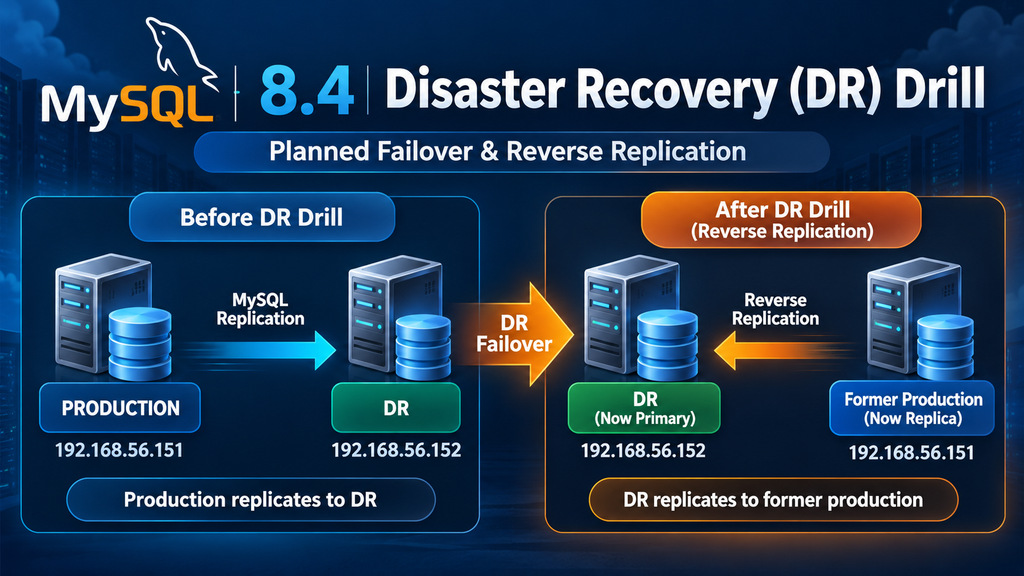
A Disaster Recovery (DR) drill is one of the most important activities for validating whether a MySQL replication-based DR environment can actually support a production failover.

In this article, we walk through a practical MySQL 8.4 DR drill, including:

Table of Contents

Toggle
      • Related posts
      • How to Fix ORA-01105 and ORA-01174 in Oracle RAC: DB_FILES Parameter Mismatch
      • How to Identify Static Initialization Parameters in Oracle Database 19c
    • Environment
  • 1. Validate Replication on the DR Server
      • What should be checked?
  • 2. Check Read-Only Configuration on DR
  • 3. Promote the DR Server
  • 4. Verify Binary Logging on the DR Server
  • 5. Verify Binary Logging on Production
  • 6. Stop Replication on the Former Production Server
  • 7. Identify the DR Binary Log Position
  • 8. Configure Reverse Replication
  • 9. Start Reverse Replication
  • 10. Put the Former Production Server Back Into Read-Only Mode
  • 11. Final DR Drill Validation
      • DR server
      • Former Production server
      • Reverse replication
  • 12. Application-Level Validation
  • 13. DR Drill Architecture After Failover
  • 14. Key Lessons from the DR Drill
      • 1. Replication health must be checked before failover
      • 2. DR should normally be protected from writes
      • 3. Binary logging is required for reverse replication
      • 4. Reverse replication is an important part of failover
      • 5. Application validation is essential
  • 15. Recommended DR Drill Checklist
  • Conclusion

Related posts

How to Fix ORA-01105 and ORA-01174 in Oracle RAC: DB_FILES Parameter Mismatch

How to Fix ORA-01105 and ORA-01174 in Oracle RAC: DB_FILES Parameter Mismatch

October 19, 2026
Static Initialization

How to Identify Static Initialization Parameters in Oracle Database 19c

October 16, 2026
  • Validating replication health on the DR server
  • Enabling writes on the DR server
  • Stopping replication on the production server
  • Promoting the DR server
  • Configuring reverse replication
  • Making the former production server a replica of DR
  • Re-enabling read-only mode after the drill
  • Validating replication status

The procedure is based on a MySQL Source/Replica architecture using binary log replication.


Environment

The DR environment used in this drill consisted of two MySQL servers:

RoleIP AddressMySQL Version
Production192.168.56.151MySQL 8.4.11
DR192.168.56.152MySQL 8.4.11
DR

Security note: Never publish actual replication passwords in scripts, blogs, screenshots, or documentation. Use placeholders such as <REPLICATION_PASSWORD>.


1. Validate Replication on the DR Server

The first step of the DR drill is to confirm that the DR server is completely synchronized with the production server.

Connect to MySQL:

mysql -u root -p

Check replication status:

SHOW REPLICA STATUS\G

Important fields to verify include:

Replica_IO_Running: Yes
Replica_SQL_Running: Yes
Seconds_Behind_Source: 0
Last_IO_Error:
Last_SQL_Error:

In this DR environment, the important values were:

Replica_IO_Running: Yes
Replica_SQL_Running: Yes
Seconds_Behind_Source: 0
Last_IO_Error:
Last_SQL_Error:

This indicates that the DR server had successfully received and executed all available transactions.

The following state is also a good indication:

Replica_SQL_Running_State:
Replica has read all relay log; waiting for more updates

This means the SQL thread has processed all relay logs currently available.

What should be checked?

Before promoting a DR server, verify:

Replica_IO_Running = Yes
Replica_SQL_Running = Yes
Seconds_Behind_Source = 0
Last_IO_Error = empty
Last_SQL_Error = empty

If replication is not healthy, do not proceed with the DR promotion until the issue is understood.


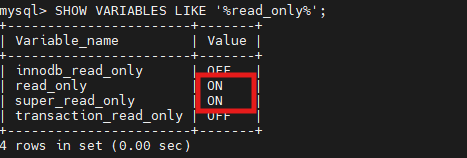
2. Check Read-Only Configuration on DR

The DR server was originally configured as read-only to prevent accidental modifications.

Check the settings:

SHOW VARIABLES LIKE '%read_only%';

The initial configuration was:

innodb_read_only       OFF
read_only              ON
super_read_only        ON
transaction_read_only  OFF

The important settings are:

read_only = ON
super_read_only = ON

This prevents normal users from modifying the DR database.


3. Promote the DR Server

During a planned DR drill, the DR database needs to become writable.

Disable read_only:

SET GLOBAL read_only = OFF;

Disable super_read_only:

SET GLOBAL super_read_only = OFF;

Verify:

SHOW VARIABLES LIKE '%read_only%';

Expected result:

innodb_read_only       OFF
read_only              OFF
super_read_only        OFF
transaction_read_only  OFF

At this point, the DR server is writable.

The logical state has now changed from:

DR Server
Read Only

to:

DR Server
Read/Write

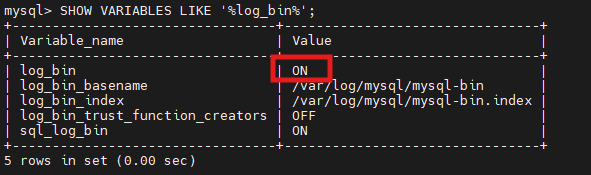
4. Verify Binary Logging on the DR Server

Before configuring reverse replication, the DR server must be capable of generating binary logs.

Check:

SHOW VARIABLES LIKE '%log_bin%';

Example:

log_bin                         ON
log_bin_basename                /var/log/mysql/mysql-bin
log_bin_index                   /var/log/mysql/mysql-bin.index
log_bin_trust_function_creators OFF
sql_log_bin                     ON

The critical parameter is:

log_bin = ON

Binary logging is required because the former production server will eventually replicate transactions from the DR server.


5. Verify Binary Logging on Production

The production server should also have binary logging enabled.

On the production server:

SHOW VARIABLES LIKE '%log_bin%';

Example:

log_bin                         ON
log_bin_basename                /var/lib/mysql/binlog
log_bin_index                   /var/lib/mysql/binlog.index
log_bin_trust_function_creators OFF
sql_log_bin                     ON

Again:

log_bin = ON

is the important requirement.


6. Stop Replication on the Former Production Server

Once the DR server has been promoted, the old production server should no longer continue replicating from the DR server’s old source.

On the former production server:

STOP REPLICA;

Expected:

Query OK, 0 rows affected

Then reset the replica configuration:

RESET REPLICA;

This removes the existing replication configuration and relay-log state.

Important: RESET REPLICA should be used carefully. Make sure you understand what replication metadata and relay logs are being removed before executing it in a production environment.


7. Identify the DR Binary Log Position

Now obtain the current binary log file and position from the promoted DR server.

On the DR server:

SHOW BINARY LOG STATUS;

Example output:

+------------------+----------+
| File             | Position |
+------------------+----------+
| mysql-bin.000002 |     1472 |
+------------------+----------+

The important information is:

File     = mysql-bin.000002
Position = 1472

These values will be used when configuring the former production server as a replica.


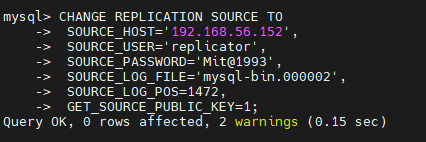
8. Configure Reverse Replication

The former production server will now become a replica of the DR server.

On the former production server, configure the DR server as the new replication source:

CHANGE REPLICATION SOURCE TO
    SOURCE_HOST='192.168.56.152',
    SOURCE_USER='replicator',
    SOURCE_PASSWORD='<REPLICATION_PASSWORD>',
    SOURCE_LOG_FILE='mysql-bin.000002',
    SOURCE_LOG_POS=1472,
    GET_SOURCE_PUBLIC_KEY=1;

The important parameters are:

SOURCE_HOST
SOURCE_USER
SOURCE_PASSWORD
SOURCE_LOG_FILE
SOURCE_LOG_POS

For MySQL 8.4, CHANGE REPLICATION SOURCE TO is the modern syntax for configuring a replication source.


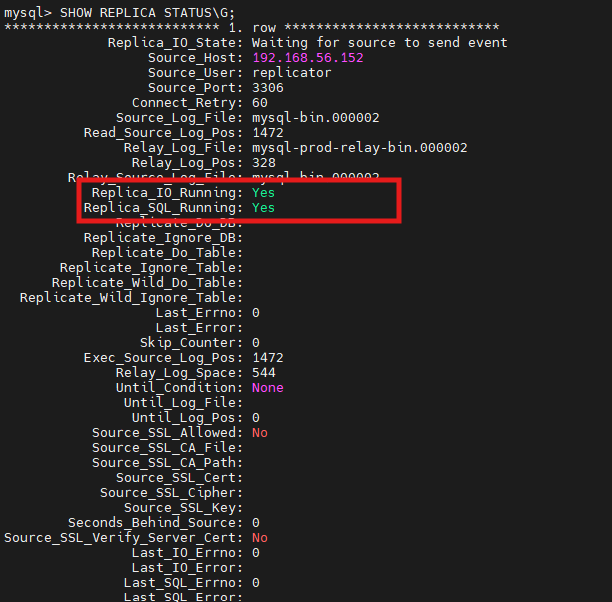
9. Start Reverse Replication

Start replication:

START REPLICA;

Then verify:

SHOW REPLICA STATUS\G

The expected result should include:

Source_Host: 192.168.56.152

Replica_IO_Running: Yes
Replica_SQL_Running: Yes

Seconds_Behind_Source: 0

Last_IO_Error:
Last_SQL_Error:

The replication state should look similar to:

Replica_IO_State:
Waiting for source to send event

Replica_SQL_Running_State:
Replica has read all relay log; waiting for more updates

This confirms that reverse replication is operational.


10. Put the Former Production Server Back Into Read-Only Mode

After confirming reverse replication, the former production server should be protected from accidental writes.

Execute:

SET GLOBAL read_only = ON;

Then:

SET GLOBAL super_read_only = ON;

Verify:

SHOW VARIABLES LIKE '%read_only%';

Expected:

innodb_read_only       OFF
read_only              ON
super_read_only        ON
transaction_read_only  OFF

The environment is now:

                 DR / PRIMARY
                192.168.56.152
                       |
                       | Replication
                       v
                 Former PROD
                192.168.56.151
                  READ ONLY

11. Final DR Drill Validation

At the end of the drill, validate the following.

DR server

SHOW VARIABLES LIKE '%read_only%';

Expected:

read_only = OFF
super_read_only = OFF

The DR server should be writable.

Former Production server

SHOW VARIABLES LIKE '%read_only%';

Expected:

read_only = ON
super_read_only = ON

Reverse replication

On the former production server:

SHOW REPLICA STATUS\G

Verify:

Replica_IO_Running: Yes
Replica_SQL_Running: Yes
Seconds_Behind_Source: 0
Last_IO_Error:
Last_SQL_Error:

12. Application-Level Validation

Database-level replication being healthy does not automatically mean the DR drill is successful.

The application team should also perform functional testing.

For example:

  1. Connect the application to the DR database.
  2. Perform a test transaction.
  3. Verify that the transaction is committed successfully.
  4. Verify the data on the DR database.
  5. Confirm that the transaction is replicated to the former production server.
  6. Validate application connectivity.
  7. Validate critical application functions.
  8. Confirm that no replication errors are generated.

A simple test can be performed by creating a controlled test record in a dedicated test table.


13. DR Drill Architecture After Failover

Before the drill:

+-------------------+       Replication       +-------------------+
|   PRODUCTION      | ----------------------> |        DR         |
| 192.168.56.151    |                         | 192.168.56.152    |
|                   |                         |                   |
| READ/WRITE        |                         | READ ONLY         |
+-------------------+                         +-------------------+

After DR promotion:

+-------------------+       Reverse          +-------------------+
|   FORMER PROD     | <---------------------- |        DR         |
| 192.168.56.151    |       Replication       | 192.168.56.152    |
|                   |                         |                   |
| READ ONLY         |                         | READ/WRITE        |
+-------------------+                         +-------------------+

This reverse replication is important because it keeps the former production server synchronized with the database that is now serving production traffic.


14. Key Lessons from the DR Drill

This DR exercise demonstrates several important MySQL DR concepts.

1. Replication health must be checked before failover

Always confirm:

Replica_IO_Running = Yes
Replica_SQL_Running = Yes
Seconds_Behind_Source = 0

before promoting the DR server.

2. DR should normally be protected from writes

Using:

SET GLOBAL read_only = ON;
SET GLOBAL super_read_only = ON;

helps prevent accidental changes on the standby server.

3. Binary logging is required for reverse replication

The promoted DR server must have:

log_bin = ON

if the former production server is going to replicate from it.

4. Reverse replication is an important part of failover

A DR drill should not end simply because the DR database became writable.

The former production server should be configured to replicate from the new primary where appropriate.

5. Application validation is essential

Database replication can be healthy while an application still has connectivity, configuration, DNS, connection-pool, or authentication issues.


15. Recommended DR Drill Checklist

ActivityStatus
Verify production replication✅
Verify DR Replica_IO_Running✅
Verify DR Replica_SQL_Running✅
Verify Seconds_Behind_Source✅
Check DR binary logging✅
Promote DR to READ/WRITE✅
Stop old replication✅
Capture DR binary log position✅
Configure reverse replication✅
Start reverse replication✅
Verify reverse replication✅
Put former production into READ ONLY✅
Perform application validationRecommended
Perform data consistency validationRecommended
Record RTO/RPORecommended
Document rollback/failback procedureRecommended

Conclusion

A MySQL DR drill should validate much more than simply starting the standby server. A successful exercise should demonstrate that the organization can promote the DR server, redirect production workload, establish reverse replication, protect the former production server, and validate application functionality.

In this MySQL 8.4.11 DR drill, the DR server was successfully promoted to a writable state, binary logging was verified, and the former production server was configured as a replica of the DR server. Finally, the former production server was returned to read_only and super_read_only mode.

This provides a practical foundation for a controlled MySQL planned failover and failback strategy.

Production recommendation: For an actual DR event, include additional controls around application quiescing, DNS/connection endpoint changes, transaction consistency, GTID-based replication, replication user security, backups, monitoring, RTO/RPO measurement, and a documented failback procedure.

MySQL HeatWave: One Database for Transactions, Analytics, ML, and Lakehouse Workloads

 MySQL Community Downloads

Tags: Disaster RecoveryDR DrillMySQL 8.4MySQL DRMySQL Replication
Previous Post

MySQL 8.4.11 Startup Failure on RHEL 9: InnoDB OS Error 13 Caused by SELinux

Next Post

Oracle Enterprise Manager 24ai: Installing Solaris SPARC Agent Software Using Self Update in Offline Mode

Next Post
Oracle Enterprise Manager 24ai: Installing Solaris SPARC Agent Software Using Self Update in Offline Mode

Oracle Enterprise Manager 24ai: Installing Solaris SPARC Agent Software Using Self Update in Offline Mode

Leave a Reply Cancel reply

Your email address will not be published. Required fields are marked *

POPULAR NEWS

  • Oracle Patch 38632161: Step-by-Step Guide to Upgrade Oracle 19c to Release Update 19.30

    Oracle Patch 38632161: Step-by-Step Guide to Upgrade Oracle 19c to Release Update 19.30

    0 shares
    Share 0 Tweet 0
  • How To Download And Install The Latest OPatch

    0 shares
    Share 0 Tweet 0
  • Oracle Database 19.32 Release Update (RU) Patching Guide – Patch 39472050

    0 shares
    Share 0 Tweet 0
  • How to Install Oracle 19c Database on Red Hat Enterprise Linux 9

    0 shares
    Share 0 Tweet 0
  • Installing Oracle Database 26AI on Red Hat Enterprise Linux 9

    0 shares
    Share 0 Tweet 0
  • About Us
  • Contact

© 2026 DBAInsight - Smarter Databases. Sharper Insights. DBAInsight.

No Result
View All Result
  • Home
  • Cloud & Modern DBs
  • Guides
  • Cloud Technology
  • Case Studies
  • Troubleshooting
  • Training & Certification

© 2026 DBAInsight - Smarter Databases. Sharper Insights. DBAInsight.

Add as a preferred source on Google
Add as preferred source on Google