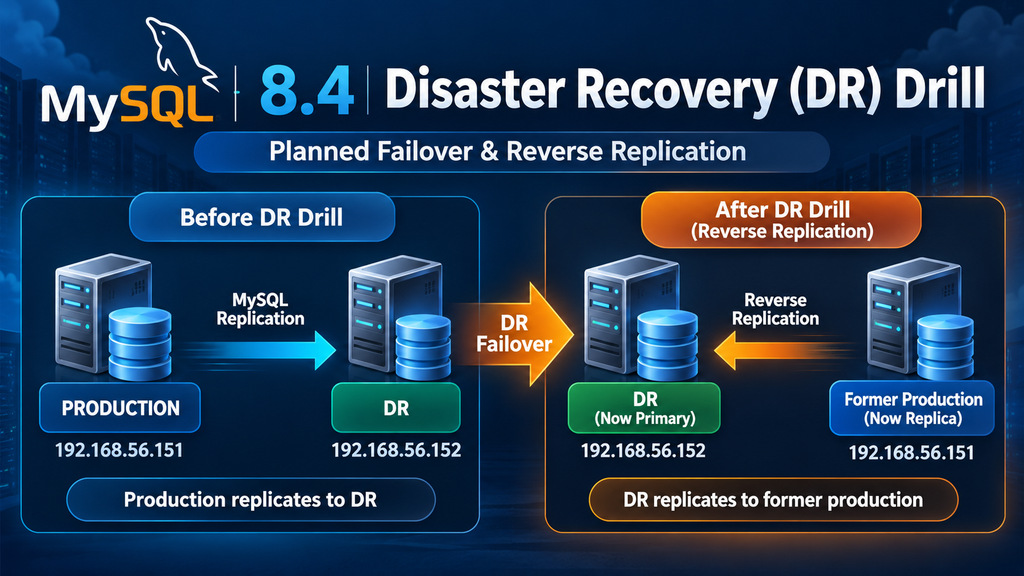
A Disaster Recovery (DR) drill is one of the most important activities for validating whether a MySQL replication-based DR environment can actually support a production failover.
In this article, we walk through a practical MySQL 8.4 DR drill, including:
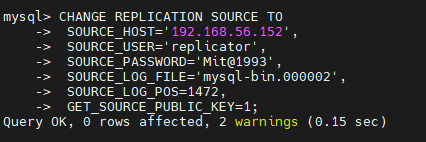
Making the former production server a replica of DR
Re-enabling read-only mode after the drill
Validating replication status
The procedure is based on a MySQL Source/Replica architecture using binary log replication.
Environment
The DR environment used in this drill consisted of two MySQL servers:
Role
IP Address
MySQL Version
Production
192.168.56.151
MySQL 8.4.11
DR
192.168.56.152
MySQL 8.4.11
Security note: Never publish actual replication passwords in scripts, blogs, screenshots, or documentation. Use placeholders such as <REPLICATION_PASSWORD>.
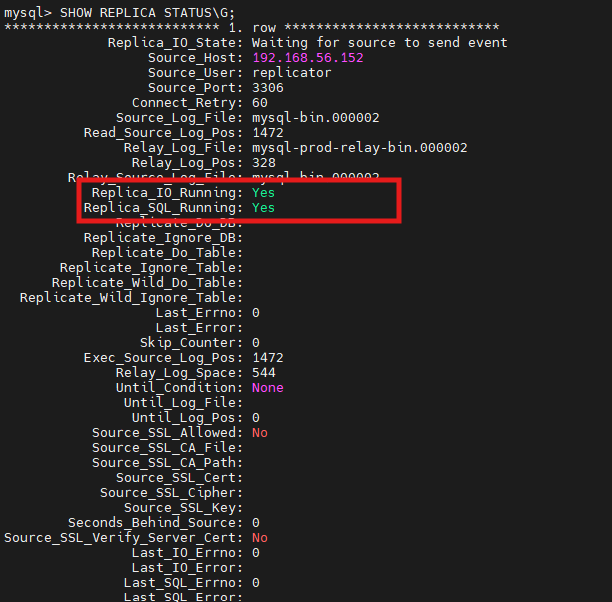
1. Validate Replication on the DR Server
The first step of the DR drill is to confirm that the DR server is completely synchronized with the production server.
If replication is not healthy, do not proceed with the DR promotion until the issue is understood.
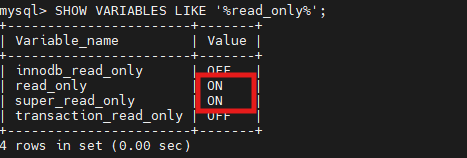
2. Check Read-Only Configuration on DR
The DR server was originally configured as read-only to prevent accidental modifications.
Check the settings:
SHOW VARIABLES LIKE '%read_only%';
The initial configuration was:
innodb_read_only       OFF
read_only              ON
super_read_only        ON
transaction_read_only  OFF
The important settings are:
read_only = ON
super_read_only = ON
This prevents normal users from modifying the DR database.
3. Promote the DR Server
During a planned DR drill, the DR database needs to become writable.
Disable read_only:
SET GLOBAL read_only = OFF;
Disable super_read_only:
SET GLOBAL super_read_only = OFF;
Verify:
SHOW VARIABLES LIKE '%read_only%';
Expected result:
innodb_read_only       OFF
read_only              OFF
super_read_only        OFF
transaction_read_only  OFF
At this point, the DR server is writable.
The logical state has now changed from:
DR Server
Read Only
to:
DR Server
Read/Write
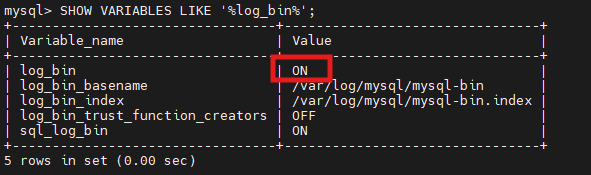
4. Verify Binary Logging on the DR Server
Before configuring reverse replication, the DR server must be capable of generating binary logs.
Check:
SHOW VARIABLES LIKE '%log_bin%';
Example:
log_bin                         ON
log_bin_basename                /var/log/mysql/mysql-bin
log_bin_index                   /var/log/mysql/mysql-bin.index
log_bin_trust_function_creators OFF
sql_log_bin                     ON
The critical parameter is:
log_bin = ON
Binary logging is required because the former production server will eventually replicate transactions from the DR server.
5. Verify Binary Logging on Production
The production server should also have binary logging enabled.
On the production server:
SHOW VARIABLES LIKE '%log_bin%';
Example:
log_bin                         ON
log_bin_basename                /var/lib/mysql/binlog
log_bin_index                   /var/lib/mysql/binlog.index
log_bin_trust_function_creators OFF
sql_log_bin                     ON
Again:
log_bin = ON
is the important requirement.
6. Stop Replication on the Former Production Server
Once the DR server has been promoted, the old production server should no longer continue replicating from the DR server’s old source.
On the former production server:
STOP REPLICA;
Expected:
Query OK, 0 rows affected
Then reset the replica configuration:
RESET REPLICA;
This removes the existing replication configuration and relay-log state.
Important:RESET REPLICA should be used carefully. Make sure you understand what replication metadata and relay logs are being removed before executing it in a production environment.
7. Identify the DR Binary Log Position
Now obtain the current binary log file and position from the promoted DR server.
This reverse replication is important because it keeps the former production server synchronized with the database that is now serving production traffic.
14. Key Lessons from the DR Drill
This DR exercise demonstrates several important MySQL DR concepts.
1. Replication health must be checked before failover
SET GLOBAL read_only = ON;
SET GLOBAL super_read_only = ON;
helps prevent accidental changes on the standby server.
3. Binary logging is required for reverse replication
The promoted DR server must have:
log_bin = ON
if the former production server is going to replicate from it.
4. Reverse replication is an important part of failover
A DR drill should not end simply because the DR database became writable.
The former production server should be configured to replicate from the new primary where appropriate.
5. Application validation is essential
Database replication can be healthy while an application still has connectivity, configuration, DNS, connection-pool, or authentication issues.
15. Recommended DR Drill Checklist
Activity
Status
Verify production replication
✅
Verify DR Replica_IO_Running
✅
Verify DR Replica_SQL_Running
✅
Verify Seconds_Behind_Source
✅
Check DR binary logging
✅
Promote DR to READ/WRITE
✅
Stop old replication
✅
Capture DR binary log position
✅
Configure reverse replication
✅
Start reverse replication
✅
Verify reverse replication
✅
Put former production into READ ONLY
✅
Perform application validation
Recommended
Perform data consistency validation
Recommended
Record RTO/RPO
Recommended
Document rollback/failback procedure
Recommended
Conclusion
A MySQL DR drill should validate much more than simply starting the standby server. A successful exercise should demonstrate that the organization can promote the DR server, redirect production workload, establish reverse replication, protect the former production server, and validate application functionality.
In this MySQL 8.4.11 DR drill, the DR server was successfully promoted to a writable state, binary logging was verified, and the former production server was configured as a replica of the DR server. Finally, the former production server was returned to read_only and super_read_only mode.
This provides a practical foundation for a controlled MySQL planned failover and failback strategy.
Production recommendation: For an actual DR event, include additional controls around application quiescing, DNS/connection endpoint changes, transaction consistency, GTID-based replication, replication user security, backups, monitoring, RTO/RPO measurement, and a documented failback procedure.