

Patch 38743669: DBA Walkthrough, Insights, and Best Practices
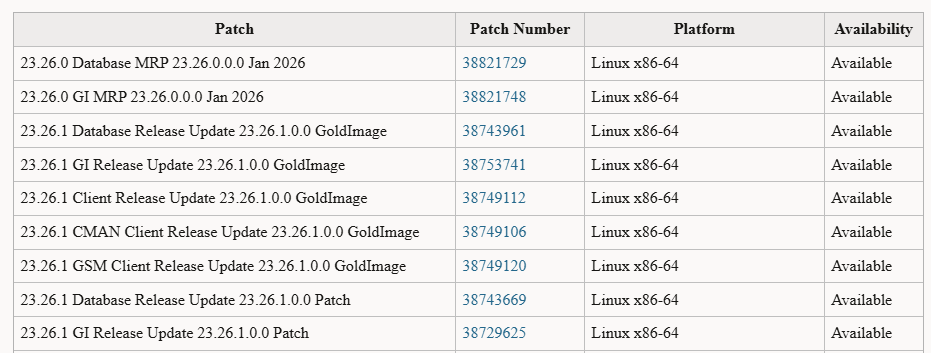
Oracle’s January 2026 Release Update for Oracle AI Database 26ai marks another solid step forward in stability, security, and operational maturity. If you’re running 26ai in production or testing environments, Patch 38743669 (Database Release Update 23.26.1.0.0) is one you should not skip.
In this post, I’ll walk through the real patching experience, highlight what actually happens behind the scenes, and share practical insights based on a successful patch application using OPatch and Datapatch.

This is not just how to patch, but what to expect when patching Oracle AI Database 26ai in January 2026.
Why This Release Update Matters
Oracle AI Database 26ai builds on the 23c code line, blending traditional RDBMS reliability with AI-ready features. As with any quarterly (or monthly) Release Update (RU), this patch focuses on:
- Critical bug fixes
- Performance optimizations
- Security improvements
- Internal component stability
- Compatibility alignment across database, JVM, networking, and tooling
Patch 38743669 specifically updates the database to Release 23.26.1.0.0, aligning both binary and SQL layers.
In short:
👉 If you care about stability, security, and supportability—this patch is essential.
Environment Overview
Before patching, here’s what the environment looked like:
- Oracle Home:
/u01/app/oracle/product/26ai/dbhome_1 - OPatch Version:
12.2.0.1.48 - Database Type:
Oracle AI Database 26ai Enterprise Edition - Architecture:
CDB with PDBs (CDB$ROOT, PDB$SEED, ORCLPDB) - Platform:
Linux (non-RAC)
OPatch was already up to date, which is important—older OPatch versions often cause unnecessary failures with newer RUs.
Verifying Existing Patches
A quick check using:
opatch lspatches

38743688;OCW RELEASE UPDATE 23.26.1.0.0 (GOLD IMAGE) (38743688) Gold Image
38743669;Database Release Update : 23.26.1.0.0 (38743669) Gold Image
confirmed that both components were present as Gold Images:
- 38743669 – Database Release Update 23.26.1.0.0
- 38743688 – OCW Release Update 23.26.1.0.0
This is common when working with gold images or previously staged homes.
Applying Patch 38743669 – What Really Happens
When running:
opatch apply
/u01/app/oracle/product/26ai/dbhome_1/OPatch/opatch apply
Oracle Interim Patch Installer version 12.2.0.1.48
Copyright (c) 2026, Oracle Corporation.  All rights reserved.


Oracle Home       : /u01/app/oracle/product/26ai/dbhome_1
Central Inventory : /u01/app/oraInventory
   from           : /u01/app/oracle/product/26ai/dbhome_1/oraInst.loc
OPatch version    : 12.2.0.1.48
OUI version       : 12.2.0.9.0
Log file location : /u01/app/oracle/product/26ai/dbhome_1/cfgtoollogs/opatch/opatch2026-01-28_08-53-25AM_1.log

Verifying environment and performing prerequisite checks...

The following patch(es) are duplicate patches with patches installed in the Oracle Home.
 [ 38743669]
Incoming patch(es) are better patch(es) with higher UPI(s) or later version(s).
OPatch would rollback installed patches and apply the better ones.


Conflicts/Supersets for each patch are:

Patch : 38743669

        Better duplicate of 38743669


Patches [   38743669 ] will be rolled back.


--------------------------------------------------------------------------------
Start OOP by Prereq process.
Launch OOP...

Oracle Interim Patch Installer version 12.2.0.1.48
Copyright (c) 2026, Oracle Corporation.  All rights reserved.


Oracle Home       : /u01/app/oracle/product/26ai/dbhome_1
Central Inventory : /u01/app/oraInventory
   from           : /u01/app/oracle/product/26ai/dbhome_1/oraInst.loc
OPatch version    : 12.2.0.1.48
OUI version       : 12.2.0.9.0
Log file location : /u01/app/oracle/product/26ai/dbhome_1/cfgtoollogs/opatch/opatch2026-01-28_08-54-08AM_1.log

Verifying environment and performing prerequisite checks...

The following patch(es) are duplicate patches with patches installed in the Oracle Home.
 [ 38743669]
Incoming patch(es) are better patch(es) with higher UPI(s) or later version(s).
OPatch would rollback installed patches and apply the better ones.


Conflicts/Supersets for each patch are:

Patch : 38743669

        Better duplicate of 38743669


Patches [   38743669 ] will be rolled back.

OPatch continues with these patches:   38743669

Do you want to proceed? [y|n]
y
User Responded with: Y
All checks passed.

Please shutdown Oracle instances running out of this ORACLE_HOME on the local system.
(Oracle Home = '/u01/app/oracle/product/26ai/dbhome_1')


Is the local system ready for patching? [y|n]
y
User Responded with: Y
Backing up files...
Applying interim patch '38743669' to OH '/u01/app/oracle/product/26ai/dbhome_1'
ApplySession: Optional component(s) [ oracle.client, 23.0.0.0.0 ] , [ oracle.companionCD.db, 23.0.0.0.0 ] , [ oracle.dbjava.dev, 23.0.0.0.0 ] , [ oracle.dslm, 23.0.0.0.0 ] , [ oracle.has.client.cvu, 23.0.0.0.0 ] , [ oracle.has.gsm.cvu, 23.0.0.0.0 ] , [ oracle.ldap.companion, 23.0.0.0.0 ] , [ oracle.mgw.common.companion, 23.0.0.0.0 ] , [ oracle.network.cman, 23.0.0.0.0 ] , [ oracle.nlsrtl.companion, 23.0.0.0.0 ] , [ oracle.odbc.companion, 23.0.0.0.0 ] , [ oracle.oraolap.mgmt, 23.0.0.0.0 ] , [ oracle.perlint, 5.38.2.0.0 ] , [ oracle.pg4appc, 23.0.0.0.0 ] , [ oracle.pg4mq, 23.0.0.0.0 ] , [ oracle.precomp.companion, 23.0.0.0.0 ] , [ oracle.rdbms.companion, 23.0.0.0.0 ] , [ oracle.rdbms.ic, 23.0.0.0.0 ] , [ oracle.rdbms.tg4db2, 23.0.0.0.0 ] , [ oracle.rdbms.tg4ifmx, 23.0.0.0.0 ] , [ oracle.rdbms.tg4msql, 23.0.0.0.0 ] , [ oracle.rdbms.tg4sybs, 23.0.0.0.0 ] , [ oracle.rdbms.tg4tera, 23.0.0.0.0 ] , [ oracle.sdo.companion, 23.0.0.0.0 ] , [ oracle.sqlj, 23.0.0.0.0 ] , [ oracle.sqlj.companion, 23.0.0.0.0 ] , [ oracle.sqlplus.companion, 23.0.0.0.0 ] , [ oracle.tg, 23.0.0.0.0 ] , [ oracle.xdk.companion, 23.0.0.0.0 ] , [ oracle.jdk, 11.0.25.9.0 ] , [ oracle.python, 3.12.5.0.0 ]  not present in the Oracle Home or a higher version is found.
Rolling back interim patch '38743669' from OH '/u01/app/oracle/product/26ai/dbhome_1'

Patching component oracle.rdbms, 23.0.0.0.0...

Patching component oracle.rdbms.util, 23.0.0.0.0...
RollbackSession removing interim patch '38743669' from inventory


OPatch back to application of the patch '38743669' after auto-rollback.


Patching component oracle.assistants.acf, 23.0.0.0.0...

Patching component oracle.assistants.asm, 23.0.0.0.0...

Patching component oracle.assistants.deconfig, 23.0.0.0.0...

Patching component oracle.assistants.netca.client, 23.0.0.0.0...

Patching component oracle.assistants.server, 23.0.0.0.0...

Patching component oracle.bali.ewt, 12.2.1.0.0...

Patching component oracle.bali.ice, 6.1.3.2.0...

Patching component oracle.bali.jewt, 11.1.1.1.0...

Patching component oracle.bali.share, 12.2.1.0.0...

Patching component oracle.blaslapack, 23.0.0.0.0...

Patching component oracle.buildtools.common, 23.0.0.0.0...

Patching component oracle.buildtools.rsf, 23.0.0.0.0...

Patching component oracle.crypto.fips, 23.0.0.0.0...

Patching component oracle.crypto.ojmisc, 23.0.0.0.0...

Patching component oracle.crypto.pki, 23.0.0.0.0...

Patching component oracle.crypto.rsa, 23.0.0.0.0...

Patching component oracle.crypto.rsf, 23.0.0.0.0...

Patching component oracle.ctx, 23.0.0.0.0...

Patching component oracle.ctx.atg, 23.0.0.0.0...

Patching component oracle.ctx.companion, 23.0.0.0.0...

Patching component oracle.ctx.rsf, 23.0.0.0.0...

Patching component oracle.dbdev, 23.0.0.0.0...

Patching component oracle.dbjava.ic, 23.0.0.0.0...

Patching component oracle.dbjava.jdbc, 23.0.0.0.0...

Patching component oracle.dbjava.server, 23.0.0.0.0...

Patching component oracle.dbjava.ucp, 23.0.0.0.0...

Patching component oracle.dbtoolslistener, 23.0.0.0.0...

Patching component oracle.hadoopcore, 23.0.0.0.0...

Patching component oracle.has.common, 23.0.0.0.0...

Patching component oracle.has.common.cvu, 23.0.0.0.0...

Patching component oracle.has.db, 23.0.0.0.0...

Patching component oracle.has.db.cvu, 23.0.0.0.0...

Patching component oracle.has.rsf, 23.0.0.0.0...

Patching component oracle.help.ohj, 11.1.2.0.0...

Patching component oracle.help.share, 11.1.2.0.0...

Patching component oracle.install.deinstalltool, 23.0.0.0.0...

Patching component oracle.javavm.client, 23.0.0.0.0...

Patching component oracle.javavm.companion, 23.0.0.0.0...

Patching component oracle.javavm.server, 23.0.0.0.0...

Patching component oracle.javavm.server.core, 23.0.0.0.0...

Patching component oracle.jdk, 11.0.24.7.0...

Patching component oracle.ldap.admin, 23.0.0.0.0...

Patching component oracle.ldap.client, 23.0.0.0.0...

Patching component oracle.ldap.rsf, 23.0.0.0.0...

Patching component oracle.mgw.common, 23.0.0.0.0...

Patching component oracle.network, 23.0.0.0.0...

Patching component oracle.network.aso, 23.0.0.0.0...

Patching component oracle.network.client, 23.0.0.0.0...

Patching component oracle.network.gsm, 23.0.0.0.0...

Patching component oracle.network.listener, 23.0.0.0.0...

Patching component oracle.network.netmgr, 23.0.0.0.0...

Patching component oracle.network.rsf, 23.0.0.0.0...

Patching component oracle.nlsrtl.rsf, 23.0.0.0.0...

Patching component oracle.nlsrtl.rsf.core, 23.0.0.0.0...

Patching component oracle.nlsrtl.rsf.ic, 23.0.0.0.0...

Patching component oracle.nlsrtl.rsf.lbuilder, 23.0.0.0.0...

Patching component oracle.odbc, 23.0.0.0.0...

Patching component oracle.odbc.ic, 23.0.0.0.0...

Patching component oracle.onnx, 23.0.0.0.0...

Patching component oracle.ons, 23.0.0.0.0...

Patching component oracle.ons.core, 23.0.0.0.0...

Patching component oracle.ons.ic, 23.0.0.0.0...

Patching component oracle.options, 23.0.0.0.0...

Patching component oracle.oracler.server, 23.0.0.0.0...

Patching component oracle.oracore.rsf, 23.0.0.0.0...

Patching component oracle.oracore.rsf.core, 23.0.0.0.0...

Patching component oracle.oraml.server, 23.0.0.0.0...

Patching component oracle.oraolap, 23.0.0.0.0...

Patching component oracle.oraolap.api, 23.0.0.0.0...

Patching component oracle.oraolap.dbscripts, 23.0.0.0.0...

Patching component oracle.ordim.client, 23.0.0.0.0...

Patching component oracle.ordim.server, 23.0.0.0.0...

Patching component oracle.ovm, 23.0.0.0.0...

Patching component oracle.precomp.common, 23.0.0.0.0...

Patching component oracle.precomp.common.core, 23.0.0.0.0...

Patching component oracle.precomp.lang, 23.0.0.0.0...

Patching component oracle.precomp.rsf, 23.0.0.0.0...

Patching component oracle.python, 3.12.3.0.0...

Patching component oracle.rdbms, 23.0.0.0.0...

Patching component oracle.rdbms.crs, 23.0.0.0.0...

Patching component oracle.rdbms.db, 23.0.0.0.0...

Patching component oracle.rdbms.dbcur, 23.0.0.0.0...

Patching component oracle.rdbms.dbscripts, 23.0.0.0.0...

Patching component oracle.rdbms.deconfig, 23.0.0.0.0...

Patching component oracle.rdbms.dm, 23.0.0.0.0...

Patching component oracle.rdbms.dv, 23.0.0.0.0...

Patching component oracle.rdbms.hs_common, 23.0.0.0.0...

Patching component oracle.rdbms.hsodbc, 23.0.0.0.0...

Patching component oracle.rdbms.install.common, 23.0.0.0.0...

Patching component oracle.rdbms.install.plugins, 23.0.0.0.0...

Patching component oracle.rdbms.install.seeddb, 23.0.0.0.0...

Patching component oracle.rdbms.lbac, 23.0.0.0.0...

Patching component oracle.rdbms.locator, 23.0.0.0.0...

Patching component oracle.rdbms.oci, 23.0.0.0.0...

Patching component oracle.rdbms.olap, 23.0.0.0.0...

Patching component oracle.rdbms.plsql, 23.0.0.0.0...

Patching component oracle.rdbms.rat, 23.0.0.0.0...

Patching component oracle.rdbms.rman, 23.0.0.0.0...

Patching component oracle.rdbms.rsf, 23.0.0.0.0...

Patching component oracle.rdbms.rsf.ic, 23.0.0.0.0...

Patching component oracle.rdbms.scheduler, 23.0.0.0.0...

Patching component oracle.rdbms.util, 23.0.0.0.0...

Patching component oracle.rhp.common, 23.0.0.0.0...

Patching component oracle.rhp.db, 23.0.0.0.0...

Patching component oracle.rsf, 23.0.0.0.0...

Patching component oracle.sdo, 23.0.0.0.0...

Patching component oracle.sdo.locator, 23.0.0.0.0...

Patching component oracle.sdo.locator.jrf, 23.0.0.0.0...

Patching component oracle.server, 23.0.0.0.0...

Patching component oracle.slax.rsf, 23.0.0.0.0...

Patching component oracle.sqlj.sqljruntime, 23.0.0.0.0...

Patching component oracle.sqlplus, 23.0.0.0.0...

Patching component oracle.sqlplus.ic, 23.0.0.0.0...

Patching component oracle.sqlplus.rsf, 23.0.0.0.0...

Patching component oracle.tfa.db, 23.0.0.0.0...

Patching component oracle.usm.deconfig, 23.0.0.0.0...

Patching component oracle.wwg.plsql, 23.0.0.0.0...

Patching component oracle.xdk, 23.0.0.0.0...

Patching component oracle.xdk.parser.java, 23.0.0.0.0...

Patching component oracle.xdk.rsf, 23.0.0.0.0...

Patching component oracle.xdk.server, 23.0.0.0.0...

Patching component oracle.xdk.xquery, 23.0.0.0.0...
Patch 38743669 successfully applied.
Log file location: /u01/app/oracle/product/26ai/dbhome_1/cfgtoollogs/opatch/opatch2026-01-28_08-54-08AM_1.log

OPatch completed with warnings.
OPatch detected the patch as a better duplicate:
“Incoming patch(es) are better patch(es) with higher UPI(s) or later version(s).
OPatch would rollback installed patches and apply the better ones.”
This behavior often surprises DBAs, but it’s expected and safe.
What OPatch Did Automatically
- Detected an existing version of the same patch
- Rolled back the older or lower UPI patch
- Applied the newer version cleanly
- Updated the Oracle Inventory
No manual rollback was required—OPatch handled it seamlessly.
Component-Level Patching (The Big Part)
One of the most noticeable aspects of this RU is how many components are updated.
During the patch, OPatch applied updates across nearly every major subsystem, including:
- Core RDBMS engine
- SQL, PL/SQL, Scheduler
- JVM (Java VM Server & Client)
- Network, Listener, CMAN
- OLAP, Spatial (SDO), Locator
- XDK, XML, JSON
- Python (updated to 3.12.x line)
- ONNX and AI-related components
- Backup, RMAN, Data Pump
- Precompilers and gateways
This breadth shows that 23.26.1.0.0 is not a minor patch—it’s a comprehensive refresh.
Despite the volume, the patch completed successfully:
Patch 38743669 successfully applied.
OPatch completed with warnings.
The warnings were informational, not failures.
Post-Patch: SQL Layer with Datapatch
Binary patching is only half the job. The real validation comes from Datapatch.
Sanity Checks First (Highly Recommended)
Running:
datapatch -sanity_checks
All critical checks passed:
- Database component status – OK
- PDB violations – OK
- Invalid objects – OK
- Tablespace and temp files – OK
- GoldenGate, LogMiner, Vault – OK
./datapatch -sanity_checks
SQL Patching sanity checks version 23.26.1.0.0 on Wed 28 Jan 2026 09:03:08 AM +0530
Copyright (c) 2021, 2026, Oracle.  All rights reserved.

Log file for this invocation: /u01/app/oracle/cfgtoollogs/sqlpatch/sanity_checks_20260128_090308_365385/sanity_checks_20260128_090308_365385.log

Running checks
JSON report generated in /u01/app/oracle/cfgtoollogs/sqlpatch/sanity_checks_20260128_090308_365385/sqlpatch_sanity_checks_summary.json file
Checks completed. Printing report:

Check: Database component status - OK
Check: PDB Violations - OK
Check: Invalid System Objects - OK
Check: Tablespace Status - OK
Check: Backup jobs - OK
Check: Temp file exists - OK
Check: Temp file online - OK
Check: Data Pump running - OK
Check: Container status - OK
Check: Oracle Database Keystore - OK
Check: Dictionary statistics gathering - WARNING
  Patching the database without recent data dictionary statistics gathered may lead to performance issues.
  Data dictionary statistics are older than 7 days.
  Run the following queries to start gathering the dictionary statistics:
    EXEC DBMS_STATS.GATHER_DICTIONARY_STATS;
    EXEC DBMS_SYSTEM.GATHER_FIXED_OBJECTS_STATS;
  Refer to MOS 457926.1 for more details.
  CDB$ROOT:
    |     LATEST      |        OPERATION        |  STATUS   |
    |-----------------+-------------------------+-----------|
    | 17-JAN-26 04:19 | gather_dictionary_stats | COMPLETED |
    |-----------------+-------------------------+-----------|
  ORCLPDB:
    |     LATEST      |        OPERATION        |  STATUS   |
    |-----------------+-------------------------+-----------|
    | 17-JAN-26 04:19 | gather_dictionary_stats | COMPLETED |
    |-----------------+-------------------------+-----------|
  PDB$SEED:
    |     LATEST      |        OPERATION        |  STATUS   |
    |-----------------+-------------------------+-----------|
    | 17-JAN-26 04:19 | gather_dictionary_stats | COMPLETED |
    |-----------------+-------------------------+-----------|
Check: Scheduled Jobs - OK
Check: GoldenGate triggers - OK
Check: GoldenGate Integrated Extract/Replicat - OK
Check: Logminer DDL triggers - OK
Check: Check sys public grants - OK
Check: Statistics gathering running - OK
Check: Optim dictionary upgrade parameter - OK
Check: Symlinks on oracle home path - OK
Check: Java Virtual Machine Enable - OK
Check: Oracle Database Vault Enabled - OK
Check: Central Inventory - OK
Check: Queryable Inventory locks - OK
Check: Queryable Inventory database directories - SKIPPED
  Message: Skipped as Sanity Checks are running on a non-RAC environment.
Check: Queryable Inventory package - SKIPPED
  Message: Skipped as Sanity Checks are running on a non-RAC environment.
Check: Queryable Inventory external table - SKIPPED
  Message: Skipped as Sanity Checks are running on a non-RAC environment.
Check: Imperva processes - OK
Check: Guardium processes - OK
Check: Locale - OK

Refer to MOS Note 2975965.1 and debug log
/u01/app/oracle/cfgtoollogs/sqlpatch/sanity_checks_20260128_090308_365385/sanity_checks_debug_20260128_090308_365385.log

SQL Patching sanity checks completed on Wed 28 Jan 2026 09:03:24 AM +0530
One Warning Worth Noting
The only warning was related to dictionary statistics:
“Data dictionary statistics are older than 7 days.”
This is common and not a blocker, but Oracle recommends running:
EXEC DBMS_STATS.GATHER_DICTIONARY_STATS;
EXEC DBMS_SYSTEM.GATHER_FIXED_OBJECTS_STATS;
Best practice: run these after patching to avoid any optimizer surprises.
Applying SQL Changes
Executing:
datapatch -verbose
./datapatch -verbose
SQL Patching tool version 23.26.1.0.0 Production on Wed Jan 28 09:03:55 2026
Copyright (c) 2012, 2026, Oracle.  All rights reserved.

Log file for this invocation: /u01/app/oracle/product/26ai/dbhome_1/cfgtoollogs/sqlpatch/sqlpatch_sid_orcl_ts_2026_01_28_09_03_55_pid_365698/sqlpatch_invocation.log

Connecting to database...OK
Gathering database info...done

Note:  Datapatch will only apply or rollback SQL fixes for PDBs
       that are in an open state, no patches will be applied to closed PDBs.
       Please refer to Note: Datapatch: Database 12c Post Patch SQL Automation
       (Doc ID 1585822.1)

Bootstrapping registry and package to current versions...done
Determining current state...done

Current state of interim SQL patches:
  No interim patches found

Current state of release update SQL patches:
  Binary registry:
    23.26.1.0.0 Release_Update 260117080636: Installed
  PDB CDB$ROOT:
    Applied 23.26.1.0.0 Release_Update 260117080636 successfully on 28-JAN-26 08.25.34.079358 AM
  PDB ORCLPDB:
    Applied 23.26.1.0.0 Release_Update 260117080636 successfully on 28-JAN-26 08.25.34.617251 AM
  PDB PDB$SEED:
    Applied 23.26.1.0.0 Release_Update 260117080636 successfully on 28-JAN-26 08.25.34.617251 AM

Adding patches to installation queue and performing prereq checks...done
Installation queue:
  For the following PDBs: CDB$ROOT PDB$SEED ORCLPDB
    No interim patches need to be rolled back
    No release update patches need to be installed
    No interim patches need to be applied

SQL Patching tool complete on Wed Jan 28 09:04:32 2026
confirmed that:
- Release Update 23.26.1.0.0 was applied successfully
- All containers were patched:
- CDB$ROOT
- PDB$SEED
- ORCLPDB
- No interim patches remained
- No pending SQL actions
Datapatch completed cleanly with no errors.
Final Validation from the Database
A final check using SQL*Plus:
select action_time, action, status, source_version, target_version
from dba_registry_sqlpatch;

ACTION_TIME
---------------------------------------------------------------------------
ACTION          STATUS                    SOURCE_VERSION  TARGET_VERSION
--------------- ------------------------- --------------- ---------------
28-JAN-26 08.25.34.079358 AM
APPLY           SUCCESS                   23.26.1.0.0     23.26.1.0.0
Result:
- ACTION: APPLY
- STATUS: SUCCESS
- TARGET_VERSION: 23.26.1.0.0
And the banner confirmed:
Oracle AI Database 26ai Enterprise Edition
Release 23.26.1.0.0 – Production
That’s exactly what you want to see before declaring success.
Key Takeaways for DBAs
Here’s what this patch experience tells us:
✅ Patch 38743669 is stable and production-ready
✅ OPatch auto-rollback behavior is normal for better duplicates
✅ Datapatch runs cleanly across CDB and PDBs
✅ Minimal post-patch work (mainly stats gathering)
✅ Strong alignment across AI, JVM, and database components
Recommended Post-Patch Checklist
Before handing the system back to users:
- ✔ Gather dictionary and fixed object stats
- ✔ Monitor alert logs for 24 hours
- ✔ Validate application connectivity
- ✔ Take a fresh backup
- ✔ Update internal patch documentation
Final Thoughts
The January 2026 Oracle AI Database 26ai Release Update (23.26.1.0.0) is a well-rounded, mature patch that reinforces Oracle’s direction toward AI-ready, secure, and stable databases.
If you’re maintaining Oracle 26ai, this patch should be part of your standard patching cycle.
As always:
Patch early, test smart, and automate where possible.
For deeper insights into Oracle’s AI database innovations, visit the detailed overview here:



Comments 2