

In Oracle GoldenGate Microservices Architecture (MA), the Receiver Server plays a central and critical role in securely receiving and processing trail files coming from the Distribution Server. If you’re working with GoldenGate 19c or later, understanding how the Receiver Server functions is essential for monitoring Paths, diagnosing issues, and ensuring smooth replication.
This blog breaks down the architecture, functionality, management, GUI features, and path flow of the Receiver Server — in a clear, beginner-friendly, and practical way.

What is the Receiver Server?
The Receiver Server is the central control service responsible for handling all incoming trail files in a GoldenGate MA environment.
It works closely with the Distribution Server and serves as the target-side service that:
- Receives trail files over the network
- Writes them to disk
- Makes them available to Replicat processes
- Replaces older Classic Architecture collectors with a single unified service
In short:
👉 Everything the Distribution Server ships, the Receiver Server catches.

Receiver Server Overview
A Receiver Server:
- Interoperates with the Distribution Server
- Accepts trail files sent over the network
- Supports Classic Architecture Data Pump extracts
- Provides compatibility for remote classic deployments
- Replaces multiple target collectors
- A single instance manages all incoming Paths
This centralized design increases simplicity, performance, and observability in GoldenGate MA deployments.
Key Objectives of the Receiver Server
After learning this module, you will be able to:
- Understand the role and function of the Receiver Server
- Manage Receiver Server operations using adminclient
- Explain how Receiver Server interacts with the Distribution Server
- Configure reverse proxy support
- Diagnose issues related to Path flows
Receiver Server Functionality
You connect to a Receiver Server when you need to perform important operational tasks, including:
1️⃣ Monitor Path Events
Track live status of incoming trails from the Distribution Server.
2️⃣ Query Incoming Path Status
Check the health and throughput of incoming Paths.
3️⃣ View Statistics of Incoming Paths
Analyze read/write metrics, delivery lag, and connection details.
4️⃣ Diagnose Path Issues
Identify network interruptions, stalled trails, or disk-related delays.
Receiver Server Interaction with Distribution Server
The Receiver Server and Distribution Server form the core data path in a GoldenGate MA deployment.
Here’s how the data moves:
Step-by-step GoldenGate MA Path Flow
- Extract captures data from the source database
- Extract stores captured changes in local trail files
- Distribution Server reads the local trail and pushes it across the Path
- Distribution Server sends trail data via SSL | TLS | UDT
- Receiver Server receives the trail and writes it to the remote trail
- Replicat reads the trail produced by the Receiver Server
- Replicat applies committed changes into the target database
This structured flow ensures secure, reliable, high-performance replication.
Receiver Server Supported Protocols
The Receiver Server supports multiple network transport protocols:
UDT (UDP-based protocol)
- Suitable for WAN networks
- High throughput, optimized for long-distance communication
Classic GoldenGate Protocol
- Used in Classic Architecture for compatibility
- Enables communication with Collectors or Data Pumps
⚠ Note:
TCP encryption does not work in mixed MA + CA environments.
Receiver Server Web GUI
GoldenGate MA comes with an intuitive web-based GUI for the Receiver Server.
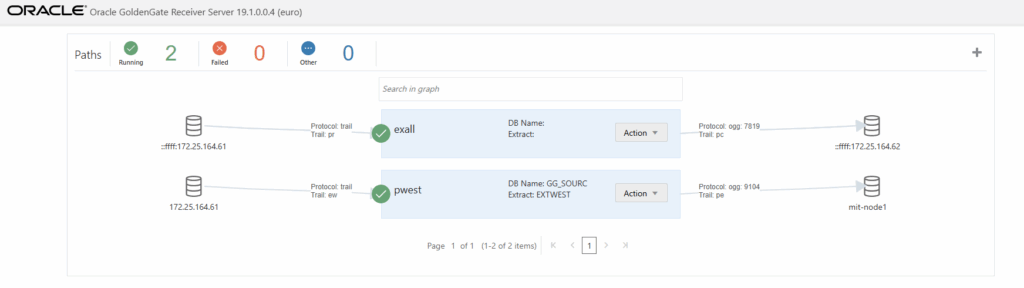
From the Receiver Server GUI, you can:
- View all configured Paths
- Access detailed Path information
- Drill down into Network Statistics and File I/O Statistics
- Monitor Extract → Distribution Server → Receiver Server → Replicat flow visually
- Use the Action button for diagnostics
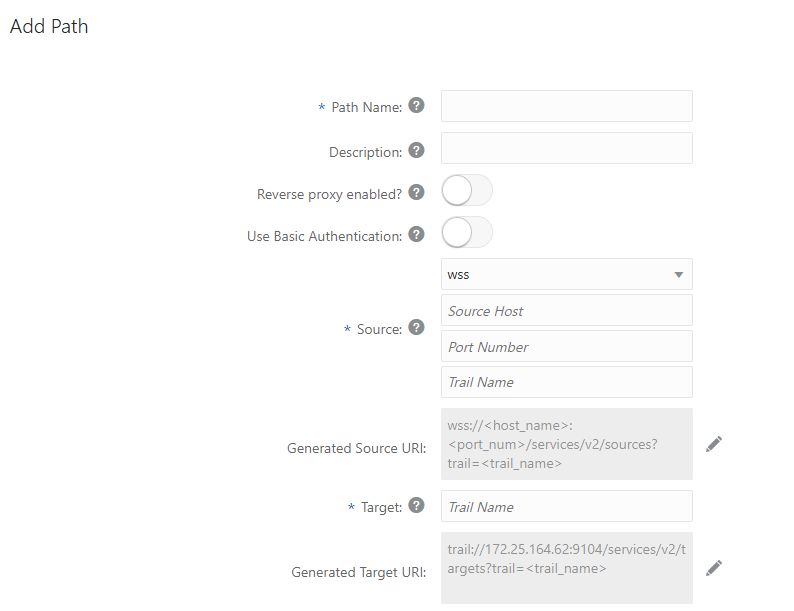
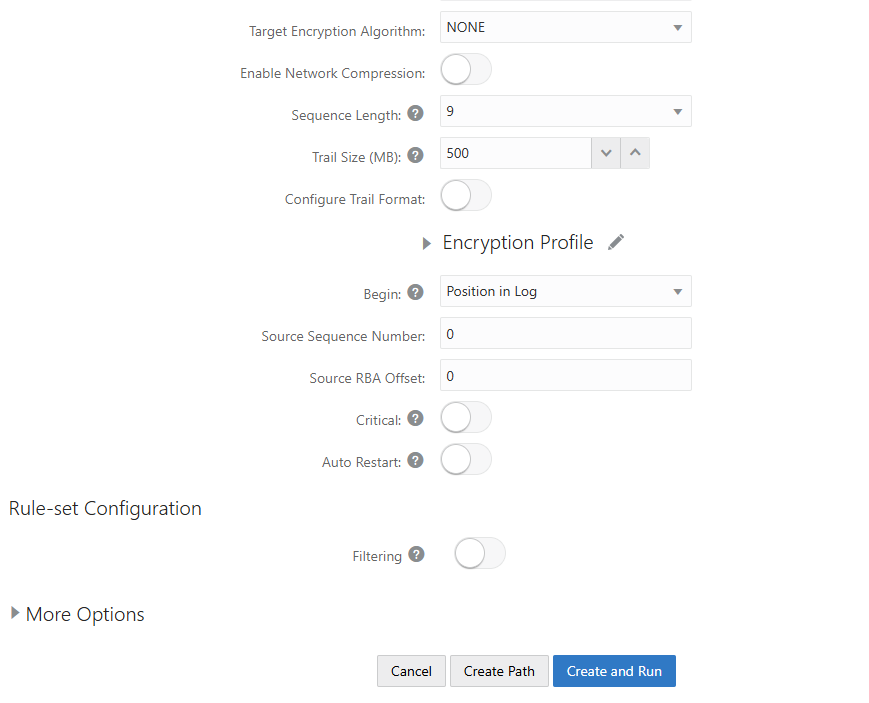
Network Statistics include:
- Target trail file
- Messages written/received
- Port details
- Throughput metrics
File I/O Statistics include:
- Total bytes read
- Total bytes written
- Idle time metrics
This visibility makes troubleshooting and performance tuning much easier.
Receiver Server: Path Information
The Network tab gives you real-time insights into:
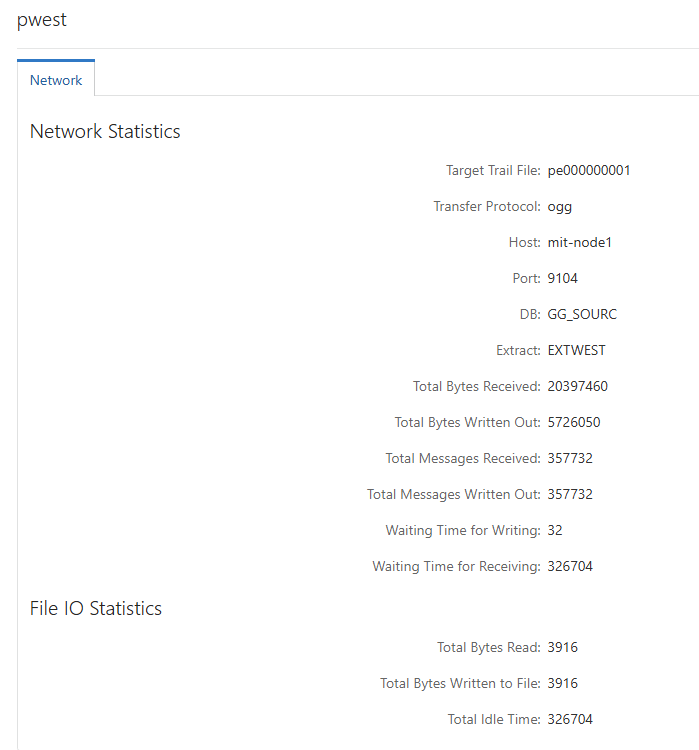
Network Statistics
- Target trail file name
- Port number
- Messages written/received
- Network throughput
File I/O Statistics
- Bytes read/written
- Idle time
- Disk performance indicators
These metrics help you tune your Distribution Server configuration for optimal flow.
Final Thoughts
The Receiver Server is a foundational component of Oracle GoldenGate’s Microservices Architecture. It simplifies target-side data ingestion, enhances monitoring, supports modern network security, and replaces legacy collectors with a powerful, unified service.
If you’re deploying GoldenGate MA in production, mastering the Receiver Server is essential for:
- Smooth data flow
- Zero-downtime replication
- Faster troubleshooting
- Scalable, secure delivery of trail files
Related Blog Posts
- What Is Oracle GoldenGate? A Beginner-Friendly Introduction
- Oracle GoldenGate 19c Microservices Architecture (MA) – Software Installation Guide
- Oracle GoldenGate 19c Microservices Architecture – Creating Certificates
- Oracle GoldenGate 19c Microservices Architecture – Configuring MA Deployment Using oggca.sh
- How to Create an Extract in Oracle GoldenGate MA (Microservices Architecture)
- Oracle GoldenGate 19c MA Distribution Server: A Complete Beginner-Friendly Guide


