

Modern enterprises demand real-time, zero-downtime data movement across heterogeneous databases—and Oracle GoldenGate stands at the center of that transformation. One of GoldenGate’s most critical workflows is the Initial Load, the process of instantiating data in the target environment before continuous replication begins.
In this comprehensive guide, we’ll break down how the Oracle GoldenGate Initial Load works, why it matters, and the best practices to ensure seamless configuration.


What Is Oracle GoldenGate Initial Load?
The Initial Load is the one-time process of copying existing data from the source database into the target database before real-time transaction replication (Extract → Trail → Replicat) begins.
It essentially “primes” your target database so GoldenGate can start delivering incremental captured changes without missing any records.
GoldenGate supports several initial load techniques depending on:
✔ Source & target database types
✔ Volume of data
✔ Network capacity
✔ Outage tolerance
✔ Performance requirements
Once the Initial Load is completed, the Extract and Replicat processes begin applying incremental changes captured from the transaction logs.
Infographic: GoldenGate Initial Load High-Level Architecture
Use this diagram in your blog or documentation:

Why Initial Load Matters
The Initial Load sets the foundation for GoldenGate’s real-time replication. Without it, the target database would not be aligned with the source, resulting in:
❌ Out-of-sync records
❌ Replication gaps
❌ Collisions and apply errors
❌ Downtime during cutover
A well-executed initial load ensures your GoldenGate implementation is:
✔ Reliable
✔ Fast
✔ Consistent
✔ Ready for change capture
Methods of Oracle GoldenGate Initial Load
GoldenGate offers multiple techniques to perform an initial load, each suited for different environments.
| GoldenGate Method | Extract Writes To | Load Method |
|---|---|---|
| File to Replicat | Trail (canonical format) | Replicat via SQL |
| File to Database Utility | Formatted text file | Database utility |
| Direct Load | Replicat (directly) | Replicat via SQL |
| Direct Bulk Load | Replicat (directly) | Replicat via SQL*Loader API |
1. File to Replicat (Most Common & Universal Method)
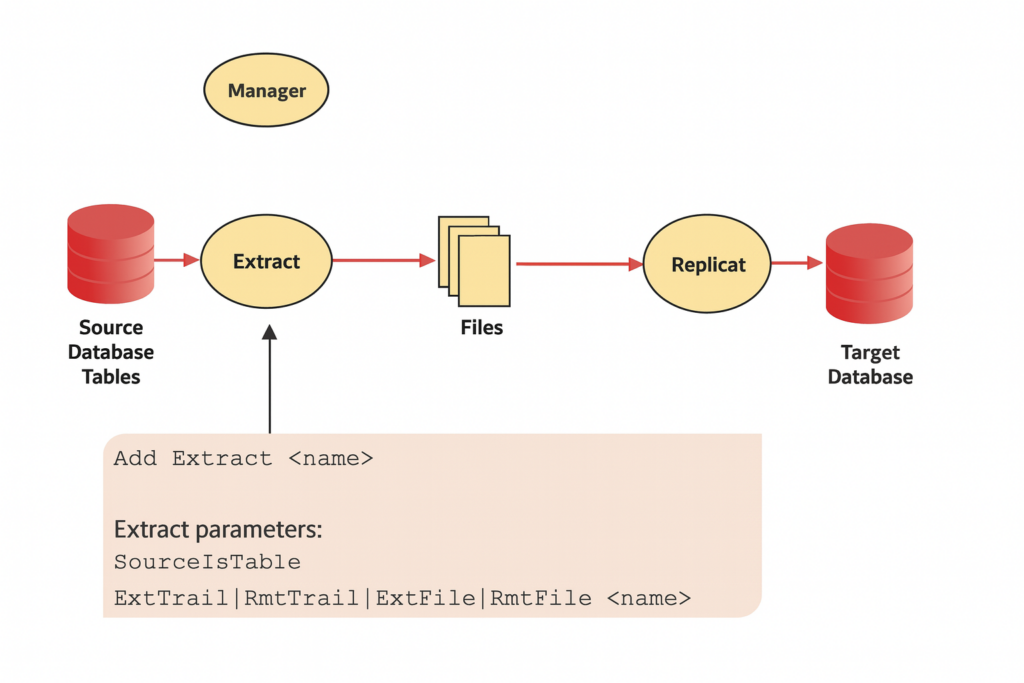
GoldenGate Extract reads directly from source tables, writes output to trail or flat files, and Replicat loads them into the target database.
Best for:
- Mixed database environments
- Zero locking and minimal impact on production
- High-volume transfers
Advantages:
✔ No table locks
✔ Supports parallel operations
✔ Works across heterogeneous DBs
2. File to Database Utility (High-Speed Load)

Extract generates ASCII or CSV files which can be imported using:
- SQL*Loader
- BCP / SSIS
- IBM Load Utility
Best for:
⚡ Extremely large datasets
⚡ High-throughput bootstrapping
3. Direct Load (Fastest for Oracle-to-Oracle)
Extract writes data directly to Replicat without trail files.
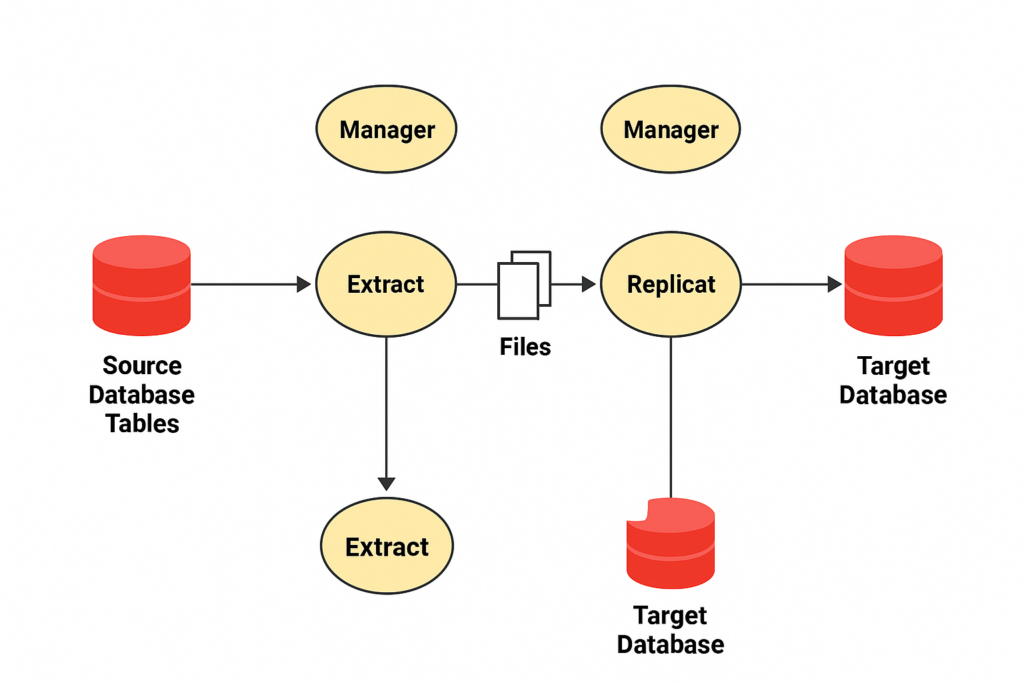
Use when:
- Low latency is required
- Same Oracle versions
- Network capacity is high
4. Direct Bulk Load (Oracle ONLY)
Replicat interfaces with SQL*Loader API to load huge volumes in bulk.
Best for:
Massive tables (TB scale)
Prerequisites Before Initial Load
To avoid conflicts or duplicate rows, ensure the following:
✔ All open transactions at Extract startup must be completed
Use:GV$TRANSACTION or GV$ACTIVE_SESSION_HISTORY.
✔ Disable DDL replication
DDL changes can break initial load consistency.
✔ Prepare target tables
Including:
- Disable foreign keys
- Drop secondary indexes
- Remove unused columns
- Set tables to READ ONLY (optional)
✔ Create Data Definitions File (if heterogeneous)
Required when:
- Column names differ
- Data types differ
- Unsupported formats exist
✔ Set up change synchronization groups
This ensures changes occurring during the Initial Load are captured and replayed.
How to Perform an Initial Load (Step-by-Step Guide)
Below is a universal method using Extract → Trail → Replicat.
Step 1: Configure Extract for Initial Load
Example:
ADD EXTRACT init_ld, SOURCEISTABLE
EXTTRAIL ./dirdat/il
TABLE hr.*;
Step 2: Run Initial Load Extract
START EXTRACT init_ld
Step 3: Configure Initial Load Replicat
ADD REPLICAT init_rep, SPECIALRUN
MAP hr.*, TARGET hr.*;
Step 4: Start Replicat
START REPLICAT init_rep
Result:
All initial rows are loaded into the target before real-time changes begin.
Best Practices for a Smooth Initial Load
Based on Oracle’s real-world recommendations:
Remove Secondary Indexes
They slow down insert speed dramatically.
Disable Constraints (temporarily)
Foreign-key checks cause delays.
Enable Parallelism
Split tables or use ranges for faster load completion.
Distribute Data Across Multiple Network Controllers
Reduces bottlenecks.
Use Flashback SCN for Oracle Data Pump Integration
Ensures consistent snapshots.
Avoid SPECIALRUN for massive loads unless required
Checkpoints are lost, so batching becomes risky.
Integrating Data Pump with GoldenGate Initial Load
One of the most recommended Oracle-to-Oracle techniques is:
Export via Data Pump (expdp) → Import (impdp) → Start Replication
Highlights:
✔ Automatically sets instantiation SCN
✔ Faster than Replicat for giant tables
✔ Avoids transaction-level conflicts
On source:
expdp user/pass directory=DATA_DIR schemas=HR FLASHBACK_SCN=<value>
On target:
impdp user/pass directory=DATA_DIR schemas=HR
Then start Replicat with:
DBOPTIONS ENABLE_INSTANTIATION_FILTERING
Common Challenges & How to Avoid Them
Slow Initial Load
Solution:
- Remove indexes
- Use Data Pump or Direct Bulk Load
- Increase parallel degree
Out-of-sync data after replication
Solution:
- Ensure consistent SCN
- Capture changes during load
Table locks on source
Solution:
- Use SOURCEISTABLE instead of transactional logs
Conclusion
The Oracle GoldenGate Initial Load is one of the most important stages of replication design. When done right, it sets the perfect baseline for real-time synchronization—allowing enterprises to migrate or replicate mission-critical systems with zero downtime and 100% accuracy.
By following the practices in this guide, you ensure your GoldenGate environment remains:
✔ Scalable
✔ High-performing
✔ Low-latency
✔ Production-ready
Whether you’re configuring MA (Microservices Architecture) or Classic Architecture, these principles will help you build reliable replication pipelines across any database ecosystem.
Related Blog Posts
- What Is Oracle GoldenGate? A Beginner-Friendly Introduction
- Oracle GoldenGate 19c Microservices Architecture (MA) – Software Installation Guide
- Oracle GoldenGate 19c Microservices Architecture – Creating Certificates
- Oracle GoldenGate 19c Microservices Architecture – Configuring MA Deployment Using oggca.sh
- How to Create an Extract in Oracle GoldenGate MA (Microservices Architecture)
- Oracle GoldenGate 19c MA Distribution Server: A Complete Beginner-Friendly Guide



Comments 1