

Introduction: Oracle 23ai and the Evolution of Enterprise Databases
Oracle Database 23ai represents a leap forward in the evolution of autonomous, AI-powered data management. Designed for high scalability, multicloud adaptability, and intelligent workload optimization, this release focuses on automating performance diagnostics, improving SQL analysis, and enabling smoother transitions across environments — from on-premises Exadata to Oracle Cloud Infrastructure (OCI) and even Microsoft Azure.
Recent case studies presented by Oracle and enterprise adopters reveal practical steps, lessons learned, and the tools that make upgrades to 23ai successful while maintaining mission-critical performance and SLAs. This article explores these real-world implementations, highlighting proven techniques using SQL Performance Analyzer (SPA), DB Replay, and GoldenGate for secure, validated migrations.


Case Study 1: Upgrading from Oracle 19c Exadata to OCI 23ai
A customer running Oracle 19c on Exadata wanted to upgrade to Oracle Database 23ai on Exadata Cloud Service in OCI. Their key concern was ensuring consistent database performance and SLA adherence after the transition.
Requirements:
- Upgrade from on-prem Exadata (19c) to Exadata Cloud in OCI running 23ai
- Validate workload behavior and ensure no SQL regression
Recommendations:
Oracle engineers recommended using:
- SQL Performance Analyzer (SPA) to detect SQL-level regressions before upgrade
- Database Replay (DB Replay) to simulate real-world production workloads post-upgrade
Implementation Steps:
On Source (19c):
- Capture SQLs into SQL Tuning Sets (STS).
- Capture the production workload using DB Capture.
- Generate a DB capture report to obtain the System Change Number (SCN) at the capture start.
On Target (23ai):
- Clone the target database using the captured SCN.
- Enable Flashback Database and create a guaranteed restore point.
- Execute SPA to identify and fix SQL regressions.
- Set up DB Replay Clients (WRCs).
- Execute DB Replay on the target and analyze performance variance.
Findings:
The SQL Performance Analyzer tested 47,806 SQL statements, identifying regressions of about -8680.9% in elapsed time for a few queries. After SPA tuning and SQL Baseline adjustments, performance stabilized.
When the customer ran DB Replay, the execution duration and DB time showed near parity with the original environment — confirming that OCI Exadata 23ai met the expected performance levels.

Case Study 2: Migration to Microsoft Azure Cloud
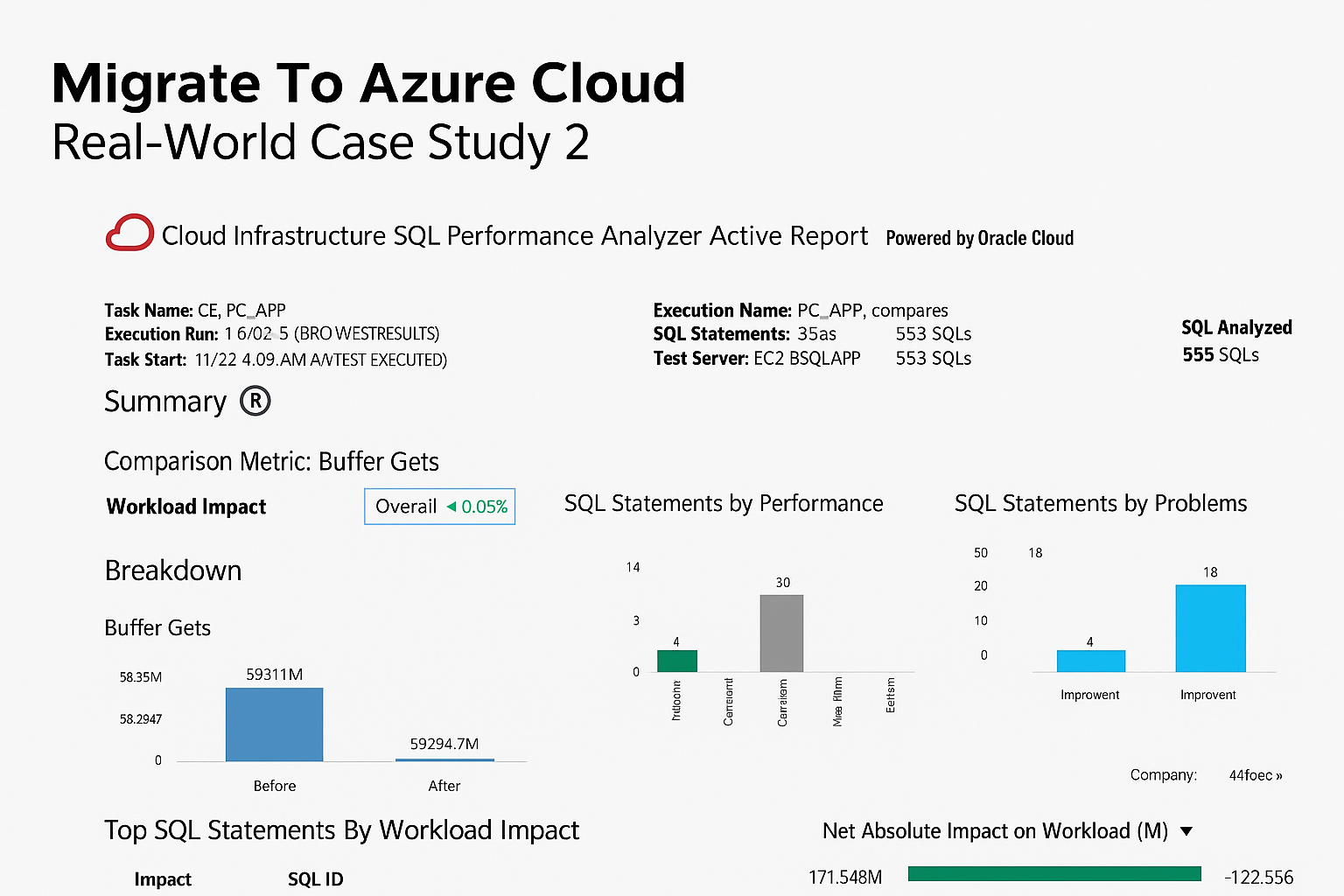
A major North American manufacturer migrated their ERP applications and Oracle databases from on-prem to Azure Cloud. The challenge was ensuring consistent performance, especially concerning I/O response and network latency.
Approach:
- Use SQL Performance Analyzer to identify SQL plan regressions.
- Use DB Replay to measure real production workload under Azure’s latency conditions.
Technical Process:
- Capture SQLs and workloads on-prem.
- Clone the target DB to Azure using SCN synchronization.
- Clone the Oracle Home binaries for environment consistency.
- Enable DB Flashback and guaranteed restore points.
- Execute SPA and DB Replay in “Query-Only Mode” to analyze read performance.
Outcome:
- Replay time: 29 minutes 26 seconds
- Capture time: 30 minutes
- Network latency: 0.01 sec on replay vs. 0.03 sec on capture
Performance consistency validated that Azure Cloud could sustain enterprise-grade Oracle workloads with minimal latency variance.
I/O Optimization Lesson:
The customer initially used Premium SSD disks (900 MB/s), leading to slightly higher I/O response times. Oracle recommended switching to Ultra Disks, capable of up to 10,000 MB/s throughput and 400,000 IOPS — perfect for Oracle or SAP HANA-class workloads.
Case Study 3: XPO’s Oracle Exadata Modernization Journey
Global logistics leader XPO showcased their strategy for upgrading mission-critical OLTP databases (40TB+, 6,000+ connections) running on Exadata X11 Cloud@Customer.
Challenges and Objectives:
- Maintain 24×7 high availability with zero downtime.
- Validate SQL compatibility between database releases.
- Optimize performance while ensuring regulatory compliance.
Key Strategies:
- Use Oracle Enterprise Manager (OEM) for diagnostic tuning.
- Leverage Real Application Testing (RAT), combining DB Replay and SPA for comparative benchmarking between X8 vs X11, and 19c vs 23ai.
- Implement GoldenGate replication for real-time data synchronization.
- Migrate to CDB/PDB architecture with rollback capability.
Compatibility Matrix Insights:
Oracle Doc ID 207303.1 confirms 23ai clients are compatible with 21c and 19c servers, but not earlier versions like 18c or 12c. XPO’s team created automated scripts to identify unsupported client versions using:
SELECT
    sci.CLIENT_VERSION,
    sci.CLIENT_DRIVER,
    ses.MODULE,
    ses.PROGRAM,
    sci.OSUSER,
    ses.USERNAME,
    COUNT(*) AS CNT
FROM
    gv$SESSION_CONNECT_INFO sci
    JOIN gv$SESSION ses
      ON sci.INST_ID = ses.INST_ID
     AND sci.SID = ses.SID
     AND sci.SERIAL# = ses.SERIAL#
WHERE
    sci.CLIENT_VERSION NOT LIKE '19.%'
    AND sci.CLIENT_VERSION NOT LIKE '21.%'
    AND sci.CLIENT_VERSION NOT LIKE '23.%'
GROUP BY
    sci.CLIENT_VERSION,
    sci.CLIENT_DRIVER,
    ses.MODULE,
    ses.PROGRAM,
    sci.OSUSER,
    ses.USERNAME
ORDER BY
    sci.CLIENT_VERSION,
    sci.CLIENT_DRIVER,
    ses.MODULE;
Output
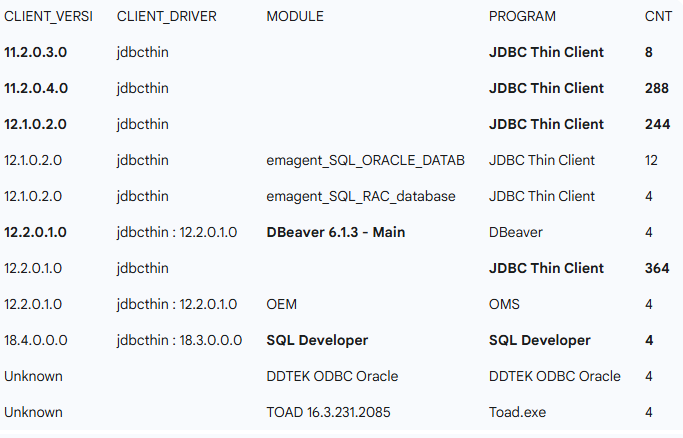
This helped pinpoint legacy clients like 12.1 JDBC and TOAD still connecting to production databases.How We Upgraded Oracle 19c to 23ai on Exadata Cloud@OCI — A Complete Real-World Guide

Security and Governance Enhancements
Oracle Database 19c and above introduced the PASSWORD_ROLLOVER_TIME profile attribute, enabling users to log in using both old and new passwords during controlled rollover windows.
For SOX compliance, teams can monitor password changes with:
SELECT username, password_change_date FROM dba_users;
Additionally, Oracle Data Safe in Exadata Cloud provides a centralized tool for security auditing, data masking, and compliance monitoring, ensuring regulatory readiness in hybrid deployments.
Security and Governance Enhancements
Performance Validation & Monitoring Enhancements
Dictionary Health Check
DBAs can run pre-upgrade consistency checks using:
SQL> set serveroutput on size unlimited;
SQL> exec dbms_dictionary_check.full;
This validates metadata integrity before upgrade and ensures no broken objects remain.
Tablespace Monitoring
XPO engineers shared a robust SQL script that uses DBA_TABLESPACE_USAGE_METRICS and DBA_LMT_FREE_SPACE to track utilization trends across tablespaces, ensuring proactive storage management in large-scale environments.
Cost Optimization and Lifecycle Management
XPO’s team emphasized Exadata cost optimization by:
- Using node sub-setting for elastic scalability.
- Leveraging faster X11 CPUs for better performance per watt.
- Taking advantage of built-in licenses in Exadata Cloud@Customer (Diag, TDE, RAT, Data Masking).
- Continuously measuring workload performance and adjusting CPU cores dynamically.
This approach minimizes underutilized compute resources and maximizes ROI throughout the database lifecycle.
Rollback and Disaster Preparedness
Because database upgrades are mission-critical, rollback readiness is essential.
XPO’s approach combined:
- Oracle AutoUpgrade for in-place upgrades.
- Flashback Restore Points for quick reversion.
- Oracle Data Guard standby databases for immediate fallback.
- Reverse GoldenGate setup (23ai → 19c) for worst-case recovery after go-live.
Detailed Runbook for Migration Success
To eliminate human error during migration, XPO prepared a comprehensive runbook including:
- Pre-cutover validation
- Dev/Test setup mirroring production
- Rollback and fallback simulations
- GoldenGate replication preparation
- Maintenance window planning
- Advance Queue (AQ) management
- Go/No-Go checkpoints
This standardized playbook became the cornerstone for controlled, low-risk 23ai adoption.
Key Takeaways
- Validate SQLs before and after upgrade using SPA and DB Replay.
- Leverage Flashback Restore Points for instant fallback safety.
- Use Exadata Cloud@Customer for optimal performance and licensing flexibility.
- Monitor and automate tablespace, performance, and client compatibility checks.
- Adopt Ultra Disks for high I/O workloads in Azure or OCI.
Oracle Database 23ai’s advanced automation, hybrid cloud adaptability, and intelligent performance diagnostics redefine enterprise data management. With strategic use of Real Application Testing tools and meticulous planning, organizations can confidently modernize while preserving the stability of mission-critical workloads.



Comments 5