

Most cloud architecture advice quietly assumes something that isn’t true for a lot of the world: that there’s a region a few milliseconds away, that you actually get to choose between two or three providers with a presence nearby, and that “multi-AZ” solves your resilience problem because the availability zones themselves are close enough not to matter.
I’ve built Oracle workloads on cloud infrastructure across South Asia and parts of Africa, and that assumption has never quite held for me. The nearest usable region for a project in Mongolia wasn’t exactly next door. Neither was the nearest one for work I did in Mozambique. When people ask me why I care so much about latency numbers other architects treat as a footnote, this is why — for a meaningful chunk of the world, “pick the nearest region” and “pick a region that’s actually fast” are two very different exercises.


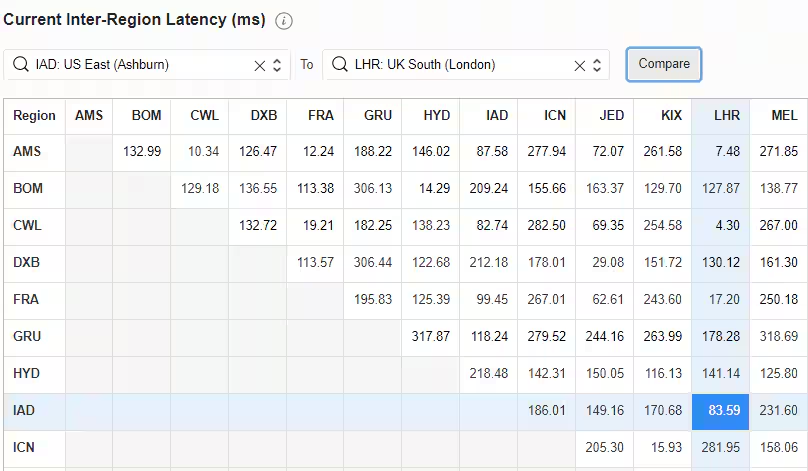
Nearest Doesn’t Mean Fast
There’s a habit in a lot of cloud guidance of treating region selection as basically solved — check the map, pick whatever’s geographically closest, move on. That works fine if you’re sitting in a market with three regions within a few hundred kilometers. It falls apart once “nearest” means routing through undersea cables, multiple transit providers, and a few international hops before your packet even reaches the data center.
I’ve measured round trips in the 150 to 300 millisecond range on connections that, on a map, looked perfectly reasonable. That’s not a rounding error. That’s the difference between an application that feels responsive and one that feels like it’s wading through mud, and no amount of instance sizing fixes it, because you’re not CPU-bound — you’re bound by the speed of light and a cable route that wasn’t built with your workload in mind.
Multi-AZ Solves a Different Problem Than the One You Actually Have
I’ve sat through vendor pitches that lean hard on “we have multiple availability zones in the region” as if that settles the resilience conversation. It settles part of it — protection against a single data center failure. It does nothing for the latency your users are already experiencing every single day, because the AZs themselves are usually clustered close together within that same distant region.
I had a client once who’d spent real money getting a beautifully redundant setup — multiple AZs, automatic failover, the works. Every box on the checklist ticked. And their users were still complaining the app felt sluggish, because none of that touched the actual problem, which was distance. Redundant doesn’t mean fast. Those are just… two separate things, and I’ve had to sit across a table from more than one CTO who genuinely thought “resilient” was the same word as “quick.”
Every Round Trip Now Has a Price Tag on It
Once your baseline latency is measured in hundreds of milliseconds instead of single digits, application design decisions that used to be harmless start costing real money in user experience. A chatty application — one that makes a dozen small round trips to fetch a page instead of one well-designed call — barely notices 2ms of latency per hop. At 250ms per hop, that same pattern turns a page load into a multi-second wait, and users notice immediately.
Honestly, a lot of my actual billable hours on these projects go somewhere people don’t expect. Not SQL tuning — I sit next to a developer, we scroll through the actual code together, and I keep asking the same annoying question about each database call: did this one need to happen separately, or did we just write it that way out of habit? Half the time the answer is habit. I’ve seen loops that fired a query per row when a single batched call would’ve done the whole job. I’ve told teams more than once to stop opening a fresh connection for every request — a brand new TCP handshake plus TLS negotiation, on a link where every hop already costs you 250ms, adds up faster than anyone expects until they actually see the numbers.
Read Replicas Change Shape When Distance Is Real
Everyone’s favorite easy answer for read-heavy workloads is “just add a read replica,” and it works great, right up until you realize you’ve stuck that replica on the far end of the exact same slow connection you were trying to get away from. At that point you haven’t fixed anything. You’ve just relocated the same latency problem somewhere a bit further down the diagram, and it took me longer than I’d like to admit to catch that mistake the first time I made it myself.
What actually helps in these environments is a slower, less satisfying process — going through the reads one by one and asking which ones genuinely need to hit something running in the cloud, and which could just as easily be served locally, cached for a while, or rewritten so the app isn’t making a fresh trip every single time it needs the same piece of data. It’s not a clean architecture pattern you can put on a slide. It’s just closer to the truth of where the bottleneck actually sits.
The Region-Selection Conversation Needs a Different Question
When clients ask me to help choose between OCI, AWS, and Azure for an Oracle workload, the standard comparison — pricing per core, feature parity, licensing terms — matters, but it’s not where I start. I start by asking what the actual measured latency looks like from where the users and the application servers physically sit, to each candidate region, at different times of day, because that number tends to vary more than people expect depending on transit routes and time-of-day congestion.
I’ve seen cases where the “obviously cheaper” provider on paper was also the one with meaningfully worse latency for that specific market, and the performance cost ended up mattering more to the business than the price difference ever did. I’ve also seen the reverse — a slightly pricier region that turned out to be reachable over a much more direct route, making the whole application noticeably snappier for a modest cost increase. You don’t know which situation you’re in until you actually measure it, and I mean measure it yourself, not trust a provider’s marketing map of “expected latency.”
Test at the Time Your Users Actually Work
One detail that trips people up: latency over long-haul international links isn’t constant throughout the day. I’ve seen measurable degradation during peak regional internet traffic hours — evenings, when everyone’s streaming video and the shared infrastructure gets genuinely congested — that simply doesn’t show up if you run your latency test once, at 10 AM, and call it done.
If your business hours latency test happens outside actual business hours, you’re testing the wrong thing.
Design for the Latency You’ll Actually Get, Not the Latency in the Diagram
I’ve reviewed architecture documents that assumed single-digit millisecond latency to a cloud region that, when I actually pinged it from the client’s data center, came back well over 200ms. That gap between the assumed number and the measured one is where a lot of “why is this so slow after go-live” incidents come from, and it’s entirely avoidable if someone just runs the test before committing to the design instead of after.
My rule now, on every project regardless of how confident anyone sounds about the network: measure first, design second. Never the other way around.
Final Thoughts
A lot of cloud architecture wisdom was written by people sitting close to major regions, and it shows in what gets treated as a solved problem versus what gets a whole chapter of caveats. Latency-aware design isn’t a niche concern reserved for exotic edge cases — for a large part of the world, it’s the default condition every Oracle cloud project starts from.
The teams that get this right aren’t the ones with the most sophisticated architecture diagram. They’re the ones who actually measured their real-world latency before designing around it, and who kept measuring it afterward, because a network path that was fine last year doesn’t stay that way forever.
Announcing the inter-region latency dashboard for Oracle Cloud Infrastructure
Oracle Database@AWS vs. On-Prem: A DR Decision Framework for Teams Without Multi-Region Budgets


