

Introduction
Oracle Database 23ai represents a major milestone in database modernization — introducing advanced AI-driven automation, improved workload intelligence, and deeper hybrid cloud flexibility. For many enterprises, the challenge isn’t just adopting Oracle 23ai’s new features — it’s ensuring that mission-critical databases transition seamlessly without breaking existing SLAs or application dependencies.
This article explores a real-world upgrade from Oracle 19c on Exadata to Oracle Database 23ai on Exadata Cloud@OCI, detailing the methodology, tools, and lessons learned that made the migration both low-risk and performance-stable.


Why Upgrade to Oracle Database 23ai?
For organizations running on Oracle Database 19c, upgrading to 23ai offers key advantages:
- AI Vector Search and JSON Relational Duality for smarter analytics.
- Improved scalability for multitenant architectures.
- Seamless hybrid deployment across on-prem, OCI, and other clouds.
- Enhanced automation via Real Application Testing (RAT) and Oracle AutoUpgrade.
But before enjoying these features, teams must overcome the most common challenge — proving that performance remains stable after migration. This is where Oracle’s Real Application Testing suite, specifically SQL Performance Analyzer (SPA) and Database Replay (DB Replay), comes into play.
The Real-World Scenario: 19c Exadata → 23ai Exadata Cloud@OCI
A large financial customer needed to move their high-transaction OLTP system from Exadata 19c on-premises to Oracle Cloud Infrastructure, leveraging Exadata Cloud@OCI for elasticity and simplified management.
Their main goals were to:
- Validate that no SQL regressions occurred post-upgrade.
- Ensure transaction throughput remained consistent.
- Complete the transition with minimal downtime.
Step 1: Capture and Benchmark Using SQL Performance Analyzer (SPA)
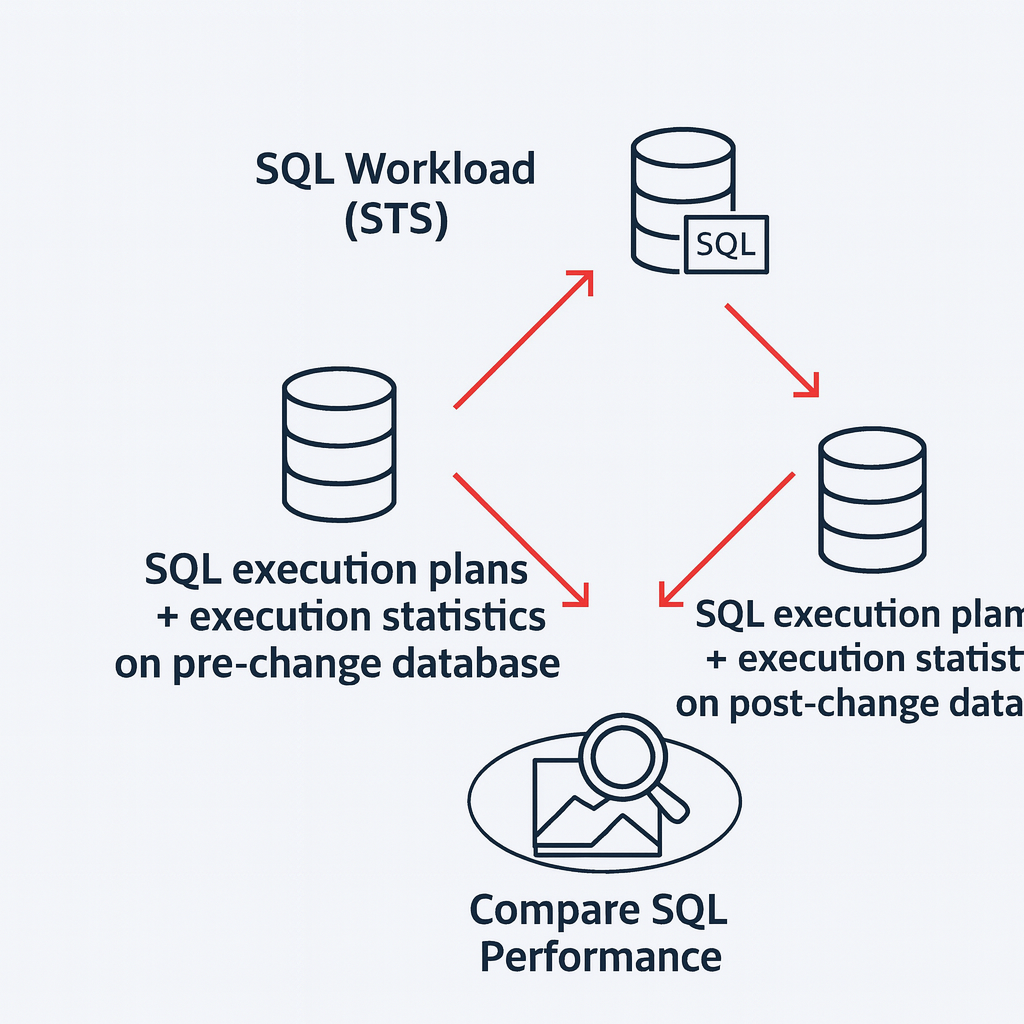
Before initiating the migration, the DBA team used SPA to capture and analyze SQL statements running in production.
Process Summary:
- Capture SQL Tuning Set (STS) from the source 19c database.
- Load STS into SPA for replay on the target 23ai environment.
- Compare execution plans and runtime statistics between pre- and post-upgrade executions.
Outcome:
SPA evaluated over 47,800 SQL statements and identified a small subset of regressions (approximately 8,600% negative variance) primarily caused by plan changes due to optimizer statistics.
By applying SQL Plan Baselines and re-gathering statistics, performance was restored before production cutover.
This proactive validation ensured no surprises during go-live.
Step 2: Validate Workload Behavior Using Database Replay (DB Replay)
After SQL-level tuning, the next focus was real workload testing. The team used Database Replay, which captures actual production workload and replays it in the target 23ai environment.
DB Replay Process:
- Capture Phase:
The workload was captured on the 19c source system for a specific SCN window.
Oracle’s Automatic Workload Repository (AWR) provided precise capture start and end points. - Pre-Processing Phase:
The captured workload was preprocessed on the target 23ai system to make it replay-ready. - Replay Phase:
Using Workload Replay Clients (WRCs), the workload was executed on the new environment to simulate actual user sessions. - Analysis Phase:
DB Replay compared capture vs replay statistics — including elapsed time, CPU usage, and SQL calls — to measure accuracy and detect anomalies.
Key Metrics:
| Metric | Capture | Replay | Variance |
|---|---|---|---|
| DB Time (min) | 30 | 29.4 | -2% |
| Average Active Sessions | 47.2 | 47.1 | -0.2% |
| User Calls | 2.79M | 2.78M | Negligible |
These results validated that the 23ai environment sustained identical workload performance — a critical win for production confidence.
Step 3: Ensuring a Safe Fallback Strategy
Because mission-critical databases can’t afford downtime, fallback and rollback planning were prioritized.
The DBAs implemented a multi-layered fallback strategy:
- Oracle AutoUpgrade Utility for in-place upgrades with rollback checkpoints.
- Flashback Database restore points for instant reversion.
- Oracle Data Guard configured for rapid failback.
- GoldenGate Reverse Replication (23ai → 19c) for disaster rollback if needed after go-live.
This approach ensured zero data loss and near-instant recovery options — allowing testing teams to confidently validate workloads.
Step 4: Automating Compatibility Checks
Before migration, the team validated all client versions connecting to the database.
A custom query against GV$SESSION_CONNECT_INFO identified unsupported clients such as legacy JDBC 12.1 and TOAD versions.
Example SQL:
SELECT sci.CLIENT_VERSION, sci.CLIENT_DRIVER, module, program, sci.osuser, username, -- machine,
       COUNT(*) AS cnt
FROM gv$SESSION_CONNECT_INFO sci, gv$session ses
WHERE sci.inst_id = ses.inst_id
  AND sci.sid = ses.sid(+)
  AND sci.SERIAL# = ses.SERIAL#(+)
  AND sci.CLIENT_VERSION NOT LIKE '19.%'
  AND sci.CLIENT_VERSION NOT LIKE '21.%'
  AND sci.CLIENT_VERSION NOT LIKE '23.%'
GROUP BY sci.CLIENT_VERSION, sci.CLIENT_DRIVER, module, program,
         sci.osuser, -- machine, -- username,
ORDER BY 1, 2, 3
By addressing these outdated connections early, post-upgrade connectivity issues were completely avoided.
Step 5: Post-Migration Validation and Performance Review
Once the system went live on 23ai, continuous monitoring was performed using Oracle Enterprise Manager (OEM) and AWR reports.
- Key SQLs were reviewed to confirm consistent response times.
- DBA_HIST_SQLSTAT and GV$SQLAREA were queried to compare performance variances.
- Top queries with minor regressions were tuned proactively using SQL Plan Management (SPM).
This disciplined validation confirmed that all workloads met or exceeded performance benchmarks from 19c.
Lessons Learned and Best Practices
- Always capture production workloads for testing — synthetic tests don’t represent true system behavior.
- Leverage SPA before DB Replay — SQL-level tuning saves significant time.
- Enable guaranteed Flashback restore points before starting any test.
- Use identical parameter files and statistics between source and target for consistent results.
- Plan rollbacks with Data Guard or GoldenGate replication before go-live.
Conclusion
Upgrading to Oracle Database 23ai is more than a version change — it’s a modernization journey toward smarter, self-optimizing database infrastructure.
Through strategic use of SQL Performance Analyzer, Database Replay, and Oracle AutoUpgrade, enterprises can perform upgrades with zero downtime, validated performance, and complete rollback assurance.
The success of this Exadata-to-OCI upgrade demonstrates that, with the right methodology, even the most mission-critical systems can evolve into the AI-driven era confidently and securely.
Explore further: https://dbainsight.com/2025/10/oracle-database-23ai-upgrade-strategies/


