

Oracle Recovery Manager (RMAN) is one of the most important tools for protecting Oracle databases through backup and recovery. However, during backup, restore, recovery, or maintenance operations, RMAN sessions can sometimes remain active for a long time.
When investigating database activity, Oracle Performance Hub can be useful for identifying periods of increased database activity. The example below shows Performance Hub activity over approximately one hour, where background activity and CPU utilization can be observed alongside other database activity.


This article explains how to identify incomplete RMAN operations using V$SESSION_LONGOPS, generate the corresponding session-kill commands, and optionally terminate those sessions using PL/SQL.

1. Monitoring Database Activity with Performance Hub
Oracle Performance Hub provides a graphical view of database activity over a selected time period.
In the example above, the activity graph shows database workload between approximately 09:25 AM and 10:25 AM, with background activity and CPU activity visible during the period.
Performance Hub can help identify:
- CPU utilization
- Background activity
- User I/O
- Wait activity
- Periods of increased database activity
- Potentially long-running operations
However, Performance Hub alone does not tell us exactly which RMAN sessions are responsible for a long-running operation.
For that, we can use Oracle’s V$SESSION_LONGOPS view.
2. Identifying RMAN Long-Running Operations
V$SESSION_LONGOPS provides information about operations that take a significant amount of time to complete.
The following query filters the output specifically for RMAN operations:
SELECT SID,
       SERIAL#,
       CONTEXT,
       SOFAR,
       TOTALWORK,
       ROUND(SOFAR/TOTALWORK*100,2) "%_COMPLETE"
FROM V$SESSION_LONGOPS
WHERE OPNAME LIKE 'RMAN%'
  AND OPNAME NOT LIKE '%aggregate%'
  AND TOTALWORK != 0
  AND SOFAR <> TOTALWORK;
Query explanation
| Column | Description |
|---|---|
SID | Oracle session identifier |
SERIAL# | Session serial number |
CONTEXT | Context associated with the long-running operation |
SOFAR | Amount of work completed |
TOTALWORK | Total estimated amount of work |
%_COMPLETE | Estimated percentage completed |
The following conditions are particularly important:
OPNAME LIKE 'RMAN%'This limits the results to RMAN operations.
OPNAME NOT LIKE '%aggregate%'This excludes aggregate RMAN operations.
TOTALWORK != 0This prevents division by zero when calculating the completion percentage.
SOFAR <> TOTALWORKThis returns operations that have not yet completed.
3. Understanding the Percentage Completed
The percentage is calculated using:
ROUND(SOFAR/TOTALWORK*100,2)For example:
SOFAR     = 650000
TOTALWORK = 1000000
The calculation is:
650000 / 1000000 × 100
= 65%
Therefore, the RMAN operation is approximately 65% complete.
This is useful when determining whether an RMAN operation is genuinely progressing or appears to be stalled.
4. Generate the RMAN Session Kill Command
Once the RMAN sessions have been identified, the SID and SERIAL# can be used to generate an Oracle session termination command.
Instead of manually constructing the command, use:
SELECT 'ALTER SYSTEM KILL SESSION ''' ||
       SID || ',' || SERIAL# || ''' IMMEDIATE;'
FROM V$SESSION_LONGOPS
WHERE OPNAME LIKE 'RMAN%'
  AND OPNAME NOT LIKE '%aggregate%'
  AND TOTALWORK != 0
  AND SOFAR <> TOTALWORK;
The query may return output similar to:
ALTER SYSTEM KILL SESSION '123,4567' IMMEDIATE;
ALTER SYSTEM KILL SESSION '125,8910' IMMEDIATE;
These commands can then be reviewed before execution.
5. Verify the RMAN Session Before Killing It
Before terminating an RMAN session, it is recommended to obtain additional information from V$SESSION.
For example:
SELECT SID,
       SERIAL#,
       USERNAME,
       STATUS,
       PROGRAM,
       MACHINE,
       SQL_ID,
       EVENT,
       STATE,
       LOGON_TIME
FROM V$SESSION
WHERE SID IN (
    SELECT SID
    FROM V$SESSION_LONGOPS
    WHERE OPNAME LIKE 'RMAN%'
      AND OPNAME NOT LIKE '%aggregate%'
      AND TOTALWORK != 0
      AND SOFAR <> TOTALWORK
);
This allows the DBA to confirm:
- Which user owns the session
- Whether the session is active
- Which client/program created it
- Which machine initiated the connection
- The current SQL ID
- The wait event
- When the session was established
This verification step is especially important in a production environment.
6. Automatically Kill Incomplete RMAN Sessions
If the DBA has confirmed that all matching RMAN sessions should be terminated, the process can be automated using PL/SQL.
BEGIN
    FOR r IN (
        SELECT SID, SERIAL#
        FROM V$SESSION_LONGOPS
        WHERE OPNAME LIKE 'RMAN%'
          AND OPNAME NOT LIKE '%aggregate%'
          AND TOTALWORK != 0
          AND SOFAR <> TOTALWORK
    )
    LOOP
        EXECUTE IMMEDIATE
            'ALTER SYSTEM KILL SESSION ''' ||
            r.SID || ',' || r.SERIAL# || ''' IMMEDIATE';
    END LOOP;
END;
/
The block loops through all matching RMAN sessions and executes:
ALTER SYSTEM KILL SESSION 'SID,SERIAL#' IMMEDIATE;for each session.
7. Important Production Consideration
Do not automatically kill every RMAN session simply because it appears in V$SESSION_LONGOPS.
An RMAN operation appearing in V$SESSION_LONGOPS does not necessarily mean that it is stuck.
A backup may legitimately take a long time because of:
- Large database size
- High archive log generation
- Slow storage
- NFS performance
- Backup destination throughput
- Network bandwidth
- RMAN channel configuration
- Compression
- Encryption
- Concurrent database workload
- I/O contention
For example, an RMAN backup may remain in the view for several hours while continuing to make progress.
Therefore, the %_COMPLETE value should be monitored over time.
8. Check Whether the RMAN Operation Is Progressing
Run the monitoring query periodically:
SELECT SID,
       SERIAL#,
       CONTEXT,
       SOFAR,
       TOTALWORK,
       ROUND(SOFAR/TOTALWORK*100,2) "%_COMPLETE"
FROM V$SESSION_LONGOPS
WHERE OPNAME LIKE 'RMAN%'
  AND OPNAME NOT LIKE '%aggregate%'
  AND TOTALWORK != 0
  AND SOFAR <> TOTALWORK;
For example, if the output changes from:
SOFAR       TOTALWORK       % COMPLETE
500000      1000000         50
to:
SOFAR       TOTALWORK       % COMPLETE
650000      1000000         65
the RMAN operation is clearly progressing.
In this situation, killing the session would normally be unnecessary.
However, if the values remain unchanged for an extended period and the operation is confirmed to be stalled, further investigation may be appropriate.
9. Combine Performance Hub and RMAN Monitoring
A useful troubleshooting approach is to combine Performance Hub with database-level RMAN monitoring.
Step 1 — Review Performance Hub
Check the period where the database showed increased activity.
Step 2 — Identify RMAN operations
Run:
SELECT SID,
       SERIAL#,
       CONTEXT,
       SOFAR,
       TOTALWORK,
       ROUND(SOFAR/TOTALWORK*100,2) "%_COMPLETE"
FROM V$SESSION_LONGOPS
WHERE OPNAME LIKE 'RMAN%'
  AND OPNAME NOT LIKE '%aggregate%'
  AND TOTALWORK != 0
  AND SOFAR <> TOTALWORK;
Step 3 — Check session details
SELECT SID,
       SERIAL#,
       USERNAME,
       STATUS,
       PROGRAM,
       MACHINE,
       SQL_ID,
       EVENT,
       STATE
FROM V$SESSION
WHERE SID = <SID>;
Step 4 — Monitor progress
Run the V$SESSION_LONGOPS query again after a suitable interval.
Step 5 — Determine whether intervention is required
If the operation is progressing, allow RMAN to continue.
If the operation is confirmed to be stuck and there is an operational reason to terminate it, generate and review the kill command.
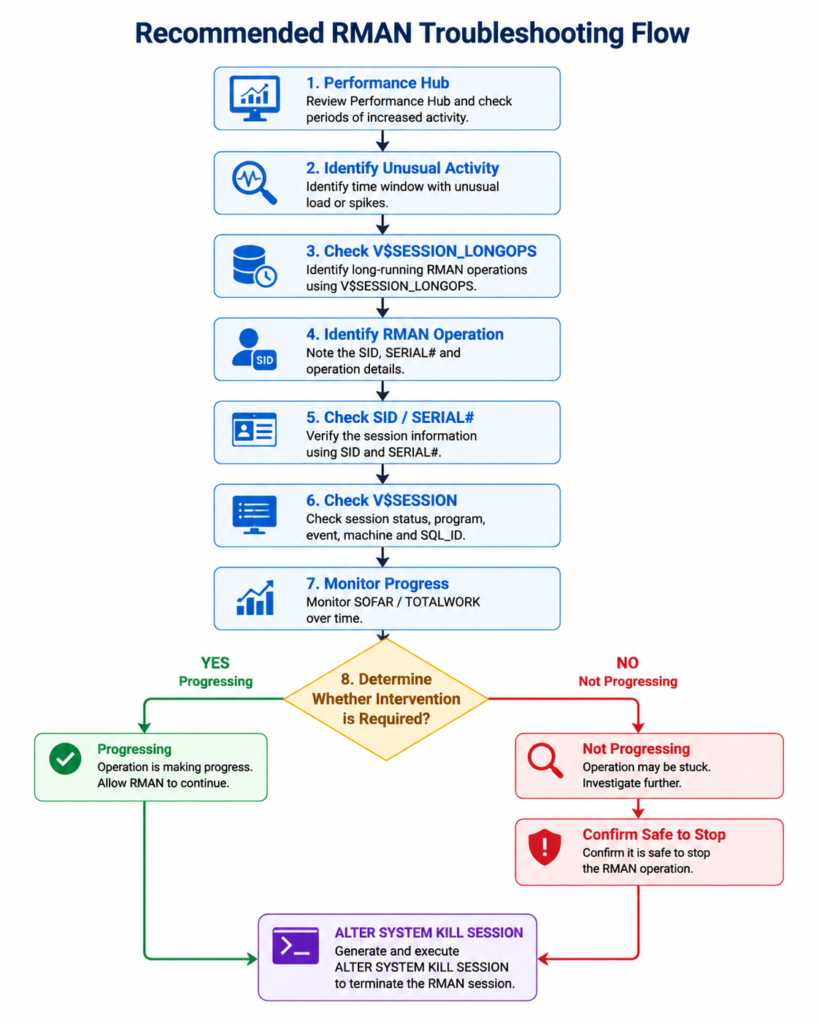
10. Recommended RMAN Troubleshooting Flow
A practical DBA workflow is:
11. Final SQL Toolkit
Identify incomplete RMAN operations
SELECT SID,
       SERIAL#,
       CONTEXT,
       SOFAR,
       TOTALWORK,
       ROUND(SOFAR/TOTALWORK*100,2) "%_COMPLETE"
FROM V$SESSION_LONGOPS
WHERE OPNAME LIKE 'RMAN%'
  AND OPNAME NOT LIKE '%aggregate%'
  AND TOTALWORK != 0
  AND SOFAR <> TOTALWORK;
Generate kill commands
SELECT 'ALTER SYSTEM KILL SESSION ''' ||
       SID || ',' || SERIAL# || ''' IMMEDIATE;'
FROM V$SESSION_LONGOPS
WHERE OPNAME LIKE 'RMAN%'
  AND OPNAME NOT LIKE '%aggregate%'
  AND TOTALWORK != 0
  AND SOFAR <> TOTALWORK;
Kill confirmed sessions automatically
BEGIN
    FOR r IN (
        SELECT SID, SERIAL#
        FROM V$SESSION_LONGOPS
        WHERE OPNAME LIKE 'RMAN%'
          AND OPNAME NOT LIKE '%aggregate%'
          AND TOTALWORK != 0
          AND SOFAR <> TOTALWORK
    )
    LOOP
        EXECUTE IMMEDIATE
            'ALTER SYSTEM KILL SESSION ''' ||
            r.SID || ',' || r.SERIAL# || ''' IMMEDIATE';
    END LOOP;
END;
/
Conclusion
Oracle Performance Hub is useful for understanding overall database activity, while V$SESSION_LONGOPS provides more detailed visibility into long-running RMAN operations.
The safest approach is not to kill an RMAN session solely because it has been running for a long time. First verify the session, monitor SOFAR and TOTALWORK, check the associated wait events and system activity, and confirm that the operation is genuinely stuck or should be stopped.
Once the session has been validated, the SID and SERIAL# values can be used to generate an ALTER SYSTEM KILL SESSION command or, when appropriate, terminate multiple confirmed RMAN sessions through PL/SQL.
Oracle RMAN Fast Incremental Backups: Speed Up Your Backup Strategy


