

Introduction
When an Oracle WebLogic Server depends on an Oracle Database repository, an expired database account can prevent WebLogic from starting successfully.
In this case, the WebLogic Server failed during startup because the password of the ADF_OPSS database account had expired.


The primary database error was:
ORA-28001: the password has expiredThis resulted in the WebLogic/OPSS error:
JPS-01055: Could not create credential store instanceThe issue occurred while WebLogic was initializing the Oracle Platform Security Services (OPSS) components and attempting to connect to the repository database.
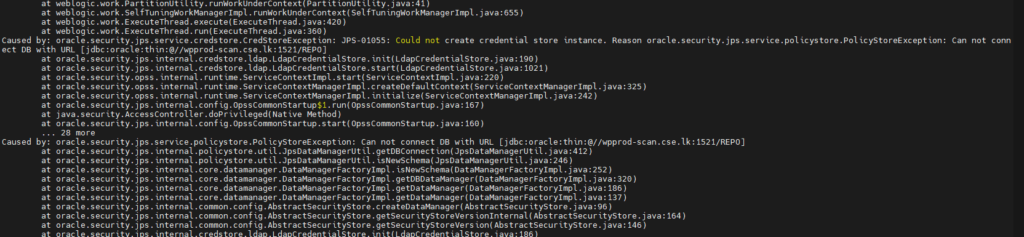
Error
The WebLogic Server log showed:
WARNING: Can not connect DB with URL
jdbc:oracle:thin:@//prod-scan:1521/REPO

java.sql.SQLException:
ORA-28001: the password has expired
This was followed by:
JPS-01055: Could not create credential store instance.
Reason oracle.security.jps.service.policystore.PolicyStoreException:
Can not connect DB with URL
jdbc:oracle:thin:@//prod-scan:1521/REPO
The server subsequently failed during startup.
Root Cause
The WebLogic OPSS datasource was configured to connect to the REPO database using the ADF_OPSS account.
The datasource configuration showed:
<name>user</name>
<value>ADF_OPSS</value>
with the database connection:
jdbc:oracle:thin:@//prod-scan:1521/REPOThe database account was checked using:
SELECT username,
       account_status,
       expiry_date
FROM dba_users
WHERE username = 'ADF_OPSS';
The account was found to be expired.
The database metadata also showed:
PASSWORD EXPIRETherefore, when WebLogic attempted to establish the OPSS repository connection, Oracle Database rejected the authentication request with:
ORA-28001: the password has expiredHow ORA-28001 Caused JPS-01055
The failure sequence was:
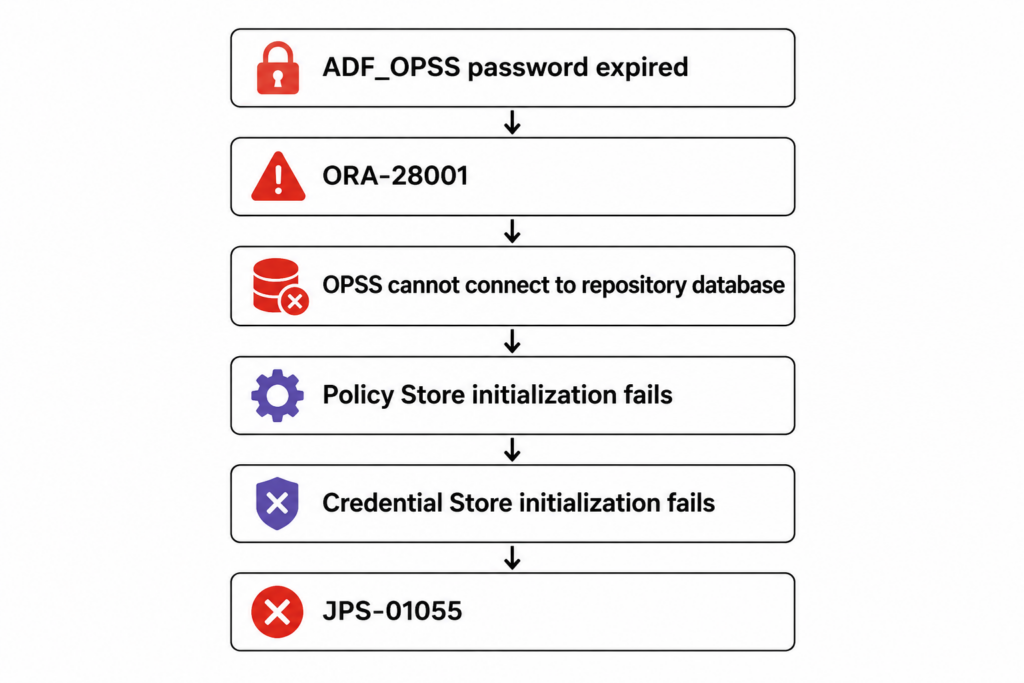
The important point is that JPS-01055 is a consequence of the database authentication failure.
The actual underlying database error is:
ORA-28001: the password has expiredChecking Expired Database Accounts
You can identify expired database accounts with:
SELECT username,
       account_status,
       expiry_date
FROM dba_users
WHERE account_status LIKE '%EXPIRED%'
ORDER BY expiry_date ASC;
For this particular issue, check the OPSS account directly:
SELECT username,
       account_status,
       expiry_date
FROM dba_users
WHERE username = 'ADF_OPSS';
If the account is expired, the output will show an appropriate expired status.
Checking the WebLogic OPSS Datasource
The OPSS datasource configuration can normally be found under:
$DOMAIN_HOME/config/jdbc/opss-datasource-jdbc.xmlFor example:
/u01/app/oracle/Middleware/ADF/user_projects/domains/base_domain/config/jdbc/opss-datasource-jdbc.xmlCheck the datasource configuration:
<jdbc-driver-params>
    <url>jdbc:oracle:thin:@//prod-scan:1521/REPO</url>
    <driver-name>oracle.jdbc.OracleDriver</driver-name>
    <properties>
        <property>
            <name>user</name>
            <value>ADF_OPSS</value>
        </property>
    </properties>
</jdbc-driver-params>
This confirms which database account WebLogic is using for the OPSS repository connection.
Resolution
The solution is to restore the ADF_OPSS database account to a valid authentication state according to your organization’s password-management procedure.
For example, if the password needs to be reset:
ALTER USER ADF_OPSS IDENTIFIED BY "<new_password>";If the account is locked, it may also need to be unlocked:
ALTER USER ADF_OPSS ACCOUNT UNLOCK;Important: Do not publish or expose production passwords or password verifiers. After changing the database password, make sure the corresponding WebLogic datasource credential is also updated using the appropriate WebLogic administration procedure.
Verify the Account
After correcting the account, verify its status:
SELECT username,
       account_status,
       expiry_date
FROM dba_users
WHERE username = 'ADF_OPSS';
The account should no longer be in an expired state.
You can then restart the WebLogic Server and monitor the server log.
Conclusion
An Oracle WebLogic Server startup failure with:
JPS-01055: Could not create credential store instancecan be caused by an expired OPSS database account.
In this case, the underlying problem was:
ORA-28001: the password has expiredThe ADF_OPSS account used by the WebLogic OPSS datasource had an expired password. Because OPSS could not connect to the repository database, the credential store could not be initialized, resulting in JPS-01055.
Therefore, when troubleshooting JPS-01055, always check the nested exception and look for the underlying database error such as:
ORA-28001: the password has expiredChecking the database account status and the WebLogic OPSS datasource configuration can quickly identify the root cause.