

A few years back I did a security review for a banking client, and one line in their audit report has stayed with me ever since — “DBA access is a single point of failure for data confidentiality.” I remember reading that and feeling a bit defensive at first, honestly. But it’s true, and most of us in this line of work know it even if we don’t say it out loud much. We spend years building up our SYSDBA muscle memory, and then compliance shows up and asks the one question we’d rather avoid — who’s watching the people who can see everything?
That question is exactly what Oracle Database Vault was built to answer.


I’ve implemented it across banking, telecom, and government environments, and every single time the reaction from the DBA team is the same mix of relief and mild horror. Relief, because finally there’s a real answer to the audit finding. Horror, because it means even you, the DBA, might get locked out of tables you used to query without a second thought.
What Database Vault Actually Does
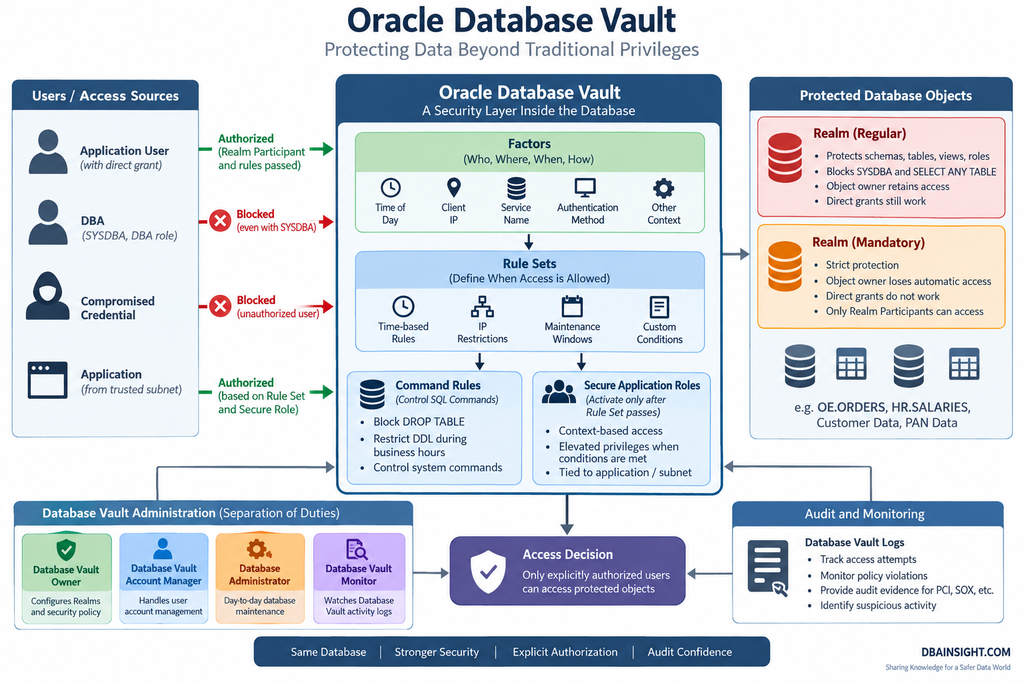
Here’s the plainest way I can put it: Database Vault doesn’t care how powerful your privileges are. SYSDBA, SELECT ANY TABLE, DBA role — none of it matters once an object sits behind a Realm. Access comes down to one question only: are you explicitly authorized to be here?
That’s a genuinely different security model than what most of us grew up with. Traditional Oracle security is privilege-based — if you have the grant, you have the access. Database Vault flips that on its head for the objects you choose to protect.
Why does this matter in practice? A few reasons I keep running into on real engagements:
A DBA with SYSDBA can, technically, browse a customer’s salary table, medical records, or account balances any time they like. Most DBAs never would. But “most” isn’t good enough for a PCI or SOX auditor, and it definitely isn’t good enough if that DBA’s credentials get compromised. Database Vault closes that gap without asking anyone to trust good intentions.
The Building Blocks
I’ll walk through these the way I explain them to junior DBAs on my team, roughly in the order you’d actually configure them.
Realms are the core concept, so start here. A Realm is a security boundary you draw around specific schemas, tables, views, or roles. Once an object is inside a Realm, even system privileges stop working against it unless you’re on the approved list. I usually describe it to clients as putting a second lock on the door — your existing Oracle privileges still exist, they just don’t open this particular room anymore.
Rule Sets decide when access gets granted. Think office-hours restrictions, IP whitelisting, or “only during the Sunday maintenance window.” I’ve used rule sets to stop a well-meaning junior admin from running a schema change at 2pm on a trading day — the rule simply wouldn’t let the session through outside the approved window.
Command Rules work at the SQL command level rather than the object level. Want to block DROP TABLE during business hours across the board? That’s a command rule. I lean on these heavily in production banking systems where an accidental DROP can turn into a very bad afternoon.
Secure Application Roles look like ordinary Oracle roles but come with a catch — they only activate after a Rule Set passes. So a role that grants elevated access might only switch on if the session originates from the right subnet and the right application. It’s a nice way to tie privilege escalation to context instead of just handing it out permanently.
Factors are the contextual attributes Database Vault evaluates behind the scenes — client IP, authentication method, time of day, which service the session came in through. These feed into your rule sets so decisions aren’t just yes/no on identity, but yes/no on the full picture of who, where, and when.
Separation of Duties — the Part Auditors Actually Care About
Out of everything in this article, this is the bit that gets the most airtime whenever I’m sitting across the table from an auditor. Database Vault makes you break up responsibilities that used to belong to one all-powerful DBA account, and it’s usually the moment in the meeting where the audit lead visibly relaxes:
| Role | Responsibility |
|---|---|
| Database Vault Owner | Configures Realms and security policy |
| Database Vault Account Manager | Handles user account management |
| Database Administrator | Day-to-day database maintenance |
| Database Vault Monitor | Watches Database Vault activity logs |
No single person configures the security policy AND has unrestricted access to the data it protects. That separation is usually the exact line item an auditor is looking for, and it’s often the reason a project sponsor greenlights Database Vault in the first place.
One thing I always flag to teams before they enable it: Oracle strips out a handful of powerful privileges automatically once Database Vault goes live — things like EXECUTE ANY PROGRAM, scheduler management rights, and LogMiner execution. Here’s the part people forget — if you later disable Database Vault, those privileges don’t just come back on their own. I’ve seen an application break in testing because nobody remembered to re-grant scheduler privileges after a rollback. Worth writing down in your runbook before you flip the switch.
Regular Realms vs. Mandatory Realms
This distinction trips people up more than anything else in Database Vault, so let me use a concrete example.
Say OE.ORDERS sits inside a Realm. Before Database Vault, SYSDBA queries it freely, and so does anyone with SELECT ANY TABLE. Once the Realm is active, both of those paths are dead — only authorized users or Realm participants get through.
Now, a Regular Realm is the gentler of the two. The object owner keeps working, and so does anyone who already had a direct grant on the object — none of that changes. What does change is SYSDBA and SELECT ANY TABLE, both of which get shut out. I reach for this option most often, honestly, because application teams tend to get nervous the moment you mention “Database Vault,” and this flavor lets them stay self-sufficient while I quietly close the door on privileged-account snooping.
A Mandatory Realm is the strict version. Even the object owner loses automatic access. Direct grants stop working. SYSDBA is blocked. The only way in is to be added explicitly as a Realm Participant. I reserve this for the genuinely sensitive stuff — think PAN data or classified government records — where “explicitly authorized” needs to mean exactly that, no exceptions, not even for the owner.
A quick real-world case: I had a user, let’s call him Bob, with straightforward SELECT access to OE.ORDERS. The moment we converted that Realm to Mandatory, Bob’s access vanished — direct grant or not. Only after we added him as a named Realm Participant did his queries start working again. That’s Database Vault doing exactly what it’s designed to do.
Why Bother With All This
Beyond the audit checkbox, here’s what I’ve genuinely seen it deliver on real projects:
It shuts down the “trusted insider” risk that keeps CISOs up at night. It gives you actual separation of duties instead of a policy document claiming you have one. It stops a compromised DBA credential from becoming a full data breach. And it makes patching windows and maintenance periods noticeably safer, since you can lock down what commands are even possible during those windows.
On the compliance side, it maps cleanly onto PCI DSS, SOX, and most internal data governance frameworks I’ve worked against. Auditors tend to recognize it immediately once you explain the Realm model — it answers their favorite question before they even ask it.
Where I’d Leave This
Database Vault isn’t really an access control knob so much as a change in mindset. You stop asking “who has the privilege” and start asking “who’s explicitly allowed to be here, right now.” If you’re running banking, healthcare, or government workloads and you haven’t looked at it yet, I’d genuinely put it near the top of your list.
My honest advice, if you’re on the fence: don’t jump straight to Mandatory Realms. I’ve watched a couple of teams try that on day one and it goes badly — support tickets pile up, everyone’s annoyed, and the project loses momentum before it’s even proven its worth. Start with Regular Realms on your two or three most sensitive schemas instead. Let the team get a feel for how Realm Participant requests actually work in practice. Once that rhythm feels normal, moving to Mandatory is a much smaller jump than people expect.
Oracle Database Vault Rule Sets, Factors & Command Rules: Complete Security Guide
Oracle Database Vault Rule Sets Explained: Dynamic Security and Access Control
Oracle Database Vault Command Rules Explained: Protecting SQL Commands with Dynamic Security


