

By now if you’ve read the other pieces in this series, you know Realms lock down objects and Rule Sets handle the “should this be allowed right now” logic. Command Rules are the third leg of that stool, and honestly the one I get the most questions about, because they attack the problem from a completely different angle — not the object, not the conditions, but the command itself. ALTER TABLE, DROP TABLE, CREATE USER, ALTER SYSTEM — Command Rules can block every one of these outright, and it doesn’t matter how many privileges the user calling them is sitting on.
Let’s get into how they actually work, where they apply, and a walkthrough I use with clients constantly.


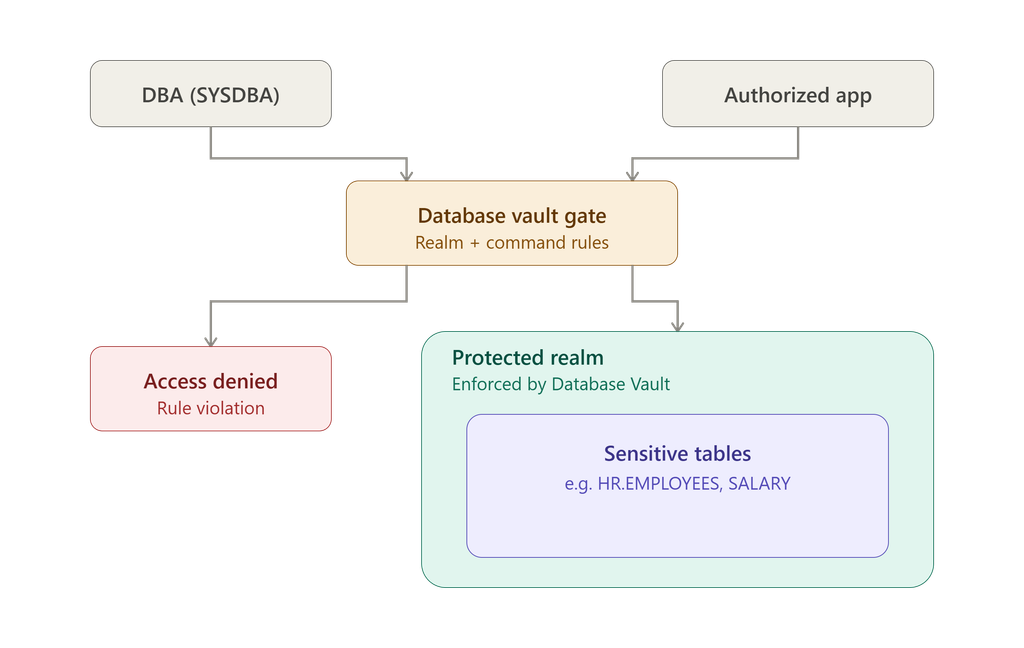
What a Command Rule Actually Is
Strip it down and a Command Rule is just a gate in front of a SQL command. Before that command runs, Database Vault checks the Rule Set attached to it. TRUE, and the statement goes through like normal. FALSE, and Oracle stops it cold and throws a Command Rule violation — privileges be damned.
The Mechanics Underneath
Here’s something that trips people up the first time they build one: Command Rules don’t get names of their own. Instead, Oracle identifies each one by the combination of the SQL command, the object owner, and the object name. That’s actually useful once you get used to it — it means you can have half a dozen ALTER TABLE Command Rules floating around, each guarding a different schema or object, without any naming conflicts to manage.
A Command Rule is built from a handful of pieces: the command it’s watching, whether it’s currently switched on, who owns the protected object, which object specifically, and the Rule Set it defers to before making a decision. When the moment comes, Database Vault checks that Rule Set — TRUE lets the command execute, FALSE kills it.
What You Can Actually Protect
The coverage here is broad. DDL commands like CREATE, ALTER, DROP, and TRUNCATE are all fair game. So are system-level commands like ALTER SYSTEM and CONNECT. Even ordinary DML — SELECT, INSERT, UPDATE, DELETE — can be gated this way, along with EXECUTE for program calls. I’ve mostly used Command Rules on the DDL and system side in production, but the DML coverage matters a lot for tightly regulated application data.
Walking Through a Real Setup
Here’s a scenario I’ve built more or less exactly like this for a client managing an order-processing schema. OE owns the ORDERS table, but the org wants change control locked down to one specific role — OE_ORDERS_DBA — rather than trusting the table owner to make structural changes whenever they feel like it.
First, a role gets created and granted to the right person:
CREATE ROLE ORDER_APP_DBA;
GRANT ORDER_APP_DBA TO OE_ORDERS_DBA;
Next, a Rule that simply checks whether the current session holds that role. That Rule goes into a Rule Set — call it ORDER_DESIGNER. Then a Command Rule gets built to protect ALTER TABLE specifically on OE.ORDERS, with ORDER_DESIGNER attached as the gatekeeper.
Now watch what happens. OE — the actual table owner — tries this:
ALTER TABLE ORDERS ADD comments VARCHAR2(100);
OE doesn’t have ORDER_APP_DBA, so the Rule Set comes back FALSE and Oracle throws a Command Rule violation. Table owner or not, the statement dies.
OE_ORDERS_DBA runs the identical command, and because that role is present, the Rule Set evaluates TRUE and the ALTER TABLE goes through clean. Same SQL, same table, completely different outcome — purely because of who’s asking. That’s change management enforced at the database level instead of relying on people following a process document nobody reads.
The Three Scopes You Can Work At
System-level rules reach across the entire database — ALTER SYSTEM and CONNECT are the classic examples, and they touch every single user, no exceptions.
Schema-level rules apply to everything inside one schema. Block DROP TABLE across the whole OE schema, for instance, and every table in it is covered without listing them individually.
Object-level rules narrow down to one specific object — say, only OE.ORDERS gets protected against ALTER TABLE, and nothing else in the schema is touched. This is the tightest scope you can get, and it’s what I reach for when I want surgical precision rather than a blanket policy.
Multitenant Environments Get Coverage Too
If you’re running a CDB setup, Command Rules extend to pluggable database operations as well — CREATE PLUGGABLE DATABASE, ALTER PLUGGABLE DATABASE, DROP PLUGGABLE DATABASE. Build these in the CDB root and the protection applies across the whole multitenant environment, not just one PDB.
Freezing a Schema Cold During a Release
Sometimes you just want to shut the door completely, no conditions, no exceptions. Say you need to freeze the OE schema during a production release window. Build a Command Rule for ALTER TABLE on OE, and instead of a custom Rule Set, attach the predefined Disabled Rule Set — which is really just the equivalent of 1 = 0 under the hood, permanently FALSE. Nothing evaluates true against that, so ALTER TABLE simply never runs while it’s attached. I’ve used this exact trick to lock down schemas during go-lives more than once — it’s blunt, but it’s reliable, and reliable is what you want at 2am during a release.
The Command Rules Oracle Ships Out of the Box
You don’t have to build everything yourself — Database Vault comes with a set of predefined Command Rules already wired up.
CREATE USER and DROP USER both defer to Can Maintain Accounts/Profiles, which requires DV_ACCOUNT_MANAGER before either command is allowed to run. ALTER PROFILE and CREATE PROFILE work the same way, gated behind Database Vault account authorization.
ALTER SYSTEM leans on ALLOW SYSTEM PARAMETERS, which governs exactly which initialization parameters can be touched. You can customize it, technically, but I’d steer clear unless there’s a genuinely good reason — Oracle’s defaults here are sensible for most environments.
ALTER USER is a little more nuanced — it covers password changes, locking and unlocking accounts, profile changes, default tablespace changes. Users can still manage their own account, but touching someone else’s requires Database Vault Account Manager authorization. SYS and the Database Vault Owner accounts sit behind their own extra layer on top of all this.
Keeping Tabs on Command Rules Over Time
A handful of reports are worth checking on a recurring basis, not just when something goes wrong. The Command Rule Audit Report shows what’s actually been evaluated and denied — useful when you’re investigating an incident or just doing a routine compliance pass. The Command Rule Configuration Issues Report flags disabled Rule Sets and invalid setups before they cause a headache. The Object Privileges Report and Sensitive Objects Report round out the picture — one shows which privileges intersect with Command Rules, the other lists what’s actually protected. And the Rule Set Configuration Issues Report catches Rule Sets that are empty or disabled and might quietly be undermining a Command Rule you thought was active.
If you’d rather query it directly, everything lives in DBA_DV_COMMAND_RULE — every Command Rule configured in the database, in one place, ready for whatever auditing or reporting you need to build around it.
Managing It Through DBMS_MACADM
Command Rules are fully scriptable through the DBMS_MACADM package — CREATE_COMMAND_RULE, UPDATE_COMMAND_RULE, and DELETE_COMMAND_RULE cover creation, modification, and removal. Full programmatic control, which I lean on heavily when I’m trying to keep Database Vault configuration reproducible across environments instead of clicking through Enterprise Manager by hand each time.
What I’d Actually Recommend
Put Command Rules on the DDL commands that genuinely scare you, not everything indiscriminately — over-restricting tends to get the whole thing disabled by a frustrated team eventually. Always attach a real Rule Set, don’t leave anything unguarded by accident. Reach for schema-level rules where they make sense instead of managing dozens of object-level rules individually. Lock production schemas down against unauthorized ALTER and DROP as a baseline, not an afterthought. Leave Oracle’s predefined Rule Sets alone unless there’s a solid reason not to. Check the audit reports on a regular schedule. And keep least privilege as the assumption running underneath all of it.
Bringing It Together
Command Rules close a gap that Realms and Rule Sets alone don’t quite cover — the ability to say no to a specific command, full stop, regardless of who’s asking or what privileges they’re carrying. Paired with Realms, Rule Sets, and Factors, they round out a security model that thinks about identity, context, and the operation itself all at once. For anyone running production Oracle environments where a single unauthorized DROP TABLE could be a very bad day, that combination is worth taking seriously.
Oracle Database Vault Rule Sets Explained: Dynamic Security and Access Control



Comments 1