

Oracle AI Database 23ai continues to redefine enterprise database management with advanced automation, AI capabilities, and modernized infrastructure. To maintain security, optimize performance, and ensure platform stability, applying quarterly Release Updates is critical. In this guide, we’ll walk through the complete process of upgrading Oracle Database 23ai to Release Update 23.26.2.0.0 using Patch 39093711 in a RAC environment.
Why Upgrade to Oracle 23ai RU 23.26.2?
Oracle’s Patch 39093711 delivers:


- Critical security fixes
- Performance improvements
- Oracle AI Database feature stability
- Updated JDK and Python components
- Enhanced RAC compatibility
- Bug fixes for enterprise workloads
For organizations running Oracle AI Database 23ai in production, staying current with Release Updates is essential for minimizing vulnerabilities and ensuring Oracle support compliance.
Step 1: Verify OPatch Version
Oracle recommends OPatch version 12.2.0.1.49 or later. How To Download And Install The Latest OPatch
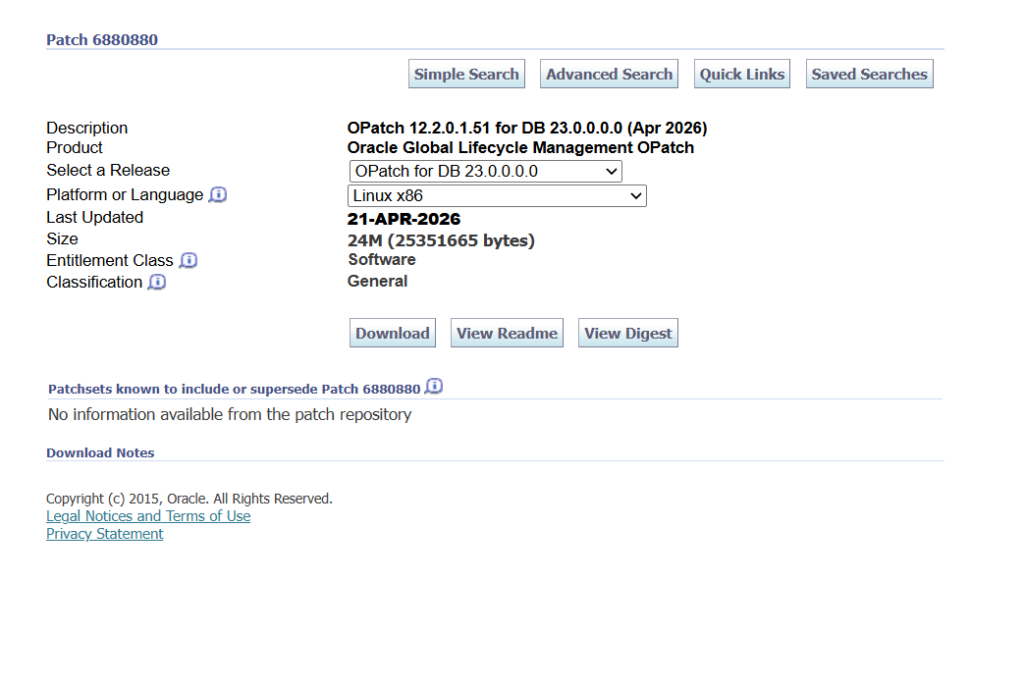
Validation:
$ opatch version
OPatch Version: 12.2.0.1.51
Using the latest OPatch version reduces installation risks and supports Oracle 23ai RU requirements.
Step 2: Run Conflict Checks
Before patching Oracle Home, validate for patch conflicts:
$ opatch prereq CheckConflictAgainstOHWithDetail -phBaseDir /u01/patch/39088031/39093711Result:
Prereq "checkConflictAgainstOHWithDetail" passed.This confirms Patch 39093711 is compatible with the existing Oracle Home.
Step 3: Apply Patch 39093711
After shutting down all Oracle instances for the target ORACLE_HOME, run:
$ opatch apply[oracle@rac-node1 39093711]$ /u01/app/oracle/product/23.26.0.0/dbhome_1/OPatch/opatch apply
Oracle Interim Patch Installer version 12.2.0.1.51
Copyright (c) 2026, Oracle Corporation. All rights reserved.
Oracle Home : /u01/app/oracle/product/23.26.0.0/dbhome_1
Central Inventory : /u01/app/oraInventory
from : /u01/app/oracle/product/23.26.0.0/dbhome_1/oraInst.loc
OPatch version : 12.2.0.1.51
OUI version : 12.2.0.9.0
Log file location : /u01/app/oracle/product/23.26.0.0/dbhome_1/cfgtoollogs/opatch/opatch2026-05-04_13-44-21PM_1.log
Verifying environment and performing prerequisite checks...
--------------------------------------------------------------------------------
Start OOP by Prereq process.
Launch OOP...
Oracle Interim Patch Installer version 12.2.0.1.51
Copyright (c) 2026, Oracle Corporation. All rights reserved.
Oracle Home : /u01/app/oracle/product/23.26.0.0/dbhome_1
Central Inventory : /u01/app/oraInventory
from : /u01/app/oracle/product/23.26.0.0/dbhome_1/oraInst.loc
OPatch version : 12.2.0.1.51
OUI version : 12.2.0.9.0
Log file location : /u01/app/oracle/product/23.26.0.0/dbhome_1/cfgtoollogs/opatch/opatch2026-05-04_13-45-24PM_1.log
Verifying environment and performing prerequisite checks...
OPatch continues with these patches: 39093711
Do you want to proceed? [y|n]
y
User Responded with: Y
All checks passed.
Please shutdown Oracle instances running out of this ORACLE_HOME on the local system.
(Oracle Home = '/u01/app/oracle/product/23.26.0.0/dbhome_1')
Is the local system ready for patching? [y|n]
y
User Responded with: Y
Backing up files...
Applying interim patch '39093711' to OH '/u01/app/oracle/product/23.26.0.0/dbhome_1'
ApplySession: Optional component(s) [ oracle.client, 23.0.0.0.0 ] , [ oracle.companionCD.db, 23.0.0.0.0 ] , [ oracle.dbjava.dev, 23.0.0.0.0 ] , [ oracle.dslm, 23.0.0.0.0 ] , [ oracle.has.client.cvu, 23.0.0.0.0 ] , [ oracle.has.gsm.cvu, 23.0.0.0.0 ] , [ oracle.ldap.companion, 23.0.0.0.0 ] , [ oracle.mgw.common.companion, 23.0.0.0.0 ] , [ oracle.network.cman, 23.0.0.0.0 ] , [ oracle.nlsrtl.companion, 23.0.0.0.0 ] , [ oracle.odbc.companion, 23.0.0.0.0 ] , [ oracle.oraolap.mgmt, 23.0.0.0.0 ] , [ oracle.perlint, 5.38.2.0.0 ] , [ oracle.pg4appc, 23.0.0.0.0 ] , [ oracle.pg4mq, 23.0.0.0.0 ] , [ oracle.precomp.companion, 23.0.0.0.0 ] , [ oracle.rdbms.companion, 23.0.0.0.0 ] , [ oracle.rdbms.ic, 23.0.0.0.0 ] , [ oracle.rdbms.tg4db2, 23.0.0.0.0 ] , [ oracle.rdbms.tg4ifmx, 23.0.0.0.0 ] , [ oracle.rdbms.tg4msql, 23.0.0.0.0 ] , [ oracle.rdbms.tg4sybs, 23.0.0.0.0 ] , [ oracle.rdbms.tg4tera, 23.0.0.0.0 ] , [ oracle.sdo.companion, 23.0.0.0.0 ] , [ oracle.sqlj, 23.0.0.0.0 ] , [ oracle.sqlj.companion, 23.0.0.0.0 ] , [ oracle.sqlplus.companion, 23.0.0.0.0 ] , [ oracle.tg, 23.0.0.0.0 ] , [ oracle.xdk.companion, 23.0.0.0.0 ] , [ oracle.jdk, 11.0.25.9.0 ] , [ oracle.python, 3.12.5.0.0 ] not present in the Oracle Home or a higher version is found.
Patching component oracle.assistants.acf, 23.0.0.0.0...
Patching component oracle.assistants.asm, 23.0.0.0.0...
Patching component oracle.assistants.deconfig, 23.0.0.0.0...
Patching component oracle.assistants.netca.client, 23.0.0.0.0...
Patching component oracle.assistants.server, 23.0.0.0.0...
Patching component oracle.bali.ewt, 12.2.1.0.0...
Patching component oracle.bali.ice, 6.1.3.2.0...
Patching component oracle.bali.jewt, 11.1.1.1.0...
Patching component oracle.bali.share, 12.2.1.0.0...
Patching component oracle.blaslapack, 23.0.0.0.0...
Patching component oracle.buildtools.common, 23.0.0.0.0...
Patching component oracle.buildtools.rsf, 23.0.0.0.0...
Patching component oracle.crypto.fips, 23.0.0.0.0...
Patching component oracle.crypto.ojmisc, 23.0.0.0.0...
Patching component oracle.crypto.pki, 23.0.0.0.0...
Patching component oracle.crypto.rsa, 23.0.0.0.0...
Patching component oracle.crypto.rsf, 23.0.0.0.0...
Patching component oracle.ctx, 23.0.0.0.0...
Patching component oracle.ctx.atg, 23.0.0.0.0...
Patching component oracle.ctx.companion, 23.0.0.0.0...
Patching component oracle.ctx.rsf, 23.0.0.0.0...
Patching component oracle.dbdev, 23.0.0.0.0...
Patching component oracle.dbjava.ic, 23.0.0.0.0...
Patching component oracle.dbjava.jdbc, 23.0.0.0.0...
Patching component oracle.dbjava.server, 23.0.0.0.0...
Patching component oracle.dbjava.ucp, 23.0.0.0.0...
Patching component oracle.dbtoolslistener, 23.0.0.0.0...
Patching component oracle.hadoopcore, 23.0.0.0.0...
Patching component oracle.has.common, 23.0.0.0.0...
Patching component oracle.has.common.cvu, 23.0.0.0.0...
Patching component oracle.has.db, 23.0.0.0.0...
Patching component oracle.has.db.cvu, 23.0.0.0.0...
Patching component oracle.has.rsf, 23.0.0.0.0...
Patching component oracle.help.ohj, 11.1.2.0.0...
Patching component oracle.help.share, 11.1.2.0.0...
Patching component oracle.install.deinstalltool, 23.0.0.0.0...
Patching component oracle.javavm.client, 23.0.0.0.0...
Patching component oracle.javavm.companion, 23.0.0.0.0...
Patching component oracle.javavm.server, 23.0.0.0.0...
Patching component oracle.javavm.server.core, 23.0.0.0.0...
Patching component oracle.jdk, 11.0.24.7.0...
Patching component oracle.ldap.admin, 23.0.0.0.0...
Patching component oracle.ldap.client, 23.0.0.0.0...
Patching component oracle.ldap.rsf, 23.0.0.0.0...
Patching component oracle.mgw.common, 23.0.0.0.0...
Patching component oracle.network, 23.0.0.0.0...
Patching component oracle.network.aso, 23.0.0.0.0...
Patching component oracle.network.client, 23.0.0.0.0...
Patching component oracle.network.gsm, 23.0.0.0.0...
Patching component oracle.network.listener, 23.0.0.0.0...
Patching component oracle.network.netmgr, 23.0.0.0.0...
Patching component oracle.network.rsf, 23.0.0.0.0...
Patching component oracle.nlsrtl.rsf, 23.0.0.0.0...
Patching component oracle.nlsrtl.rsf.core, 23.0.0.0.0...
Patching component oracle.nlsrtl.rsf.ic, 23.0.0.0.0...
Patching component oracle.nlsrtl.rsf.lbuilder, 23.0.0.0.0...
Patching component oracle.odbc, 23.0.0.0.0...
Patching component oracle.odbc.ic, 23.0.0.0.0...
Patching component oracle.onnx, 23.0.0.0.0...
Patching component oracle.ons, 23.0.0.0.0...
Patching component oracle.ons.core, 23.0.0.0.0...
Patching component oracle.ons.ic, 23.0.0.0.0...
Patching component oracle.options, 23.0.0.0.0...
Patching component oracle.oracler.server, 23.0.0.0.0...
Patching component oracle.oracore.rsf, 23.0.0.0.0...
Patching component oracle.oracore.rsf.core, 23.0.0.0.0...
Patching component oracle.oraml.server, 23.0.0.0.0...
Patching component oracle.oraolap, 23.0.0.0.0...
Patching component oracle.oraolap.api, 23.0.0.0.0...
Patching component oracle.oraolap.dbscripts, 23.0.0.0.0...
Patching component oracle.ordim.client, 23.0.0.0.0...
Patching component oracle.ordim.server, 23.0.0.0.0...
Patching component oracle.ovm, 23.0.0.0.0...
Patching component oracle.precomp.common, 23.0.0.0.0...
Patching component oracle.precomp.common.core, 23.0.0.0.0...
Patching component oracle.precomp.lang, 23.0.0.0.0...
Patching component oracle.precomp.rsf, 23.0.0.0.0...
Patching component oracle.python, 3.12.3.0.0...
Patching component oracle.rdbms, 23.0.0.0.0...
Patching component oracle.rdbms.crs, 23.0.0.0.0...
Patching component oracle.rdbms.db, 23.0.0.0.0...
Patching component oracle.rdbms.dbcur, 23.0.0.0.0...
Patching component oracle.rdbms.dbscripts, 23.0.0.0.0...
Patching component oracle.rdbms.deconfig, 23.0.0.0.0...
Patching component oracle.rdbms.dm, 23.0.0.0.0...
Patching component oracle.rdbms.dv, 23.0.0.0.0...
Patching component oracle.rdbms.hs_common, 23.0.0.0.0...
Patching component oracle.rdbms.hsodbc, 23.0.0.0.0...
Patching component oracle.rdbms.install.common, 23.0.0.0.0...
Patching component oracle.rdbms.install.plugins, 23.0.0.0.0...
Patching component oracle.rdbms.install.seeddb, 23.0.0.0.0...
Patching component oracle.rdbms.lbac, 23.0.0.0.0...
Patching component oracle.rdbms.locator, 23.0.0.0.0...
Patching component oracle.rdbms.oci, 23.0.0.0.0...
Patching component oracle.rdbms.olap, 23.0.0.0.0...
Patching component oracle.rdbms.plsql, 23.0.0.0.0...
Patching component oracle.rdbms.rat, 23.0.0.0.0...
Patching component oracle.rdbms.rman, 23.0.0.0.0...
Patching component oracle.rdbms.rsf, 23.0.0.0.0...
Patching component oracle.rdbms.rsf.ic, 23.0.0.0.0...
Patching component oracle.rdbms.scheduler, 23.0.0.0.0...
Patching component oracle.rdbms.util, 23.0.0.0.0...
Patching component oracle.rhp.common, 23.0.0.0.0...
Patching component oracle.rhp.db, 23.0.0.0.0...
Patching component oracle.rsf, 23.0.0.0.0...
Patching component oracle.sdo, 23.0.0.0.0...
Patching component oracle.sdo.locator, 23.0.0.0.0...
Patching component oracle.sdo.locator.jrf, 23.0.0.0.0...
Patching component oracle.server, 23.0.0.0.0...
Patching component oracle.slax.rsf, 23.0.0.0.0...
Patching component oracle.sqlj.sqljruntime, 23.0.0.0.0...
Patching component oracle.sqlplus, 23.0.0.0.0...
Patching component oracle.sqlplus.ic, 23.0.0.0.0...
Patching component oracle.sqlplus.rsf, 23.0.0.0.0...
Patching component oracle.tfa.db, 23.0.0.0.0...
Patching component oracle.usm.deconfig, 23.0.0.0.0...
Patching component oracle.wwg.plsql, 23.0.0.0.0...
Patching component oracle.xdk, 23.0.0.0.0...
Patching component oracle.xdk.parser.java, 23.0.0.0.0...
Patching component oracle.xdk.rsf, 23.0.0.0.0...
Patching component oracle.xdk.server, 23.0.0.0.0...
Patching component oracle.xdk.xquery, 23.0.0.0.0...
Patch 39093711 successfully applied.
Sub-set patch [38743669] has become inactive due to the application of a super-set patch [39093711].
Please refer to Doc ID 2161861.1 for any possible further required actions.
Log file location: /u01/app/oracle/product/23.26.0.0/dbhome_1/cfgtoollogs/opatch/opatch2026-05-04_13-45-24PM_1.log
OPatch succeeded.
Patch process includes:
- Oracle Home backup
- Component validation
- Binary patching
- JDK upgrades
- Python updates
- RAC environment patch preparation
Successful output:
Patch 39093711 successfully applied.Oracle automatically deactivates prior subset patch 38743669, replacing it with the new superseding Release Update.
Step 4: Validate Post-Patch Binary Installation
After installation:
$ opatch lspatches
39093711;Database Release Update : 23.26.2.0.0 (39093711)
38743688;OCW RELEASE UPDATE 23.26.1.0.0 (GOLD IMAGE) (38743688) Gold Image
This confirms Oracle Home binaries are fully upgraded.
Step 5: Run Datapatch Sanity Checks
Before SQL patching, validate database readiness:
$ datapatch -sanity_checks/u01/app/oracle/product/23.26.0.0/dbhome_1/OPatch/datapatch -sanity_checks
SQL Patching sanity checks version 23.26.2.0.0 on Mon 04 May 2026 02:05:59 PM +0530
Copyright (c) 2021, 2026, Oracle. All rights reserved.
Log file for this invocation: /u01/app/oracle/cfgtoollogs/sqlpatch/sanity_checks_20260504_140559_1928640/sanity_checks_20260504_140559_1928640.log
RAC detected, verifying SSH connection...
Done
Warning: SSH connection between nodes failed.
Some system checks will run only on the current node and others will be skipped.
Refer to debug log for more details
Running checks
JSON report generated in /u01/app/oracle/cfgtoollogs/sqlpatch/sanity_checks_20260504_140559_1928640/sqlpatch_sanity_checks_summary.json file
Checks completed. Printing report:
Check: Database component status - OK
Check: PDB Violations - OK
Check: Invalid System Objects - OK
Check: Tablespace Status - OK
Check: Backup jobs - OK
Check: Temp file exists - OK
Check: Temp file online - OK
Check: Data Pump running - OK
Check: Container status - OK
Check: Oracle Database Keystore - OK
Check: Dictionary statistics gathering - WARNING
Patching the database without recent data dictionary statistics gathered may lead to performance issues.
Data dictionary statistics are older than 7 days.
Run the following queries to start gathering the dictionary statistics:
EXEC DBMS_STATS.GATHER_DICTIONARY_STATS;
EXEC DBMS_SYSTEM.GATHER_FIXED_OBJECTS_STATS;
Refer to MOS 457926.1 for more details.
PDB$SEED:
| LATEST | OPERATION | STATUS |
|-----------------+-------------------------+-----------|
| 30-JAN-26 16:26 | gather_dictionary_stats | COMPLETED |
|-----------------+-------------------------+-----------|
Check: Scheduled Jobs - OK
Check: GoldenGate triggers - OK
Check: GoldenGate Integrated Extract/Replicat - OK
Check: Logminer DDL triggers - OK
Check: Check sys public grants - OK
Check: Statistics gathering running - OK
Check: Optim dictionary upgrade parameter - OK
Check: Symlinks on oracle home path - OK
Check: Java Virtual Machine Enable - OK
Check: Oracle Database Vault Enabled - OK
Check: Duplicated ORACLE_HOME values - SKIPPED
Message: Skipped as SSH remote connection failed.
Check: Recyclebin Empty - WARNING
Datapatch could fail when unpurged objects remain in the recycle bin.
No objects should be found in the recycle bin.
Empty the recyclebin by running 'PURGE RECYCLEBIN'. For more information about purging the recyclebin please visit Oracle Help Center, then search for 'PURGE - SQL Language Reference' and choose results according to your database version.
ORCLPDB1:
| RECYCLEBIN_OBJ_COUNT |
|----------------------|
| 12 |
|----------------------|
Check: Central Inventory - OK
Check: Queryable Inventory locks - OK
Check: Queryable Inventory database directories - OK
Check: Queryable Inventory external table - OK
Check: Queryable Inventory package - OK
Check: Imperva processes - OK
Check: Guardium processes - OK
Check: Locale - OK
Refer to MOS Note 2975965.1 and debug log
/u01/app/oracle/cfgtoollogs/sqlpatch/sanity_checks_20260504_140559_1928640/sanity_checks_debug_20260504_140559_1928640.log
SQL Patching sanity checks completed on Mon 04 May 2026 02:09:18 PM +0530
Important Findings from Sanity Checks
Warnings Identified:
1. SSH RAC Node Communication Failure
Warning: SSH connection between nodes failedThis limits some remote validation checks but does not always block patching.
2. Dictionary Statistics Outdated
EXEC DBMS_STATS.GATHER_DICTIONARY_STATS;
EXEC DBMS_SYSTEM.GATHER_FIXED_OBJECTS_STATS;Refreshing dictionary statistics helps avoid post-upgrade performance issues.
3. Recycle Bin Objects Detected
PURGE RECYCLEBIN;Recycle bin cleanup is highly recommended before datapatch execution.
Step 6: Prepare for Datapatch
Ensure:
- RAC node SSH is functional
- Recycle bin is purged
- Dictionary statistics are current
- All PDBs are properly opened
- No invalid objects or tablespace issues exist
Oracle 23ai 23.26.2 Benefits
After successful patching, organizations gain:
Security:
- Updated vulnerability protections
- Improved encryption support
- Hardened Oracle Home
Performance:
- JDK and Python enhancements
- AI feature stability
- Improved RAC behavior
- Better patch supersedence management
Operational:
- Reduced software risk
- Enhanced Oracle support alignment
- Improved patch lifecycle consistency
Best Practices for Oracle 23ai Patching
Recommended DBA checklist:
- Upgrade OPatch first
- Run prerequisite conflict checks
- Validate RAC SSH connectivity
- Gather dictionary stats
- Purge recycle bin
- Execute datapatch sanity checks
- Monitor logs carefully
Common Oracle 23ai Patch Challenges
Watch for:
- OPatch version mismatches
- RAC SSH failures
- Recycle bin blockers
- Closed PDBs
- Outdated dictionary statistics
- Insufficient Oracle Home space
Proactive validation significantly reduces production patch risks.
Final Thoughts
Oracle Database 23ai Patch 39093711 (RU 23.26.2.0.0) is a critical upgrade for enterprise RAC environments seeking improved security, performance, and AI platform reliability.
This real-world patching process demonstrates that successful Oracle 23ai maintenance depends on:
- Proper OPatch versioning
- Thorough prerequisite validation
- Clean Oracle Home preparation
- Datapatch readiness
- RAC environment consistency
For DBAs managing Oracle AI Database platforms, quarterly patching remains one of the most important strategies for protecting enterprise infrastructure while maximizing database innovation.
Oracle 23ai patching is more than routine maintenance—it’s strategic operational resilience.


