

Introduction
Upgrading a mission-critical Oracle Database can feel like walking a tightrope — balancing performance, compatibility, and zero downtime. For XPO, whose business operations depend on high-volume OLTP transactions across 40TB+ databases with thousands of concurrent connections, upgrading from Oracle Database 19c to 23ai was not just a version shift; it was a transformation in scalability, performance, and intelligence.
This technical deep dive unpacks how XPO planned, tested, validated, and executed their migration using Oracle Exadata, Real Application Testing (RAT), GoldenGate, and AutoUpgrade — all while ensuring continuous availability and adherence to strict performance SLAs.


1. Understanding the Challenge: Mission-Critical Complexity
XPO’s core databases handled over 7,300 SQLs and 225 transactions per second on Exadata X11 Cloud@Customer environments.
The key challenges were:
- Maintaining compatibility with thousands of client connections after the upgrade.
- Ensuring latency-sensitive performance SLAs (SQLs > 250 ms unacceptable).
- Preserving 24×7 uptime with fallback options in case of unexpected issues.
- Managing complex dependencies like SQL Macros, Advanced Queuing (TxnEventQueues), and multi-tenant migration (CDB/PDB).
Their approach needed to ensure both speed and safety — testing workloads before production cutover and validating every SQL’s behavior post-upgrade.
2. Strategy: Real Application Testing (RAT) for Zero-Risk Upgrade
To minimize risk, XPO leveraged Oracle’s Real Application Testing (RAT) suite — particularly the Database Replay and SQL Performance Analyzer (SPA) components — to capture, replay, and analyze real production workloads.
Steps Implemented:
- Workload Capture:
Captured 32 GB+ of real production workload data from Oracle 19c usingDB Replay. - Replay on Target (23ai):
Replayed the exact workload on the 23ai test environment to measure response times and concurrency behavior. - Comparative Analysis:
Used SPA and DBA_HIST_SQLSTAT to compare performance variances — identifying SQLs with positive or negative response time changes. - Validation:
Applied AWR and GV$SQLAREA comparisons to ensure no degradation in critical queries.
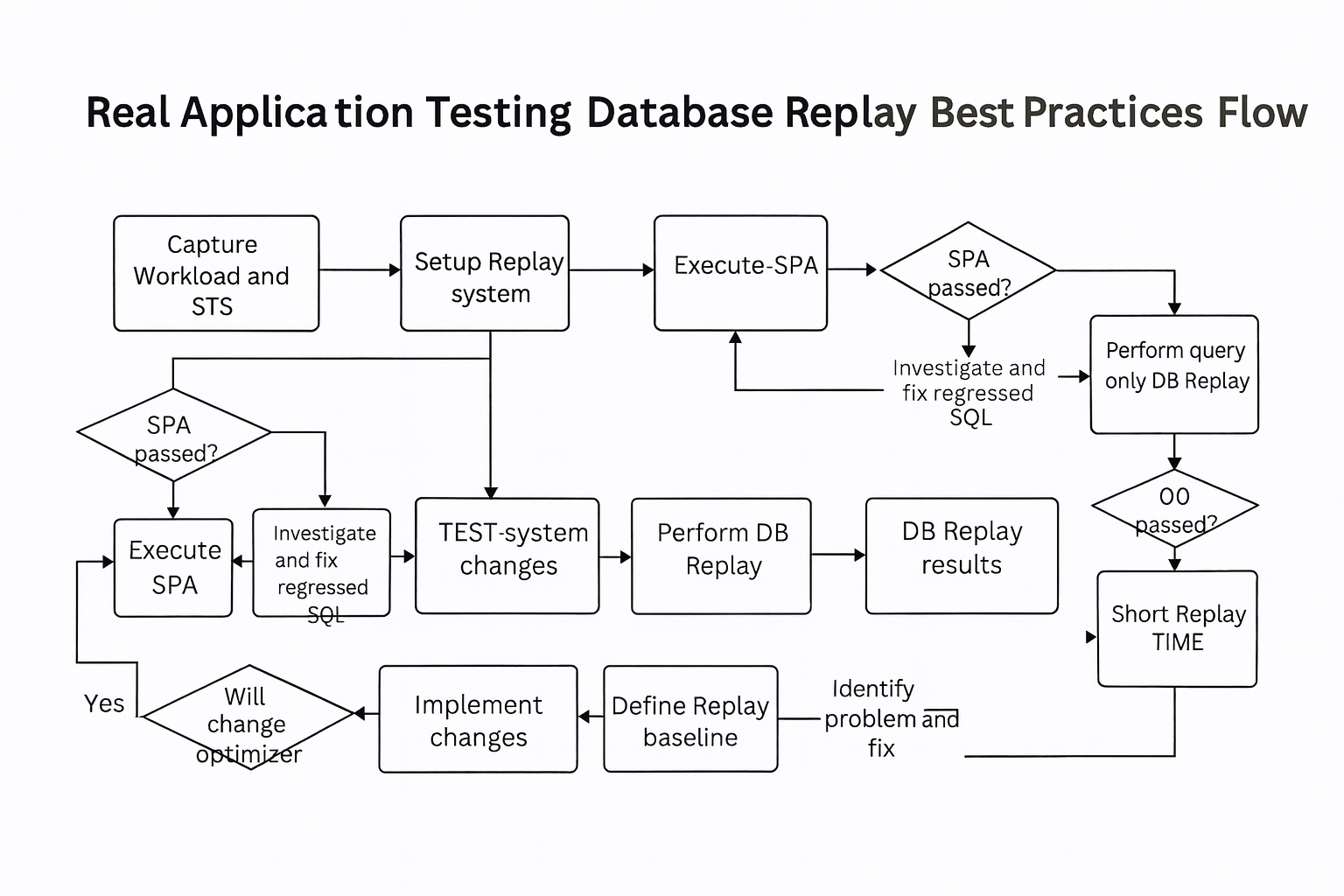
This scientific validation method gave confidence that the 23ai environment could handle identical loads with improved throughput and reduced latency.
3. Ensuring Compatibility Across Client Versions
Compatibility issues between old client drivers and the new 23ai database can derail migrations.
To prevent this, XPO analyzed all client connection versions using this SQL script:
SELECT sci.osuser, sci.client_version, sci.client_driver, module, program, COUNT(*) AS cnt
FROM gv$session_connect_info sci, gv$session ses
WHERE sci.sid = ses.sid AND sci.inst_id = ses.inst_id
AND sci.client_version NOT LIKE '23%'
GROUP BY sci.client_version, sci.client_driver, module, program
ORDER BY 1, 2, 3;
This identified outdated JDBC, SQL Developer, and TOAD clients, ensuring every connection was upgraded or whitelisted.
4. SQL Response Time Validation
After RAT testing, XPO performed SQL response time validation by:
- Capturing
GV$SQLAREAfrom both 19c and 23ai. - Comparing execution time variances using
WITH SQLanalytics andDBA_HIST_SQLSTAT. - Highlighting SQL statements that required indexing or optimization.
This proactive approach reduced row lock contention and improved query efficiency before go-live.
5. Quick Fallback / Rollback Strategy
For mission-critical systems, having a fast rollback plan is as important as the upgrade itself.
XPO implemented a multi-layered rollback architecture:
- Oracle AutoUpgrade Utility: Performed in-place upgrades with automated checkpointing.
- Flashback Database: Enabled instant restoration to restore points if anomalies were detected.
- Oracle Data Guard: Configured a separate standby for immediate fallback.
- GoldenGate Reverse Replication: Ensured bidirectional data sync between 19c and 23ai for rollback scenarios.
This allowed a return to 19c within hours, ensuring business continuity even in worst-case situations.
6. Detailed Runbook for Migration and Testing
XPO’s success came from a meticulous, step-by-step runbook designed to minimize human errors:
- ✅ Pre-cutover preparation and dry-run testing (same size as production)
- ✅ Dev/Test environment setup
- ✅ Rollback/Fallback simulation
- ✅ GoldenGate replication configuration
- ✅ Dequeue/Enqueue queue handling
- ✅ Domain name validation for DB links
- ✅ Maintenance window planning and “Go/No-Go” checkpoints
Every process — from replaying workloads to post-upgrade validation — was documented and automated wherever possible.
7. Cost Optimization and Infrastructure Efficiency
XPO optimized costs by using Exadata X11 Cloud@Customer features:
- Node sub-setting to scale compute dynamically.
- Faster CPUs with higher throughput efficiency.
- Built-in licenses for Diagnostics, RAT, TDE, and Data Masking.
- Dynamic adjustment of CPU cores based on workload metrics.
This ensured a balance between performance scalability and operational cost efficiency.
8. Security Enhancements Post-Upgrade
With Oracle 19c+, XPO enhanced database security using:
- PASSWORD_ROLLOVER_TIME to allow seamless password transitions.
- DBA_USERS.PASSWORD_CHANGE_DATE for compliance tracking.
- Integration with Oracle Data Safe for proactive security auditing.
This strengthened password policy enforcement without disrupting user access during password rotation periods.
9. Post-Migration Monitoring and Automation
After successful go-live, XPO implemented automated monitoring scripts for tablespace utilization using:
SELECT tablespace_name, ROUND(used_space/tablespace_size*100,2) AS used_percent
FROM dba_tablespace_usage_metrics
ORDER BY used_percent DESC;
Additionally, DBMS_DICTIONARY_CHECK was run to verify metadata integrity and ensure no dictionary mismatches post-upgrade.
Conclusion
The XPO migration from Oracle 19c to 23ai exemplifies how a structured, test-driven approach can make even the most complex upgrades seamless and risk-free.
By leveraging Exadata performance, Real Application Testing, and GoldenGate replication, XPO not only achieved zero downtime but also enhanced scalability, performance, and security.
For enterprises considering a similar move, the lesson is clear — test deeply, automate everything, and always have a rollback plan. With Oracle 23ai, modernization is not just an upgrade — it’s a leap toward the future of autonomous, intelligent data management.
Explore further: https://dbainsight.com/2025/10/oracle-database-23ai-upgrade-strategies/


