

Ran into this one during a routine GI patching cycle recently, and it’s worth writing up because the output looks scary enough that it’ll make you stop dead in your tracks if you don’t already know what’s going on.
If you’re prepping to apply the Oracle Grid Infrastructure 19.31 Release Update, there’s a decent chance you’ll hit a conflict warning during the OPatch prerequisite check that, on the surface, tells you to go request a merge patch from Oracle Support. Don’t. It’s a known false positive, and I want to walk through exactly why it shows up and what to actually do instead.


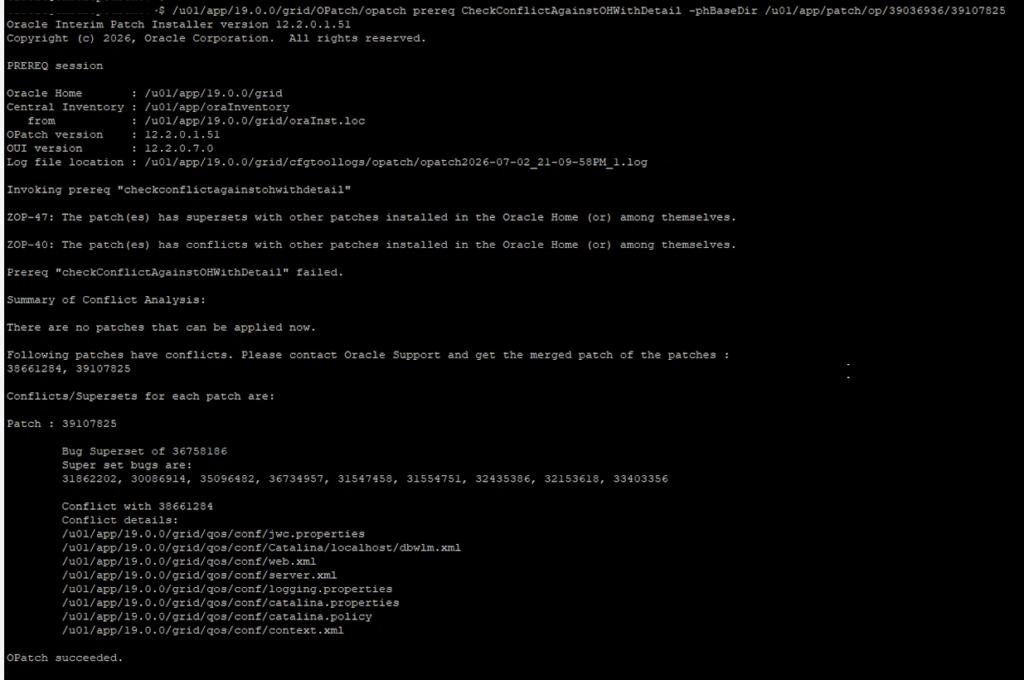
What You’ll See
Run the usual prereq check:
$GRID_HOME/OPatch/opatch prereq CheckConflictAgainstOHWithDetail \
-phBaseDir /u01/app/patch/op/39036936/39107825
And you’ll get something like:
ZOP-47: The patch(es) has supersets with other patches installed.
ZOP-40: The patch(es) has conflicts with other patches installed.

Following patches have conflicts:
38661284
39107825
At first glance this reads like exactly the situation you don’t want — Oracle telling you two patches genuinely conflict and you need a merge patch before you go any further. I’ll admit the first time I saw this I assumed the same thing and nearly opened an SR before double-checking.
The Setup Where This Shows Up
- Oracle Grid Infrastructure 19c
- 19.31 Grid Infrastructure Release Update
- Patch bundle: 39036936
- DBWLM RU patch: 39107825
- OPatch version: 12.2.0.1.51
What’s Actually Happening
Along with the conflict message, you’ll usually see a bunch of file-level conflicts reported too — things like:
qos/conf/jwc.properties
qos/conf/server.xml
qos/conf/web.xml
qos/conf/context.xml
qos/conf/logging.properties
qos/conf/catalina.properties
qos/conf/catalina.policy
qos/conf/Catalina/localhost/dbwlm.xml
All pointing at the same conclusion — go get a merge patch. Except that’s not actually the right call here, and the reason comes down to a structural change Oracle made starting with 19.31.
Beginning with GI 19.31, Oracle pulled the legacy QoS/WLM (Quality of Service / Workload Manager) directory out of the Grid Infrastructure home entirely. The 19.31 Release Update ReadMe puts it plainly — starting from the April 2026 19.31 update, that QoS/WLM directory is gone.
That removal is exactly what trips up the prerequisite checker. It sees the old OCW RU still referencing paths that no longer exist the way they used to, compares that against the new DBWLM RU, and concludes there’s a conflict. There isn’t one — this is the checker misreading a directory structure change, not an actual patch incompatibility. OPatchAuto, for what it’s worth, handles the same scenario just fine without raising any alarm.
Oracle’s tracking this internally as Bug 39320451 — “OPatch prereq CheckConflictAgainstOHWithDetail shows conflict with 19.31 DBWLM RU and OCW RU.” It affects the 19.31 DBWLM RU against earlier OCW Release Updates specifically.
What Oracle Support Says to Actually Do
Oracle Support has confirmed you can safely ignore this particular conflict output. Rather than trusting the individual prereq check, run the OPatchAuto analysis instead:
$GRID_HOME/OPatch/opatchauto apply -analyze \
/u01/app/patch/op/39036936
If that analysis comes back clean, you’re good to proceed with the actual patch:
$GRID_HOME/OPatch/opatchauto apply \
/u01/app/patch/op/39036936
The earlier prereq command will still throw its conflict message every time you run it — that doesn’t change — but OPatchAuto processes the patches correctly regardless. I’d trust the analyze step over the standalone prereq check in this specific case.
If You’re Patching Manually
Not everyone runs OPatchAuto — some environments still apply patches one at a time. If that’s you, order matters here more than usual. Oracle’s documented sequence is:
OCW RU → ACFS RU → DBWLM RU → Database RU → Tomcat RU
In practice that’s:
opatch apply -oh $GI_HOME -local <OCW Patch>
opatch apply -oh $GI_HOME -local <ACFS Patch>
opatch apply -oh $GI_HOME -local <DBWLM Patch>
opatch apply -oh $GI_HOME -local <Database RU>
opatch apply -oh $GI_HOME -local <Tomcat RU>
Stick to that order and you avoid dependency issues that show up if you patch things out of sequence.
Do You Actually Need a Merge Patch?
No, and this is worth repeating because the prereq output is pretty insistent about it. It’ll tell you outright to contact Oracle Support and get a merged patch — but Oracle Support has explicitly said that guidance doesn’t apply here. Run the OPatchAuto analysis, confirm it passes, and continue patching normally. No SR, no merge patch, no waiting on a fix from Oracle.
Quick Recap
- OPatch prereq check throwing a conflict here is expected behavior, not a red flag
- There’s no real patch conflict underneath it
- You don’t need a merge patch
- It’s safe to continue patching
- Use
opatchauto apply -analyzeas your actual go/no-go check - Oracle’s tracking this as Bug 39320451
Final Thoughts
If you hit a conflict between the DBWLM RU (39107825) and an existing OCW RU while running CheckConflictAgainstOHWithDetail on GI 19.31, don’t let it derail your maintenance window. It’s a known side effect of Oracle removing the QoS/WLM directory in 19.31, and the prereq checker just hasn’t caught up to that change — it’s flagging a conflict that doesn’t actually exist.
Run the OPatchAuto analyze step, confirm it’s clean, and proceed. If you’re doing this by hand, just respect the patch order and you’ll be fine. Worth bookmarking this one before your next 19.31 patching cycle so you’re not scrambling to figure out whether to open a ticket at 11pm.


