

If you’ve recently upgraded an Oracle 19c CDB from 19.25 RU to 19.31 RU and encountered the following SQL patch violation, you might assume it’s a failed datapatch execution.
'19.31.0.0.0 Release_Update 2605151111' is installed in the CDB but
'19.25.0.0.0 Release_Update...' is installed in the PDB
In my case, however, the actual problem had nothing to do with SQL patching itself.


The root cause was surprisingly simple: the PDB had no TEMPFILE configured.
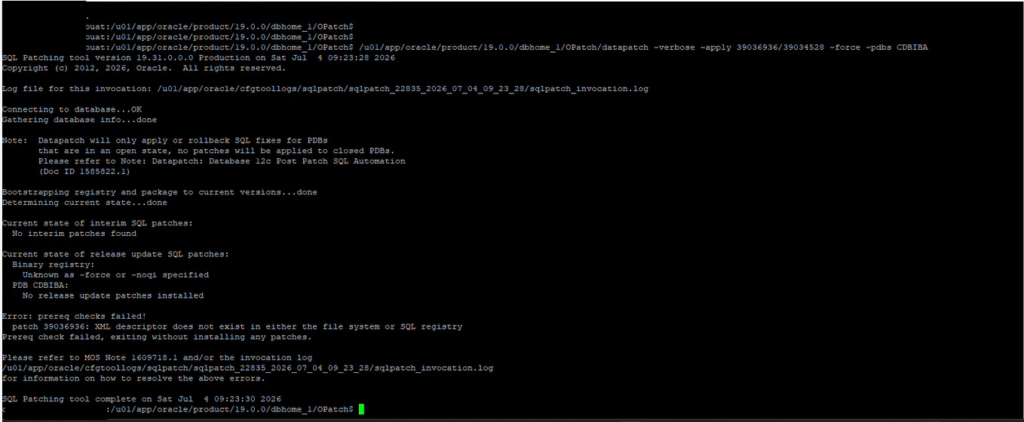
Environment
- Oracle Database 19c Multitenant
- Source Database RU: 19.25
- Target Oracle Home: 19.31
- Datapatch executed after Oracle Home upgrade
- Several PDBs reported pending SQL patch violations
Symptoms
Running the sanity check before datapatch produced multiple warnings similar to the following:
Check: PDB Violations - WARNING

IBA
'19.31.0.0.0 Release_Update 2605151111' is installed in the CDB
but '19.25.0.0.0 Release_Update...' is installed in the PDB
STATUS : PENDING
At first glance, it appeared that the SQL patch had simply not been applied to the PDB.
The Important Clue
Scrolling further through the sanity check output revealed two critical errors that were easy to overlook.
Check: Temp file exists - ERROR

The default temporary tablespace must have at least one temp file associated.

IBA
COUNT
0
and
Check: Temp file online - ERROR

DEFAULT TEMPFILE(S) STATUS IS/ARE:
OFFLINE OR NOT EXIST
These messages immediately pointed to the real issue.
Why Missing TEMPFILE Causes Datapatch Problems
During datapatch, Oracle executes numerous SQL scripts inside every PDB.
These scripts frequently require temporary space for operations such as:
- Sorting
- Creating indexes
- Recompiling objects
- Running catalog updates
- Data dictionary changes
If the default temporary tablespace has no online tempfile, these SQL operations cannot execute successfully.
As a result:
- Datapatch skips or fails for that PDB.
- SQL patch metadata remains at the previous RU.
- The PDB continues reporting the old patch level.
- Oracle raises the familiar patch mismatch message:
19.31 installed in CDB
19.25 installed in PDB
Although the message suggests a patch mismatch, the underlying problem may actually be a missing TEMPFILE.
How to Verify
Investigating the Issue with datapatch -sanity_checks
Before attempting to rerun datapatch, I wanted to understand why the PDBs were reporting SQL patch mismatches. To identify the root cause, I executed the following command:
$ORACLE_HOME/OPatch/datapatch -sanity_checksThe datapatch -sanity_checks utility performs a comprehensive pre-patching validation of the Oracle environment. Instead of simply reporting the SQL patch mismatch, it checks for a wide range of conditions that could prevent Datapatch from completing successfully, including:
- PDB plugin violations
- Invalid Oracle-maintained objects
- Tablespace usage
- Missing or offline TEMPFILEs
- Scheduler jobs
- Data dictionary statistics
- Backup status
- Keystore configuration
- Container status
- Oracle Inventory health
The sanity check immediately revealed two key findings:
- The affected PDB (
CDBIBA) was reporting a SQL patch mismatch:'19.31.0.0.0 Release_Update 2605151111' is installed in the CDB
but '19.25.0.0.0 Release_Update...' is installed in the PDB - More importantly, it also reported that the PDB had no online TEMPFILE configured, which turned out to be the real cause of the issue:
Check: Temp file exists - ERROR
Check: Temp file online - ERROR
Without running datapatch -sanity_checks, it would have been easy to assume that the problem was a failed SQL patch. Instead, the sanity report quickly pointed to the missing TEMPFILE, allowing the issue to be resolved before rerunning Datapatch.
Check the default temporary tablespace.
SHOW PARAMETER default_temp_tablespace;Then verify tempfiles.
SELECT
tablespace_name,
file_name,
status
FROM dba_temp_files;
Or simply run:
$ORACLE_HOME/OPatch/datapatch -sanity_checksThe sanity report clearly identifies missing or offline tempfiles before patching.
The Fix
Create a tempfile inside the affected PDB.
ALTER SESSION SET CONTAINER=IBA;

ALTER TABLESPACE TEMP
ADD TEMPFILE
'/u02/oradata/IBA/temp01.dbf'
SIZE 2G
AUTOEXTEND ON;
Verify it exists.
SELECT file_name
FROM dba_temp_files;
Run Datapatch Again
After adding the tempfile:
$ORACLE_HOME/OPatch/datapatchThis time the SQL patch completed successfully for the affected PDB.
Running the sanity check again showed that the SQL patch violation had disappeared.
Verify the Patch Level
Check SQL patch history.
SELECT
patch_id,
action,
status,
description
FROM dba_registry_sqlpatch
ORDER BY action_time DESC;
Or verify from the CDB.
SELECT
con_id,
status,
version
FROM cdb_registry;
All PDBs should now report the same Release Update as the CDB.
Lessons Learned
This issue is a good reminder that the reported error isn’t always the real cause.
Before assuming datapatch failed because of patch conflicts, always review the complete datapatch -sanity_checks output for underlying prerequisites.
In this case, the actual root cause was:
- ❌ No TEMPFILE in the affected PDB
- ❌ Default temporary tablespace unusable
- ❌ Datapatch unable to execute SQL scripts
- ✅ Adding a TEMPFILE allowed the SQL patch to complete successfully
- ✅ All SQL patch violations were resolved
Final Thoughts
The error:
'19.31.0.0.0 Release_Update' is installed in the CDB but
'19.25.0.0.0 Release_Update' is installed in the PDB
does not always indicate a patch conflict or an incomplete Oracle Home upgrade.
Sometimes, the solution is much simpler.
If datapatch reports pending SQL patch violations, always check the sanity report for missing prerequisites—especially the existence and status of TEMPFILEs in every PDB. A missing tempfile can prevent SQL patching entirely, even though the CDB has already been successfully upgraded.


