

If you’ve worked with Oracle databases long enough, you’ve probably had the conversation where someone asks why the organization needs Exadata specifically. It’s a fair question — Exadata carries a reputation for being expensive, complex, and overkill for anything but the largest workloads.
That reputation is partly earned and partly outdated. The managed cloud version changes the calculus considerably. You get the hardware performance and software integration that made Exadata the benchmark for Oracle workloads, without owning the physical infrastructure or managing the underlying platform yourself. Oracle handles that layer. You handle the databases.

This guide walks through how the architecture actually fits together — networking, infrastructure, VM clusters, storage decisions, and the things worth knowing before you start provisioning.
What Exadata Database Service Actually Is
Exadata has always been about co-engineering the hardware and software together. The storage servers don’t just hold data — they process it. Smart Scan offloads query filtering to the storage layer. Smart Flash Cache keeps hot data accessible at flash speeds. Hybrid Columnar Compression reduces storage requirements dramatically for the right workload types. These aren’t features you bolt on — they’re built into how the platform works at every layer.
Exadata Database Service takes that platform and delivers it as a managed cloud service. You can run it in Oracle’s public cloud regions or deploy it in your own data center through Exadata Cloud@Customer — which matters for organizations with data residency requirements or compliance constraints that prevent moving workloads to a public cloud environment.
Either way, the architecture underneath is the same.
How the Architecture Fits Together
The Exadata stack has three main physical layers, and understanding how they interact explains most of the performance characteristics people care about.
Database servers are where Oracle databases actually run. Exadata uses a virtualization model that separates Oracle-managed components (Dom0) from customer-managed virtual machines (DomU). Your databases live in the DomU layer — customer-controlled, customer-managed. Oracle’s operational tooling runs in Dom0 and never touches your database environment directly.
Storage servers are what separates Exadata from conventional storage. Instead of dumb storage arrays that return raw blocks, Exadata storage servers run their own processing. Smart Scan filtering, compression, flash caching — all of this happens at the storage layer before data travels to the database servers. For the right query patterns, this eliminates enormous amounts of unnecessary I/O.
The RoCE network fabric connects database servers to storage servers using RDMA over Converged Ethernet. This isn’t a standard Ethernet connection — it’s a purpose-built, ultra-low latency fabric designed specifically for RAC interconnect traffic and storage access. The performance numbers Exadata produces for I/O-intensive workloads are largely a function of this fabric combined with the intelligent storage layer.
Network Architecture — More Layers Than You’d Expect
Exadata environments use multiple dedicated networks, and keeping them straight matters when you’re configuring deployments or troubleshooting connectivity issues.
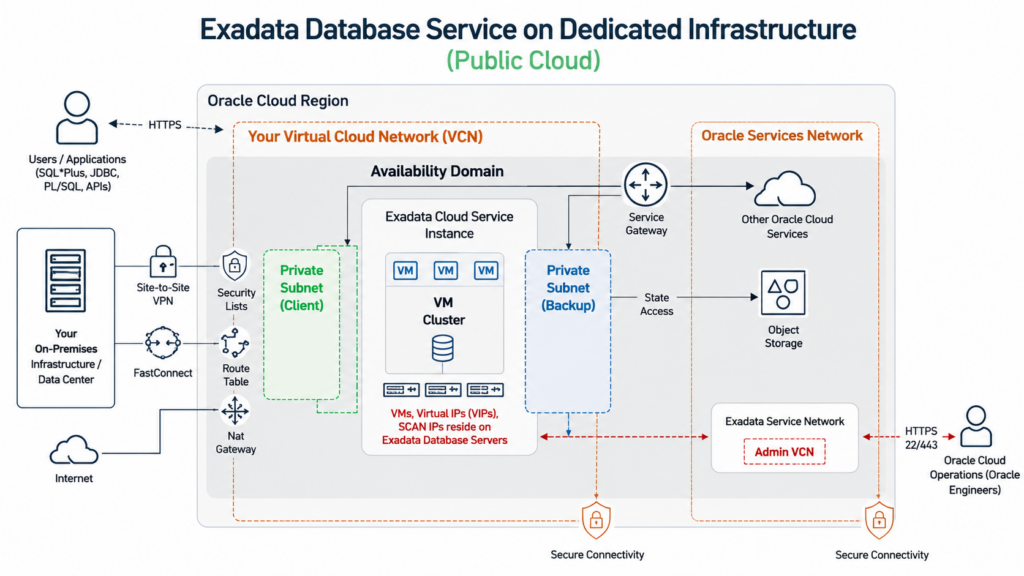
The client network is what applications use to reach databases. Oracle RAC, SCAN listeners, Virtual IP addresses — all of this runs here. Every database server has redundant interfaces on the client network, so a single NIC failure doesn’t take down connectivity. Applications connect through SCAN, which abstracts the underlying cluster topology and handles load balancing across available nodes.
The backup network exists specifically to keep backup traffic off the client network. It sounds like a minor detail until you’ve watched a large RMAN backup job saturate network bandwidth during business hours and take down application connectivity. Dedicated backup interfaces prevent that class of problem entirely.
The Oracle Cloud Operations network handles infrastructure maintenance, monitoring, and hardware management. Customers don’t see this network and can’t access it — it’s how Oracle’s operations team manages the physical infrastructure layer on your behalf.
VCN and Subnet Requirements
Before provisioning Exadata Database Service in OCI, the networking foundation needs to be in place.
A Virtual Cloud Network is Oracle Cloud’s software-defined networking layer — your private network within OCI, with CIDR blocks, subnets, route tables, security lists, and gateways all defined and managed through the console or API.
For Exadata, you need two subnets specifically:
The client subnet handles application and user access to the database. This is where your SCAN listeners and VIPs will live.
The backup subnet handles backup traffic and bulk data movement. Keep it separate from the client subnet — that’s the point.
Oracle recommends regional subnets over availability domain-specific subnets for both. Regional subnets span all availability domains within a region, which gives you more flexibility and reduces the networking complexity when you start thinking about HA configurations.
Use RFC1918 private address ranges. This is standard practice but worth stating explicitly — public IP ranges on internal database networks create unnecessary exposure.
Connectivity Options — Getting From On-Premises to OCI
Most Exadata deployments aren’t purely cloud-isolated. There’s an on-premises environment, an existing network, and a connectivity requirement between the two.
OCI gives you three main paths:
IPSec VPN is the quickest to stand up and works well for lower-bandwidth requirements or as a backup path. It runs over the public internet with encryption, so it’s secure, but latency and throughput are subject to whatever your internet connection can deliver.
Oracle FastConnect is the right answer for production Exadata workloads. Dedicated private connectivity, predictable latency, high bandwidth, no public internet traversal. If you’re moving significant data volumes or running latency-sensitive applications, this is what you want. It costs more than VPN, and it takes longer to provision, but for production use cases the difference in performance and reliability justifies it.
Service Gateway handles a different problem — private access to Oracle Cloud services like Object Storage from within your VCN, without routing traffic through the public internet. For backup configurations that target Object Storage, this is how you keep backup traffic on private paths.
Exadata Infrastructure — What You’re Actually Provisioning
The starting point for any Exadata Database Service deployment is a Cloud Exadata Infrastructure resource. This is the physical layer — database servers and storage servers — that everything else sits on top of.
Minimum configuration is two database servers and three storage servers. That baseline delivers high availability, triple mirroring through ASM High Redundancy, and hardware fault tolerance. A storage server can fail and the cluster keeps running. A database server can fail and the remaining node handles the workload through RAC.
You choose the Exadata model during provisioning — Base System, X8M, X9M, or elastic configurations depending on your performance and capacity requirements. Compute and storage scale independently, and you can add servers later without taking down your databases. That elasticity is one of the more operationally useful characteristics of the managed service.
VM Clusters — Where Your Databases Actually Live
The VM Cluster is the customer-managed layer that sits on top of the Exadata infrastructure.
It runs Oracle Clusterware, Grid Infrastructure, virtual machines, and database software. You can have multiple Database Homes and multiple RAC databases within a single VM Cluster, each with independent resource allocation. Oracle manages the physical infrastructure below this layer. Everything inside the VM Cluster is yours to configure, operate, and maintain.
When you create a VM Cluster, the key decisions are:
OCPU allocation — how much CPU the cluster gets. This drives database performance directly.
Memory allocation — RAM assigned to the virtual machines. Size this based on your SGA requirements plus OS overhead.
Local storage allocation — filesystem storage for each VM, separate from ASM storage.
Network configuration — VCN, client subnet, backup subnet, hostname prefix, network security groups. Get this right at provisioning time. Some of these are difficult or impossible to change later.
Licensing — BYOL if you have existing Oracle licenses to apply, License Included if you’re paying through the cloud subscription. The financial implications of this choice are significant. Know which model your organization is using before you provision.
Storage Architecture — ASM Disk Groups and What Goes Where
Exadata uses Oracle ASM to manage storage, and the default configuration creates two disk groups that handle different data types.
The DATA disk group holds data files, tablespaces, and database objects — the primary database content.
The RECO disk group holds recovery-related content: Fast Recovery Area, archived logs, RMAN backups, recovery files. Keeping these separate from DATA is standard ASM practice and simplifies backup and recovery operations.
The storage decisions you make at VM Cluster provisioning time have permanent consequences, which makes them worth thinking through carefully.
Sparse Snapshots — The Feature That Changes Development Workflows
Sparse Snapshots are one of those Exadata capabilities that doesn’t get enough attention outside of storage conversations, because the operational impact is genuinely significant.
The traditional approach to creating a development or test copy of a production database involves a full clone — copy all the data, provision equivalent storage, wait. For large databases this means hours of elapsed time and full storage consumption for every copy you create.
Sparse Snapshots work differently. You create one Test Master database. Snapshots share unchanged data blocks with that master — only blocks that get modified in a snapshot copy consume additional storage. Creating a snapshot takes seconds rather than hours. Storage consumption is a fraction of a full copy.
For development teams that need fresh database copies regularly, or test environments that run parallel workloads against production-like data, this changes the economics entirely. Multiple developers can each have their own database copy without the storage multiplication problem.
Sparse Snapshots require a dedicated SPARSE ASM disk group, which brings us to the storage allocation decisions.
Storage Allocation Choices You Can’t Change Later
This is worth its own section because the consequences of getting it wrong are permanent — there’s no going back after VM Cluster provisioning.
Allocate storage for local backups — selecting this increases RECO disk group capacity to support local backup storage. If you don’t select it, that capacity goes to DATA instead. Choose based on whether you’re planning to use local storage for RMAN backups or routing everything to Object Storage.
Allocate storage for sparse snapshots — selecting this creates the SPARSE disk group and enables the snapshot functionality described above. If you don’t select it at provisioning time, sparse snapshots are unavailable for the lifetime of that VM Cluster.
Think through your intended use cases before provisioning. Sparse snapshots for development environments, local backup retention requirements, balance between DATA and RECO capacity — these decisions are made once.
Why Organizations Actually Choose Exadata Service
The performance case is well-documented. Smart Scan, flash cache, RoCE fabric, intelligent storage processing — for Oracle Database workloads, particularly large-scale OLTP and mixed workloads, the performance gap between Exadata and conventional infrastructure is real and measurable.
But for the cloud service specifically, the operational model is often the more compelling argument. Oracle manages the physical infrastructure — hardware failures, firmware updates, storage server maintenance, infrastructure patching. The DBA team focuses on databases, schemas, performance tuning, and application support. The layer below that is Oracle’s problem.
For organizations that have run on-premises Exadata and understand what’s involved in managing that infrastructure, the shift to managed service is often a meaningful reduction in operational burden.
Cloud@Customer addresses the organizations that want the managed service model but can’t move to a public cloud environment. The infrastructure lives in your data center. Oracle manages it remotely. Your data never leaves your facility. For regulated industries with strict data residency requirements, this matters.
The Bottom Line
Exadata Database Service is a serious platform for serious Oracle workloads. The architecture — dedicated networks, RoCE fabric, intelligent storage processing, VM cluster isolation, ASM storage management, sparse snapshot capability — is designed specifically for Oracle Database and has been refined over multiple hardware generations.
The cloud service model removes the infrastructure management burden while preserving the performance characteristics. That’s a meaningful trade for most organizations.
The things to get right upfront: network design, subnet configuration, connectivity to on-premises environments, storage allocation decisions at VM Cluster provisioning time. These foundational choices shape everything that runs on top of them. The time spent thinking through them before provisioning is significantly less than the time spent working around them after.


