

Introduction: The Rise of Multicloud with Oracle and AWS
The cloud computing landscape is rapidly evolving, and multicloud architecture has become a key strategy for modern enterprises. Multicloud refers to the coordinated use of cloud services from multiple providers to increase flexibility, resilience, and performance.
During CloudWorld 2024, Oracle and Amazon Web Services (AWS) announced a major collaboration: Oracle Database@AWS. This service allows organizations to run Oracle databases on Oracle Cloud Infrastructure (OCI) hardware deployed inside AWS data centers. The solution became generally available in June 2025.


With Oracle Database@AWS, businesses can run high-performance Oracle databases like Exadata and Autonomous Database while integrating seamlessly with AWS applications and services. One of the most important components of this architecture is the Oracle Database Network (ODB Network), which acts as the networking backbone connecting Oracle databases with AWS applications.
In this article, we will explore how the ODB Network works, its architecture, deployment process, and key considerations for cloud architects.
Understanding Oracle Database@AWS Architecture
Oracle Database@AWS is designed to combine the strengths of two major cloud providers:
- OCI provides Oracle database infrastructure such as Exadata hardware and Autonomous Database services.
- AWS provides application hosting, compute, and cloud services.
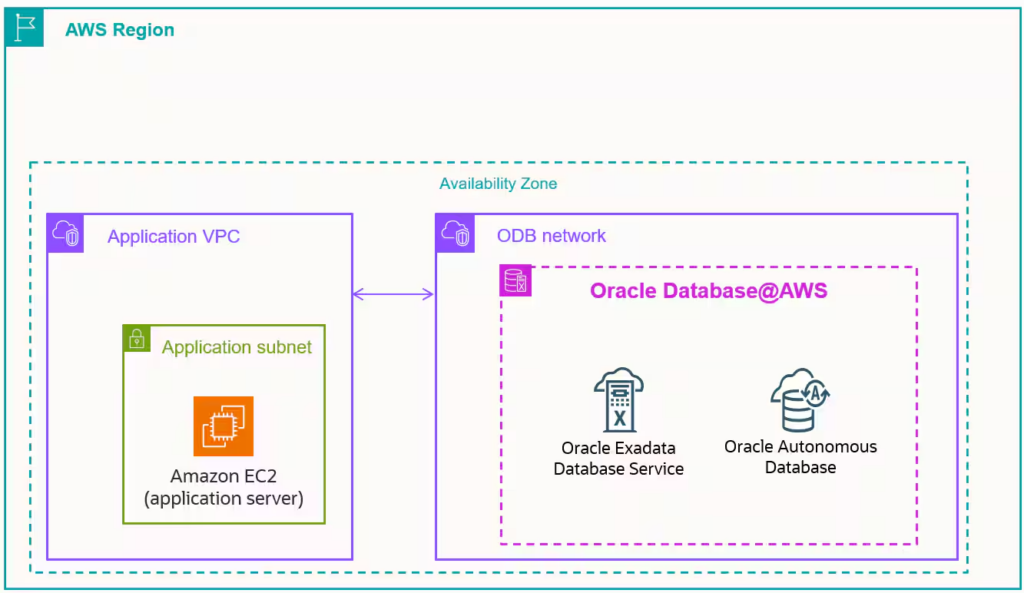
Although the databases logically run on OCI, the infrastructure is physically deployed inside specific AWS Availability Zones (AZs).
Currently, Oracle Database@AWS is available in the following regions:
AWS Regions
- N. Virginia (us-east-1)
- Oregon (us-west-2)
OCI Regions
- US East (Ashburn)
- US West (Boardman)
This architecture allows applications running in AWS to access Oracle databases with low latency and high performance.
However, to enable communication between the AWS application layer and the Oracle database layer, a specialized networking component is required. This is where the ODB Network comes into play.
What is an Oracle Database Network (ODB Network)?
An Oracle Database Network (ODB Network) is a dedicated private network inside AWS designed specifically for Oracle Database@AWS resources.
It behaves similarly to an AWS Virtual Private Cloud (VPC) but with an important difference:
👉 An ODB Network only supports Oracle Database@AWS services.
It is used to deploy resources such as:
- Exadata Infrastructure
- Exadata VM Clusters
- Autonomous VM Clusters
- Oracle Databases
In a typical multi-tier architecture:
- The application layer runs inside an AWS VPC
- The database layer runs inside the ODB Network
- The two networks are connected through ODB Peering
This ensures secure and efficient communication between applications and databases.
OCI Concepts for AWS Architects
For engineers familiar with AWS, learning OCI terminology is essential when working with Oracle Database@AWS.
Oracle University offers a training course called “OCI for AWS Architects”, which helps cloud engineers map AWS concepts to OCI equivalents.
| AWS Concept | OCI Equivalent |
|---|---|
| VPC (Virtual Private Cloud) | VCN (Virtual Cloud Network) |
| Availability Zone | Availability Domain |
| Subnet | Subnet |
| Route Tables | Route Tables |
Understanding these parallels simplifies deployment and troubleshooting in Oracle Database@AWS environments.
How to Access Oracle Database@AWS
Before creating an ODB Network, customers must obtain access to the Oracle Database@AWS service.
The process involves several steps:
- Request a private offer from Oracle
- Accept the offer through AWS Marketplace
- Pair the AWS account with an OCI tenancy
- Access the Oracle Database@AWS dashboard
Once the service is activated, users can provision the following resources:
- ODB Network
- Exadata Infrastructure
- Exadata VM Cluster
- Autonomous VM Cluster
These components work together to deliver high-performance Oracle database services within AWS.
Launching an ODB Network
Creating an ODB Network is relatively simple and requires only a few configuration parameters.
1. ODB Network Name
The name must begin with a letter or underscore.
2. Availability Zone (AZ)
Selecting the correct AZ is extremely important.
AWS uses logical AZ names like:
- us-west-2a
- us-west-2b
- us-west-2c
However, Oracle Database@AWS requires selecting the physical AZ ID, such as:
- usw2-az3
- usw2-az4
- use1-az4
- use1-az6
The ODB Network must be deployed in the same AZ as the Exadata Infrastructure.
3. Client Subnet CIDR
The Client subnet CIDR represents the VCN CIDR block in OCI.
Important characteristics:
- The ODB Network contains one client subnet
- It reserves five IP addresses
- Used for database connectivity
4. Backup Subnet CIDR
This subnet handles backup and recovery traffic.
Key characteristics:
- Uses a secondary CIDR block
- Reserves three IP addresses
- Supports backup operations for Exadata resources
5. DNS Configuration
The default DNS domain is:
oraclevcn.com
Users can also create custom prefixes such as:
client.oudbaws.oraclevcn.com
This configuration simplifies database service discovery and connectivity.
OCI Resources Created with the ODB Network
When an ODB Network is created, several OCI networking resources are automatically provisioned in the paired OCI tenancy.
These include:
- Two IPv4 CIDR blocks
- Two subnets (Client and Backup)
- Cross-tenancy DRG attachment
- Service Gateway
- Route rules
- Seven Network Security Groups (NSGs)
- DNS resolver endpoints
These resources enable secure communication between:
- AWS applications
- Oracle databases
- OCI services
The DNS resolver endpoints ensure name resolution between AWS and OCI environments, allowing applications to easily connect to database endpoints.
Important Networking Considerations
1. Route Rules in the Application VPC
When an AWS VPC is peered with an ODB Network, a route rule must be manually configured.
This route ensures that application traffic destined for the database network is correctly forwarded.
Typically, administrators configure this rule using:
- AWS CLI
- AWS CloudShell
The Amazon Resource Name (ARN) of the ODB Network is required for this configuration.
2. Deleting the ODB Network
When removing an ODB Network, administrators must select the option:
“Delete associated OCI resources.”
If this option is not selected, leftover OCI resources may remain in the tenancy, making cleanup complex and time-consuming.
Why Oracle Database@AWS Matters for Multicloud
The partnership between Oracle and AWS represents a significant shift in cloud strategy.
Instead of competing exclusively, both providers now collaborate to offer best-of-breed services across clouds.
Benefits include:
- Low-latency integration between AWS applications and Oracle databases
- High performance using Exadata infrastructure
- Unified management across OCI and AWS
- Flexible multicloud architecture
For organizations heavily invested in AWS but dependent on Oracle databases, Oracle Database@AWS provides an ideal solution.
Conclusion
Multicloud is rapidly becoming the standard architecture for modern enterprises. Integrating services across different cloud providers can be challenging, especially when dealing with complex database systems.
Oracle Database@AWS simplifies this challenge by bringing OCI database services directly into AWS data centers. At the center of this integration lies the Oracle Database Network (ODB Network), which provides the networking layer that securely connects AWS applications with Oracle databases.
By understanding the architecture, deployment process, and networking components of the ODB Network, cloud architects and database administrators can design high-performance multicloud solutions that leverage the best capabilities of both Oracle and AWS.
As Oracle continues expanding its Oracle Database@AWS learning path, mastering these concepts will become increasingly valuable for professionals working in modern cloud environments.


