

Oracle Enterprise Manager 24ai Release 1 administrators now have the August 2026 Holistic Patch for Oracle Management Service, released on August 18, 2026.
The patch is identified as 39881086 and provides a consolidated set of updates for the Enterprise Manager OMS infrastructure.


In this article, I’ll walk through the important prerequisites, patch preparation, OMSPatcher analysis, a real-world prerequisite failure, and the steps required before proceeding with the installation.
Patch: 39881086
Product: Oracle Enterprise Manager 24ai Release 1
Component: Oracle Management Service
Release: August 2026
The information below is based on the Oracle patch README and an actual Enterprise Manager 24ai patching session.
What Is the Oracle Enterprise Manager 24ai August 2026 Holistic Patch?
Oracle’s holistic patching mechanism provides a consolidated way to apply quarterly Critical Patch Update-related changes to the Enterprise Manager infrastructure.
Instead of manually applying multiple middleware component patches individually, the holistic patch contains a collection of patches that update different components of the OMS environment.
The August 2026 holistic patch includes updates for components such as:
- ADF
- Coherence
- WebLogic Server
- OHS
- OPSS
- OWSM
- JDBC
- OSS
- WebCenter
- RDA
- Perl
- Oracle JDK
- Other Fusion Middleware components
The Oracle README identifies the patch as:
Bug 39881086 — Enterprise Manager 24ai Release 1 Holistic Patch for Oracle Management Service – August 2026.
Important Prerequisites
Before attempting to install Patch 39881086, several prerequisites must be satisfied.
1. Take an OMS Backup
Because the holistic patch modifies OMS binaries, Oracle recommends taking a filesystem backup of the OMS environment.
The backup should include:
- Middleware Home
gc_inst- Software Library
- Oracle inventory information
This is especially important before making changes to a production Enterprise Manager environment.
2. Check the OMSPatcher Version
For Enterprise Manager 24ai Release 1, Oracle requires:
OMSPatcher 13.9.24.16.0 or later
You can check the installed version using:
$ORACLE_HOME/OMSPatcher/omspatcher version
In my environment, the installed version was:
OMSPatcher Version: 13.9.24.16.0
OPlan Version: 12.2.0.1.16
OsysModel build: Tue Apr 28 18:16:31 PDT 2020
So the OMSPatcher prerequisite was satisfied.
3. The Most Important Requirement: OMS 24.1.0.12 or Later
This is the prerequisite that caused the actual installation failure in my environment.
Oracle requires the OMS to have:
Oracle Enterprise Manager 24ai Release 1 Update 12 — 24.1.0.12
or later before applying the August 2026 holistic patch.
The Oracle README specifically references OMS Patch 39675954 or later as the required update level.
This requirement is separate from the OMSPatcher version.
In other words:
Having OMSPatcher 13.9.24.16.0 does not mean that your OMS is automatically at the required 24.1.0.12 Release Update level.
Both requirements must be satisfied.
[oracle@db-node0 oms_home]$ /u01/install/jdk-21.0.12.1/bin/java -jar 6880880/opatch_generic.jar -silent oracle_home=/u01/app/oracle/middleware/oms_home
/u01/app/oracle/middleware/oms_home/OMSPatcher/omspatcher apply
OMSPatcher Automation Tool
Copyright (c) 2024, Oracle Corporation.  All rights reserved.


OMSPatcher version : 13.9.24.16.0
OUI version        : 13.9.4.0.0
Running from       : /u01/app/oracle/middleware/oms_home
Log file location  : /u01/app/oracle/middleware/oms_home/cfgtoollogs/omspatcher/opatch2026-08-28_12-39-54PM_1.log

OMSPatcher log file: /u01/app/oracle/middleware/oms_home/cfgtoollogs/omspatcher/39675954/omspatcher_2026-08-28_12-40-30PM_analyze.log

Please enter OMS weblogic admin server URL(t3s://db-node0.mit.com:7102):>
Please enter OMS weblogic admin server username(weblogic):>
Please enter OMS weblogic admin server password:>

Enter SYS or Non-SYS (Admin User) username: sys
Enter 'sys' password :


Prereq "checkComponents" for patch 39669453 passed.

Prereq "checkComponents" for patch 39669553 passed.

Prereq "checkComponents" for patch 39669462 passed.

Prereq "checkComponents" for patch 39669516 passed.

Prereq "checkComponents" for patch 39669456 passed.

Prereq "checkComponents" for patch 39669537 passed.

Prereq "checkComponents" for patch 39669569 passed.

Configuration Validation: Success
4. Check the Existing OMS Patches
Before applying a large holistic patch, it is a good practice to review the existing OMS inventory.
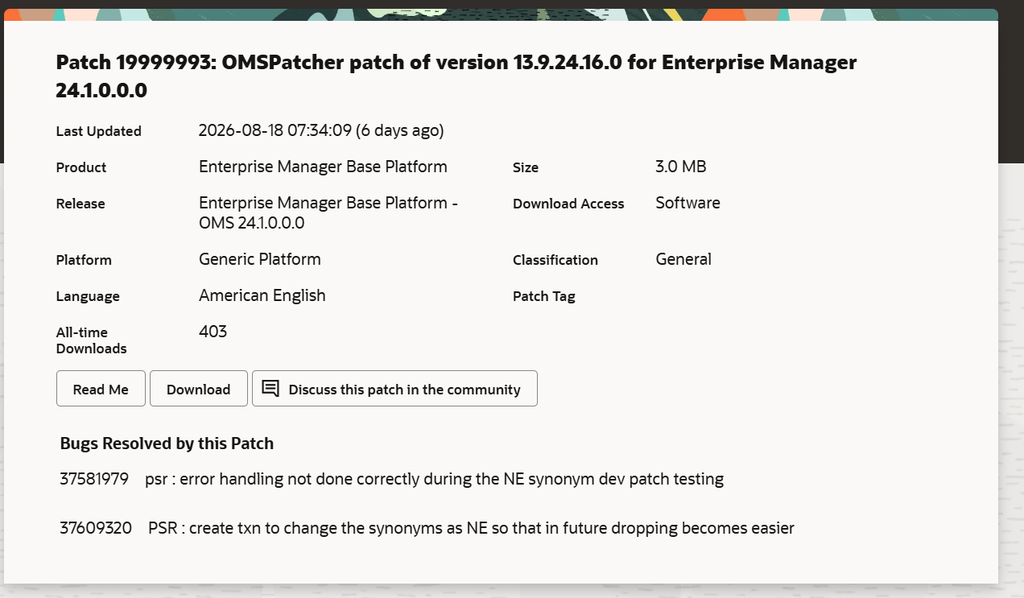
I used:
./omspatcher lspatches
The environment was running OMSPatcher:
OMSPatcher version : 13.9.24.16.0
OUI version        : 13.9.4.0.0
The output showed several existing Fusion Middleware and database-client-related patches, including older WebLogic, ADF, OHS, OPSS, OWSM, WebCenter and other component patches.
For a more detailed inventory, Oracle also recommends using:
$ORACLE_HOME/OPatch/opatch lsinventory -details
5. Extract the August 2026 Holistic Patch
After downloading Patch 39881086, extract the patch ZIP into a suitable patch directory.
For example:
unzip p39881086_241000_Generic_new.zip
This creates:
39881086/
The patch directory contains the binary patches and other files required by OMSPatcher.
Oracle recommends approximately 30 GB of free space for the extracted holistic patch contents.
For Unix multi-OMS environments, the patch directory should be placed in a shared location.
6. Always Run the Analyze Operation First
This is one of the most important steps.
Do not immediately run:
omspatcher apply
Instead, perform an analysis first:
$ORACLE_HOME/OMSPatcher/omspatcher apply /u01/install/39881086 -spb_patch -analyze
The analyze operation checks whether the environment is ready for the holistic patch.
It does not install and deploy the patch.
Oracle specifically recommends this analysis to identify configuration and binary prerequisite problems before the actual installation.
7. Real-World Error: Minimum RU Check Failed
In my environment, the analyze operation returned the following error:
ERROR :: The minimum Release Update (RU) check failed
for applying the given holistic patch.

Recommended action:
If you wish to apply this holistic patch,
ensure your OMS is patched with at least 24.1.0.12
This was the key issue.
Although OMSPatcher itself was already:
13.9.24.16.0
the OMS software was not at the required minimum Release Update level.
Therefore, OMSPatcher correctly prevented the holistic patch from being applied.
Why Did OMSPatcher Reject the Patch?
The August 2026 holistic patch has a minimum OMS Release Update requirement.
The environment must first be patched to at least:
24.1.0.12
The dependency can be summarized as:
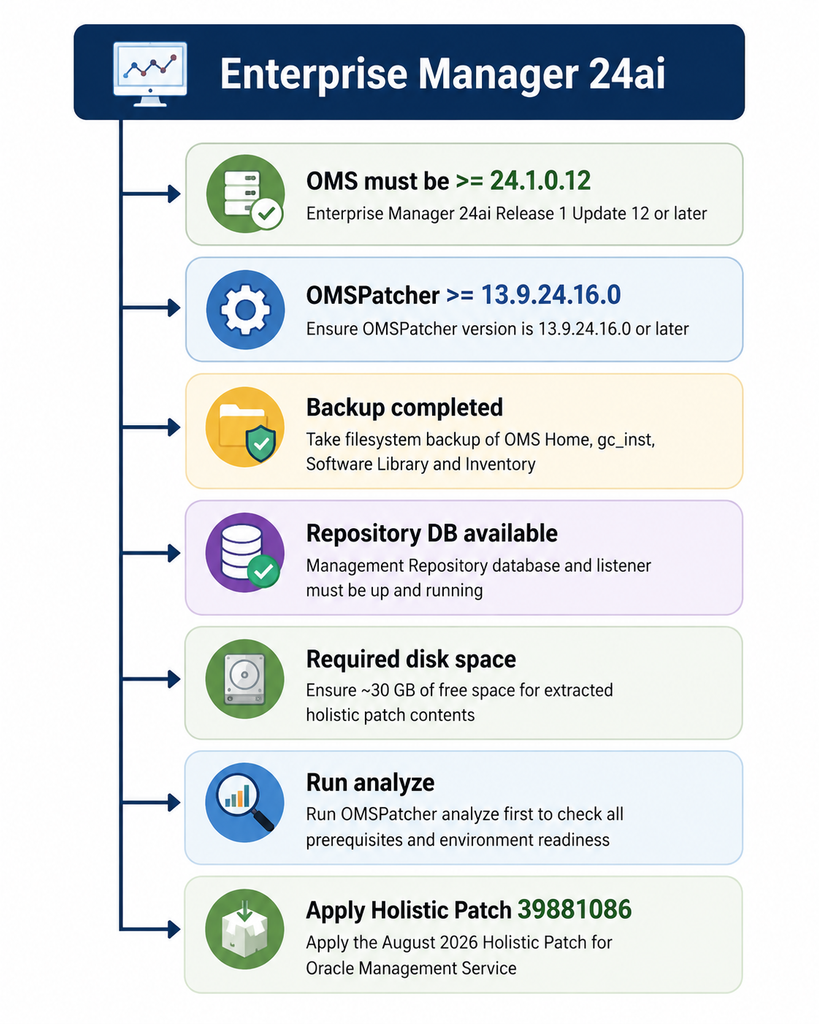
This is an important distinction when troubleshooting OMS patching failures.
8. OMSPatcher Also Detected Older OPatch and JDK Versions
The analyze output provided additional useful information.
The environment had:
Environment OPatch : 13.9.4.2.17
SPB OPatch         : 13.9.4.2.24
OMSPatcher therefore indicated that the OPatch version included with the patch was newer and would need to be updated.
The analysis also showed:
SPB JDK version : 1.8.0.503
Env JDK version : 1.8.0.431
The patch therefore identified that the JDK included with the holistic patch was newer than the environment JDK.
This demonstrates why the -analyze option is so useful.
It can expose multiple issues before the actual patch installation starts.
9. Updating OPatch
In the environment used for this testing, OPatch was updated using the generic OPatch installer.
The command was:
/u01/install/jdk-21.0.12.1/bin/java \
-jar 6880880/opatch_generic.jar \
-silent \
oracle_home=/u01/app/oracle/middleware/oms_home
The installer reported:
OPatch 13.9.4.2.24
as the version being installed.
However, updating OPatch alone does not solve the minimum OMS Release Update requirement.
The OMS still needs to be at least 24.1.0.12 before Patch 39881086 can be applied.
10. Stop the OMS Before Installation
Once all prerequisites have been satisfied, the OMS can be stopped before the patching operation.
For example:
emctl stop oms
The test environment returned:
Stopping Oracle Management Server...
Node Manager Not Running
Oracle Management Server is Down
JVMD Engine is Down
The exact shutdown procedure can vary depending on the OMS topology and operating system.
11. Apply the Holistic Patch
Once the OMS is at the required Release Update level and the prerequisite analysis completes successfully, apply the patch using:
/u01/app/oracle/middleware/oms_home/OMSPatcher/omspatcher apply /u01/install/39881086 -spb_patch
For Windows:
omspatcher.bat apply <PATCH_TOP_DIR>/39881086 -spb_patch
Oracle notes that on Unix multi-OMS environments, OMSPatcher provides scripts that must be executed on additional OMS instances to complete the patching process.
On Windows multi-OMS environments, the patching procedure needs to be repeated on the additional OMS instances.
12. What Is Included in Patch 39881086?
The August 2026 holistic patch contains a significant number of component updates.
Some of the important patches listed by Oracle include:
| Patch | Component |
|---|---|
| 39765141 | ADF Bundle Patch |
| 39562796 | Coherence Cumulative Patch |
| 39574504 | FMW Thirdparty Bundle Patch |
| 39487427 | JDBC Bundle Patch |
| 39774796 | Oracle JDK 8 Update 503 |
| 39611663 | OHS Bundle Patch |
| 39659274 | OPSS Bundle Patch |
| 39567777 | OSS Bundle Patch |
| 39697343 | OWSM Bundle Patch |
| 38445807 | Perl patch for EM 24.1 |
| 39246821 | RDA |
| 39785701 | WebCenter Core Bundle Patch |
| 39796340 | WebLogic Server Patch Set Update |
The complete list is available in Section 7 of the Oracle README.
13. Don’t Forget the Repository Database
Another important prerequisite is the Management Repository database.
Oracle requires the database hosting the Management Repository and its listener to be up and running before applying the holistic patch.
Before starting the OMS patching activity, verify:
Repository Database       UP
Repository Listener       UP
OMS                       Ready for patching
OMS Home                  Correct
OMSPatcher                Correct version
Disk Space                 Available
Backup                     Completed
14. Special Considerations
There are some environment-specific requirements in the August 2026 README.
IBM AIX
Oracle documents a special requirement when applying Patch 39881086 on top of the July 2025 holistic patch.
Patch 37894414 must be rolled back before proceeding with the August 2026 holistic patch in that specific scenario.
Repository Database 19.30
If Database Release Update 19.30.0.0.0, Patch 38632161, is installed on the Enterprise Manager Repository Database, Oracle requires overlay one-off Patch 38641793 after Patch 38632161.
Windows
If CheckActiveFilesAndExecutables errors occur, Oracle refers administrators to MOS Note KB218335 for troubleshooting.
Conclusion
The Oracle Enterprise Manager 24ai August 2026 Holistic Patch, 39881086, provides a consolidated update for the OMS infrastructure and includes updates across multiple Fusion Middleware and Enterprise Manager components.
However, the patch should not be treated as a simple omspatcher apply operation.
The most important prerequisite from my testing was the minimum OMS Release Update requirement.
If your OMS is below:
24.1.0.12
the holistic patch will fail the prerequisite check, even if your OMSPatcher version is already:
13.9.24.16.0
In my environment, the -analyze operation caught this issue before the patch was installed.
That is why I strongly recommend running:
omspatcher apply <PATCH_TOP_DIR>/39881086 -spb_patch -analyze
first.
Analyze → Fix prerequisites → Re-analyze → Apply
This approach can save significant troubleshooting time and, more importantly, reduce the risk of an unsuccessful OMS patching operation.
Always review the official Oracle patch README and applicable My Oracle Support notes for your specific Enterprise Manager topology before applying the patch.
Oracle Critical Security Patch Update Advisory – August 2026
EM 24ai: How To Upgrade Enterprise Manager 24.1 OMSPatcher Utility to the Latest Version



Comments 1