

Oracle Enterprise Manager (EM) 24ai uses OMSPatcher to apply patches and perform patching operations against the Enterprise Manager Cloud Control OMS. Keeping the OMSPatcher utility updated is an important part of maintaining a supported and reliable Enterprise Manager environment.
In this guide, we will walk through the process of upgrading the OMSPatcher utility on an Oracle Enterprise Manager 24.1 OMS using Patch 19999993.


The procedure is based on a real Enterprise Manager 24.1 environment where the OMSPatcher utility was upgraded and subsequently verified successfully. The environment showed OMSPatcher 13.9.24.1.0 after the upgrade.
Important: Always review the README and installation instructions supplied with the patch from My Oracle Support before performing the procedure in a production environment.
Environment
The procedure covered in this article uses:
- Oracle Enterprise Manager: 24.1
- Component: OMS
- Utility: OMSPatcher
- Patch: 19999993
- Patch package:
p19999993_241000_Generic.zip - OMS Oracle Home:
/u01/app/oracle/middleware/oms_home - Resulting OMSPatcher version:
13.9.24.1.0
Why Upgrade OMSPatcher?
OMSPatcher is an important component of the Enterprise Manager patching framework.
Before applying Enterprise Manager patches, it is good practice to verify that the OMSPatcher version installed in the OMS Oracle Home meets the requirements of the patch being applied.
An outdated OMSPatcher version can result in patch prerequisite failures or incompatibility with newer Enterprise Manager patches.
Therefore, the general process is:
- Obtain the required OMSPatcher patch.
- Back up the existing OMSPatcher directory.
- Extract the new OMSPatcher package into the OMS Oracle Home.
- Set the appropriate
ORACLE_HOME. - Verify the installed OMSPatcher version.
Step 1: Download Patch 19999993
Log in to My Oracle Support and download the required OMSPatcher patch for Enterprise Manager 24.1.
Direct Link : Patch 19999993 for EM 24.1.0.0.0
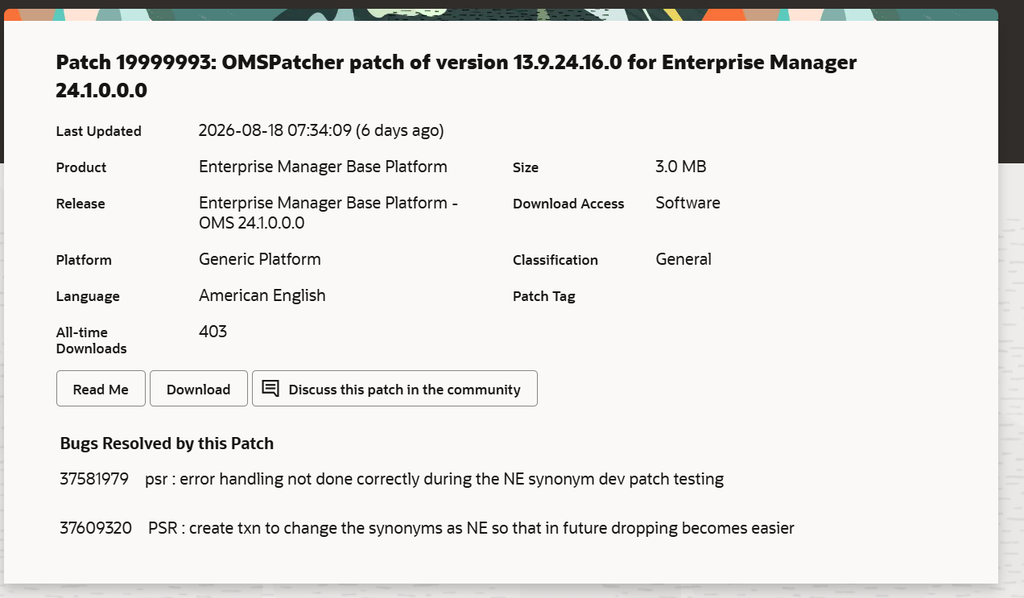
The patch used in this procedure is:
Patch 19999993
The downloaded file is:
p19999993_241000_Generic.zipCopy the ZIP file to the Enterprise Manager OMS Oracle Home or another staging location accessible from the OMS server.
For example:
/u01/app/oracle/middleware/oms_homeStep 2: Verify the Existing OMSPatcher Version
Before replacing the existing utility, check the currently installed OMSPatcher version.
Navigate to the OMSPatcher directory:
cd $ORACLE_HOME/OMSPatcherThen execute:
./omspatcher versionFor example:
OMSPatcher Version: 13.9.24.1.0
OPlan Version: 12.2.0.1.16
OsysModel build: Tue Apr 28 18:16:31 PDT 2020

OMSPatcher succeeded.
This provides a baseline that can be compared with the version after the upgrade.
Step 3: Back Up the Existing OMSPatcher Directory
Before replacing the OMSPatcher utility, take a backup of the existing directory.
Go to the OMS Oracle Home:
cd <OMS_ORACLE_HOME>Rename the existing OMSPatcher directory:
mv OMSPatcher OMSPatcher_oldFor example:
cd /u01/app/oracle/middleware/oms_home

mv OMSPatcher OMSPatcher_old
This provides a simple rollback option if you need to restore the previous OMSPatcher installation.
You can verify the directory:
ls -ld OMSPatcher*Expected output will show both the old directory and, after extraction, the new directory.
Step 4: Extract the New OMSPatcher Package
Copy the downloaded ZIP file into the OMS Oracle Home.
For example:
cd /u01/app/oracle/middleware/oms_homeThen extract the package:
unzip p19999993_241000_Generic.zipAlternatively, you can specify the destination explicitly:
unzip p19999993_241000_Generic.zip \
-d /u01/app/oracle/middleware/oms_home
The extraction creates a new:
OMSPatcher/directory under the OMS Oracle Home.
The package contains the OMSPatcher executable, Java libraries, patch metadata, scripts, configuration files, and other components required by the Enterprise Manager patching framework.
For example, the extraction includes:
OMSPatcher/
├── omspatcher
├── omspatcher.bat
├── jlib/
├── scripts/
├── patches/
├── oms/
├── wlskeys/
├── adminConfig/
├── createLcmUserUtl/
└── executeSqlUtl/
The actual extraction from the environment showed the new OMSPatcher directory being created under:
/u01/app/oracle/middleware/oms_home/OMSPatcher/and included Enterprise Manager patch metadata such as patches 37703206, 37581979, and 37609320.
Step 5: Set the OMS ORACLE_HOME
Before running OMSPatcher, make sure the ORACLE_HOME environment variable points to the Enterprise Manager OMS Oracle Home.
For example:
export ORACLE_HOME=/u01/app/oracle/middleware/oms_homeVerify the value:
echo $ORACLE_HOMEExpected:
/u01/app/oracle/middleware/oms_homeYou can also verify that the new OMSPatcher executable exists:
ls -l $ORACLE_HOME/OMSPatcher/omspatcherStep 6: Verify the OMSPatcher Version
Now execute the OMSPatcher version command:
$ORACLE_HOME/OMSPatcher/omspatcher versionAlternatively:
cd $ORACLE_HOME/OMSPatcher

./omspatcher version
A successful installation should return output similar to:
OMSPatcher Version: 13.9.24.1.0
OPlan Version: 12.2.0.1.16
OsysModel build: Tue Apr 28 18:16:31 PDT 2020

OMSPatcher succeeded.
The key item to verify is:
OMSPatcher Version: 13.9.24.1.0The OMSPatcher succeeded. message confirms that the utility executed successfully.
Complete Procedure
For a quick reference, the main procedure can be summarized as follows:
# Go to OMS Oracle Home
cd /u01/app/oracle/middleware/oms_home

# Back up the existing OMSPatcher
mv OMSPatcher OMSPatcher_old

# Extract the new OMSPatcher
unzip p19999993_241000_Generic.zip

# Set OMS Oracle Home
export ORACLE_HOME=/u01/app/oracle/middleware/oms_home

# Verify OMSPatcher
$ORACLE_HOME/OMSPatcher/omspatcher version
Expected result:
OMSPatcher Version: 13.9.24.16.0
OPlan Version: 12.2.0.1.16
OsysModel build: Tue Apr 28 18:16:31 PDT 2020

OMSPatcher succeeded.
Validation Checklist
After upgrading OMSPatcher, verify the following:
- Correct OMS Oracle Home is configured.
- The previous
OMSPatcherdirectory has been backed up. p19999993_241000_Generic.zipwas extracted successfully.- The new
$ORACLE_HOME/OMSPatcherdirectory exists. - The OMSPatcher executable is available.
- OMSPatcher reports the expected version.
- The command finishes with
OMSPatcher succeeded.
Important Considerations
1. Take a backup first
Do not immediately remove the existing OMSPatcher directory.
Renaming it to:
OMSPatcher_oldprovides a straightforward recovery option.
2. Use the correct OMS Oracle Home
Make sure you are updating the OMSPatcher associated with the Enterprise Manager OMS Oracle Home, not another Oracle Home installed on the server.
For example:
/u01/app/oracle/middleware/oms_home3. Verify before patching
Do not proceed directly to applying an Enterprise Manager patch after extracting OMSPatcher.
First verify:
$ORACLE_HOME/OMSPatcher/omspatcher versionand confirm that the expected version is displayed.
4. Review Oracle documentation
Patch requirements can change between Enterprise Manager releases and individual patch bundles. Always verify the specific OMSPatcher version required by the Enterprise Manager patch you intend to apply.
Conclusion
Upgrading the OMSPatcher utility is a relatively straightforward but important maintenance task for an Oracle Enterprise Manager 24.1 environment.
The process consists of backing up the existing OMSPatcher directory, extracting the required OMSPatcher package into the OMS Oracle Home, configuring ORACLE_HOME, and validating the installed version.
In the example environment documented here, the procedure resulted in:
OMSPatcher Version: 13.9.24.16.0
OPlan Version: 12.2.0.1.16
OsysModel build: Tue Apr 28 18:16:31 PDT 2020

OMSPatcher succeeded.
Once the OMSPatcher version has been successfully validated, the environment is ready for subsequent Enterprise Manager patching activities that require this OMSPatcher release.
Disclaimer: Patch numbers, OMSPatcher versions, prerequisites, and supported Enterprise Manager combinations can change. Always validate the applicable patch README and requirements in My Oracle Support before performing the procedure.



Comments 1