

Introduction
High availability is the backbone of any enterprise database system. In Oracle RAC environments, this reliability is delivered through Oracle Clusterware Resource Management — a powerful framework that ensures services, databases, listeners, and applications stay available even during failures.
Two of the most critical capabilities within Oracle Clusterware Resource Management are:


Failover and Relocation
These mechanisms allow Oracle RAC to automatically recover from failures and balance workloads dynamically without manual DBA intervention.
In this guide, we will break down how Oracle Clusterware Resource Management works, and explain in simple terms how failover and relocation keep your systems running smoothly.
What is Oracle Clusterware Resource Management?
Oracle Clusterware Resource Management is the component of Oracle Clusterware responsible for:
- Managing cluster resources (databases, services, listeners, VIPs)
- Monitoring their health
- Restarting failed resources
- Relocating workloads across nodes
Each managed component is defined as a resource in the cluster.
Examples of Cluster Resources
| Resource Type | Example |
|---|---|
| Database | RAC database instance |
| Service | SALES_APP service |
| Listener | Local and SCAN listeners |
| VIP | Virtual IP address |
| ASM | ASM instance |
All of these are controlled by Cluster Ready Services (CRS).
Key Components Behind Resource Management
Oracle Clusterware uses several background processes:
| Process | Role |
|---|---|
| CRSD | Manages resources |
| CSSD | Node membership & eviction |
| EVMD | Event management |
| OHASD | Starts cluster stack |
👉 These components together power Oracle Clusterware Resource Management
What is Failover in Oracle Clusterware?
Failover is the process of:
Automatically moving a failed resource from one node to another surviving node
When does failover happen?
Failover is triggered when:
- Node crashes
- Instance stops
- Service fails
- Listener goes down
Example of Failover
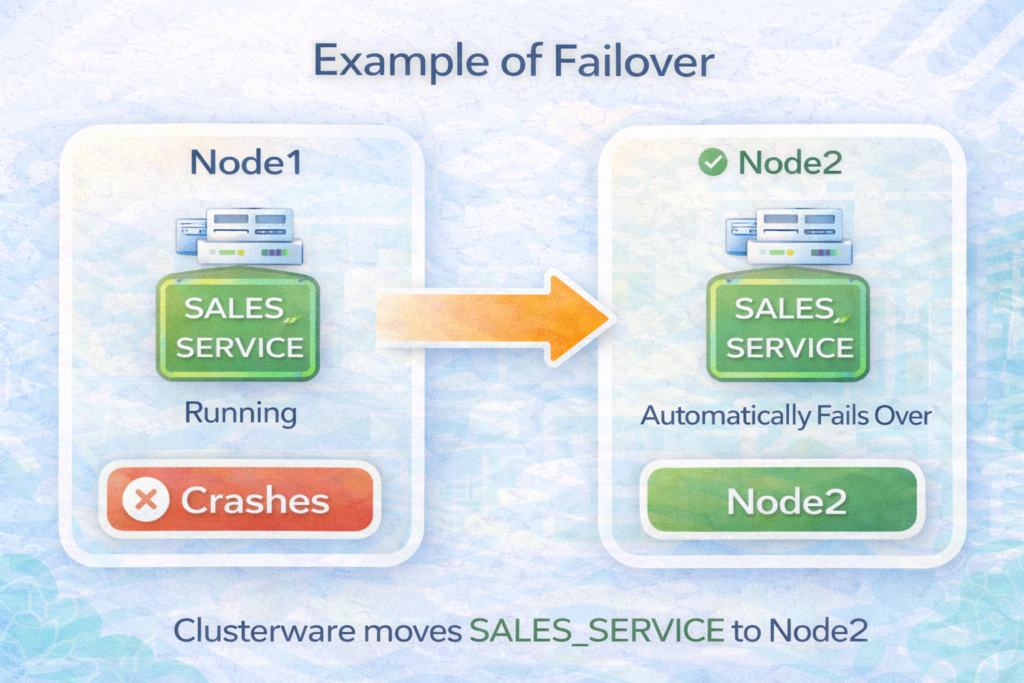
Result:
✔ Application continues running
✔ Users reconnect automatically
✔ Minimal downtime
Types of Failover
1️⃣ Service Failover
Moves services to another node
2️⃣ Instance Failover
Database instance fails → restarted on another node (policy-managed)
3️⃣ VIP Failover
Virtual IP moves to another node for fast client reconnection
What is Relocation in Oracle Clusterware?
Relocation is a planned movement of a resource from one node to another.
Unlike failover, relocation is:
✔ Controlled
✔ Planned
✔ DBA-initiated or policy-driven
Example of Relocation
srvctl relocate service -db PROD -service SALES -oldinst node1 -newinst node2
👉 Moves service from Node1 to Node2 without failure
Why Relocation is Important
Relocation is used for:
- Load balancing
- Planned maintenance
- Node patching
- Capacity management
Failover vs Relocation – Key Differences
| Feature | Failover | Relocation |
|---|---|---|
| Trigger | Failure | Manual / policy |
| Control | Automatic | Controlled |
| Downtime | Minimal | Minimal |
| Use Case | Node crash | Load balancing |
How Oracle Decides Where to Move Resources
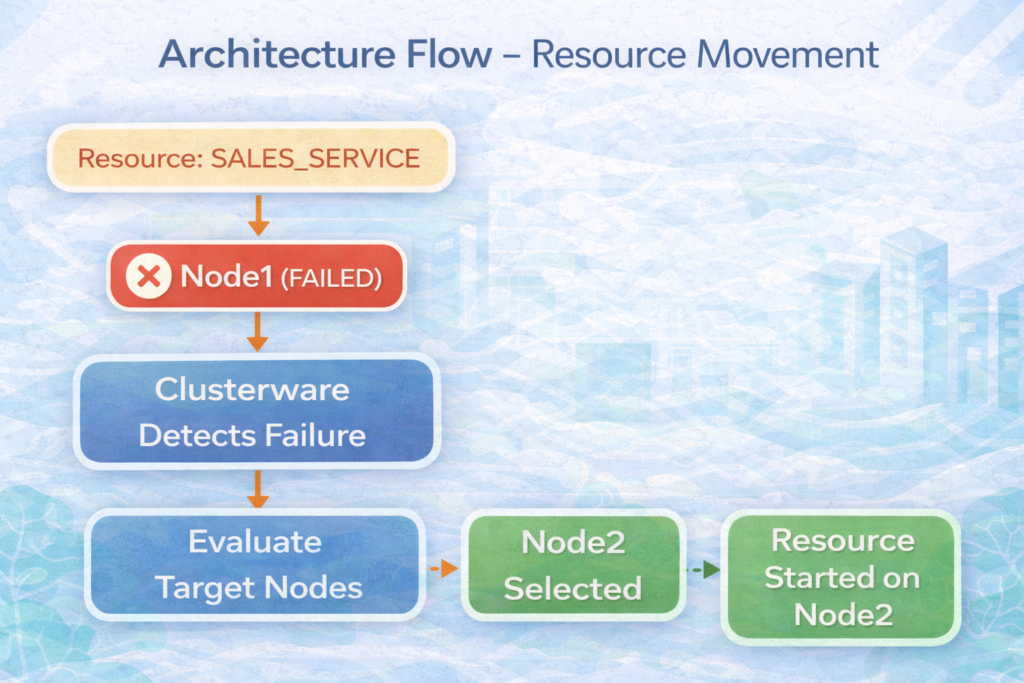
In Oracle Clusterware Resource Management, placement decisions are based on:
- Preferred nodes
- Available nodes
- Server pools (policy-managed)
- Load balancing goals
- Service cardinality
Architecture Flow – Resource Movement
Restart Policies in Clusterware
Each resource has restart attributes:
RESTART_ATTEMPTSFAILURE_THRESHOLDFAILURE_INTERVAL
Clusterware tries to restart locally first, then failover.
Monitoring Resource Failover and Relocation
DBAs can monitor resource status using:
crsctl stat res -t
srvctl status service -db PROD
And logs:
$GRID_HOME/log/<node>/crsd.log$GRID_HOME/log/<node>/agent
Real-World Example
A production RAC system with 3 nodes:
- Node1 handling 60% load
- Node2 and Node3 idle
Using relocation:
srvctl relocate service -db PROD -service SALES -oldinst node1 -newinst node3
Result:
✔ Balanced workload
✔ Reduced CPU pressure
✔ Improved response time
Best Practices for Resource Management
✔ Define preferred and available nodes properly
✔ Use services instead of direct instance connections
✔ Use policy-managed RAC for dynamic scaling
✔ Monitor CRS logs regularly
✔ Configure restart attributes carefully
Common Mistakes to Avoid
❌ Not defining failover nodes
❌ Incorrect service configuration
❌ Ignoring server pools in policy-managed RAC
❌ Not testing failover scenarios
Integration with High Availability Features
Oracle Clusterware Resource Management works with:
- Transparent Application Failover (TAF)
- Fast Connection Failover (FCF)
- Application Continuity (TAC)
These ensure seamless user experience after failover.
Easy Way to Remember
Failover = Unplanned movement due to failure
Relocation = Planned movement for optimization
Conclusion
Oracle Clusterware Resource Management is the engine that keeps your RAC environment running 24/7.
Through intelligent use of:
Failover and Relocation
Oracle ensures:
✔ High availability
✔ Load balancing
✔ Minimal downtime
✔ Smooth maintenance operations
Understanding how Oracle Clusterware Resource Management works will help DBAs design resilient, scalable, and high-performing RAC environments.


