

Upgrading an Oracle database using AutoUpgrade is usually smooth and predictable—but sometimes a single precheck can block the entire process. One such common and confusing failure is the ARCHIVE_MODE_ON error during the PRECHECKS stage.
In this blog, we’ll break down:


- What the AutoUpgrade PRECHECK error means
- Why ARCHIVE_MODE_ON fails even when Archive Log mode is enabled
- How AutoUpgrade’s restoration logic affects the upgrade
- The exact fix using
upg1.restoration=no - Best practices to avoid this issue in future upgrades
This guide is based on a real upgrade scenario from Oracle Database 19.23 to 23.26 using AutoUpgrade.
The AutoUpgrade Error: What Happened?
During an AutoUpgrade run, the job fails at the PRECHECKS stage with the following summary:
[Stage Name]    PRECHECKS
[Status]        FAILURE
Check failed for CDB$ROOT
[ARCHIVE_MODE_ON]

The following checks have ERROR severity and no auto fixup is available:
CDB$ROOT ARCHIVE_MODE_ON
The upgrade does not start, and AutoUpgrade clearly states:
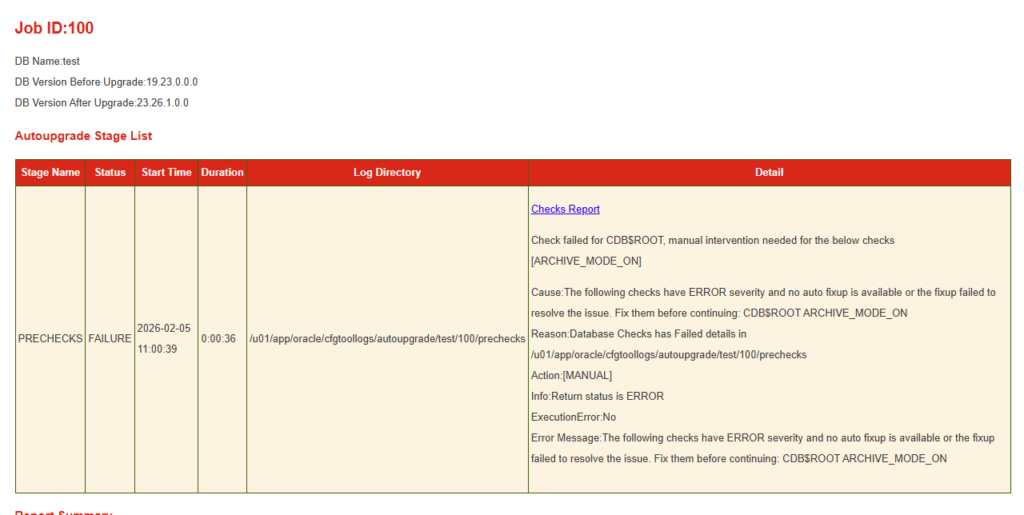
Manual intervention needed
This happens before any actual database upgrade begins, which means your database is still untouched—a good thing.
Understanding ARCHIVE_MODE_ON Precheck
Oracle AutoUpgrade requires the database to be in ARCHIVELOG mode for safety and recoverability during the upgrade.
This check ensures:
- Redo logs are archived
- Point-in-time recovery is possible
- Flashback or restoration actions can succeed
However, here’s the important part:
The failure is NOT always because ARCHIVELOG mode is OFF
In many real environments, the database is already in ARCHIVELOG mode, yet the check still fails.
So why does this happen?
The Hidden Reason: AutoUpgrade Restoration Logic
By default, AutoUpgrade assumes it may need to restore the database if something goes wrong. To do this safely, it validates additional restore-related conditions.
One of those conditions is tightly coupled with ARCHIVELOG and restoration capability.
If AutoUpgrade detects:
- Limited recovery configuration
- Non-standard backup setup
- RAC or custom storage layouts
- No intention to use AutoUpgrade restore
…it may still block the upgrade, even though ARCHIVELOG mode is technically enabled.
This is exactly what happened in this case.
The Breakthrough: Second Run Succeeds
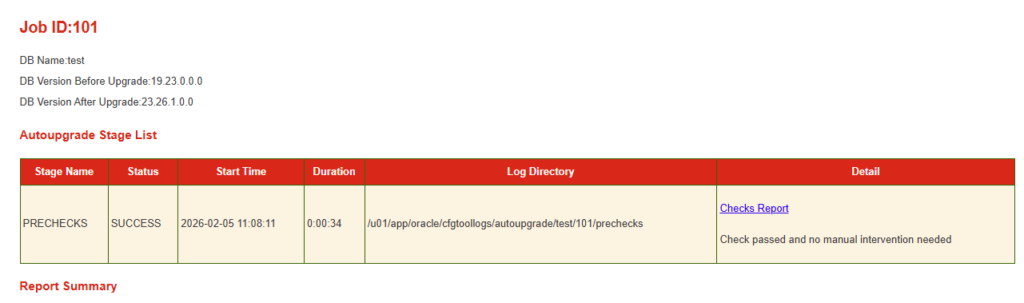
On the second attempt, the PRECHECKS suddenly pass:
[Stage Name]    PRECHECKS
[Status]        SUCCESS
Check passed and no manual intervention needed
What changed?
👉 The AutoUpgrade configuration.
The Correct Fix: Disable AutoUpgrade Restoration
✅ Solution
Add the following line to your config.cfg file:
upg1.restoration=no
That’s it.
Why This Fix Works
By setting:
upg1.restoration=no
You are explicitly telling AutoUpgrade:
- Do NOT attempt automated restore
- Do NOT enforce restore-related prechecks
- Assume rollback will be handled manually if needed
Once restoration logic is disabled:
ARCHIVE_MODE_ONprecheck no longer blocks the upgrade- PRECHECKS complete successfully
- Upgrade proceeds as expected
This is ideal when:
- You already have RMAN backups
- You manage recovery externally
- You want full control during upgrades
Before and After: What Changed
❌ Before
- AutoUpgrade enforces restoration safety checks
ARCHIVE_MODE_ONfails- Upgrade blocked at PRECHECKS
✅ After
- Restoration logic skipped
- PRECHECKS succeed
- Upgrade proceeds from 19c → 23ai
Is This Fix Safe?
Yes—if used correctly.
You should only disable restoration if:
- You have verified RMAN backups
- You have tested recovery procedures
- You are comfortable handling rollback manually
AutoUpgrade is conservative by design. Disabling restoration shifts responsibility to the DBA—but many production environments already operate this way.
Recommended Pre-Upgrade Checklist
Before running AutoUpgrade with restoration=no, ensure:
- Database is in ARCHIVELOG mode
- Valid RMAN backups exist
- Flashback settings are understood
- Upgrade tested in lower environment
status.logmonitored after each stage
Best Practices for AutoUpgrade PRECHECKS
- Always read
status.log, not just terminal output - Review detailed logs under:
$ORACLE_BASE/cfgtoollogs/autoupgrade/<db>/<job>/prechecks - Do not assume errors are literal—many are policy-based
- Use
restoration=nowhen you control backups externally
Final Thoughts
The ARCHIVE_MODE_ON AutoUpgrade error is one of the most misunderstood PRECHECK failures. In many cases, the database is perfectly healthy—but AutoUpgrade’s built-in safety rules are simply too strict for real-world environments.
By understanding how AutoUpgrade restoration works and applying:
upg1.restoration=no
you can:
- Avoid unnecessary upgrade blocks
- Keep full control over recovery
- Perform clean, predictable upgrades to Oracle 23ai
For DBAs upgrading from Oracle 19c to 23ai, this fix can save hours of confusion and repeated failed attempts—especially in RAC and enterprise environments.


