

Keeping your Oracle Database environment patched is one of the most critical responsibilities of a DBA. Regular patching not only fixes security vulnerabilities but also improves stability, performance, and long-term support compliance.
In this guide, we’ll walk through applying the Oracle 19.30 Release Update (RU) using the runInstaller -applyRU method. This approach is especially useful when you want to patch during installation or upgrade an Oracle Home cleanly instead of applying the RU later with OPatch.


This walkthrough is based on a real Linux environment and validated command output.
Why Patch Oracle 19c to Release Update 19.30?
Oracle Database 19c is Oracle’s Long Term Support (LTS) release, supported through 2030. However, Oracle does not recommend running the base 19.3 software without the latest Release Updates.
Oracle 19.30 RU benefits include:
- Critical security fixes (CPU)
- Bug fixes across SQL, RAC, Data Guard, ASM
- Performance and optimizer improvements
- Better compatibility with modern OS kernels
- Stability improvements for production workloads
Applying RUs consistently ensures your environment remains secure, supported, and predictable.
Patch Strategy: runInstaller vs OPatch
Oracle provides two common approaches:
| Method | When to Use |
|---|---|
opatch apply | Existing Oracle Home |
runInstaller -applyRU | During fresh install or clean Oracle Home |
In this guide, we focus on runInstaller -applyRU, which:
- Applies the RU before the database binaries are fully configured
- Results in a clean, patched Oracle Home
- Reduces post-install patching steps
Prerequisites
Before starting, ensure:
- Oracle user is configured
- ORACLE_HOME directory exists
- Sufficient disk space in
/u01 - Inventory is healthy
- Correct RU patch downloaded (19.30)
Step 1: Unzip Oracle 19.3 Database Home
Start by extracting the Oracle Database software ZIP into the target Oracle Home directory.
unzip LINUX.X64_193000_db_home.zip -d /u01/app/oracle/product/19.30
This creates a software-only Oracle Home prepared for patching and installation.
Step 2: Verify Existing OPatch Version
Navigate to the OPatch directory and check the current version.
[oracle@prod OPatch]$ ./opatch version
OPatch Version: 12.2.0.1.17

OPatch succeeded.
Although functional, this OPatch version is not the latest, and Oracle strongly recommends upgrading OPatch before applying any RU.
Step 3: Upgrade OPatch Utility
Download and extract the latest OPatch bundle:
unzip p6880880_190000_Linux-x86-64.zip -d /u01/app/oracle/product/19.30
Verify again:
[oracle@prod OPatch]$ ./opatch version
OPatch Version: 12.2.0.1.49

OPatch succeeded.
✅ You are now running a supported and recommended OPatch version, which is mandatory for applying newer RUs.
Step 4: Apply Oracle 19.30 RU Using runInstaller
This is the core step of the process.
Navigate to the Oracle Home directory and run:
./runInstaller -applyRU /home/oracle/patch/38629535
What This Command Does
- Prepares the Oracle Home for patching
- Applies the 19.30 Release Update
- Launches the Oracle Database Setup Wizard afterward
- Ensures the Oracle Home is patched before configuration
Step 5: Monitor Patch Application Output
During execution, you should see output similar to:
Preparing the home to patch...
Applying the patch /home/oracle/patch/38629535...
Successfully applied the patch.
This confirms the RU has been applied successfully.
Step 6: Review Installer Logs
Oracle automatically generates detailed logs for auditing and troubleshooting.
The log can be found at:
 /u01/app/oraInventory/logs/InstallActions2026-01-22_02-00-49PM/
 installerPatchActions_2026-01-22_02-00-49PM.log
Always review this log if:
- The installer fails
- You see warning messages
- You are patching production systems
Step 7: Oracle Database Setup Wizard Launches
After applying the RU, Oracle automatically launches:
Launching Oracle Database Setup Wizard...
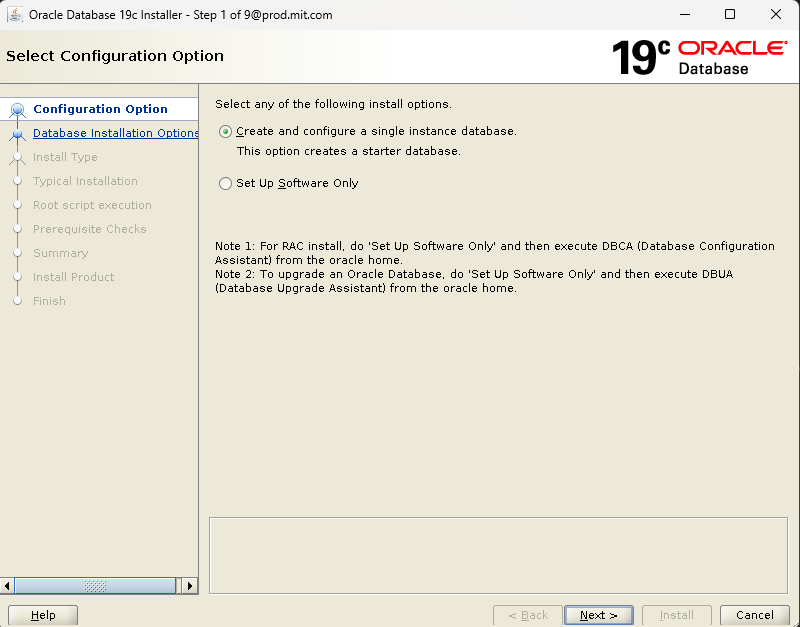
From here, you can:
- Continue with database creation
- Configure listeners
- Complete software-only installation
- Integrate with Grid Infrastructure if required
At this point, your Oracle Home is already at 19.30, which is the cleanest and safest approach.
Advantages of Using runInstaller -applyRU
✔ Clean Oracle Home with RU applied
✔ No post-install patching steps
✔ Reduced downtime during upgrades
✔ Lower risk of patch conflicts
✔ Oracle-recommended approach for new installs
This method is especially useful in:
- Production refreshes
- Golden image creation
- Automated builds
- DR site preparation
Common Mistakes to Avoid
- ❌ Applying RU without updating OPatch
- ❌ Mixing OPatch and runInstaller methods
- ❌ Using wrong patch ID for your version
- ❌ Skipping log validation
- ❌ Patching Grid and DB homes incorrectly
Final Thoughts
Applying the Oracle 19.30 Release Update using runInstaller -applyRU is one of the cleanest and most reliable ways to keep your Oracle Database environment secure and compliant.
By upgrading OPatch first and applying the RU during installation, you minimize risk, reduce operational overhead, and align with Oracle best practices.
If you manage enterprise Oracle environments, this method should be part of your standard build and upgrade strategy.


