

Multitenant architecture has fundamentally transformed the way Oracle databases are deployed, managed, and secured. But with great flexibility comes a new challenge: how do you restrict what pluggable databases (PDBs) can and cannot do—without compromising the security of the entire container database (CDB)?
This is exactly where PDB Lockdown Profiles come into play.


PDB Lockdown Profiles allow DBAs to control privileges, restrict access to sensitive features, and prevent unauthorized operations inside a PDB. If you’re managing multi-tenant environments in Oracle Database 18c, 19c, or later, understanding lockdown profiles is not optional—it’s essential.
In this guide, we break down:
- What PDB lockdown profiles are
- Why they exist
- How to create and apply them
- Static vs dynamic lockdown profiles
- Inheritance rules across CDB, application root, and PDBs
- Real-world scenarios where lockdown profiles protect your environment
Let’s dive in.
What Are PDB Lockdown Profiles?
A PDB lockdown profile is a set of rules that restrict certain operations inside a PDB. These rules help DBAs enforce separation of duties and prevent elevation of privileges—especially in environments where identity is shared across PDBs.
Why do we need lockdown profiles?
Because without restrictions, users inside a PDB could:
- Modify instance-level parameters
- Use network-related features
- Access OS-level directories
- Perform operations like partitioning, Advanced Queuing, or Data Guard
- Use any feature that should normally be controlled at the CDB level
Oracle solves this with the ALTER SYSTEM SET PDB_LOCKDOWN = profile_name parameter.
Types of Restrictions Available in Lockdown Profiles
Oracle allows DBAs to restrict operations across three main categories:
1. Statements
These include operations executed using ALTER SYSTEM, such as:
- Setting instance parameters
- Flushing shared pools
- Switching logfile
- Setting checkpoints
Example restricted statement:
ALTER SYSTEM2. Features
Features you can restrict include:
- NETWORK_ACCESS
- Controls UTL_TCP, UTL_SMTP, UTL_HTTP, UTL_INADDR, and external DBMS operations
- COMMON_SCHEMA_ACCESS
- Governs operations involving common users, common directories, or replacing objects in common schemas
- OS_ACCESS
- Directory operations, UTL_FILE, and external procedures
- XDB_PROTOCOLS
- WebDAV, HTTP(S), and XDB runtime
- JAVA_RUNTIME, JAVA
- Enables or disables Java execution inside PDBs
3. Options
Includes sensitive features such as:
- Partitioning
- Advanced Queuing
- Real Application Clusters
- Oracle Data Guard
This granular control gives DBAs the authority to lock down capabilities that could compromise security, performance, or stability across the CDB.
| STATEMENT | FEATURE | OPTION |
|---|---|---|
| ALTER SYSTEM | NETWORK_ACCESS | Partitioning |
| (Flush shared pool, checkpoint, switch logfile, set) | – UTL_TCP – UTL_SMTP – UTL_HTTP – UTL_INADDR – XDB_PROTOCOLS – DBMS_DEBUG_JDWP | |
| COMMON_SCHEMA_ACCESS | Advanced Queuing | |
| OS_ACCESS | Real Application Clusters (RAC) | |
| – UTL_FILE – JAVA_OS_ACCESS – EXTERNAL_PROCEDURES | ||
| XDB_PROTOCOLS | Oracle Data Guard | |
| JAVA, JAVA_RUNTIME |
How PDB Lockdown Profiles Work
A PDB lockdown profile is created at the CDB root or Application Root. Once created, you define:
- What statements are blocked
- Which features are enabled/disabled
- Which options are restricted
The core syntax:
CREATE LOCKDOWN PROFILE lock_profile1;
ALTER LOCKDOWN PROFILE lock_profile1 DISABLE STATEMENT = ('ALTER SYSTEM');
ALTER LOCKDOWN PROFILE lock_profile1 DISABLE FEATURE = ('NETWORK_ACCESS');
ALTER LOCKDOWN PROFILE lock_profile1 DISABLE OPTION = ('PARTITIONING');
To apply it:
ALTER SYSTEM SET PDB_LOCKDOWN = lock_profile1;
This applies to:
- All PDBs (if set at CDB root)
- Individual PDBs (if set within that PDB)
Restricting Operations in a PDB Using a Lockdown Profile
Oracle supports four steps to implement PDB lockdown profiles:
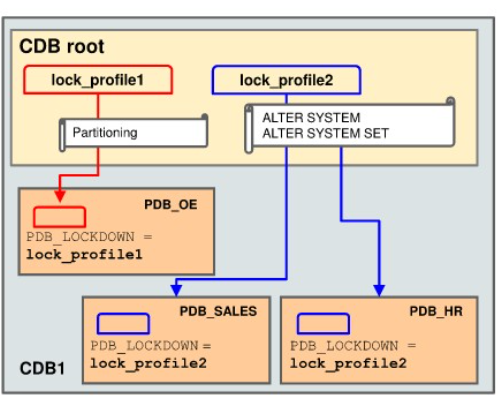
1. Create the lockdown profile
Define your profile name and initial structure.
2. Define rules
Disable statements, features, or options.
3. Set PDB_LOCKDOWN at CDB level
This makes the lockdown profile global for all PDBs.
4. Override in specific PDBs (optional)
A PDB can set its own lockdown profile:
ALTER SYSTEM SET PDB_LOCKDOWN = lock_profile2;
If a PDB defines its own profile, it overrides the CDB-level profile.
Important Concept: Lockdown Profile Inheritance
Multitenant architecture introduces a hierarchy:

CDB Root
 → Application Root
 → Application PDBs
 → Regular PDBs
Rules of Inheritance:
- If a PDB has no lockdown profile defined,
it inherits the profile defined in CDB root. - If a PDB defines its own profile,
it overrides the root-level profile. - Application PDBs may also inherit rules from the Application Root.
- If there is a conflict,
CDB root rules take precedence, unless the PDB explicitly disables them.
The slides illustrate how:
CDB_prof1applies to all PDBs unless overridden- Application roots can have their own lockdown profiles
- Application PDBs can inherit from application root
- Any rule explicitly disabled at the PDB level wins over inherited rules
This structure allows flexible, yet secure, governance of what each PDB can do.
Static vs Dynamic PDB Lockdown Profiles
Oracle allows creating new lockdown profiles based on existing ones in two ways:
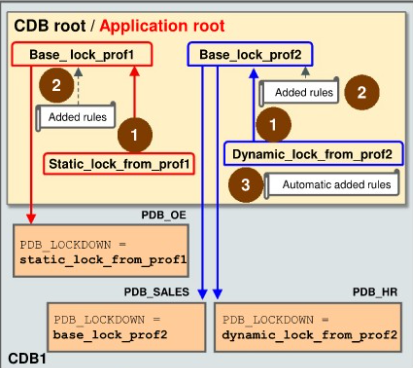
Static Lockdown Profiles
Created using the FROM clause:
CREATE LOCKDOWN PROFILE prof3 FROM base_profile1;
Characteristics:
- Rules are copied at creation time
- Future updates to
base_profile1do not affectprof3 - Use static profiles when you want isolated, snapshot-style control
Dynamic Lockdown Profiles
Created using the INCLUDING clause:
CREATE LOCKDOWN PROFILE prof4 INCLUDING base_profile2;
Characteristics:
- Inherits disabled rules from base profile
- Inherits future changes automatically
- If new rules conflict, explicitly added rules take precedence
Dynamic profiles are perfect for large deployments where standard restrictions must stay synced across many PDBs.
Real-World Use Cases for PDB Lockdown Profiles
1. Cloud / Hosting environments
Restrict tenants from accessing OS, network, or other sensitive features.
2. Production systems
Prevent unintentional parameter changes such as:
ALTER SYSTEM SET ...- Log switching
- Shared pool operations
3. Database consolidation
Ensure one PDB cannot impact performance or availability of others.
4. Security & Compliance
Disable:
- UTL_HTTP (prevent data exfiltration)
- UTL_FILE (block filesystem access)
- Java execution (limit attack surface)
5. Multi-application architecture
Application roots can apply app-wide restrictions.
Conclusion
Oracle’s PDB Lockdown Profiles are one of the most powerful yet underused tools in the multitenant arsenal. They allow administrators to enforce rigid security boundaries between pluggable databases, restrict dangerous features, and ensure stability across the entire CDB.
Whether you’re securing a multi-tenant cloud platform or simply tightening privilege control, PDB lockdown profiles provide:
- Fine-grained feature restriction
- Safe operation boundaries
- Strong tenant isolation
- Flexible inheritance
- Centralized governance
A well-designed lockdown strategy can dramatically improve the reliability, security, and predictability of your Oracle environment.
Related Articles
- Schema-Only Users in Oracle 19c: A Complete Guide to Secure, Modern Database Architecture
- Proxy Users in Oracle Database: A Complete Guide to Secure Multi-Tier Authentication


