

When working with Oracle Active Data Guard (ADG), one common challenge has been handling DML operations (INSERT, UPDATE, DELETE, MERGE) on a standby database. Traditionally, standby databases were read-only, which meant any attempt to perform DML would result in the dreaded error:
ORA-16000: database or pluggable database open for read-only access
But with the introduction of Active Data Guard DML Redirection, Oracle has transformed the way we manage standby databases. This powerful feature allows incidental DML and DDL operations to be executed on the standby, while maintaining all ACID properties and ensuring that the workload is seamlessly synchronized with the primary database. To fully leverage Active Data Guard DML Redirection, you first need a properly configured physical standby environment. As outlined in the “Steps to Configure Oracle Data Guard Physical Standby” guide on DBAInsight


What is Active Data Guard DML Redirection?
DML Redirection is an Oracle feature that allows any DML executed on an Active Data Guard standby to be transparently redirected to the primary database, where the change is applied. The redo is then shipped back to the standby, ensuring both databases stay in sync.
- DML (Data Manipulation Language): INSERT, UPDATE, DELETE, MERGE.
- DDL (Data Definition Language): Primarily supports creating and dropping Global Temporary Tables (GTTs) on standby.
This means you can now:
- Run read queries on your standby as usual.
- Execute occasional DML/DDL without errors or manual workarounds.
- Ensure data consistency across primary and standby databases.
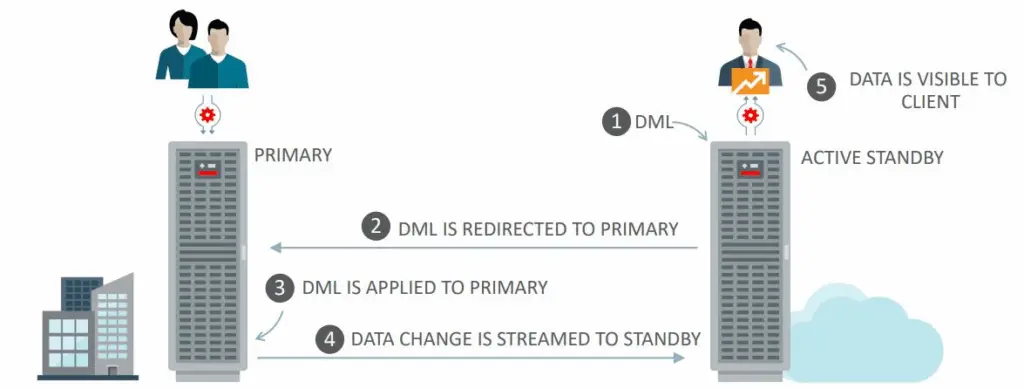
How DML Redirection Works
Here’s the simplified workflow:
- A client issues a DML statement on the standby database.
- The statement is forwarded to the primary database.
- The primary executes the statement and generates redo logs.
- Redo is shipped and applied to the standby database in real time.
- The result is returned to the client, maintaining full transparency.
For DDL operations like creating Global Temporary Tables, the command is captured and passed to the primary. Once redo is applied back to the standby, the session continues normally.
Requirements for DML Redirection
For DML Redirection to succeed, a few conditions must be met:
- The standby database must have real-time apply enabled.
- The standby must be in sync with the primary database.
- The feature must be enabled at the session level.
Example:
ALTER SESSION ENABLE adg_redirect_dml;
By default, the parameter ADG_REDIRECT_DML is disabled (FALSE). You must explicitly enable it in your session or configure it in the environment.
Hands-On Example: DML Redirection in Action
Let’s walk through a quick test to see Active Data Guard DML Redirection in real-world use.
Step 1: On the Primary Database
SQL> CREATE TABLE tab1 (id NUMBER, description VARCHAR2(20));
SQL> INSERT INTO tab1 VALUES (1, 'a');
SQL> COMMIT;
Step 2: On the Standby Database
SQL> SELECT * FROM tab1;

ID   DESCRIPTION
--   ------------
1    a

-- Try to insert without redirection
SQL> INSERT INTO tab1 VALUES (2, 'b');
ORA-16000: database or pluggable database open for read-only access
As expected, the DML fails because the standby is in read-only mode.
Step 3: Enable DML Redirection on the Standby
SQL> ALTER SESSION ENABLE adg_redirect_dml;

SQL> INSERT INTO tab1 VALUES (2, 'b');
1 row created.

SQL> COMMIT;
Now the DML is redirected to the primary, executed there, and shipped back to the standby — all transparent to the user.
On the primary:
SQL> SELECT * FROM tab1;

ID   DESCRIPTION
--   ------------
1    a
2    b
Global Temporary Tables (GTT) on Standby
Another benefit of this feature is the ability to create and drop Global Temporary Tables directly on an Active Data Guard standby.
SQL> ALTER SESSION ENABLE adg_redirect_dml;

SQL> CREATE GLOBAL TEMPORARY TABLE gtt_tab1 (
  id NUMBER,
  description VARCHAR2(20)
) ON COMMIT DELETE ROWS;

Table created.
This makes it easier for developers and applications to use temporary structures on the standby without breaking their workflows.
Key Notes and Version History
- In Oracle 18c, DML Redirection required setting the hidden parameter:
_enable_proxy_adg_redirect = TRUE
From Oracle 19c onward, it is available as a standard feature without hidden parameters.
Why DML Redirection Matters
Active Data Guard DML Redirection helps organizations:
- Simplify operations – Developers can use standby for occasional DML without changing code.
- Improve availability – Standbys can support more dynamic workloads.
- Maintain consistency – All operations still follow strict ACID principles.
- Enhance disaster recovery – Standbys are no longer strictly “read-only.”
Final Thoughts
Oracle Active Data Guard DML Redirection bridges the gap between read-only reporting workloads and occasional write operations on standby databases. By transparently forwarding DML and DDL to the primary, it ensures high availability, data consistency, and operational simplicity for enterprises running mission-critical workloads on Oracle.
If you’re running Oracle 19c or above, enabling this feature can significantly improve how your applications interact with standby databases — turning them from passive replicas into more active participants in your data ecosystem.
To fully leverage Active Data Guard DML Redirection, you first need a properly configured physical standby environment. As explained in the Steps to Configure Oracle Data Guard Physical Standby guide essential tasks include enabling forced logging on the primary, creating a standby control file, setting up redo transport, and configuring managed recovery with real-time apply. For deeper technical insights, Oracle also provides official guidance in My Oracle Support Document ID 2465016.1


