

19c database upgrade from 11.2.0.4 to 19c using DBUA is one of the most recommended approaches for organizations still running on Oracle 11g. Oracle 19c is the long-term support release, offering improved performance, enhanced security, and extended support through 2030. Using the Database Upgrade Assistant (DBUA) simplifies the entire upgrade process, automating checks, schema migrations, and validations to ensure a smooth transition.

Overview of the 19c Database Upgrade
Before starting the upgrade, ensure the following:


- Source Database Version: Oracle Database 11.2.0.4 (terminal release of 11g).
- Target Version: Oracle Database 19.0.0.0 or later (19c).
- Supported Platform: Verify that your operating system is certified with Oracle 19c.
- Disk Space: Ensure adequate space in data, FRA, and Oracle home directories.
- Backups: Take a full RMAN/expdp backup before initiating the upgrade.
- Patches: Apply the latest PSU/patches on both 11g and 19c homes.
- Environment Variables: Configure
ORACLE_HOME,ORACLE_SID, and updatePATH.
Prepare the Environment
Install 19c Software:
- Install Oracle 19c binaries in a new ORACLE_HOME (software-only installation).
- Do not create a new database during installation.
- Oracle Support Note: 19c Upgrade Paths (Doc ID 742060.1)
RMAN full backups before upgrade
- Ensure backup is complete before upgrade.
Run Pre-Upgrade Checks:
- The
preupgrade.jarPre-Upgrade Information Tool, introduced with Oracle Database 18c, is included with newer Oracle releases. This utility resides in the new Oracle home directory and is used to analyze the current database, generate upgrade readiness reports, and create fix-up scripts. - Navigate to the 19c home and run the pre-upgrade tool:
cd $ORACLE_HOME/rdbms/admin
java -jar preupgrade.jar TERMINAL TEXT DIR /tmp/preupgrade

Example
/u01/app/oracle/product/11.2.0/dbhome_1/jdk/bin/java -jar /u01/app/oracle/product/19.0.0/dbhome_1/rdbms/admin/preupgrade.jar FILE DIR /u01/preupgrade/
- This generates reports (
preupgrade.log,preupgrade_fixups.sql,postupgrade_fixups.sql). - Execute the generated fixup scripts in the 11g database:
SQL> @/u01/preupgrade/preupgrade_fixups.sql
Executing Oracle PRE-Upgrade Fixup Script

Auto-Generated by:       Oracle Preupgrade Script
                         Version: 19.0.0.0.0 Build: 13
Generated on:            2025-07-23 21:54:29

For Source Database:     TEST
Source Database Version: 11.2.0.4.0
For Upgrade to Version:  19.0.0.0.0

Preup                             Preupgrade
Action                            Issue Is
Number  Preupgrade Check Name     Remedied    Further DBA Action
------  ------------------------  ----------  --------------------------------
    1.  ols_sys_move              YES         None.
    2.  em_present                NO          Manual fixup recommended.
    3.  invalid_objects_exist     NO          Manual fixup recommended.
    4.  streams_setup             NO          Manual fixup recommended.
    5.  tde_in_use                NO          Manual fixup recommended.
    6.  dictionary_stats          YES         None.
    7.  trgowner_no_admndbtrg     YES         None.
    8.  pre_fixed_objects         YES         None.
    9.  component_info            NO          Informational only.
                                              Further action is optional.
   10.  exf_rul_exists            NO          Informational only.
                                              Further action is optional.
   11.  rman_recovery_version     NO          Informational only.
                                              Further action is optional.
   12.  invalid_all_obj_info      NO          Informational only.
                                              Further action is optional.

The fixup scripts have been run and resolved what they can. However,
there are still issues originally identified by the preupgrade that
have not been remedied and are still present in the database.
Depending on the severity of the specific issue, and the nature of
the issue itself, that could mean that your database is not ready
for upgrade.  To resolve the outstanding issues, start by reviewing
the preupgrade_fixups.sql and searching it for the name of
the failed CHECK NAME or Preupgrade Action Number listed above.
There you will find the original corresponding diagnostic message
from the preupgrade which explains in more detail what still needs
to be done.

PL/SQL procedure successfully completed.
ols_sys_move
- As part of the upgrade to 19, records in the 11.2.0.4.0 audit table SYSTEM.AUD$ are moved to SYS.AUD$. This step can be manually performed before the upgrade to reduce downtime
Logged in AS SYSDBA, run $ORACLE_HOME/rdbms/admin/olspreupgrade.sql from the new Oracle Database 19 home.

Log to 11.2.0.4 Database as Sysdba

TRUNCATE table system.AUD$;

<19c_Oracle_Home>/rdbms/admin/olspreupgrade.sql
Remove EM Database Control
Step 1: If database control is configured, stop EM Database Control,
      using the following command

        $> emctl stop dbconsole

Step 2: Connect to the database using the SYS account AS SYSDBA
EM Remove Location: /u01/app/oracle/product/19.0.0.0/dbhome_1/rdbms/admin/emremove.sql

        SET ECHO ON;
        SET SERVEROUTPUT ON;
        @emremove.sql
Remove Streams setup
- Starting with Oracle Database 19, Oracle Streams is desupported. It is strongly advised to remove any streams configuration manually.
sqlplus / as sysdba

SQL*Plus: Release 11.2.0.4.0 Production on Thu Mar 14 20:56:29 2019

Copyright (c) 1982, 2013, Oracle.  All rights reserved.


Connected to:
Oracle Database 11g Enterprise Edition Release 11.2.0.4.0 - 64bit Production
With the Partitioning, OLAP, Data Mining and Real Application Testing options

SQL>EXEC DBMS_STREAMS_ADM.REMOVE_STREAMS_CONFIGURATION();
Auto-login Oracle Transparent Data Encryption (TDE)
- If an auto-login Oracle Transparent Data Encryption (TDE) Keystore is correctly set up, no action needs to be taken. Otherwise, before starting up the database in upgrade mode in the new Oracle Database Oracle Home, either open the TDE Keystore, or ensure that an auto-login TDE Keystore is configured for the system. If errors are seen while the database upgrade is running because the TDE Keystore is closed, then open the TDE Keystore and resume the upgrade (see “catctl.pl -R”). It may be necessary to open the TDE Keystore as the upgrade progresses in a non-CDB or CDB (e.g., in CDB$ROOT and PDB) if no auto-login TDE Keystore has been configured, as the upgrade process can shutdown and startup the database.
orapki wallet create -wallet "/etc/oracle/wallets/<DB_NAME>" -auto_login
Purge Recyclebin
- The Purge Recyclebin step ensures that any dropped objects residing in the database recycle bin are permanently removed before the upgrade. This helps free up space, reduces unnecessary clutter, and avoids potential upgrade issues caused by invalid or obsolete objects.
SQL> purge recyclebin;

Recyclebin purged.
Get list of Valid Components Database Registry
- Review the information before upgrading.
SELECT comp_id,
       version,
       status,
       namespace,
       schema
FROM   dba_registry
ORDER  BY comp_id;
  OMP_ID     VERSION         STATUS       NAMESPACE  SCHEMA
---------- --------------- ------------ ---------- ---------------
CATALOG    11.2.0.4.0      VALID        SERVER     SYS
CATJAVA    11.2.0.4.0      VALID        SERVER     SYS
CATPROC    11.2.0.4.0      VALID        SERVER     SYS
EXF        11.2.0.4.0      VALID        SERVER     EXFSYS
JAVAVM     11.2.0.4.0      VALID        SERVER     SYS
OLS        11.2.0.4.0      VALID        SERVER     LBACSYS
OWM        11.2.0.4.0      VALID        SERVER     WMSYS
RAC        11.2.0.4.0      VALID        SERVER     SYS
RUL        11.2.0.4.0      VALID        SERVER     EXFSYS
XDB        11.2.0.4.0      VALID        SERVER     XDB
XML        11.2.0.4.0      VALID        SERVER     SYS
Starting DBUA
Set Environment for 19c Home:
export ORACLE_HOME=/u01/app/oracle/product/19.0.0/dbhome_1
export ORACLE_SID=upg19c
export PATH=$ORACLE_HOME/bin:$PATH
dbua
Select Database: Choose the 11.2.0.4 database you want to upgrade

Checks: DBUA performs prerequisite and compatibility checks.

Select Upgrade Options

Backup Option: DBUA prompts for backup (recommended even if you already took RMAN backup).
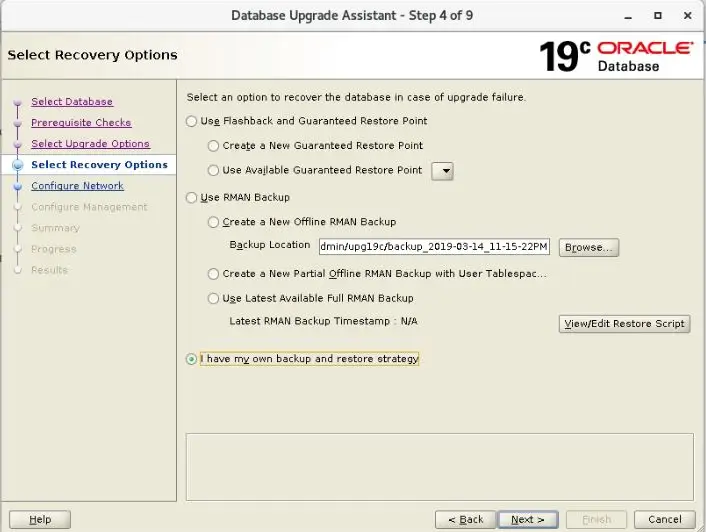
Network Configuration

Management Configuration: EM database express enable it and provide port number or uncheck it.

Upgrade: Review summary and start the upgrade process.


Post-Upgrade Steps
Check Database Informations
SQL> select VERSION,name,open_mode from v$instance,v$database;

VERSION    NAME   OPEN_MODE
---------  ------ ----------
19.0.0.0.0 UPG19C READ WRITE
Timezone Upgrade
[oracle@TnD-ORA-CSE1 ~]$ sqlplus "/as sysdba"

SQL*Plus: Release 19.0.0.0.0 - Production on Mon May 18 08:10:05 2026
Version 19.29.0.0.0

Copyright (c) 1982, 2025, Oracle.  All rights reserved.


Connected to:
Oracle Database 19c Enterprise Edition Release 19.0.0.0.0 - Production
Version 19.29.0.0.0

SQL> @/u01/app/oracle/product/19.0.0.0/dbhome_1/rdbms/admin/utltz_upg_check.sql

Session altered.

INFO: Starting with RDBMS DST update preparation.
INFO: NO actual RDBMS DST update will be done by this script.
INFO: If an ERROR occurs the script will EXIT sqlplus.
INFO: Doing checks for known issues ...
INFO: Database version is 19.0.0.0 .
INFO: This database is a Multitenant database.
INFO: Current container is CDB$ROOT .
INFO: Updating the RDBMS DST version of the CDB / CDB$ROOT database
INFO: will NOT update the RDBMS DST version of PDB databases in this CDB.
WARNING: There are 1 open PDBs .
WARNING: They will be closed when running utltz_upg_apply.sql .
INFO: Database RDBMS DST version is DSTv32 .
INFO: No known issues detected.
INFO: Now detecting new RDBMS DST version.
A prepare window has been successfully started.
INFO: Newest RDBMS DST version detected is DSTv44 .
INFO: Next step is checking all TSTZ data.
INFO: It might take a while before any further output is seen ...
A prepare window has been successfully ended.
INFO: A newer RDBMS DST version than the one currently used is found.
INFO: Note that NO DST update was yet done.
INFO: Now run utltz_upg_apply.sql to do the actual RDBMS DST update.
INFO: Note that the utltz_upg_apply.sql script will
INFO: restart the database 2 times WITHOUT any confirmation or prompt.

Session altered.
SQL> @/u01/app/oracle/product/19.0.0.0/dbhome_1/rdbms/admin/utltz_upg_apply.sql

Session altered.

INFO: If an ERROR occurs, the script will EXIT SQL*Plus.
INFO: The database RDBMS DST version will be updated to DSTv44 .
INFO: This database is a Multitenant database.
INFO: Current container is CDB$ROOT .
INFO: Updating the RDBMS DST version of the CDB / CDB$ROOT database
INFO: will NOT update the RDBMS DST version of PDB databases in this CDB.
WARNING: There are 1 open PDBs .
WARNING: They will be closed when CDB$ROOT is restarted
WARNING: This script will restart the database 2 times
WARNING: WITHOUT asking ANY confirmation.
WARNING: Hit control-c NOW if this is not intended.

SCRIPT
--------------------------------------------------------------------------------
?/rdbms/admin/utltz_upg_apply_patch.sql
INFO: Restarting the database in UPGRADE mode to start the DST upgrade.
Database closed.
Database dismounted.
ORACLE instance shut down.
ORACLE instance started.

Total System Global Area 2466248408 bytes
Fixed Size                  9180888 bytes
Variable Size            1761607680 bytes
Database Buffers          687865856 bytes
Redo Buffers                7593984 bytes
Database mounted.
Database opened.
INFO: Starting the RDBMS DST upgrade.
INFO: Upgrading all SYS owned TSTZ data.
INFO: It might take time before any further output is seen ...
An upgrade window has been successfully started.
INFO: Restarting the database in NORMAL mode to upgrade non-SYS TSTZ data.
Database closed.
Database dismounted.
ORACLE instance shut down.
ORACLE instance started.

Total System Global Area 2466248408 bytes
Fixed Size                  9180888 bytes
Variable Size            1761607680 bytes
Database Buffers          687865856 bytes
Redo Buffers                7593984 bytes
Database mounted.
Database opened.
INFO: Upgrading all non-SYS TSTZ data.
INFO: It might take time before any further output is seen ...
INFO: Do NOT start any application yet that uses TSTZ data!
INFO: Next is a list of all upgraded tables:
Table list: "GSMADMIN_INTERNAL"."AQ$_CHANGE_LOG_QUEUE_TABLE_S"
Number of failures: 0
Table list: "GSMADMIN_INTERNAL"."AQ$_CHANGE_LOG_QUEUE_TABLE_L"
Number of failures: 0
Table list: "MDSYS"."SDO_DIAG_MESSAGES_TABLE"
Number of failures: 0
Table list: "DVSYS"."AUDIT_TRAIL$"
Number of failures: 0
Table list: "DVSYS"."SIMULATION_LOG$"
Number of failures: 0
Table list: "C##OGG_ADMIN"."AQ$_OGG$Q_TAB_EXTUP_S"
Number of failures: 0
Table list: "C##OGG_ADMIN"."AQ$_OGG$Q_TAB_EXTUP_L"
Number of failures: 0
INFO: Total failures during update of TSTZ data: 0 .
An upgrade window has been successfully ended.
INFO: Your new Server RDBMS DST version is DSTv44 .
INFO: The RDBMS DST update is successfully finished.
INFO: Make sure to exit this SQL*Plus session.
INFO: Do not use it for timezone related selects.

Session altered.

SQL>
Manual Method
Time zone file.
sqlplus / as sysdba <<EOF

-- Check current settings.
SELECT * FROM v$timezone_file;

SHUTDOWN IMMEDIATE;
STARTUP UPGRADE;

-- Begin upgrade to the latest version.
SET SERVEROUTPUT ON
DECLARE
  l_tz_version PLS_INTEGER;
BEGIN
  l_tz_version := DBMS_DST.get_latest_timezone_version;

  DBMS_OUTPUT.put_line('l_tz_version=' || l_tz_version);
  DBMS_DST.begin_upgrade(l_tz_version);
END;
/

SHUTDOWN IMMEDIATE;
STARTUP;

-- Do the upgrade.
SET SERVEROUTPUT ON
DECLARE
  l_failures   PLS_INTEGER;
BEGIN
  DBMS_DST.upgrade_database(l_failures);
  DBMS_OUTPUT.put_line('DBMS_DST.upgrade_database : l_failures=' || l_failures);
  DBMS_DST.end_upgrade(l_failures);
  DBMS_OUTPUT.put_line('DBMS_DST.end_upgrade : l_failures=' || l_failures);
END;
/

-- Check new settings.
SELECT * FROM v$timezone_file;

COLUMN property_name FORMAT A30
COLUMN property_value FORMAT A20

SELECT property_name, property_value
FROM   database_properties
WHERE  property_name LIKE 'DST_%'
ORDER BY property_name;
Set COMPATIBALE parameter value to 19.0.0
--See if any restore points are still out there.  Drop them if they exist:
SQL> SELECT NAME, SCN, TIME, DATABASE_INCARNATION#, GUARANTEE_FLASHBACK_DATABASE, STORAGE_SIZE FROM V$RESTORE_POINT;

SQL> drop restore point <restore pint name>;

--Set COMPATIBALE parameter
SQL> ALTER SYSTEM SET COMPATIBLE = '19.0.0' SCOPE=SPFILE;

System altered.

SQL> shut immediate;
Database closed.
Database dismounted.
ORACLE instance shut down.
SQL>
SQL> startup;
ORACLE instance started.

Total System Global Area 1560277408 bytes
Fixed Size                  8896928 bytes
Variable Size            1191182336 bytes
Database Buffers          352321536 bytes
Redo Buffers                7876608 bytes
Database mounted.
Database opened.
SQL>
SQL> show parameter COMPATIBLE

NAME                                 TYPE        VALUE
------------------------------------ ----------- ------------------------------
compatible                           string      19.0.0 <----
noncdb_compatible                    boolean     FALSE
Verify DBA_REGISTRY
col COMP_ID for a10
col COMP_NAME for a40
col VERSION for a15
set lines 180
set pages 999
select COMP_ID,COMP_NAME,VERSION,STATUS from dba_registry;
Gather fixed object stats.
sqlplus / as sysdba
EXECUTE DBMS_STATS.GATHER_FIXED_OBJECTS_STATS;
exit;
AutoFixup
sqlplus / as sysdba
@/u01/preupgrade/postupgrade_fixups.sql



Comments 3