
Introduction
When monitoring Oracle Database environments using Oracle Enterprise Manager (EM) 13c, DBAs may encounter repeated SQL parse errors related to the OMC_ASH_VIEWER package in the Oracle Database alert log.
These errors can generate warnings such as WARNING: too many parse errors and ORA-00904: invalid identifier, potentially creating unnecessary noise in the database alert log.
This issue can occur when the OMC_ASH_VIEWER PL/SQL package, which is used by Enterprise Manager to retrieve Active Session History (ASH) information for the Performance Hub, has not been deployed on the monitored Oracle Database.
This article explains the symptoms, root cause, and step-by-step resolution.
Applies To
- Oracle Enterprise Manager Cloud Control 13c Release 4 (13.4) and later.
- Oracle Enterprise Manager 13.3.2.0.0 and later.
- Oracle Database Enterprise Edition 19c.
- Oracle Database 19.25.0.0.0 (as reported in the affected environment).
1. Understanding the Issue
Oracle Enterprise Manager uses the DBSNMP.OMC_ASH_VIEWER package to retrieve ASH-related information and display it in the following section:
Enterprise Manager Console → Performance Hub → ASH Analytics
If the package is missing or has not been properly deployed on the monitored database, Enterprise Manager may repeatedly attempt to execute SQL statements referencing this package.
As a result, the database alert log may contain repeated parse errors.
1.1 Database Alert Log Errors
The following messages may appear in the Oracle Database alert log:
WARNING: too many parse errors, count=500 SQL hash=0xb6a91e8f

PARSE ERROR: ospid=2835, error=904 for statement:

SELECT DBSNMP.omc_ash_viewer.getVersion() FROM DUAL

Additional information:
hd=0x85e359c0 phd=0x85e36018 flg=0x20
cisid=0 sid=0 ciuid=0 uid=0 sqlid=fa9vmfqvak7ng

Current username=SYS

Application: OEM Action: [ACTIVE] ExecuteThread: '65'
The important error is:
ORA-00904: "DBSNMP"."OMC_ASH_VIEWER"."GETVERSION":
invalid identifier
This indicates that Oracle cannot resolve the referenced package function.
1.2 Enterprise Manager OMS Trace File
The Enterprise Manager OMS trace file (emoms.trc) may also contain messages similar to the following:
DBSNMP.omc_ash_viewer.getVersion was not found
on target <DB_Target_Name> (oracle_database).

Error:
ORA-00904: "DBSNMP"."OMC_ASH_VIEWER"."GETVERSION":
invalid identifier
Additional messages may reference the ASH Analytics time picker:
SELECT sys.dbms_ash.incrementTimePicker(
    begin_time_utc=> ?,
    bucket_size=> ?
).getClobVal(2,2) AS output
FROM dual
These messages indicate that Enterprise Manager is attempting to retrieve ASH information but cannot find the expected OMC_ASH_VIEWER function.
2. Root Cause Analysis
The primary cause of this issue is that the OMC_ASH_VIEWER package has not been deployed on the affected Oracle Database.
To verify whether the package exists, connect to the affected database using an account with appropriate privileges and execute:
SELECT owner,
       object_name,
       object_type,
       status,
       created
FROM   dba_objects
WHERE  object_name LIKE '%ASH_VIEWER%';
If the package has not been deployed, the query may return:
no rows selectedYou can also verify the package function by executing:
SELECT dbsnmp.OMC_ASH_VIEWER.getVersion()
FROM dual;
If the package is missing, the following error may be returned:
ORA-00904: "DBSNMP"."OMC_ASH_VIEWER"."GETVERSION":
invalid identifier
This confirms that the expected package function is unavailable in the database.
3. Solution: Deploy the OMC_ASH_VIEWER Package Using EM 13c
The recommended resolution is to deploy the required Database Management PL/SQL packages through the Enterprise Manager console.
Follow the steps below.
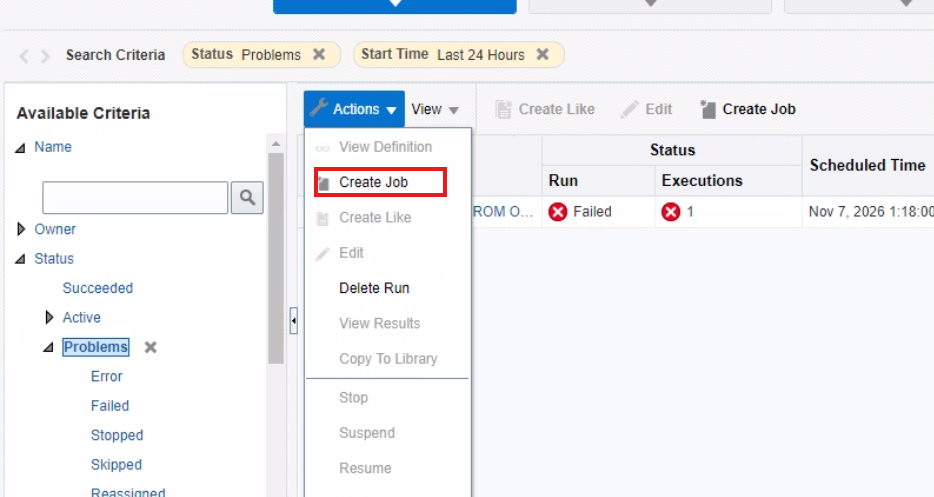
Step 1: Log in to Enterprise Manager
Log in to the Oracle Enterprise Manager Cloud Control 13c console.
Navigate to:
Enterprise → Jobs → Activity
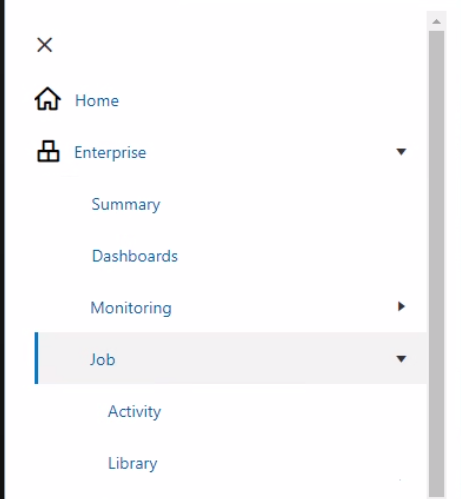
Click Create Job.
Step 2: Select the Job Type
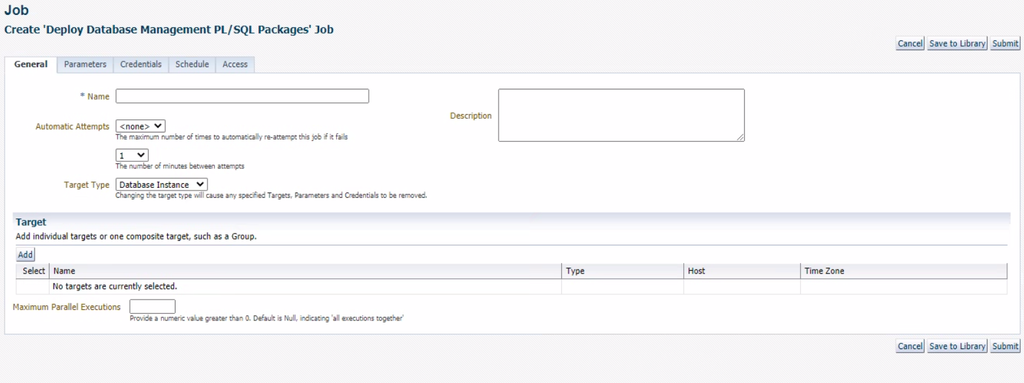
In the Create Job window:
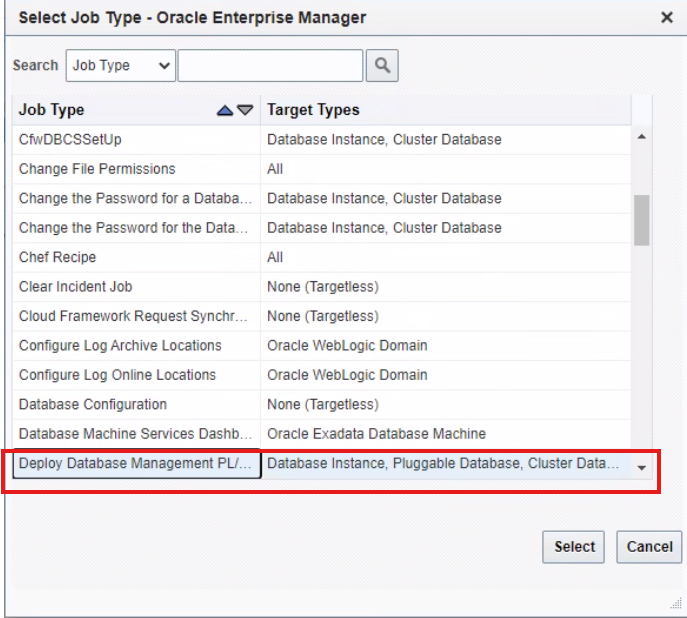
- Search for the following job type:
Deploy Database Management PL/SQL Packages - Select the job type.
- Continue to the job configuration page.
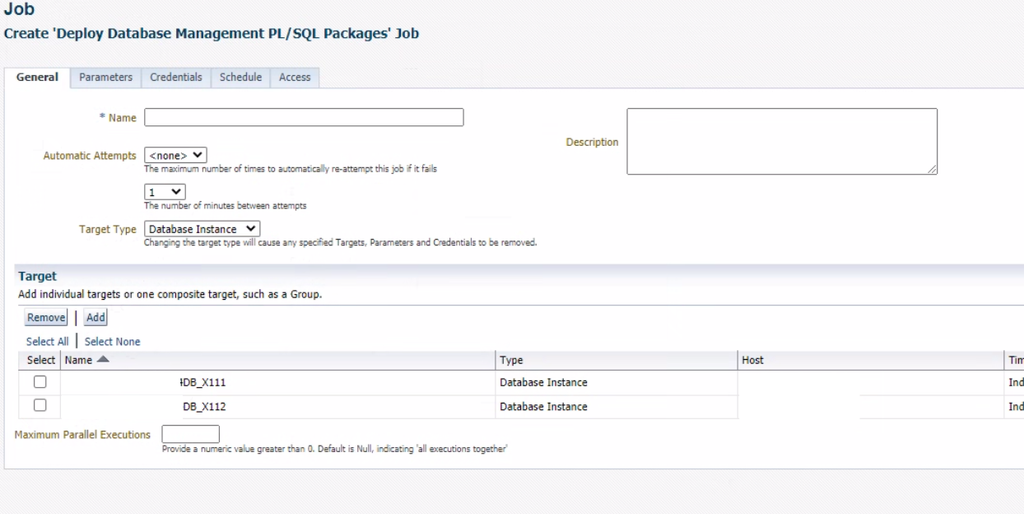
Step 3: Configure General Settings
Under the General tab:
- Enter an appropriate job name.
- Under the Target section, click Add.
- Locate and select the affected database target.
- Confirm the target selection.
Depending on your environment, the target type may be:
- Database Instance
- Pluggable Database
Select the appropriate target for the affected database.
Step 4: Configure Database Credentials
Navigate to the Credentials tab.
If preferred SYSDBA credentials are already configured for the selected target:
- Select the Preferred credentials option.
- Verify that the credentials have the required privileges.
Otherwise:
- Select New.
- Provide the appropriate SYS credentials.
- Configure the credentials with SYSDBA privileges.
Step 5: Schedule and Execute the Job
Navigate to the Schedule tab.
You can configure the job to:
- Execute immediately.
- Execute at a specified date and time.
Review the configuration and submit the job.
Monitor the job execution from:
Enterprise → Jobs → Activity
Ensure that the deployment job completes successfully.
4. Verify the Package Deployment
After successful deployment, connect to the affected Oracle Database and verify the package.
Step 1: Check the Package Objects
Execute:
SELECT owner,
       object_name,
       object_type,
       status,
       created
FROM   dba_objects
WHERE  object_name LIKE '%ASH_VIEWER%'
ORDER BY object_type;
Verify that the expected package objects are present and valid.
Step 2: Verify the Package Version
Execute:
SELECT dbsnmp.OMC_ASH_VIEWER.getVersion()
FROM dual;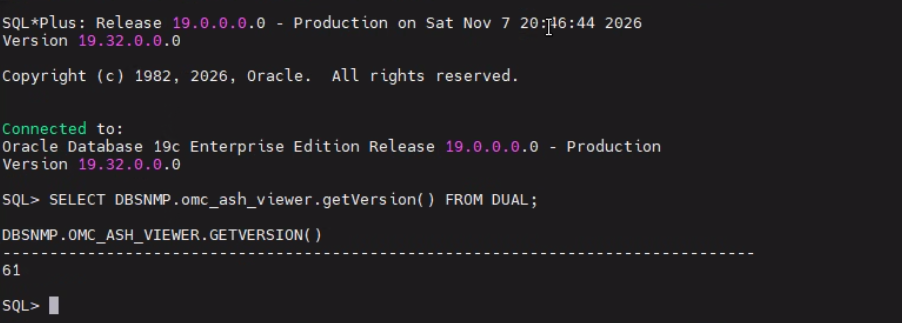
Expected Result:
The query should successfully return the deployed package version instead of raising ORA-00904.
Step 3: Monitor the Database Alert Log
Continue monitoring the database alert log to verify that the repeated parse errors related to OMC_ASH_VIEWER no longer occur.
You can also review the Enterprise Manager OMS trace file to confirm that the previous package lookup errors have been resolved.
5. Conclusion
Repeated ORA-00904 parse errors related to DBSNMP.OMC_ASH_VIEWER.GETVERSION in an Oracle Database alert log can indicate that the required Enterprise Manager ASH Viewer package is missing from the monitored database.
By deploying the Database Management PL/SQL Packages through Oracle Enterprise Manager 13c and validating the package version, DBAs can resolve this issue and restore the expected ASH Analytics package functionality.
Regular monitoring of database alert logs and Enterprise Manager job execution is recommended to identify and address similar monitoring-related issues.
EM 13c: Parse Errors Caused By OMC_ASH_VIEWER Package in DB Alert log – KB720305