
Every quarter I get the same question from colleagues and blog readers: “Which patch do I actually need, the GI RU or the database RU?” With the October 2026 cycle out, Patch 39915792 (Database Release Update 19.33.0.0.261020) is the one for anyone who only has a database home to patch. In this post I’ll go through what it is, how it differs from the GI bundle, how to apply it, and the small details that Oracle’s readme mentions in passing and that bite people later.
If you run Grid Infrastructure, you’ll also want my earlier post on the [19.33 GI Release Update, Patch 39922757], because this database RU is one of the sub-patches inside that bundle.

What Is Patch 39915792?
It’s the 19c database quarterly Release Update for October 2026. It is cumulative, so everything from earlier database bundles is already inside, and you don’t have to install previous quarters first. The only requirement is that the home already runs Oracle Database 19c.
Oracle has packed a lot of installation flexibility into this one. The patch is RAC rolling installable, so you can patch node by node without taking the whole cluster down. It’s also Data Guard Standby-First installable, which lets you patch the standby first and reduce risk and downtime. And it’s Database Vault installable, though Vault environments have their own note on MOS that you should read first.
One caveat that catches people out is that this patch applies to database homes only. Oracle states plainly that it cannot be applied to a Grid Infrastructure home. If your server has a Grid home, check the Primary Note for Database Quarterly Release Updates on MOS to find the matching GI patch.
DB RU, GI RU or OJVM: Which One Do You Need?
This is where confusion starts, so let me spell it out.
The database RU (this patch) covers the database home. The GI RU (39922757) is a bundle that contains this database RU together with the OCW, ACFS, Tomcat and DBWLM sub-patches, and it patches both Grid and database homes. The OJVM Release Update is a separate patch, and the database RU doesn’t include it. If you use Java inside the database and want both patches in one downtime window, Oracle points to a dedicated MOS note describing the patching options. For RAC rolling installs the OJVM patch has extra requirements of its own, also documented on MOS.
The readme also reminds you that the RU ships with the JDK fixes from the previous cycle. For the newest JDK fixes you’d install a separate JDK patch, and its number is listed in the Primary Note for Database Quarterly Release Updates. I’ve seen teams patch every quarter and still run an older JDK because nobody read that line.
One Point About Grid-Based Homes
Oracle includes a recommendation for homes that use Grid components, which covers RAC, Oracle Restart, and single-instance databases using ASM. Those database homes need the matching OCW RU so the DBRU and OCW libraries stay compatible. In practice, that’s another reason I usually patch such systems through the GI RU and opatchauto, not by running opatch apply on the database home by hand.
What’s New in the Release Notes
Nothing dramatic in this cycle, but a few standing notes are worth repeating. Since 19.27 (April 2025), small pages are not allowed for the RDBMS SGA on Exadata. If you’ve been running with small pages there, check the MOS note Oracle references before you patch.
The 19c database is certified on Oracle Linux 9 and RHEL 9 from 19.22 onward. And UTL_URI.ESCAPE has been RFC-compliant since 19.21, treating # as a reserved character, which can break old code that relied on the previous behavior.
Time zone patches: copied, not applied
The RU contains the core DST patches, from DSTV33 (tzdata2018g) up to DSTV46 (tzdata2026b and 2026c). This one matters: installing the RU does not change the DST version of any database. The files are only copied into $ORACLE_HOME/oracore/zoneinfo. Upgrading the DST version is a separate decision that you can make at any time, and it needs downtime. If you do plan it, Oracle recommends going to the latest available version.
Before You Patch
OPatch version
You need OPatch 12.2.0.1.52 or later. Oracle recommends the latest OPatch for 19c (patch 6880880 on MOS, “OPatch for DB 19.0.0.0.0”). On RAC, update OPatch in every database home being patched. Put the patch and OPatch in a shared location so every node can reach them.
How To Download And Install The Latest OPatch
Backups and environment checks
Back up the Oracle home binaries and the central inventory. Oracle recommends it, and it’s cheap insurance. On SLES 15 SP3 and later, you also need the compat-libpthread-nonshared package installed. Make sure make, ar, ld and nm are in your PATH, because OPatch relinks libraries during the install and fails without them.
Conflict detection
Check for conflicts between your installed one-offs and the new RU. The easiest way is the Patch Recommendations and Patch Plans features in My Oracle Support. Without those, upload your OPatch inventory to the MOS Conflict Checker. You can also test manually:
unzip p39915792_<version>_<platform>.zip
cd 39915792
$ORACLE_HOME/OPatch/opatch prereq CheckMinimumOPatchVersion
$ORACLE_HOME/OPatch/opatch prereq CheckConflictAgainstOHWithDetail -phBaseDir <UNZIPPED_PATCH_LOCATION>/39915792/
The report lists conflicting patches and patches for which the RU is a superset. A superset result is fine, since the RU contains the old fix. A true conflict needs a resolution patch, and the Database Patch Conflict Resolution note on MOS tells you whether one exists or whether you need to request it.
Applying the Patch
The method depends on your setup.
Non-RAC: shut down all instances and listeners that use the home, then run:
unzip -d <PATCH_TOP_DIR> p39915792_<version>_<platform>.zip
cd <PATCH_TOP_DIR>/39915792
opatch apply
RAC: use the OPatch rolling method, one node at a time, so the database stays available. The MOS note on rolling patch support in RAC covers the details.
Data Guard: if you aren’t using Standby-First, the patch must go on both the primary and the physical standby, as described in the MOS note for non-Standby-First DBRU application. If you do use Standby-First, remember the rule that datapatch must not run on the standby. It runs once, on the primary, after every database in the configuration has the binaries.
Out-of-place patching: the readme also points to the out-of-place approach, where you patch a cloned home and switch services over afterwards. It’s a good way to shorten your outage if you can handle the extra disk space.
After the Binaries: Post-Install Steps
Check Oracle home after the run:
$ORACLE_HOME/opatch lspatches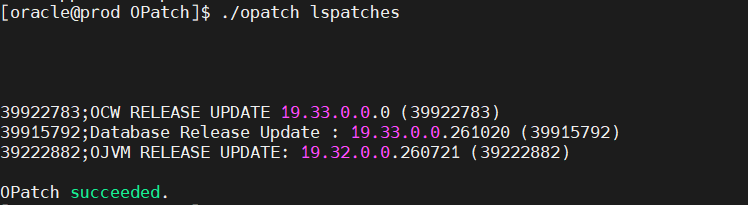
Load the SQL changes with datapatch
Patching the binaries is only half the job. Start the database, open the pluggable databases, and run datapatch. On RAC, do this on one node only.
sqlplus /nolog
SQL> connect / as sysdba
SQL> startup
SQL> alter pluggable database all open;
SQL> quit

cd $ORACLE_HOME/OPatch
./datapatch -sanity_checks
./datapatch
For a non-CDB, skip the alter pluggable database line. If you open only selected PDBs, datapatch only processes the CDB and those PDBs. Open any skipped or newly plugged PDB later and rerun datapatch.
Then check CDB_REGISTRY_SQLPATCH and confirm the APPLY status is SUCCESS. Oracle notes that you only see PDB$SEED results if _EXCLUDE_SEED_CDB_VIEW=FALSE is set, so don’t panic if the seed doesn’t show up. Logs live under $ORACLE_BASE/cfgtoollogs/sqlpatch/39915792/, in a file named 39915792_apply_<SID>_<CDB>_<timestamp>.log. If a PDB has invalid objects afterwards, run utlrp.sql through catcon.pl.
Fix the extjob permissions
This is the step I’d bet most people skip. Relinking during the patch can change permissions on extjob, which breaks external jobs. As root:
chown root $ORACLE_HOME/bin/extjob
chmod 4750 $ORACLE_HOME/bin/extjob
Upgrade the RMAN catalog
If you use a recovery catalog, connect and run UPGRADE CATALOG; twice, since the second run confirms it.
Optimizer behavior
Oracle says no new fix that could change an execution plan gets activated automatically. Fixes you already had enabled stay on. If you want to enable new ones deliberately, the MOS note on managing “installed but disabled” fixes with DBMS_OPTIM_BUNDLE has the commands.
New or upgraded databases created after the patch: run the datapatch step for any new database. An upgraded database needs no extra action.
Rolling Back
For a non-RAC home, shut everything down and run:
opatch rollback -id 39915792On RAC, roll back node by node: stop the instance on the node, roll back, then start it with srvctl start instance -d <db-unique-name> -n <nodename>. After the binaries, run datapatch on one node only, confirm ROLLBACK shows SUCCESS in CDB_REGISTRY_SQLPATCH, check the 39915792_rollback_... log, and upgrade the RMAN catalog again.
Known Issues: Errors You Can Ignore
The readme lists a set of errors that can show up during datapatch or its rollback and are safe to ignore. They are mostly “does not exist” and “already exists” messages, such as ORA-00942, ORA-00955, ORA-01430, ORA-01432, ORA-01434, ORA-04043 and ORA-29830, and ORA-06512 when it follows one of those. They look scary in the log, but Oracle documents them as harmless. For anything else, and for issues found after release, check the October 2026 known issues note on MOS before escalating.
My Practical Advice
Run the conflict check well before your window, ideally the week before, so any resolution patch request has time to come back. Decide up front whether you also need OJVM and the JDK patch, because adding them later means a second outage. And put the extjob fix in your checklist, not in your memory.
Frequently Asked Questions
Is Patch 39915792 cumulative? Yes. It includes all content from previous database bundles.
Can I apply it to a Grid Infrastructure home? No. It’s for database homes only. Use the GI RU for Grid.
Can I patch RAC without downtime? Yes. The patch is RAC rolling installable.
Does it include OJVM? No. The OJVM Release Update is a separate patch.
Does it change my database time zone version? No. DST files are only copied into the Oracle home, and no DST upgrade happens.
Do I need to run datapatch? Yes, after the binary install, on one node for RAC. Check CDB_REGISTRY_SQLPATCH afterwards.
Where do I find the list of fixed bugs? The readme refers to the “Database 19 Release Updates and Revisions Bugs Fixed Lists” note on MOS.



Hello,
I want to know when Oracle GI RELEASE UPDATE 19.33.0.0.0 for Oracle Solaris on SPARC 64-bit will be released ?
Regards,