
Introduction
When starting an Oracle Real Application Clusters (RAC) database, you may encounter errors indicating that the database cannot be mounted because the configuration of one instance is incompatible with another instance.
In this scenario, the instance startup produces the following errors:

ORA-32004: obsolete or deprecated parameter(s) specified
ORA-01105: mount is incompatible with mounts by other instances
ORA-01174: DB_FILES is 4000 but needs to be 3000 to be compatible
ORA-01507: database not mounted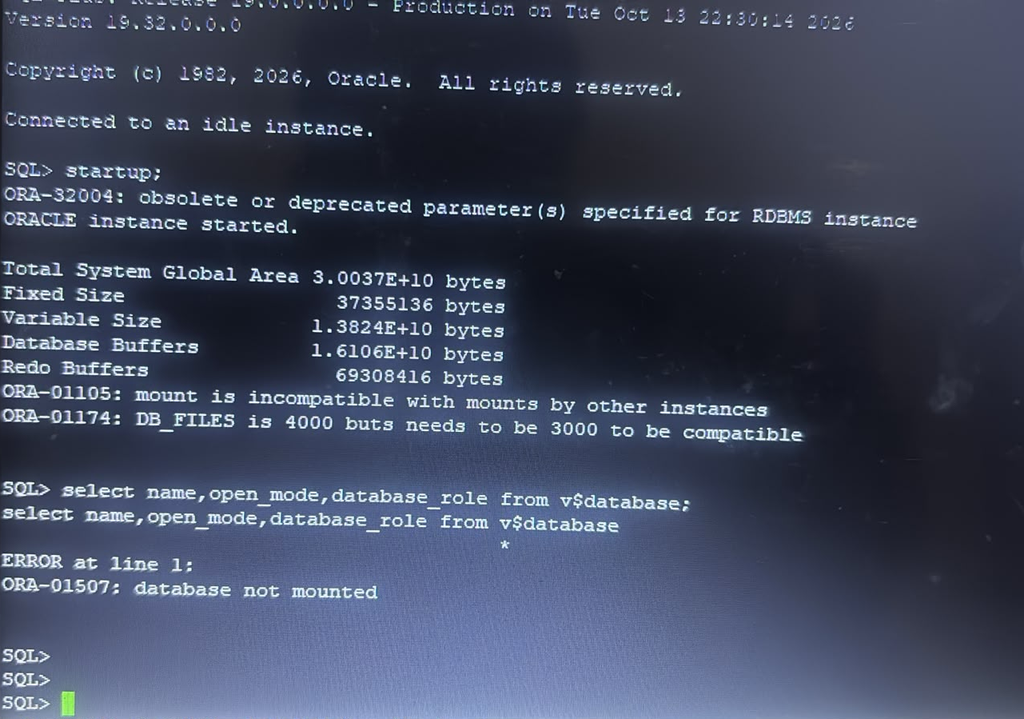
The main issue is a mismatch in the DB_FILES initialization parameter between RAC instances. One instance is configured with DB_FILES=4000, while another instance has DB_FILES=3000.
This article explains how to identify the mismatch and resolve it safely without unnecessarily forcing every RAC instance to use the same value.
1. Understanding the Errors
ORA-01105: Mount is incompatible with mounts by other instances
This error occurs when an instance attempts to mount a database using configuration settings that are incompatible with those used by another instance already mounting or running the same database.
In a RAC environment, certain database initialization parameters must be consistent across all instances.
ORA-01174: DB_FILES is 4000 but needs to be 3000 to be compatible
The DB_FILES parameter specifies the maximum number of database files that can be opened for a database instance. Its configured value must be compatible across all instances mounting the same database.
In this example:
| RAC instance | DB_FILES |
|---|---|
| Instance 1 | 3000 |
| Instance 2 | 4000 |
The instance configured with DB_FILES=4000 cannot mount the database while another instance has mounted it with an incompatible value of 3000.
Important: DB_FILES is a static initialization parameter. A change requires an instance restart to take effect.
ORA-01507: Database not mounted
This is a subsequent error because the mount operation failed. Queries against V$DATABASE, such as the following, cannot succeed until the database is mounted:
SELECT name, open_mode, database_role
FROM v$database;
Therefore, ORA-01507 is a consequence of the mount failure rather than the root cause.
2. Check the Database State
Connect to the affected instance as SYSDBA:
sqlplus / as sysdbaCheck the current instance state:
SELECT instance_name,
       status,
       database_status
FROM v$instance;
You may find that the instance is in the STARTED state because the database has not mounted successfully.
At this stage, queries against V$DATABASE are not appropriate because the database is not mounted.
3. Check DB_FILES Configuration on All RAC Instances
First, inspect the parameter configuration in the SPFILE:
SET LINESIZE 200
SET PAGESIZE 100

COLUMN sid FORMAT A20
COLUMN name FORMAT A20
COLUMN value FORMAT A15

SELECT sid,
       name,
       value,
       isspecified
FROM v$spparameter
WHERE name = 'db_files'
ORDER BY sid;
This helps identify instance-specific entries in the SPFILE.
For RAC databases, inspect the SPFILE configuration for entries such as:
SID          NAME       VALUE
------------ ---------- -----
*            db_files   3000
RACDB1        db_files   3000
RACDB2        db_files   4000
The example above illustrates a possible configuration mismatch. Actual entries will depend on the database configuration.
If the instance cannot mount, use an available instance that is already mounted or connect to the SPFILE configuration through an appropriate administrative method.
4. Understand the Correct Resolution
The correct fix depends on the intended database configuration.
There is no requirement to increase DB_FILES to an arbitrarily large value. Instead, identify the value that should be used consistently by all instances.
For example, if the intended configuration is DB_FILES=3000, and the second instance has an unnecessary instance-specific value of 4000, remove or correct that override.
Option A: Correct an instance-specific SPFILE entry
If the database uses an SPFILE and the incorrect setting is specific to RACDB2, connect to an available mounted instance as SYSDBA and execute:
ALTER SYSTEM RESET db_files
SCOPE=SPFILE
SID='RACDB2';
This removes the instance-specific override, allowing the instance to inherit the wildcard value if one is configured.
Important: Run this command only after confirming that the wildcard SPFILE entry contains the intended value. If the wildcard value is absent, resetting the instance-specific entry may not produce the desired configuration.
Option B: Set the intended value explicitly
If the database requires an explicit instance-specific setting, configure the correct value:
ALTER SYSTEM SET db_files=3000
SCOPE=SPFILE
SID='RACDB2';
Use the actual instance name from your environment.
Because DB_FILES is static, the corrected value will take effect after the affected instance is restarted.
Do not apply both options blindly. Choose the method that matches your existing SPFILE configuration.
5. Restart the Affected RAC Instance
Before restarting, confirm that the target instance can be stopped without causing an unacceptable service interruption.
For Oracle RAC databases managed by Oracle Clusterware, use SRVCTL rather than starting and stopping managed instances independently through SQL*Plus.
For example:
srvctl stop instance -db RACDB -instance RACDB2
srvctl start instance -db RACDB -instance RACDB2
Replace RACDB and RACDB2 with the actual database unique name and instance name.
For a standalone instance not managed by Clusterware, the restart procedure will differ.
6. Verify the Resolution
After restarting the affected instance, check its status:
srvctl status database -db RACDBThen connect to the database:
sqlplus / as sysdbaVerify the database state:
SELECT instance_name,
       status,
       database_status
FROM v$instance;
Once the database is mounted, verify the database details:
SELECT name,
       open_mode,
       database_role
FROM v$database;
Finally, verify the effective DB_FILES setting on each RAC instance:
SHOW PARAMETER db_files;Run this command against each instance, or use a suitable cluster-wide administrative connection.
Ensure the instances have compatible values and that the database mounts and opens successfully.
7. What About ORA-32004?
The startup output also contains:
ORA-32004: obsolete or deprecated parameter(s) specifiedThis warning indicates that one or more initialization parameters are obsolete or deprecated in the Oracle Database version being started.
It is separate from the DB_FILES mismatch and is not the direct cause of ORA-01105 in this scenario.
Review the database alert log and initialization parameter configuration to identify the affected parameter. Remove or replace it only after confirming its purpose and the supported alternative for your Oracle Database release.
8. Best Practices for Oracle RAC DBAs
- Maintain compatible values for initialization parameters that must be consistent across RAC instances.
- Review wildcard (
*) and instance-specific SPFILE entries before changing static parameters. - Avoid increasing
DB_FILESwithout a documented requirement. - Remember that static parameters require an instance restart.
- Use SRVCTL to manage Oracle Clusterware-controlled database instances.
- Review the alert log after startup failures and distinguish root-cause errors from subsequent errors.
- Test configuration changes in a non-production environment whenever possible.
Conclusion
The Oracle RAC startup failure in this scenario is caused by an incompatible DB_FILES setting between instances. The instance configured with DB_FILES=4000 cannot mount the database while the other instance requires DB_FILES=3000.
The solution is to inspect the SPFILE, identify the incorrect instance-specific setting, correct or remove the override as appropriate, and restart the affected instance.
Once the configuration is compatible, the mount failure should be resolved, allowing the database to proceed to the appropriate operational state.


