
Introduction
Oracle Database uses initialization parameters to control database behavior, memory management, instance configuration, and other operational settings. Some parameters can be modified dynamically while the database is running, while others require a database restart for changes to take effect.
For Oracle DBAs, identifying static initialization parameters is important when planning configuration changes, troubleshooting startup issues, and maintaining production database environments.

In this article, we will explore how to identify static initialization parameters using Oracle dynamic performance views and how to check parameter configurations in Oracle RAC environments.
1. Identify All Static Initialization Parameters
Oracle provides the ISSYS_MODIFIABLE column in the V$PARAMETER view to indicate whether an initialization parameter can be modified dynamically at the system level.
Execute the following query as a user with the required privileges:
SELECT name,
       value,
       issys_modifiable
FROM   v$parameter
WHERE  issys_modifiable = 'FALSE'
ORDER BY name;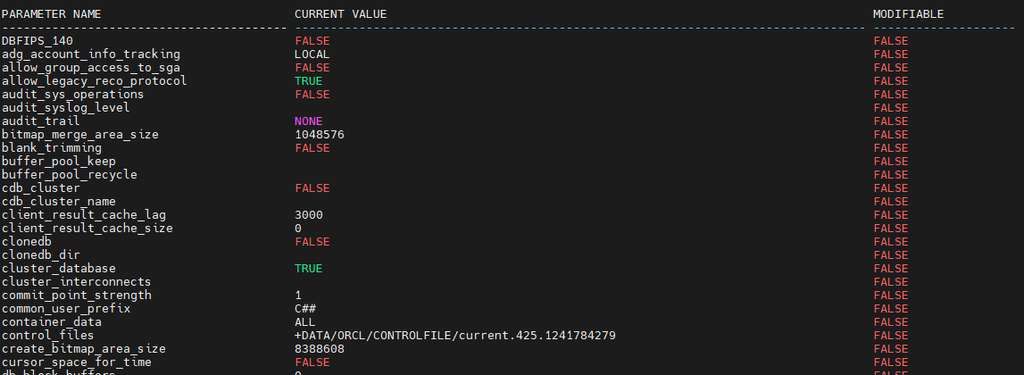
This query displays parameters that cannot be modified dynamically at the system level. Changes to these parameters generally require an instance restart to take effect.
2. Understand ISSYS_MODIFIABLE Values
The ISSYS_MODIFIABLE column identifies how an initialization parameter can be modified.
| Value | Description |
|---|---|
IMMEDIATE | The parameter can be modified dynamically, and the change takes effect immediately. |
DEFERRED | The parameter can be modified dynamically, with the change affecting subsequent sessions. |
FALSE | The parameter cannot be modified dynamically at the system level; a restart is required for the new value to take effect. |
This column provides a straightforward way to distinguish static parameters from dynamically modifiable parameters.
Note: The query uses the standard ISSYS_MODIFIABLE column available in V$PARAMETER. There is no need to include additional columns that may not be available in every Oracle version or view.
3. Check a Specific Initialization Parameter
If you need to investigate an individual parameter, use the following query and replace parameter_name with the parameter you want to check.
SELECT name,
       value,
       issys_modifiable
FROM   v$parameter
WHERE  name = 'parameter_name';
For example, to check the modifiability of DB_FILES, replace parameter_name with db_files.
The output indicates whether the parameter can be modified dynamically or requires a restart. The same approach can be used to investigate other Oracle initialization parameters.
4. Check Initialization Parameters Across Oracle RAC Instances
In Oracle RAC environments, it is important to compare parameter values across running instances when troubleshooting configuration differences.
The GV$PARAMETER view provides information from all accessible instances.
SELECT inst_id,
       name,
       value,
       issys_modifiable
FROM   gv$parameter
WHERE  issys_modifiable = 'FALSE'
ORDER BY name, inst_id;
This query lists static initialization parameters and their values for each accessible RAC instance.
Review the output to identify differences in parameter values between instances. Any differences should be investigated against the database configuration and Oracle’s requirements before making changes.
5. Verify Parameters Configured in the SPFILE
The V$SPPARAMETER view displays initialization parameter settings stored in the server parameter file (SPFILE).
Use the following query to review the configured values:
SELECT sid,
       name,
       value,
       isspecified
FROM   v$spparameter
WHERE  isspecified = 'TRUE'
ORDER BY name, sid;
The SID column identifies whether a parameter is configured globally using * or specifically for an instance.
Comparing the SPFILE configuration with the running values reported by V$PARAMETER or GV$PARAMETER helps identify configuration differences and determine whether a restart is needed to apply a change.
If the database uses a PFILE instead of an SPFILE, review the active PFILE configuration separately.
6. Best Practices for Oracle DBAs
Before changing initialization parameters in a production environment, follow these practices:
- Check
ISSYS_MODIFIABLEto determine whether the parameter can be changed dynamically. - Review the current parameter value using
V$PARAMETER. - Verify the configured settings in
V$SPPARAMETER, where applicable. - In RAC environments, compare values across instances using
GV$PARAMETER. - Confirm the parameter’s documentation and operational requirements before making changes.
- Plan a maintenance window when an instance restart is required.
Conclusion
Identifying static initialization parameters is an important task for Oracle Database administrators. The ISSYS_MODIFIABLE column in V$PARAMETER provides a simple way to identify parameters that cannot be changed dynamically at the system level.
By combining V$PARAMETER, GV$PARAMETER, and V$SPPARAMETER, DBAs can investigate parameter settings, compare RAC instance configurations, and plan database changes more safely.
Installing Oracle Database Client 19c: A Step-by-Step Visual Guide


