

Every DBA who has run a Release Update knows the moment. You kick off the pre-patch sanity checks, you’re expecting the usual green ticks, and then one line refuses to cooperate. Mine was on a Saturday evening, patching a 19c environment from RU 19.22 up to 19.31 (the April 2026 bundle), when the sanity check log threw this at me:
Check: Invalid System Objects - WARNING
| GSMADMIN_INTERNAL | 7 |
| SYS               | 4 |
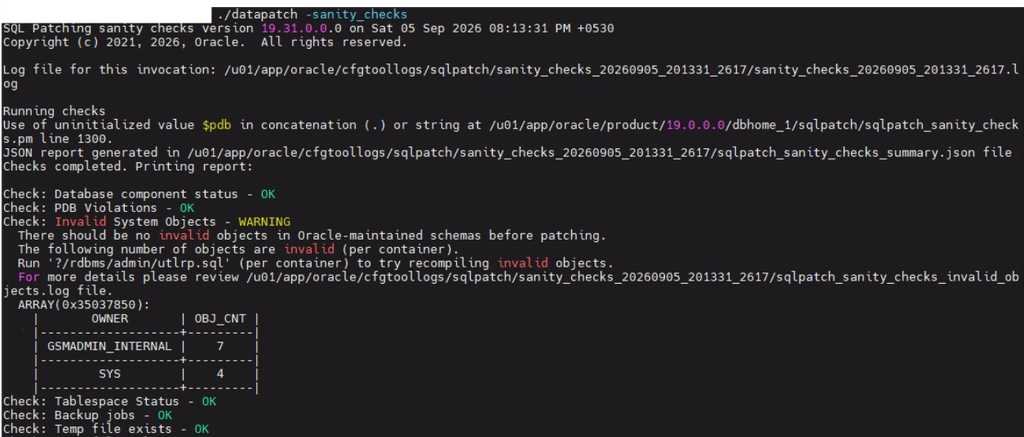
Eleven invalid objects sitting in Oracle-maintained schemas, right before a production patch. Not the kind of thing you wave off without looking, no matter how many times you’ve seen “just run utlrp.sql and move on” as the standard advice.


Why I Didn’t Just Run utlrp and Call It a Day
The reflex response to invalid objects is almost always the same: recompile, check again, done. And most of the time that’s exactly right — a table gets altered, dependent views go stale, utlrp.sql walks the dependency tree and fixes it in one pass. But before I ran anything, I wanted to actually look at what was invalid, because eleven objects in SYS and a semi-obscure internal schema felt like it deserved five minutes of reading before five minutes of running scripts.
So I pulled the detail from dba_errors, and that’s where this stopped being routine.
The Errors That Don’t Fix Themselves
The objects in question were DBMS_GSM_COMMON, DBMS_GSM_FIXED, DBMS_GSM_UTILITY, DBMS_GSM_POOLADMIN, and DBMS_GSM_DBADMIN, along with a handful of triggers and views. The error codes told a very different story than the usual “stale dependency” pattern:
- PLS-00323 — a subprogram or cursor is declared in the package specification but missing from the package body.
- PLS-00263 — a mismatch between
ACCESSIBLE BYclauses on the specification versus the body. - ORA-00942 — a view referencing a table that simply does not exist.
None of those clear up with a recompile. utlrp.sql works by re-resolving dependencies against objects that already agree with each other structurally. Here, the specification and the body of the same package genuinely disagreed on what functions existed and what access rules applied. Recompiling a body that doesn’t match its own spec just gives you the same error a second time. I’ve seen enough false-positive invalid objects over the years to know the difference between “needs a nudge” and “needs an explanation,” and this was clearly the second kind.
Naming the Suspect
Every one of those failing packages belonged to GSMADMIN_INTERNAL, with a few mirrored objects in SYS. That schema is the internal home for Global Data Services — Oracle’s sharding and multi-database coordination catalog. It ships by default in every 19c container database whether or not anyone has ever touched sharding. That’s an important detail, because a schema existing is not the same as a schema being used.
The pattern matched something I’d half-remembered from previous RU cycles: after a Release Update, the package specifications for GDS objects get reloaded fresh as part of the standard catproc execution, while the package bodies already sitting in the data dictionary were compiled against the previous release’s version of that same catalog. Spec says one thing, body says another — hence PLS-00323 and PLS-00263. The MGV_DERIVATIVES and related views throwing ORA-00942 pointed the same direction: they depend on GSM catalog tables that were never fully instantiated in the first place.
Confirming Before Fixing
Suspicion isn’t proof, so before touching anything I ran three checks.
First, whether the GDS catalog was actually populated:
SELECT * FROM gsmadmin_internal.database_ref;
SELECT * FROM gsmadmin_internal.shard_group$;
Both came back with ORA-00942: table or view does not exist. Not permission errors, not empty result sets — the tables themselves were never created. That’s the tell. If sharding had ever been configured here, those catalog tables would exist even if empty.
Second, whether anything outside SYS and GSMADMIN_INTERNAL actually depended on these packages:
SELECT owner, name, type
FROM dba_dependencies
WHERE referenced_name IN ('DBMS_GSM_COMMON','DBMS_GSM_FIXED','DBMS_GSM_UTILITY',
                          'DBMS_GSM_POOLADMIN','DBMS_GSM_DBADMIN')
AND owner NOT IN ('SYS','GSMADMIN_INTERNAL');
Zero rows. No application schema, no other Oracle component, nothing in the environment ever calls into the GDS packages.
Between those two results, the diagnosis was settled. This wasn’t a sharding deployment with a broken catalog — it was scaffolding for a feature that had never been switched on, showing internal version drift after an RU. Cosmetic, in other words, but only provably cosmetic once I’d checked rather than assumed.
Patching Anyway, and Why That Was the Right Call
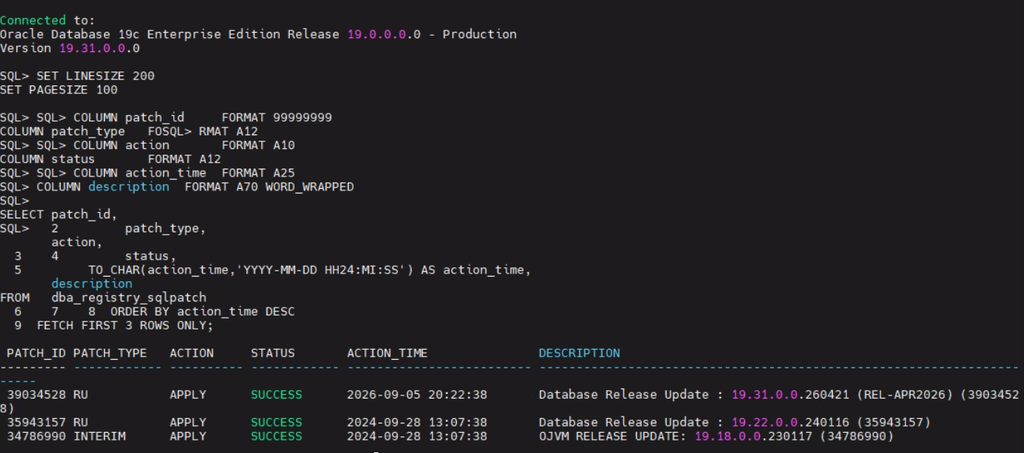
With GDS confirmed unused and zero external dependencies, there was no reason to hold up the maintenance window trying to reload the GSM catalog from scratch — running catgsm.sql against a database that never had the catalog tables in the first place would have been extra risk for a feature nobody uses, right in the middle of a patch cycle. So I proceeded with datapatch -verbose, and it applied 19.31.0.0.260421 clean, no errors, moving the SQL registry forward from RU 240104023954 with a single successful patch installation.
Afterward, utlrp.sql ran as expected — the same eleven GSM-related objects came back invalid again, exactly as predicted, and everything else in the database compiled without issue. That repeat failure, on the same objects, for the same reason, was the confirmation that the earlier analysis had been right rather than lucky.
The Actual Lesson
The habit that mattered here wasn’t a script or a one-liner fix. It was reading the error text instead of trusting the object count. “11 invalid objects” and “PLS-00323 subprogram declared in package specification and must be defined in package body” are very different pieces of information, and only one of them tells you whether you’re looking at something safe to defer or something that needs surgery before you patch.
If you’re seeing invalid DBMS_GSM_* packages in GSMADMIN_INTERNAL or SYS after a Release Update and you’ve never configured Global Data Services or sharding in your environment, this is very likely the same benign version-drift pattern — check gsmadmin_internal.database_ref for existence, confirm there are no external dependencies, and patch with confidence. If those catalog tables do exist and you’re actually running GDS, that’s a different investigation entirely, and one worth taking a lot more seriously before you touch a production patch window.

