

Oracle continues to deliver quarterly Release Updates (RUs) for Oracle Database 19c, helping organizations stay secure, stable, and fully supported. The July 2026 Database Release Update (19.32) introduces cumulative security fixes, performance improvements, and bug fixes while remaining fully compatible with Oracle RAC, Data Guard, and Database Vault environments.
In this article, we’ll walk through the complete patching process for Oracle Database Release Update 19.32 (Patch 39472050), including prerequisite checks, OPatch validation, applying the patch, running Datapatch, and verifying the installation.


This guide is based on a successful implementation using Oracle Database 19c and OPatch 12.2.0.1.52.

Environment
| Component | Version |
|---|---|
| Oracle Database | 19c |
| Release Update | 19.32.0.0.260721 |
| Patch Number | 39472050 |
| OPatch Version | 12.2.0.1.52 |
| Patch Method | OPatch Apply |
About Patch 39472050
Oracle Database Release Update 19.32 is a cumulative patch, meaning it includes all fixes delivered in previous 19c Release Updates.
Some highlights include:
- Security updates
- Bug fixes
- Performance improvements
- Oracle RAC Rolling Installable
- Data Guard Standby-First Installable
- Database Vault compatible
- Includes previous JDK fixes (latest JDK RU is distributed separately)
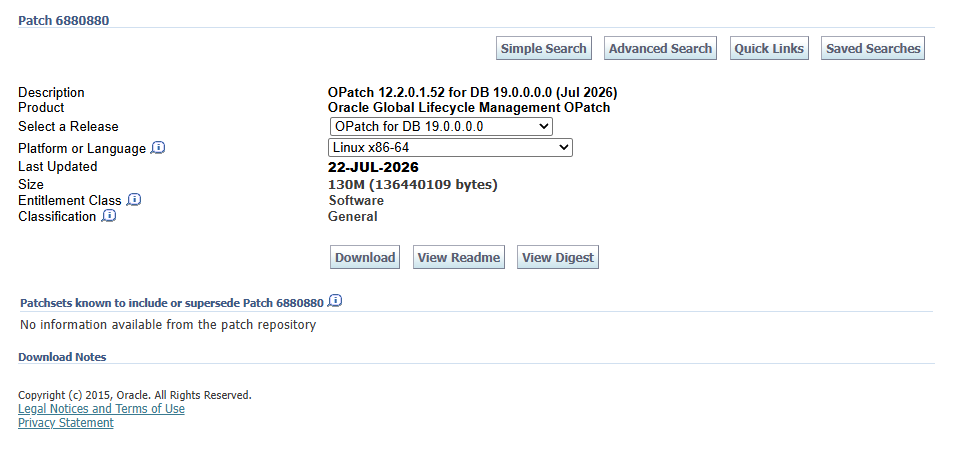
Oracle recommends using OPatch 12.2.0.1.52 or later before installing this Release Update.
DOWNLOAD PATCH : Critical Patch Update (CPU) Jul 2026 for Oracle Database Products
Step 1 – Unzip the Patch
Download Patch 39472050 from My Oracle Support.
unzip p39472050_<version>_<platform>.zip

cd 39472050
Step 2 – Verify OPatch Version
Before patching, confirm the installed OPatch version satisfies Oracle’s requirement.
For more informations: How To Download And Install The Latest OPatch
./opatch prereq CheckMinimumOPatchVersionOracle recommends OPatch 12.2.0.1.52 or later.
Step 3 – Check for Patch Conflicts
Always verify that no existing one-off patches conflict with the Release Update.
/u01/app/oracle/product/19.0.0/OPatch/opatch prereq \
CheckConflictAgainstOHWithDetail \
-phBaseDir /home/oracle/install/39472050/
Output:
Oracle Interim Patch Installer version 12.2.0.1.52
Copyright (c) 2026, Oracle Corporation.  All rights reserved.

PREREQ session

Oracle Home       : /u01/app/19c/grid
Central Inventory : /u01/app/oraInventory
   from           : /u01/app/19c/grid/oraInst.loc
OPatch version    : 12.2.0.1.52
OUI version       : 12.2.0.7.0
Log file location : /u01/app/19c/grid/cfgtoollogs/opatch/opatch2026-07-23_09-16-19AM_1.log

Invoking prereq "checkconflictagainstohwithdetail"

Prereq "checkConflictAgainstOHWithDetail" passed.

OPatch succeeded.
A successful conflict check means the Oracle Home is ready for patching.
Step 4 – Apply the Database Release Update
Execute the patch from the extracted directory.
cd 39472050

opatch apply
During installation Oracle performs several validations:
- Oracle Home verification
- Inventory validation
- Backup of Oracle Home files
- Component validation
- Patch dependency verification
After confirmation:
Do you want to proceed? [y|n]

y
If databases are still running Oracle requests shutdown:
Please shutdown Oracle instances running out of this ORACLE_HOME

Is the local system ready for patching?

y
Once confirmed, OPatch applies the Release Update automatically.
Successful Patch Installation
The installation completed successfully.
Final output:
Patch 39472050 successfully applied.

OPatch succeeded.
The installer also reported:
Sub-set patch [37960098] has become inactive due to
the application of super-set patch [39472050]
This is expected behavior when a newer Release Update supersedes an older patch.
/u01/app/oracle/product/19.0.0/OPatch/opatch apply
Oracle Interim Patch Installer version 12.2.0.1.52
Copyright (c) 2026, Oracle Corporation.  All rights reserved.


Oracle Home       : /u01/app/oracle/product/19.0.0
Central Inventory : /u01/app/oraInventory
   from           : /u01/app/oracle/product/19.0.0/oraInst.loc
OPatch version    : 12.2.0.1.52
OUI version       : 12.2.0.7.0
Log file location : /u01/app/oracle/product/19.0.0/cfgtoollogs/opatch/opatch2026-07-23_09-29-10AM_1.log

Verifying environment and performing prerequisite checks...

--------------------------------------------------------------------------------
Start OOP by Prereq process.
Launch OOP...

Oracle Interim Patch Installer version 12.2.0.1.52
Copyright (c) 2026, Oracle Corporation.  All rights reserved.


Oracle Home       : /u01/app/oracle/product/19.0.0
Central Inventory : /u01/app/oraInventory
   from           : /u01/app/oracle/product/19.0.0/oraInst.loc
OPatch version    : 12.2.0.1.52
OUI version       : 12.2.0.7.0
Log file location : /u01/app/oracle/product/19.0.0/cfgtoollogs/opatch/opatch2026-07-23_09-32-14AM_1.log

Verifying environment and performing prerequisite checks...
OPatch continues with these patches:   39472050

Do you want to proceed? [y|n]
y
User Responded with: Y
All checks passed.

Please shutdown Oracle instances running out of this ORACLE_HOME on the local system.
(Oracle Home = '/u01/app/oracle/product/19.0.0')


Is the local system ready for patching? [y|n]
y
User Responded with: Y
Backing up files...
Applying interim patch '39472050' to OH '/u01/app/oracle/product/19.0.0'
ApplySession: Optional component(s) [ oracle.network.gsm, 19.0.0.0.0 ] , [ oracle.assistants.asm, 19.0.0.0.0 ] , [ oracle.datamining, 19.0.0.0.0 ] , [ oracle.crypto.rsf, 19.0.0.0.0 ] , [ oracle.oraolap.mgmt, 19.0.0.0.0 ] , [ oracle.pg4appc, 19.0.0.0.0 ] , [ oracle.precomp.companion, 19.0.0.0.0 ] , [ oracle.rdbms.ic, 19.0.0.0.0 ] , [ oracle.java.sqlj.sqljruntime, 19.0.0.0.0 ] , [ oracle.rdbms.tg4db2, 19.0.0.0.0 ] , [ oracle.sdo.companion, 19.0.0.0.0 ] , [ oracle.tfa, 19.0.0.0.0 ] , [ oracle.rdbms.tg4ifmx, 19.0.0.0.0 ] , [ oracle.oid.client, 19.0.0.0.0 ] , [ oracle.rdbms.tg4sybs, 19.0.0.0.0 ] , [ oracle.ldap.ztk, 19.0.0.0.0 ] , [ oracle.ons.eons.bwcompat, 19.0.0.0.0 ] , [ oracle.net.cman, 19.0.0.0.0 ] , [ oracle.ons.cclient, 19.0.0.0.0 ] , [ oracle.xdk.companion, 19.0.0.0.0 ] , [ oracle.options.olap, 19.0.0.0.0 ] , [ oracle.rdbms.tg4msql, 19.0.0.0.0 ] , [ oracle.rdbms.tg4tera, 19.0.0.0.0 ] , [ oracle.network.cman, 19.0.0.0.0 ] , [ oracle.options.olap.api, 19.0.0.0.0 ] , [ oracle.jdk, 1.8.0.191.0 ] , [ oracle.jdk, 1.8.0.391.11 ]  not present in the Oracle Home or a higher version is found.

Patching component oracle.rdbms.util, 19.0.0.0.0...

Patching component oracle.rdbms.rsf, 19.0.0.0.0...

Patching component oracle.rdbms, 19.0.0.0.0...

Patching component oracle.assistants.acf, 19.0.0.0.0...

Patching component oracle.assistants.deconfig, 19.0.0.0.0...

Patching component oracle.assistants.server, 19.0.0.0.0...

Patching component oracle.blaslapack, 19.0.0.0.0...

Patching component oracle.buildtools.rsf, 19.0.0.0.0...

Patching component oracle.wwg.plsql, 19.0.0.0.0...

Patching component oracle.ctx, 19.0.0.0.0...

Patching component oracle.dbdev, 19.0.0.0.0...

Patching component oracle.dbjava.ic, 19.0.0.0.0...

Patching component oracle.dbjava.jdbc, 19.0.0.0.0...

Patching component oracle.dbjava.ucp, 19.0.0.0.0...

Patching component oracle.duma, 19.0.0.0.0...

Patching component oracle.javavm.client, 19.0.0.0.0...

Patching component oracle.ldap.client, 19.0.0.0.0...

Patching component oracle.ldap.owm, 19.0.0.0.0...

Patching component oracle.ldap.rsf, 19.0.0.0.0...

Patching component oracle.ldap.security.osdt, 19.0.0.0.0...

Patching component oracle.marvel, 19.0.0.0.0...

Patching component oracle.network.rsf, 19.0.0.0.0...

Patching component oracle.nlsrtl.rsf, 19.0.0.0.0...

Patching component oracle.nlsrtl.rsf.core, 19.0.0.0.0...

Patching component oracle.nlsrtl.rsf.ic, 19.0.0.0.0...

Patching component oracle.swd.oui, 12.2.0.7.0...

Patching component oracle.odbc.ic, 19.0.0.0.0...

Patching component oracle.ons, 19.0.0.0.0...

Patching component oracle.ons.ic, 19.0.0.0.0...

Patching component oracle.oracore.rsf, 19.0.0.0.0...

Patching component oracle.precomp.common.core, 19.0.0.0.0...

Patching component oracle.precomp.rsf, 19.0.0.0.0...

Patching component oracle.rdbms.crs, 19.0.0.0.0...

Patching component oracle.rdbms.dbscripts, 19.0.0.0.0...

Patching component oracle.rdbms.deconfig, 19.0.0.0.0...

Patching component oracle.rdbms.install.common, 19.0.0.0.0...

Patching component oracle.rdbms.oci, 19.0.0.0.0...

Patching component oracle.rdbms.rsf.ic, 19.0.0.0.0...

Patching component oracle.rdbms.scheduler, 19.0.0.0.0...

Patching component oracle.rhp.db, 19.0.0.0.0...

Patching component oracle.rsf, 19.0.0.0.0...

Patching component oracle.sdo, 19.0.0.0.0...

Patching component oracle.sdo.locator.jrf, 19.0.0.0.0...

Patching component oracle.sqlj.sqljruntime, 19.0.0.0.0...

Patching component oracle.sqlplus, 19.0.0.0.0...

Patching component oracle.sqlplus.ic, 19.0.0.0.0...

Patching component oracle.tfa.db, 19.0.0.0.0...

Patching component oracle.xdk.rsf, 19.0.0.0.0...

Patching component oracle.rdbms.hs_common, 19.0.0.0.0...

Patching component oracle.javavm.server, 19.0.0.0.0...

Patching component oracle.rdbms.install.plugins, 19.0.0.0.0...

Patching component oracle.rdbms.locator, 19.0.0.0.0...

Patching component oracle.oraolap.api, 19.0.0.0.0...

Patching component oracle.rdbms.hsodbc, 19.0.0.0.0...

Patching component oracle.network.client, 19.0.0.0.0...

Patching component oracle.rdbms.drdaas, 19.0.0.0.0...

Patching component oracle.rdbms.dm, 19.0.0.0.0...

Patching component oracle.rdbms.rman, 19.0.0.0.0...

Patching component oracle.rdbms.rat, 19.0.0.0.0...

Patching component oracle.ovm, 19.0.0.0.0...

Patching component oracle.odbc, 19.0.0.0.0...

Patching component oracle.xdk.server, 19.0.0.0.0...

Patching component oracle.oraolap.dbscripts, 19.0.0.0.0...

Patching component oracle.xdk.xquery, 19.0.0.0.0...

Patching component oracle.network.listener, 19.0.0.0.0...

Patching component oracle.dbtoolslistener, 19.0.0.0.0...

Patching component oracle.ldap.rsf.ic, 19.0.0.0.0...

Patching component oracle.xdk.parser.java, 19.0.0.0.0...

Patching component oracle.sdo.locator, 19.0.0.0.0...

Patching component oracle.ctx.rsf, 19.0.0.0.0...

Patching component oracle.ldap.ssl, 19.0.0.0.0...

Patching component oracle.oraolap, 19.0.0.0.0...

Patching component oracle.mgw.common, 19.0.0.0.0...

Patching component oracle.install.deinstalltool, 19.0.0.0.0...

Patching component oracle.rdbms.dv, 19.0.0.0.0...

Patching component oracle.xdk, 19.0.0.0.0...

Patching component oracle.nlsrtl.rsf.lbuilder, 19.0.0.0.0...

Patching component oracle.ctx.atg, 19.0.0.0.0...

Patching component oracle.network.aso, 19.0.0.0.0...

Patching component oracle.rdbms.lbac, 19.0.0.0.0...

Patching component oracle.precomp.lang, 19.0.0.0.0...

Patching component oracle.precomp.common, 19.0.0.0.0...

Patching component oracle.oracler.server, 19.0.0.0.0...

Patching component oracle.perlint, 5.28.1.0.0...

Patching component oracle.jdk, 1.8.0.201.0...
Patch 39472050 successfully applied.
Sub-set patch [37960098] has become inactive due to the application of a super-set patch [39472050].
Please refer to Doc ID 2161861.1 for any possible further required actions.
Log file location: /u01/app/oracle/product/19.0.0/cfgtoollogs/opatch/opatch2026-07-23_09-32-14AM_1.log

OPatch succeeded.
Step 5 – Run Datapatch Sanity Checks
Before applying SQL changes, Oracle recommends validating the database.
$ORACLE_HOME/OPatch/datapatch -sanity_checksResults included:
✅ Database Component Status
✅ Invalid Objects
✅ Tablespace Status
✅ Temp Files
✅ Database Vault
✅ Queryable Inventory
Oracle also displayed two warnings.
Dictionary Statistics Warning
Data dictionary statistics are older than 7 daysOracle recommends:
EXEC DBMS_STATS.GATHER_DICTIONARY_STATS;

EXEC DBMS_STATS.GATHER_FIXED_OBJECTS_STATS;
Scheduler Jobs Warning
Oracle detected jobs scheduled during the maintenance window.
This is only a warning but Oracle recommends avoiding scheduler activity while Datapatch is running to reduce locking issues.
./datapatch -sanity_checks
SQL Patching sanity checks version 19.32.0.0.0 on Thu 23 Jul 2026 09:51:46 AM +0530
Copyright (c) 2021, 2026, Oracle.  All rights reserved.

Log file for this invocation: /u01/app/oracle/cfgtoollogs/sqlpatch/sanity_checks_20260723_095146_10516/sanity_checks_20260723_095146_10516.log

Running checks
JSON report generated in /u01/app/oracle/cfgtoollogs/sqlpatch/sanity_checks_20260723_095146_10516/sqlpatch_sanity_checks_summary.json file
Checks completed. Printing report:

Check: Database component status - OK
Check: PDB Violations - OK
Check: Invalid System Objects - OK
Check: Tablespace Status - OK
Check: Backup jobs - OK
Check: Temp file exists - OK
Check: Temp file online - OK
Check: Data Pump running - OK
Check: Container status - OK
Check: Oracle Database Keystore - OK
Check: Dictionary statistics gathering - WARNING
  Patching the database without recent data dictionary statistics gathered may lead to performance issues.
  Data dictionary statistics are older than 7 days.
  Run the following queries to start gathering the dictionary statistics:
    EXEC DBMS_STATS.GATHER_DICTIONARY_STATS;
    EXEC DBMS_SYSTEM.GATHER_FIXED_OBJECTS_STATS;
  Refer to MOS 457926.1 for more details.
  PDB:
    |     LATEST      |        OPERATION        |  STATUS   |
    |-----------------+-------------------------+-----------|
    | 14-OCT-25 11:46 | gather_dictionary_stats | COMPLETED |
    |-----------------+-------------------------+-----------|
  PDB$SEED:
    |     LATEST      |        OPERATION        |  STATUS   |
    |-----------------+-------------------------+-----------|
    | 14-OCT-25 11:46 | gather_dictionary_stats | COMPLETED |
    |-----------------+-------------------------+-----------|
Check: Scheduled Jobs - WARNING
  Execution of scheduler jobs while database patching is running may lead to failures and/or performance issues.
  There are jobs currently running or scheduled to be executed during next hour.
  If you experience Datapatch errors caused by locking in the database, consider patching the database when jobs are not running or preventing jobs from starting.
  To check for jobs that are running or scheduled to run:
    SELECT owner as schema_name, job_name, state, next_run_date
    FROM sys.all_scheduler_jobs
    WHERE state = 'RUNNING'
    UNION
      SELECT owner as schema_name, job_name, state, next_run_date
      FROM sys.all_scheduler_jobs
      WHERE state = 'SCHEDULED'
      and cast(next_run_date as date) > sysdate
      and cast(next_run_date as date) < sysdate + 1/24;
  PDB:
    | SCHEMA_NAME |          JOB_NAME           |   STATE   |            NEXT_RUN_DATE            |
    |-------------+-----------------------------+-----------+-------------------------------------|
    |     SYS     | OBJNUM_REUSE_MAINTAIN_JOB$$ | SCHEDULED | 23-JUL-26 10.32.34.949164 AM +05:30 |
    |-------------+-----------------------------+-----------+-------------------------------------|
Check: GoldenGate triggers - OK
Check: Logminer DDL triggers - OK
Check: Check sys public grants - OK
Check: Statistics gathering running - OK
Check: Optim dictionary upgrade parameter - OK
Check: Symlinks on oracle home path - OK
Check: Central Inventory - OK
Check: Java Virtual Machine Enable - OK
Check: Oracle Database Vault Enabled - OK
Check: Queryable Inventory database directories - OK
Check: Queryable Inventory locks - OK
Check: Queryable Inventory package - OK
Check: Queryable Inventory external table - OK
Check: Imperva processes - OK
Check: Guardium processes - OK
Check: Locale - OK

Refer to MOS Note 2975965.1 and debug log
/u01/app/oracle/cfgtoollogs/sqlpatch/sanity_checks_20260723_095146_10516/sanity_checks_debug_20260723_095146_10516.log

SQL Patching sanity checks completed on Thu 23 Jul 2026 09:51:52 AM +0530
Step 6 – Execute Datapatch
Once sanity checks are complete:
$ORACLE_HOME/OPatch/datapatch -verboseDatapatch performs:
- SQL patch deployment
- Registry updates
- SQL fix application
- CDB/PDB synchronization
Oracle also reminds administrators that only open PDBs receive SQL updates.
Datapatch will only apply SQL fixes for PDBs that are OPEN.Always verify every required PDB is opened in READ WRITE mode before executing Datapatch.
./datapatch -verbose
SQL Patching tool version 19.32.0.0.0 Production on Thu Jul 23 09:52:26 2026
Copyright (c) 2012, 2026, Oracle.  All rights reserved.

Log file for this invocation: /u01/app/oracle/cfgtoollogs/sqlpatch/sqlpatch_10600_2026_07_23_09_52_26/sqlpatch_invocation.log

Connecting to database...OK
Gathering database info...done

Note:  Datapatch will only apply or rollback SQL fixes for PDBs
       that are in an open state, no patches will be applied to closed PDBs.
       Please refer to Note: Datapatch: Database 12c Post Patch SQL Automation
       (Doc ID 1585822.1)

Bootstrapping registry and package to current versions...done
Determining current state...done

Current state of interim SQL patches:
  No interim patches found

Current state of release update SQL patches:
  Binary registry:
    19.32.0.0.0 Release_Update 260705220710: Installed
  PDB CDB$ROOT:
    Rolled back to 19.28.0.0.0 Release_Update 250705030417 successfully on 06-MAY-26 10.37.59.486073 AM
  PDB PDB:
    Applied 19.28.0.0.0 Release_Update 250705030417 successfully on 14-OCT-25 11.48.20.897843 AM
  PDB PDB$SEED:
    Rolled back to 19.28.0.0.0 Release_Update 250705030417 successfully on 06-MAY-26 10.39.27.074933 AM

Adding patches to installation queue and performing prereq checks...done
Installation queue:
  For the following PDBs: CDB$ROOT PDB$SEED PDB
    No interim patches need to be rolled back
    Patch 39472050 (Database Release Update : 19.32.0.0.260721 (39472050)):
      Apply from 19.28.0.0.0 Release_Update 250705030417 to 19.32.0.0.0 Release_Update 260705220710
    No interim patches need to be applied

Installing patches...
Patch installation complete.  Total patches installed: 3

Validating logfiles...done
Patch 39472050 apply (pdb CDB$ROOT): SUCCESS
  logfile: /u01/app/oracle/cfgtoollogs/sqlpatch/39472050/28919163/39472050_apply_CDB_CDBROOT_2026Jul23_09_54_51.log (no errors)
Patch 39472050 apply (pdb PDB$SEED): SUCCESS
  logfile: /u01/app/oracle/cfgtoollogs/sqlpatch/39472050/28919163/39472050_apply_CDB_PDBSEED_2026Jul23_09_57_32.log (no errors)
Patch 39472050 apply (pdb PDB): SUCCESS
  logfile: /u01/app/oracle/cfgtoollogs/sqlpatch/39472050/28919163/39472050_apply_CDB_PDB_2026Jul23_09_57_32.log (no errors)
SQL Patching tool complete on Thu Jul 23 10:02:57 2026
Best Practices Before Every Quarterly RU
Before installing any Release Update, Oracle recommends:
- Back up Oracle Home
- Back up Central Inventory
- Update OPatch to the latest version
- Perform conflict detection
- Run
datapatch -sanity_checks - Disable scheduled maintenance jobs during patching
- Verify all PDBs are open before running Datapatch
These steps reduce downtime and help prevent common patching issues.
Final Thoughts
Applying Oracle Database Release Update 19.32 (Patch 39472050) is a straightforward process when Oracle’s recommended validation steps are followed. In this implementation, the prerequisite checks passed successfully, the Release Update was applied without conflicts, and Datapatch completed the SQL deployment after verifying the database environment.
One important takeaway is the value of running datapatch -sanity_checks before patching. It helps identify issues such as outdated dictionary statistics or scheduled jobs that could impact the patching process. Addressing these warnings in advance leads to a smoother and more reliable maintenance window.
By combining regular quarterly Release Updates with proper validation and post-patch verification, DBAs can keep Oracle Database 19c environments secure, stable, and fully supported.



Thanks for the details. In a 19c RAC environment with the Oracle GI 19.2x, if we plan to install the Database RU 19.30 / 19.31 / 19.32, should the GI infrastructure be installed with 19.30 / 19.31 / 19.32 patch first as a pre-requisite ?
Yes. For Oracle RAC, the Grid Infrastructure should be patched first to the corresponding RU (19.30/19.31/19.32) before applying the Database RU. This is the recommended patching sequence: GI RU → Database RU → datapatch.
Thank you for the quick response. Just one more quick question regarding the GI and DB patch levels. We know that, version of GI should be at least equal to or greater than that of the DB.
I read in an MOS note that, starting 18c, it’s enough as long as the first digit of the versions of both GI and DB match and the rest can be anything. Only in the prior versions, the version number till the 4th digit should match (again, GI version number should greater than or equal to that of DB).
Going by this argument, in this case of 19c, GI can be 19.26 and DB can be 19.32 (slightly higher than GI) Have you personally experienced anything like this ?
Yes, I have seen environments where the Database RU was ahead of the GI RU during phased patching, and they worked without any issues.
From 18c onwards, Oracle supports interoperability within the same major release (19c), so GI 19.26 with DB 19.32 is generally supported.
However, for production, my recommendation is still to keep GI and DB on the same RU level and patch GI first, as this is Oracle’s recommended best practice and simplifies support and troubleshooting.
Hello and thanks for the useful instuction guide.
Actually I have one possible correction
chapter
Step 5 – Run Datapatch Sanity Checks
The command
“EXEC DBMS_SYSTEM.GATHER_FIXED_OBJECTS_STATS;”
should be corrected as
“EXEC DBMS_STATS.GATHER_FIXED_OBJECTS_STATS;”
That would be my tip ! Maybe you have a look at it ?
Thanks and regards, Karlheinz
Hi Karlheinz,
Thank you very much for taking the time to read the guide and for pointing this out.
You’re absolutely right—EXEC DBMS_STATS.GATHER_FIXED_OBJECTS_STATS; is the correct command. I appreciate you catching the typo. I’ve updated the guide accordingly.
Thanks again for your valuable feedback!