

Oracle Database 19c continues to be the Long-Term Support (LTS) release for enterprise environments, making quarterly Release Updates (RUs) essential for maintaining security, stability, and performance.
In this article, I’ll walk through applying Oracle Grid Infrastructure Release Update 19.32 (July 2026) using OPatchAuto, including prerequisite validation, conflict checking, space verification, and successful patch deployment.


This guide is based on a successful patch implementation on an Oracle Restart environment.
Environment
| Component | Version |
|---|---|
| Oracle Grid Infrastructure | 19c |
| Release Update | 19.32.0.0.260721 |
| Patch Number | 39467003 |
| OPatch Version | 12.2.0.1.52 |
| Patch Method | OPatchAuto |
What’s Included in Patch 39467003?
The Grid Infrastructure Release Update contains multiple sub-patches.
DOWNLOAD PATCH : Critical Patch Update (CPU) Jul 2026 for Oracle Database Products
| Patch | Description |
|---|---|
| 39472050 | Database Release Update 19.32 |
| 39526364 | Oracle Clusterware (OCW) Release Update |
| 39503034 | Oracle ACFS Release Update |
| 39107855 | Tomcat Update (not applicable from 19.31 onwards) |
| 39107825 | DBWLM Update (removed beginning with 19.31) |
Oracle also notes several important changes beginning with the 19.31 Release Update:
- Tomcat has been replaced by Micronaut
- QoS/WLM directories have been removed
- This RU is Data Guard Standby-First Installable
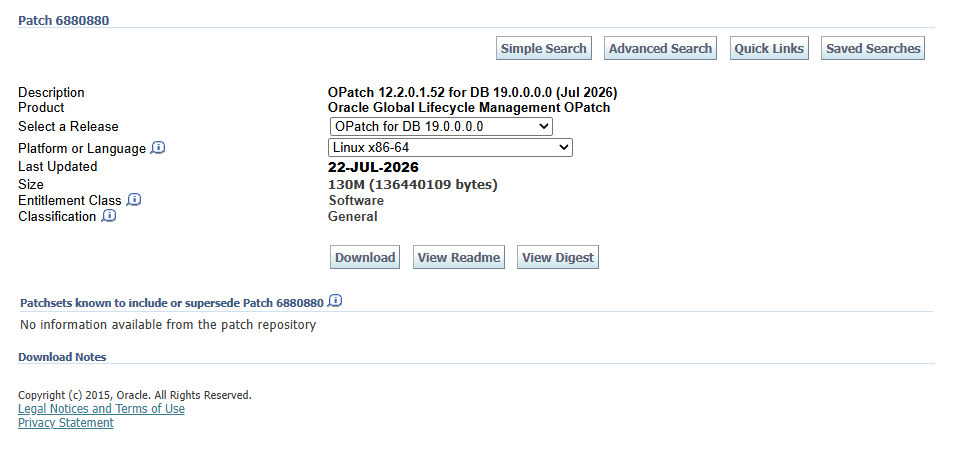
- OPatch version 12.2.0.1.52 or later is required.
Step 1 — Verify Current Oracle Inventory
Always capture the current Oracle inventory before patching.
/u01/app/19c/grid/OPatch/opatch lsinventory -detail \
-oh /u01/app/19c/grid/
This provides the existing patch inventory and serves as a rollback reference if needed.
Step 2 — Verify OPatch Version
The first prerequisite is ensuring the Oracle Home uses a supported OPatch version.
For more informations: How To Download And Install The Latest OPatch
/u01/app/19c/grid/OPatch/opatch prereq \
CheckMinimumOPatchVersion \
-phBaseDir /home/oracle/install/39467003/39472050
Result:
Prereq "checkMinimumOPatchVersion" passed.
OPatch succeeded.
The environment was running:
OPatch version : 12.2.0.1.52which satisfies the minimum requirement.
Step 3 — Check Patch Conflicts
Before applying any Release Update, verify that each sub-patch has no conflicts with the Oracle Home.
Example:
/u01/app/19c/grid/OPatch/opatch prereq \
CheckConflictAgainstOHWithDetail \
-phBaseDir /home/oracle/install/39467003/39472050
Repeat for every patch directory:
39472050
39526364
39503034
39107855
39107825
Each returned:
Prereq "checkConflictAgainstOHWithDetail" passed.

OPatch succeeded.
Run OPatch Conflict Check: As the Grid home user
/u01/app/19c/grid/OPatch/opatch lsinventory -detail -oh /u01/app/19c/grid/
/u01/app/19c/grid/OPatch/opatch prereq CheckMinimumOPatchVersion -phBaseDir /home/oracle/install/39467003/39472050
/u01/app/19c/grid/OPatch/opatch prereq CheckConflictAgainstOHWithDetail -phBaseDir /home/oracle/install/39467003/39472050
/u01/app/19c/grid/OPatch/opatch prereq CheckConflictAgainstOHWithDetail -phBaseDir /home/oracle/install/39467003/39526364
/u01/app/19c/grid/OPatch/opatch prereq CheckConflictAgainstOHWithDetail -phBaseDir /home/oracle/install/39467003/39503034
/u01/app/19c/grid/OPatch/opatch prereq CheckConflictAgainstOHWithDetail -phBaseDir /home/oracle/install/39467003/39107855
/u01/app/19c/grid/OPatch/opatch prereq CheckConflictAgainstOHWithDetail -phBaseDir /home/oracle/install/39467003/39107825
Run OPatch Conflict Check: For Oracle home, as home user:
/u01/app/oracle/product/19.0.0/OPatch/opatch prereq CheckMinimumOPatchVersion-phBaseDir /home/oracle/install/39467003/39472050
/u01/app/oracle/product/19.0.0/OPatch/opatch prereq CheckConflictAgainstOHWithDetail -phBaseDir /home/oracle/install/39467003/39472050
/u01/app/oracle/product/19.0.0/OPatch/opatch prereq CheckConflictAgainstOHWithDetail -phBaseDir /home/oracle/install/39467003/39526364
The same validation was also performed for the Database Oracle Home.
Step 4 — Verify System Space
Create a patch list file.
Example:
/home/oracle/install/39467003/39472050
/home/oracle/install/39467003/39526364
/home/oracle/install/39467003/39503034
/home/oracle/install/39467003/39107855
/home/oracle/install/39467003/39107825
Run:
/u01/app/19c/grid/OPatch/opatch prereq \
CheckSystemSpace \
-phBaseFile /tmp/patch_list_gihome.txt
Output:
Oracle Interim Patch Installer version 12.2.0.1.52
Copyright (c) 2026, Oracle Corporation.  All rights reserved.

PREREQ session

Oracle Home       : /u01/app/19c/grid
Central Inventory : /u01/app/oraInventory
   from           : /u01/app/19c/grid/oraInst.loc
OPatch version    : 12.2.0.1.52
OUI version       : 12.2.0.7.0
Log file location : /u01/app/19c/grid/cfgtoollogs/opatch/opatch2026-07-23_08-21-52AM_1.log

Invoking prereq "checksystemspace"

Prereq "checkSystemSpace" passed.

OPatch succeeded.
Repeat the same validation for the Database Home.
cat /tmp/patch_list_dbhome.txt

/home/oracle/install/39467003/39472050
/home/oracle/install/39467003/39526364

/u01/app/oracle/product/19.0.0/OPatch/opatch prereq CheckSystemSpace -phBaseFile /tmp/patch_list_dbhome.txt

[oracle@prod ~]$ /u01/app/oracle/product/19.0.0/OPatch/opatch prereq CheckSystemSpace -phBaseFile /tmp/patch_list_dbhome.txt
Oracle Interim Patch Installer version 12.2.0.1.52
Copyright (c) 2026, Oracle Corporation.  All rights reserved.

PREREQ session

Oracle Home       : /u01/app/19c/grid
Central Inventory : /u01/app/oraInventory
   from           : /u01/app/19c/grid/oraInst.loc
OPatch version    : 12.2.0.1.52
OUI version       : 12.2.0.7.0
Log file location : /u01/app/19c/grid/cfgtoollogs/opatch/opatch2026-07-23_08-21-52AM_1.log

Invoking prereq "checksystemspace"

Prereq "checkSystemSpace" passed.

OPatch succeeded.
Step 5 — Apply the Release Update
Execute OPatchAuto as root.
/u01/app/19c/grid/OPatch/opatchauto apply /home/oracle/install/39467003/The patch workflow automatically performs:
- Environment validation
- Patch applicability checks
- CRS shutdown
- Binary patch application
- rootadd_rdbms.sh execution
- CRS startup
- Final verification
The session completed successfully in approximately 18 minutes.
/u01/app/19c/grid/OPatch/opatchauto apply /home/oracle/install/39467003/

OPatchauto session is initiated at Thu Jul 23 08:27:08 2026

System initialization log file is /u01/app/19c/grid/cfgtoollogs/opatchautodb/systemconfig2026-07-23_08-27-17AM.log.

Session log file is /u01/app/19c/grid/cfgtoollogs/opatchauto/opatchauto2026-07-23_08-27-23AM.log
The id for this session is NRLR

Executing OPatch prereq operations to verify patch applicability on home /u01/app/19c/grid
Patch applicability verified successfully on home /u01/app/19c/grid


Executing patch validation checks on home /u01/app/19c/grid
Patch validation checks successfully completed on home /u01/app/19c/grid


Performing prepatch operations on CRS - bringing down CRS service on home /u01/app/19c/grid
Prepatch operation log file location: /u01/app/oracle/crsdata/prod/crsconfig/hapatch_2026-07-23_08-31-04AM.log
CRS service brought down successfully on home /u01/app/19c/grid


Start applying binary patch on home /u01/app/19c/grid
Binary patch applied successfully on home /u01/app/19c/grid


Running rootadd_rdbms.sh on home /u01/app/19c/grid
Successfully executed rootadd_rdbms.sh on home /u01/app/19c/grid


Performing postpatch operations on CRS - starting CRS service on home /u01/app/19c/grid
Postpatch operation log file location: /u01/app/oracle/crsdata/prod/crsconfig/hapatch_2026-07-23_08-41-36AM.log
CRS service started successfully on home /u01/app/19c/grid

OPatchAuto successful.

--------------------------------Summary--------------------------------

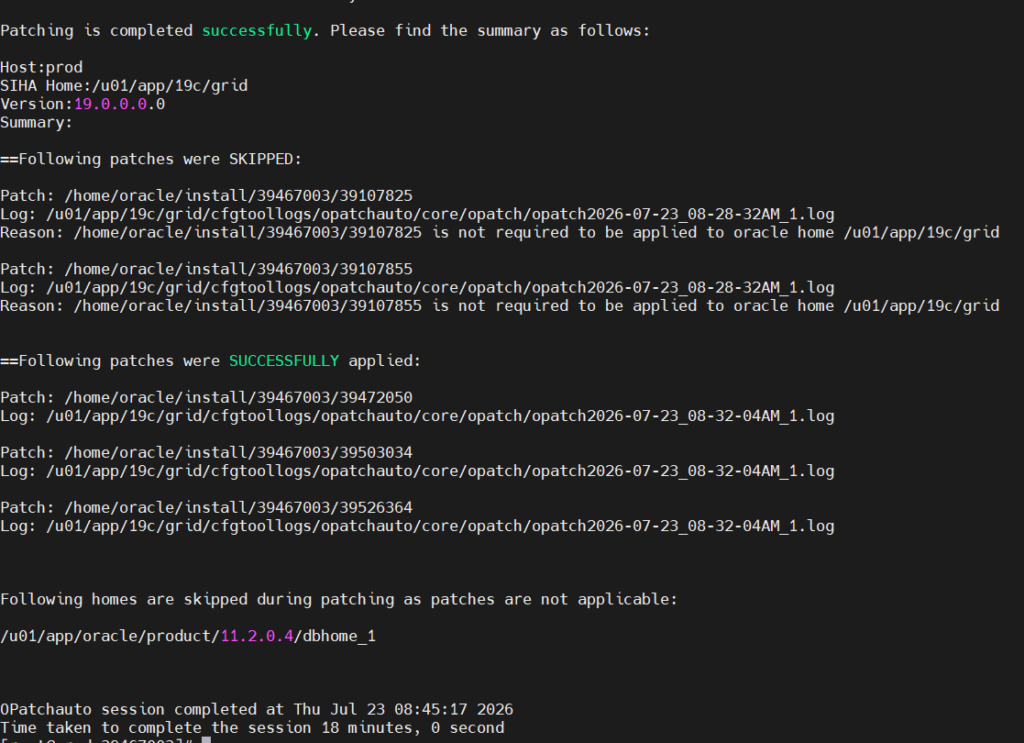
Patching is completed successfully. Please find the summary as follows:

Host:prod
SIHA Home:/u01/app/19c/grid
Version:19.0.0.0.0
Summary:

==Following patches were SKIPPED:

Patch: /home/oracle/install/39467003/39107825
Log: /u01/app/19c/grid/cfgtoollogs/opatchauto/core/opatch/opatch2026-07-23_08-28-32AM_1.log
Reason: /home/oracle/install/39467003/39107825 is not required to be applied to oracle home /u01/app/19c/grid

Patch: /home/oracle/install/39467003/39107855
Log: /u01/app/19c/grid/cfgtoollogs/opatchauto/core/opatch/opatch2026-07-23_08-28-32AM_1.log
Reason: /home/oracle/install/39467003/39107855 is not required to be applied to oracle home /u01/app/19c/grid


==Following patches were SUCCESSFULLY applied:

Patch: /home/oracle/install/39467003/39472050
Log: /u01/app/19c/grid/cfgtoollogs/opatchauto/core/opatch/opatch2026-07-23_08-32-04AM_1.log

Patch: /home/oracle/install/39467003/39503034
Log: /u01/app/19c/grid/cfgtoollogs/opatchauto/core/opatch/opatch2026-07-23_08-32-04AM_1.log

Patch: /home/oracle/install/39467003/39526364
Log: /u01/app/19c/grid/cfgtoollogs/opatchauto/core/opatch/opatch2026-07-23_08-32-04AM_1.log

Following homes are skipped during patching as patches are not applicable:

/u01/app/oracle/product/11.2.0.4/dbhome_1

OPatchauto session completed at Thu Jul 23 08:45:17 2026
Time taken to complete the session 18 minutes, 0 second
Patch Results
Successfully applied:
| Patch | Description |
|---|---|
| 39472050 | Database RU 19.32 |
| 39503034 | ACFS RU |
| 39526364 | OCW RU |
Skipped automatically:
| Patch | Reason |
|---|---|
| 39107825 | Not required for this Oracle Home |
| 39107855 | Not required for this Oracle Home |
This demonstrates one of OPatchAuto’s advantages—it automatically skips sub-patches that are no longer applicable instead of failing the entire patch process.
Why Perform All Prerequisite Checks?
Many patch failures occur because administrators skip validation steps.
The following checks should always be completed:
- Verify Oracle Inventory
- Verify OPatch version
- Check patch conflicts
- Check Oracle Home free space
- Review patch applicability
- Back up Oracle Home before patching
Following these validations significantly reduces the risk of downtime and patch failures. Oracle also recommends backing up the Oracle Home and Central Inventory before applying any Release Update.
Final Thoughts
Applying Oracle Grid Infrastructure Release Update 19.32 (Patch 39467003) was straightforward after completing the recommended prerequisite checks. The process validated the environment, detected no conflicts, confirmed sufficient system space, and completed the OPatchAuto deployment successfully in about 18 minutes.
One notable behavior in this release is that obsolete components such as Tomcat and DBWLM/QOS are automatically skipped when they are no longer applicable, simplifying patch management in newer 19c environments.
By consistently following Oracle’s recommended validation workflow before every quarterly Release Update, DBAs can minimize risk and keep Grid Infrastructure environments secure, stable, and fully supported.



Comments 2