

Planned maintenance on RAC has always been a bit of a gamble. Push the window too aggressively and users start dropping sessions mid-transaction. Play it too safe and your maintenance windows stretch out unpredictably. And then there’s the scenario nobody schedules for — a node just dies, and now the question is how fast Oracle can put itself back together and let applications carry on.
Oracle AI Database 26ai takes a real run at both sides of this problem. Between Intelligent Session Draining, Drain Timeout History, Fast Start Reconfiguration (FSR), and Bounded Recovery Time, Oracle’s given DBAs a lot more control — and a lot less guesswork — over how maintenance actually plays out.


If you’re running mission-critical RAC where every second of downtime gets noticed, this release is worth a close look.
First, Let’s Clear Up What Draining Actually Is
I still see this misunderstood fairly often: Draining is not an Application Continuity feature. It’s a native RAC capability, and it does something much simpler — it lets existing sessions finish what they’re doing before an instance goes offline, rather than yanking the connection out from under them.
Instead of just killing sessions, Oracle essentially tells them: finish your current work, then move over to another instance. That one behavioral shift is what makes planned maintenance feel almost invisible to the application layer.
How the Draining Process Actually Runs
- Oracle marks a service for draining
- New connections get routed to healthy instances
- Sessions already running keep processing
- Sessions disconnect naturally once they finish
- Maintenance kicks off once everything’s drained
And here’s the part I like: if every session clears out in two seconds, Oracle doesn’t sit around waiting for the full timeout window — it moves on immediately.
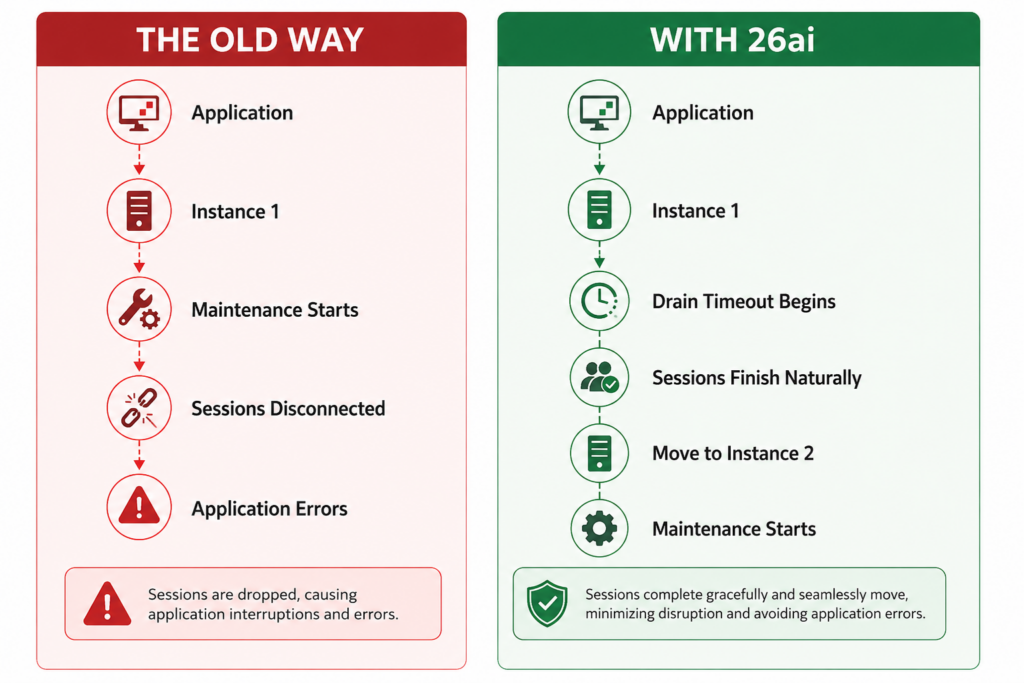
In most cases, users have no idea maintenance even happened.
Drain Timeout, Explained Simply
Drain timeout is just the ceiling — the maximum time Oracle gives active sessions to wrap up. Set it to 5 seconds, and Oracle gives sessions up to 5 seconds. If they’re all done in 2, maintenance proceeds right away. No unnecessary waiting either direction.
Default is 300 seconds (5 minutes), which is a reasonable middle ground for most shops out of the box — though I’d still recommend tuning it once you’ve got real drain history to look at (more on that below).
The Long-Running Session Problem
Not everything drains cleanly in a few seconds. Batch jobs, warehouse loads, long-running reports, bulk data loads — these were never going to finish inside a five-minute window, and that’s fine, that’s just reality.
When a session blows past the configured timeout, the DBA is left choosing between:
- Waiting it out longer
- Interrupting the session outright
- Falling back on Application Continuity (AC)
- Falling back on Transparent Application Continuity (TAC)
What’s new in 26ai is that Oracle now gets ahead of this decision by identifying, in advance, which sessions probably won’t drain in time.
Smarter Failover, Not Blanket Treatment
Instead of handling every session the same way, Oracle now:
- Flags sessions unlikely to drain within the timeout
- Picks out which sessions are actually eligible for failover
- Leans on Application Continuity where it can
- Avoids terminating sessions unnecessarily
- Cuts down replay time after a failover event
It’s a more surgical approach than the old blunt-instrument method of “wait or kill.”
Finally — Real Drain Timeout History
This might be my favorite addition in the whole release. For years, drain timeout values were basically an educated guess. You’d set something reasonable, watch how maintenance went, and adjust based on gut feel and a few war stories from past outages.
Now Oracle actually tracks this. The V$SERVICE_DRAIN_TIMEOUT_ADVICE view gives you:
- Previous drain durations
- How many sessions were marked for draining
- How many actually drained successfully
- The last drain timeout value used
- Drain behavior broken down by service
In practice that might look like:
| Service | Typical Drain Time |
|---|---|
| Sales Service | < 5 seconds |
| Reporting Service | < 30 seconds |
| Batch Service | Several minutes |
That’s a huge upgrade from guessing. You can now size your maintenance windows around what your services actually do, not what you assume they do.
Setting It Up
Drain timeout is configured through srvctl, using parameters for drain timeout and maximum drain timeout. That means each RAC service can have its own maintenance behavior tuned to its workload — OLTP services draining in seconds, reporting services given a bit more room, and batch services routed through Application Continuity instead of forced to drain at all.
Now for the Other Half: Fast Start Reconfiguration
Planned maintenance is one thing. A node crashing without warning is a different animal entirely, and it triggers RAC Reconfiguration — the process that makes sure committed transactions stay committed, uncommitted work rolls back, buffer cache ownership gets rebuilt, and the cluster comes back to a consistent state.
Historically, this meant inspecting a huge number of cached blocks one by one, which is exactly as slow as it sounds. 26ai speeds this up considerably.
How FSR Categorizes Blocks
Oracle sorts cached blocks into three buckets:
- Clean blocks — already on disk, nothing to do
- Dirty blocks — contain unwritten changes, need recovery
- Dubious blocks — need inspection before Oracle can even say which category they belong in
Bloom Filters Do the Heavy Lifting
Instead of scanning every cached block in sequence, Oracle now uses Bloom Filters to quickly zero in on which blocks actually need attention. That alone cuts recovery work dramatically.
On top of that, Oracle looks at access patterns — frequently accessed blocks get recovered first, while cold blocks can wait their turn. The practical result is that application work resumes far sooner than it used to.
Oracle’s own benchmarks put Fast Start Reconfiguration at up to 10x faster than 19c in supported environments. That’s not a marginal tuning win — that’s the difference between a multi-minute outage and one that barely registers.
Bounded Recovery Time — With Real Numbers
Oracle also published actual test results, not just marketing figures. The test setup:
- Exadata X9M
- Three-node RAC
- Heavy YCSB workload
- 30 concurrent threads
- 50/50 read/write split
FAST_START_MTTR_TARGET = 5
Recovery time came in at roughly 3.07 seconds. Oracle’s framing this as sub-five-second recovery for most applications once properly tuned — and based on that test data, it’s a believable claim.
Why MTTR Still Matters
Recovery performance leans heavily on FAST_START_MTTR_TARGET. Lower it, and Oracle flushes dirty buffers more aggressively, which means:
- Faster crash recovery
- Less work to do during reconfiguration
- More predictable outage duration
There’s no universal “right” value here — it depends on your workload. Before touching this parameter, pull the MTTR recommendations out of your AWR reports first. Don’t just set it low because lower sounds better; you’ll trade recovery speed for extra I/O overhead during normal operation if you push it too far.
What All of This Adds Up To
- Graceful session draining during maintenance
- Smarter, more selective failover decisions
- Real historical drain timeout data instead of guesswork
- Faster service relocation
- Up to 10x faster Fast Start Reconfiguration
- Bloom Filter-driven recovery optimization
- Prioritized, access-pattern-aware block recovery
- Sub-five-second recovery in Oracle’s own testing
- Meaningfully better RAC availability overall
- Shorter, more predictable maintenance windows
Final Thoughts
Oracle AI Database 26ai brings RAC maintenance into a much more modern place — both the planned and unplanned kind. Session Draining lets applications keep running through maintenance instead of getting yanked offline, and the new drain history data finally gives DBAs something concrete to plan around instead of relying on past experience and a bit of luck.
On the recovery side, Fast Start Reconfiguration’s use of Bloom Filters and smarter block prioritization is a genuinely different approach to a problem that’s existed since RAC was first introduced — and the numbers back it up.
For anyone running Oracle RAC on Exadata or other environments where availability is measured in seconds rather than minutes, this is one of those 26ai feature sets worth testing well before it hits your production maintenance calendar.


