

Oracle Database 11g Release 2 (11.2.0.4) remains one of the most widely used and stable database versions in enterprise environments. Even today, many legacy systems, enterprise applications, and upgrade paths still depend on this version as a stepping stone toward newer releases like 19c.
In this blog, I’ll walk you through everything you need to know about Oracle 11.2.0.4 binaries, including what it is, why it matters, and how to download it correctly.


What is Oracle 11.2.0.4?
Oracle 11.2.0.4 is the final patch set release of Oracle Database 11g Release 2. It includes thousands of bug fixes, performance improvements, and stability enhancements compared to earlier 11g versions.
Unlike minor patches, this patch set is a full installation package, meaning you can install it directly without first installing 11.2.0.1 or earlier versions.
It is distributed as:
- Patch Number: 13390677
- Version: 11.2.0.4.0
- Type: Full Database Software (not just a patch)
Why Oracle 11.2.0.4 is Important
Even though Oracle has released newer versions, 11.2.0.4 is still relevant for several reasons:
1. Stability and Reliability
This is considered the most stable release of 11g, with thousands of bugs fixed across earlier versions.
2. Long-Term Support
Many enterprise systems were certified only up to 11.2.0.4, making it a critical version in production environments.
3. Upgrade Path Requirement
In many upgrade scenarios (e.g., to 19c), Oracle requires databases to first move to 11.2.0.4 before proceeding.
4. Full Installation Package
You don’t need a base version—this patch set itself acts as the complete installer.
What’s Included in the Download?
When you access the download page, you’ll notice something important:
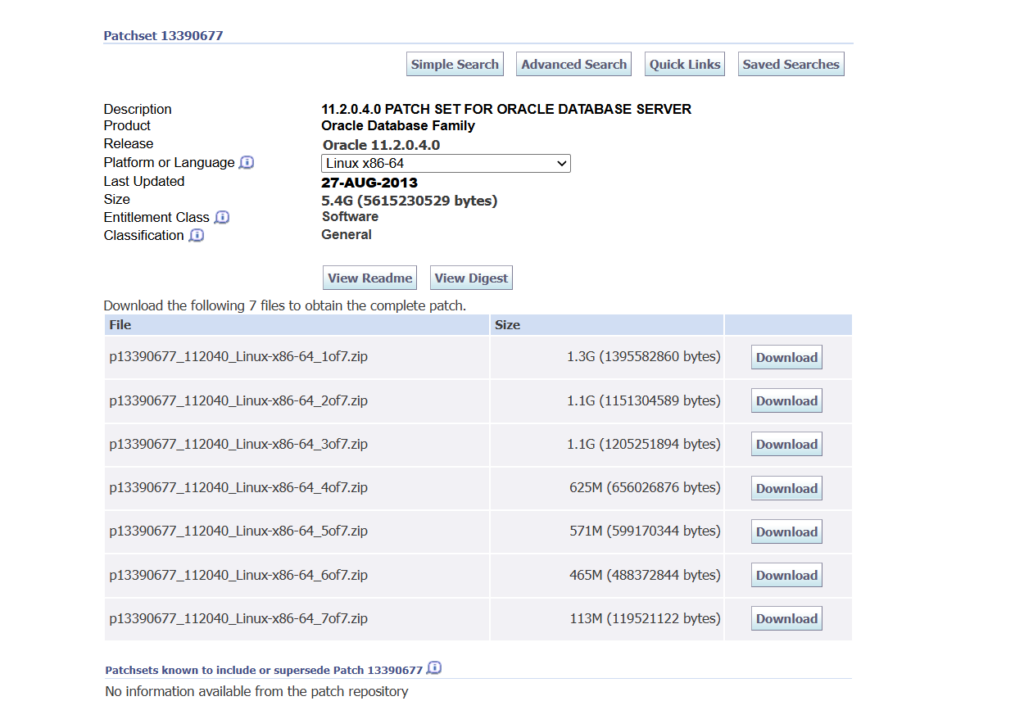
👉 The binaries are split into multiple ZIP files (usually 7 parts).
This is completely normal.
Typical file structure:
p13390677_112040_Linux-x86-64_1of7.zipp13390677_112040_Linux-x86-64_2of7.zip- …
p13390677_112040_Linux-x86-64_7of7.zip
Oracle distributes them this way because of the large size (around 5GB+ total).
You must download all parts to perform a successful installation.
🔗 Download Oracle 11.2.0.4 Binaries
You can download the official Oracle 11.2.0.4 patch set from My Oracle Support using the link below:
👉 Download Oracle 11.2.0.4 Patch Set (13390677)
📌 Important Notes:
- You need a valid Oracle Support account (MOS) to download.
- Select your platform (Linux, Windows, AIX, Solaris, etc.).
- Ensure you download all ZIP parts.
Supported Platforms
Oracle 11.2.0.4 is available across multiple platforms, including:
- Linux (x86 / x86-64)
- Windows (32-bit / 64-bit)
- Solaris (SPARC & x86)
- IBM AIX
- HP-UX
This makes it highly flexible for enterprise deployments.
Installation Overview
Here’s a high-level installation flow:
Step 1: Download All ZIP Files
Download all parts of the patch set from the link above.
Step 2: Extract Files
unzip p13390677_112040_Linux-x86-64_1of7.zip
unzip p13390677_112040_Linux-x86-64_2of7.zip
...
All files will extract into a single directory structure.
Step 3: Run Installer
./runInstallerFollow the GUI installation steps.
Step 4: Choose Installation Type
You can select:
- Software Only
- Create and Configure Database
Step 5: Post Installation
After installation:
- Apply latest PSU (Patch Set Update)
- Configure listener
- Create database (if not done during install)
Upgrade vs Fresh Installation
Oracle supports two main approaches:
1. Fresh Installation
Install 11.2.0.4 directly (recommended for new setups).
2. Upgrade Existing Database
Upgrade from:
- 11.2.0.1 / 11.2.0.2 / 11.2.0.3 → 11.2.0.4
👉 Best practice: Out-of-place upgrade (install new Oracle Home and migrate database)
⚠️ Important Best Practices
Before installing or upgrading, keep these in mind:
✔ Always Take Full Backup
Never proceed without a full database backup.
✔ Read the README
Each patch set comes with a README file—follow it strictly.
✔ Check OS Compatibility
Ensure your Linux/Unix version is supported.
✔ Apply Latest PSU
11.2.0.4 alone is not enough—apply latest security patches.
✔ Use Separate Oracle Home
Avoid in-place upgrades unless necessary.
Common Use Cases
Oracle 11.2.0.4 is commonly used for:
- Legacy enterprise systems
- Middleware integrations
- EBS environments
- Pre-upgrade staging (to 19c/21c)
Pro Tip (From Real Experience)
If you are setting up a test lab or RAC environment, make sure:
- You install Grid Infrastructure separately
- Match database and grid versions
- Use proper kernel parameters and prerequisites
Since you mentioned you’re working with RAC setups, this version is still widely used in lab environments for testing clustering scenarios.
Final Thoughts
Oracle 11.2.0.4 is more than just a patch—it’s a milestone release in Oracle’s database history. Its stability, widespread adoption, and role in upgrade paths make it essential knowledge for any DBA.
Even in 2026, understanding and working with 11.2.0.4 remains valuable—especially when dealing with legacy systems or migration projects.
Quick Summary
- Version: Oracle 11.2.0.4
- Patch: 13390677
- Type: Full installation package
- Files: 7 ZIP parts
- Requirement: Oracle Support Account
👉 Download here:
Oracle 11.2.0.4 Binaries Download Page


