

In today’s multi-cloud world, organizations rely on multiple platforms for identity and access management. One of the most common requests from enterprise customers has been the ability to integrate Microsoft Azure Active Directory (Azure AD) with Oracle databases.
With Oracle Database 23c, this integration becomes more seamless, secure, and enterprise-ready.

In this blog, we’ll explore how Azure AD integration with Oracle Database works, why it matters, and how it improves security and user management.
Why Azure AD Integration Matters
Modern enterprises often use:
- Microsoft Azure Active Directory for identity management
- Oracle Cloud Infrastructure (OCI) or on-prem Oracle databases
The challenge?
👉 Managing users separately across systems leads to:
- Complexity
- Security risks
- Increased administrative overhead
Organizations want:
- A single identity system
- Centralized user management
- Secure authentication across platforms
👉 Oracle 23c addresses this need directly
Evolution of Authentication in Oracle
Before Azure AD integration, Oracle provided several authentication methods:
🔹 1. Oracle Directory Mapping
Users could be:
- Mapped from database to Oracle Directory
But:
- Direct database login gave no privileges
- Full access required directory-based authentication
🔹 2. Commonly Managed Users (CMU)
Introduced in Oracle 18c:
- Allowed integration with third-party Active Directories
- Enabled centralized authentication
Limitation
Many enterprises use:
- Microsoft Azure Active Directory
But integration was not straightforward.
👉 This created a gap that Oracle 23c now fills.
What’s New in Oracle 23c?
Oracle 23c introduces native integration with Microsoft Azure Active Directory.
This allows:
- Authentication via Azure AD
- Secure access to Oracle databases
- Centralized identity management
👉 A highly requested feature by enterprise customers
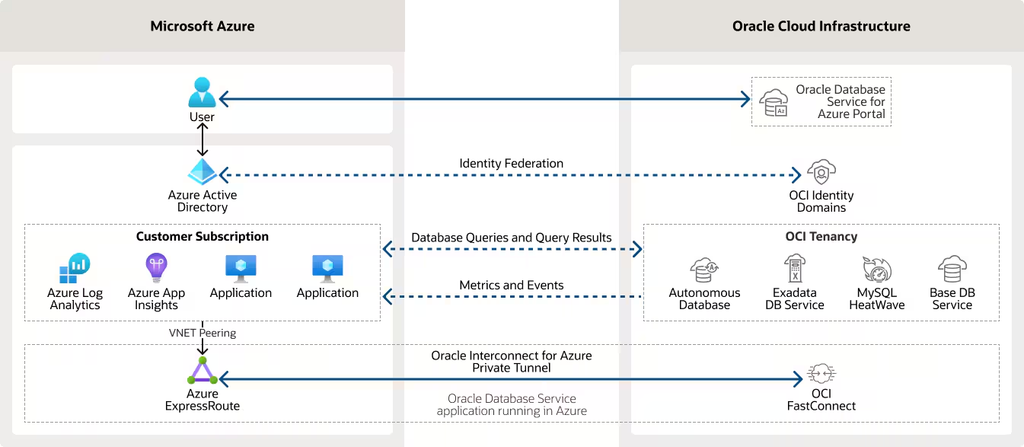
How Azure AD Integration Works
Let’s break it down into a simple flow:
Step 1: User Authentication in Azure AD
- Users log in via Azure Active Directory
- Azure validates identity
- Generates an authentication token
Step 2: Token Generation
Azure AD creates:
- Secure tokens representing user identity
These tokens:
- Contain authentication details
- Are used for database access
Step 3: Token Sent to Oracle Database
- The application retrieves the token
- Sends it to Oracle Database
Step 4: Token Validation
Oracle:
- Validates the token
- Maps user identity
- Grants access based on roles
👉 Result:
Secure, centralized authentication without storing credentials in the database.
Integration Architecture Overview
The integration involves:
- Azure Active Directory
- Oracle Database (OCI or on-prem)
- Application layer
- Token-based authentication
👉 This creates a secure bridge between Microsoft and Oracle ecosystems.
Key Configuration Steps
To enable Azure AD integration, organizations must:
✅ 1. Register Oracle Database with Azure AD
- Create a database service instance
- Register it in Azure AD
✅ 2. Configure Application Details
Define:
- Application ID
- Tenant ID
- Service URLs
- Public keys
✅ 3. Enable Communication
- Allow Oracle DB to communicate with Azure AD
- Set authentication parameters
✅ 4. Map Users
- Create globally authenticated users
- Map them to Azure AD identities
✅ 5. Configure Connection Pools
- Use service principals
- Manage connections securely
👉 Once configured, authentication becomes seamless.
Security Benefits
1. Centralized Identity Management
- Manage users in Azure AD
- No need to maintain database users separately
2. Strong Authentication
- Token-based authentication
- Reduced password exposure
3. Role-Based Access Control
- Assign roles centrally
- Enforce consistent policies
4. Improved Auditing
- Track authentication events
- Enhance compliance
5. Multi-Cloud Security
- Works across:
- Oracle Cloud
- On-prem environments
Performance & Scalability Advantages
- Faster authentication using tokens
- Reduced database overhead
- Scalable for large user bases
Real-World Use Cases
🔹 Enterprise Applications
- Employees authenticate via Azure AD
- Access Oracle databases securely
🔹 Multi-Cloud Environments
- Azure identity + Oracle database
- Unified access control
🔹 SaaS Platforms
- Centralized user management
- Secure API access
🔹 Hybrid Environments
- On-prem + cloud integration
- Seamless authentication
Things to Consider
- Proper configuration is critical
- Token management must be secure
- Network connectivity between systems required
Best Practices
✔️ Use Centralized Role Management
Avoid duplicating roles in multiple systems
✔️ Secure Token Storage
Protect token files and access points
✔️ Monitor Authentication Logs
Track access and detect anomalies
✔️ Test Integration Thoroughly
Ensure smooth operation before production
How This Fits into Oracle 23c Security
Azure AD integration is part of a broader security enhancement in Oracle 23c, which includes:
- Read-only users and sessions
- Simplified privilege management
- Advanced auditing capabilities
👉 Together, they provide a modern, secure database environment
Final Thoughts
Oracle 23c’s integration with Microsoft Azure Active Directory is a major step forward in enterprise security and identity management.
Key Takeaways:
- Centralized authentication using Azure AD
- Token-based secure access
- Simplified user management
- Enhanced security and compliance
👉 This feature bridges the gap between Microsoft and Oracle ecosystems, making it easier for organizations to operate in a hybrid and multi-cloud world.
Migrating Oracle Databases to Azure Cloud — Performance Validation and Lessons Learned


