

Oracle Real Application Clusters (RAC) environments are designed to scale, self-heal, and remain highly available. But behind this flexibility lies an important architectural component that many DBAs hear about but don’t fully understand: Grid Plug and Play (GPnP).
GPnP is one of the foundational services that enables dynamic cluster configuration, simplified deployment, and high availability in Oracle Clusterware. In this blog, we’ll break down GPnP architecture in a simple, humanized way, explaining how it works, why it exists, and how it interacts with services like mDNS, GNS, SCAN listeners, and DHCP.


If you manage Oracle RAC or Grid Infrastructure, this is knowledge you must have.
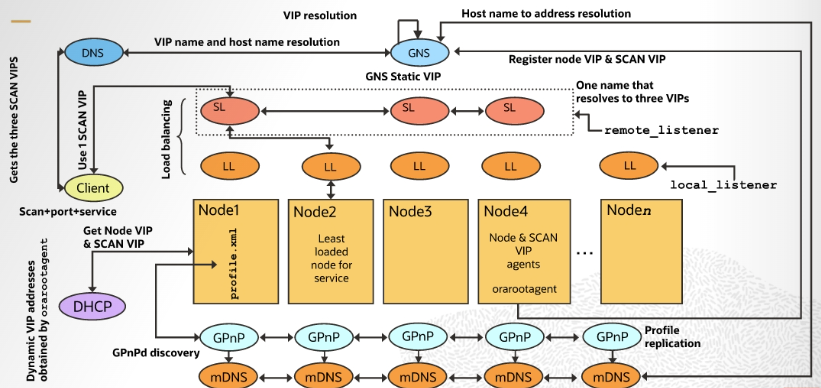
What Is Oracle Grid Plug and Play (GPnP)?
Grid Plug and Play (GPnP) is a distributed service that allows Oracle Clusterware to automatically discover, configure, and manage cluster nodes without heavy manual configuration.
Unlike traditional static cluster setups, GPnP enables:
- Dynamic node addition and removal
- Automatic profile replication
- High availability without a single point of failure
The key idea behind GPnP is peer-to-peer architecture. There is no master node controlling the configuration.
GPnP Service – How It Works
The GPnP service is collectively provided by all cluster nodes.
Key characteristics:
- A GPnP agent runs on every cluster node
- Each agent is equal (peer-to-peer)
- No central master process
- Profiles are replicated across nodes
- High availability is built-in by design
If one GPnP agent fails or a node crashes, the cluster continues to function normally, because other GPnP agents can still respond.
This design eliminates single points of failure and ensures continuous service availability.
Why GPnP Is Highly Available by Design
Traditional centralized services fail when the master goes down. GPnP avoids this completely.
Because:
- Every node runs its own GPnP agent
- Configuration is shared and replicated
- Any agent can respond to discovery requests
Even if multiple nodes fail, new nodes can still join the cluster, retrieve profiles, and start services.
This makes GPnP a core enabler of Oracle RAC resilience.
Multicast Discovery and mDNS – The Backbone of GPnP
GPnP relies heavily on multicast DNS (mDNS) for service discovery.
What is mDNS?
mDNS is a multicast-based name resolution mechanism that allows systems to discover services without a centralized DNS server.
In GPnP:
- mDNS daemons run on every cluster node
- Nodes advertise their services using multicast
- GPnP agents discover peers automatically
- No manual configuration is required
This multicast discovery allows GPnP to:
- Locate peer agents
- Discover configuration profiles
- Join the cluster dynamically
In simple terms, nodes “find each other” automatically using multicast.
GPnP Name Resolution – Inside vs Outside the Domain
Name resolution in a GPnP environment behaves differently depending on where the client resides.
Name Resolution Inside the GPnP Domain
Within the GPnP domain:
- Most names are resolved using mDNS
- Each node runs an mDNS responder
- The responder knows the node’s names and IPs
- OS client libraries use multicast to resolve names
When a node queries a name:
- A multicast request is sent
- The node owning the name responds
- The IP address is returned
This eliminates the need for static host files or complex DNS entries inside the cluster.
Name Resolution Outside the GPnP Domain
Clients outside the GPnP domain cannot use multicast.
For these clients:
- Standard DNS is used
- The global DNS delegates a subdomain to the GPnP domain
- That delegation points to a Grid Naming Service (GNS)
This ensures seamless access for external clients.
Grid Naming Service (GNS) – Bridging DNS and mDNS
The Grid Naming Service (GNS) acts as a translator between:
- External DNS queries
- Internal multicast-based name resolution
How GNS works:
- External client sends DNS request
- GNS receives the request
- GNS forwards it to mDNS collectors
- mDNS responses are gathered
- GNS translates the response
- Result is sent back to the client
Why GNS is “virtual”
- GNS is stateless
- Any node in the multicast domain can host it
- Oracle CRS ensures availability
- No persistent state means no recovery issues
Only required GNS configuration:
- IP address listening on standard DNS port (53)
- Domain names it is responsible for resolving
This design keeps GNS simple, scalable, and resilient.
SCAN Listener and Local Listeners – Built-in Load Balancing
One of the most powerful features enabled by GPnP is SCAN (Single Client Access Name).
What SCAN does:
- Provides a single connection endpoint
- Enables load balancing
- Supports seamless node addition/removal
How SCAN Works
- Client sends connection request to SCAN name
- SCAN resolves to multiple SCAN IPs
- SCAN listener receives the request
- SCAN listener checks service registrations
- It selects the least loaded node
- Client is redirected to the local listener
- Connection is established
All of this happens transparently, with no special client configuration.
Why SCAN Is Critical
- No need to change client configs when nodes are added
- Automatic load balancing
- Improved availability
- Simplified application connectivity
SCAN is a perfect example of how GPnP simplifies cluster operations.
Node Startup in a GPnP Environment
When a node starts in a GPnP-enabled cluster, the process is highly automated.
Startup sequence:
- Public network IP is negotiated using DHCP
- Oracle Clusterware starts on the node
- GPnP agent starts
- GPnP agent retrieves profile:
- From local storage, or
- From peer GPnP agents using multicast discovery
- Shared storage is configured per profile
- Network interfaces are configured dynamically
- Cluster services are started
If static configuration exists, it is used as a reference—but dynamic configuration takes priority.
This allows nodes to be:
- Added easily
- Replaced quickly
- Recovered automatically
Why GPnP Matters to DBAs
Many DBAs treat GPnP as “background magic,” but understanding it helps you:
- Troubleshoot cluster startup issues
- Diagnose name resolution problems
- Understand SCAN behavior
- Design scalable RAC architectures
- Confidently add or remove nodes
- Reduce downtime during failures
GPnP is not optional—it is core to modern Oracle RAC.
Real-World Benefits of GPnP Architecture
- ✅ No single point of failure
- ✅ Zero manual configuration for discovery
- ✅ Automatic profile replication
- ✅ Simplified cluster expansion
- ✅ Built-in high availability
- ✅ Seamless client connectivity
- ✅ Reduced operational complexity
Conclusion
Oracle Grid Plug and Play (GPnP) is the silent engine that powers dynamic, resilient, and scalable Oracle RAC environments. By combining peer-to-peer architecture, multicast discovery, virtual naming services, and intelligent listeners, GPnP eliminates many of the traditional pain points of cluster management.
For DBAs, understanding GPnP is no longer optional—it’s essential for designing, operating, and troubleshooting modern Oracle Grid Infrastructure.
If you understand GPnP, you understand how Oracle RAC truly works under the hood.
Related Articles
- ORA-04063 and ORA-00904 on “SYS.DBA_REGISTRY” Has Errors
- ORA-04031: Unable to Allocate Shared Memory – Causes, Fixes, and Prevention (Oracle DBA Guide)
- Fixing the “Error in invoking target ‘agent nmhs’ of makefile ins_emagent.mk” During Oracle 11.2.0.4 Installation on Linux
- Health-check Checklist for Oracle Real Application Clusters (RAC) & Oracle Clusterware: What to Review, How to Automate


