

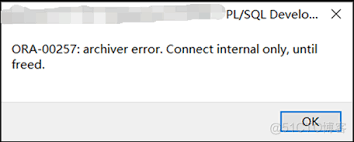
It’s late in the day, your production database starts throwing errors, and your application logs fill up with this message:
ORA-00257: archiver error. Connect internal only, until freed.
Suddenly, new transactions stop. Users can’t log in. The entire system feels frozen.


Don’t worry — this is one of the most common Oracle database issues, and the fix is usually straightforward once you understand what’s happening.
Let’s walk through why this happens, how to fix it fast, and how to prevent it for good.
What Does ORA-00257 Mean?
The ORA-00257 error indicates that the ARCH process (Archiver) can’t write redo logs to the archive destination.
In plain English — Oracle is trying to archive redo logs to your archive destination (usually for recovery and Data Guard), but it has run out of space or lost access to that destination.
When this happens, Oracle halts all new commits to protect data integrity.
Common Causes of ORA-00257
- Archive destination is full
The filesystem, ASM disk group, or NFS mount where logs are stored has no free space. - Archive destination is unreachable
The mount point (NFS, shared storage) is disconnected or not accessible. - Archive log destination misconfiguration
Wrong or unavailable path inLOG_ARCHIVE_DEST_nparameters. - Too many archived logs not deleted
Logs haven’t been backed up or purged for a long time, filling the destination.
Step-by-Step Troubleshooting Guide
Let’s go through how to fix this step-by-step safely.
Step 1: Confirm the Error
Log in as SYSDBA:
sqlplus / as sysdba
Run:
ARCHIVE LOG LIST;
You’ll see something like:
Database log mode              Archive Mode
Automatic archival             Enabled
Archive destination            /u01/app/oracle/arch
Log sequence number            10547
If it’s stuck — that’s the issue.
Step 2: Check Archive Destination Usage
Run this on your OS:
df -h /u01/app/oracle/arch
If it shows 100% usage — you’ve found the culprit.
For ASM:
SELECT name, total_mb, free_mb FROM v$asm_diskgroup;
Step 3: Check Current Archive Settings
In SQL*Plus:
SHOW PARAMETER log_archive_dest;
This lists all configured archive destinations (e.g., LOG_ARCHIVE_DEST_1, LOG_ARCHIVE_DEST_2, etc.).
Step 4: Free Up Space (Safe Fix)
Delete or move old archive logs after verifying backups.
If RMAN backups exist:
RMAN> DELETE ARCHIVELOG ALL COMPLETED BEFORE 'SYSDATE-2';
If manual cleanup is needed:
cd /u01/app/oracle/arch
ls -lh
rm *.arc   # only after confirming backups
✅ Be absolutely sure you’ve backed up your logs before deleting them.
Step 5: Re-enable Archiving
Once space is cleared:
ALTER SYSTEM ARCHIVE LOG ALL;
If the issue was resolved:
ALTER SYSTEM SWITCH LOGFILE;
Then check again:
ARCHIVE LOG LIST;
You should now see that new archives are being generated and applied successfully.
Step 6: Verify the Archive Log Process
Confirm all archiver processes are running:
SELECT process, status FROM v$archive_processes;
Expected output:
ARC0    STARTED
ARC1    STARTED
ARC2    STARTED
ARC3    STARTED
If any are STOPPED, restart them:
ALTER SYSTEM ARCHIVE LOG START;
Example: Real Production Scenario
A financial system running Oracle 19c on Linux suddenly stopped accepting transactions.
The error log showed:
ORA-00257: archiver error. Connect internal only, until freed.
Upon checking:
df -h /u01/app/oracle/arch
Output:
Filesystem      Size  Used Avail Use% Mounted on
/dev/sdb1       100G  100G     0 100% /u01/app/oracle/arch
The backup retention policy hadn’t been running for three days, and old archive logs filled the disk.
After removing logs older than 2 days and verifying RMAN backups:
DELETE ARCHIVELOG ALL COMPLETED BEFORE 'SYSDATE-2';
The database resumed normal operations immediately.
Prevention Best Practices
Automate archive log cleanup
Set a cleanup policy in RMAN:
CONFIGURE ARCHIVELOG DELETION POLICY TO APPLIED ON STANDBY;
or schedule:
DELETE NOPROMPT ARCHIVELOG ALL COMPLETED BEFORE 'SYSDATE-3';
Monitor archive destination size
Use shell scripts or monitoring tools (like Datadog, OEM, or Prometheus) to alert when usage > 80%.
Configure multiple destinations
Example:
ALTER SYSTEM SET LOG_ARCHIVE_DEST_2='LOCATION=/u02/arch MANDATORY';
Enable automatic space management for ASM
Helps balance datafile and log storage when using ASM
Integrate archiving checks into health scripts
Add archive log usage checks into daily DBA monitoring routines.
Related Articles
- Oracle Grid Infrastructure 19c Restart Home Installation — Complete Step-by-Step Guide
- How To Download And Install The Latest OPatch
- How to Fix “ORA-01111: Name for Data File Is Unknown” in Oracle Standby Databases
Final Thoughts
The ORA-00257 Archiver Error is Oracle’s way of protecting you from data loss — it halts transactions to prevent overwriting redo logs before they’re safely archived.
The good news is, the fix is simple: free up space, confirm backups, and manage archive logs proactively.
With a solid cleanup policy and alerting in place, you’ll never have to face this issue during business hours again.


