

Oracle Database Monthly Recommended Patch (DB MRP) 19.32.0.0.260915, delivered through Patch 39971265, provides cumulative MRP content for Oracle Database 19c environments.
In this article, we walk through a real-world installation of Patch 39971265 on an Oracle Database 19c Oracle Home using OPatch 12.2.0.1.52.


The procedure covers:
- Checking the existing Oracle Home patch level
- Extracting Patch 39971265
- Running the OPatch conflict prerequisite check
- Applying the MRP using
opatch napply - Reviewing the patches included in the MRP
- Understanding the RAC installation considerations
- Post-patching verification
Note: This article documents an installation performed on September 16, 2026, using the Oracle Database 19.32 environment shown in the command outputs below.
1. What is Oracle Database MRP 19.32?
Oracle Database Monthly Recommended Patch (DB MRP) 19.32.0.0.260915 is a cumulative patch. This means the latest MRP includes the content from previous MRPs.
Patch 39971265 is associated with the September 2026 Database MRP.
An important prerequisite is that the Oracle Home must already have:
Oracle Database Release Update 19.32.0.0.260721
The MRP is specifically applicable to the Oracle Database Home.
The README also identifies the patch as Oracle RAC Rolling Installable, which is important for RAC environments where node-by-node patching can be used.
2. Environment Used for the Installation
The patch was applied to the following Oracle Home:
/u01/app/oracle/product/19.0.0
The OPatch version was:
OPatch Version: 12.2.0.1.52
The Oracle Home was already running the 19.32 Release Update along with several additional Oracle components.
3. Check the OPatch Version
Before applying any patch, verify the installed OPatch version.
cd /u01/app/oracle/product/19.0.0/OPatch

./opatch version
Output:
OPatch Version: 12.2.0.1.52

OPatch succeeded.
The MRP documentation states that online-installable content can be applied using OPatch 12.2.0.1.52 or later.
Therefore, the environment used for this installation satisfies that OPatch version requirement.
4. Check the Existing Oracle Home Patches
Before applying a new MRP, it is important to capture the current patch inventory.
Run:
./opatch lspatches
The environment reported:
39526364;OCW RELEASE UPDATE 19.32.0.0.0 (39526364)
39503034;ACFS RELEASE UPDATE 19.32.0.0.0 (39503034)
39472050;Database Release Update : 19.32.0.0.260721 (39472050)
39107855;TOMCAT RELEASE UPDATE 19.0.0.0.0 (39107855)
39107825;DBWLM RELEASE UPDATE 19.0.0.0.0 (39107825)

OPatch succeeded.
The important prerequisite here is:
39472050;Database Release Update : 19.32.0.0.260721
This corresponds to the required 19.32.0.0.260721 Database Release Update specified for the MRP.
5. Download and Extract Patch 39971265
The downloaded patch archive was:
Oracle Critical Security Patch Update Advisory – September 2026
p39971265_1932000DBRU_Linux-x86-64.zip
Extract the patch:
unzip p39971265_1932000DBRU_Linux-x86-64.zip
The extraction created:
39971265/
with multiple sub-patches, including:
39570736
39750798
For example:
39971265/
├── 39570736/
│   ├── README.txt
│   ├── files/
│   └── etc/
│
└── 39750798/
    ├── README.txt
    ├── files/
    └── etc/
Patch 39971265 is therefore a composite MRP, containing multiple individual patch components.
6. Run the Conflict Check
Before applying the MRP, perform an OPatch conflict check.
Command:
/u01/app/oracle/product/19.0.0/OPatch/opatch \
prereq CheckConflictAgainstOHWithDetail \
-ph ./39971265
The environment reported:
Oracle Interim Patch Installer version 12.2.0.1.52

Oracle Home       : /u01/app/oracle/product/19.0.0
Central Inventory : /u01/app/oraInventory
OPatch version    : 12.2.0.1.52
OUI version       : 12.2.0.7.0
Most importantly:
Invoking prereq "checkconflictagainstohwithdetail"

Prereq "checkConflictAgainstOHWithDetail" passed.

OPatch succeeded.
This confirms that OPatch did not identify a conflict between Patch 39971265 and the existing Oracle Home inventory.
Recommendation: Always perform the conflict check before proceeding with a production patch installation.
7. Apply Patch 39971265
After the prerequisite check passed, the MRP was applied using:
/u01/app/oracle/product/19.0.0/OPatch/opatch napply ./39971265
napply is particularly useful for a patch bundle containing multiple interim patches because OPatch processes the applicable patches contained within the directory.
The installer identified the following patches:
39487170
39570655
39570736
39661089
39750798
39761039
39761126
39763853
39779336
39833225
39890510
39897693
39901922
39935553
39951966
The installer then requested confirmation:
Do you want to proceed? [y|n]
The response was:
y
8. Oracle Home Shutdown Requirement
During the installation, OPatch displayed:
Please shutdown Oracle instances running out of this ORACLE_HOME on the local system.

(Oracle Home = '/u01/app/oracle/product/19.0.0')

Is the local system ready for patching? [y|n]
The environment was confirmed ready:
y
OPatch then continued with the patching operation.
For the standard offline MRP installation method, Oracle’s documentation recommends shutting down database instances, listeners, and other software running from the Oracle Home before applying the MRP.
9. Patch Application Details
OPatch subsequently applied each individual patch contained within Patch 39971265.
Examples from the installation output include:
Applying interim patch '39487170'
and:
Patching component oracle.rdbms.rsf
Patching component oracle.xdk.rsf
Patching component oracle.rdbms
Another component was:
Applying interim patch '39570736'
which updated:
oracle.rdbms
oracle.ctx.rsf
The MRP also contained patches affecting components such as:
oracle.sdo
oracle.rdbms.dbscripts
oracle.rdbms.rman
oracle.rdbms.util
oracle.network.rsf
oracle.perlint
This demonstrates that the MRP is not simply a single binary patch; it consists of multiple patch components targeting different Oracle Database Home components.
10. Optional Component Message
During the installation, OPatch reported:
Optional component(s) [ oracle.network.cman, 19.0.0.0.0 ]
not present in the Oracle Home or a higher version is found.
This message appeared while applying patches:
39761126
39763853
This is an informational prerequisite/application message indicating that the optional component was either not installed in this Oracle Home or a higher version was already present.
It did not prevent the patch installation from continuing.
11. Successful Patch Application
After processing all components, OPatch reported:
Patches 39487170,39570655,39570736,39661089,39750798,
39761039,39761126,39763853,39779336,39833225,
39890510,39897693,39901922,39935553,39951966
successfully applied.
Finally:
OPatch succeeded.
The OPatch log was generated under:
/u01/app/oracle/product/19.0.0/cfgtoollogs/opatch/
with the patch execution log:
opatch2026-09-16_21-06-55PM_1.log
12. Verify the Installed Patches
After the patch completes, verify the Oracle Home inventory.
Run:
cd /u01/app/oracle/product/19.0.0/OPatch

./opatch lspatches
You should verify that the patches included by the MRP are now present in the Oracle Home.
It is also useful to run:
./opatch lsinventory
and review the complete inventory.
For production environments, preserve the pre-patch and post-patch outputs for change records and audit purposes.
13. Database-Level Post-Patching Tasks
Updating the Oracle Home is only one part of an Oracle Database patching exercise.
After the binaries are patched, start the database and perform the required database-level patching activities.
For environments where datapatch is applicable, check the SQL patch status:
$ORACLE_HOME/OPatch/datapatch -sanity_checks
Then execute:
$ORACLE_HOME/OPatch/datapatch -verbose
After completion, verify the SQL patch registry from SQL*Plus:
SELECT patch_id,
       action,
       status,
       action_time,
       description
FROM   dba_registry_sqlpatch
ORDER BY action_time DESC;
Look for:
STATUS = SUCCESS
for the applicable SQL patches.
Important: The exact database post-patching procedure should follow the README for the specific MRP and the topology of the environment.
14. RAC Considerations
Patch 39971265 is identified as Oracle RAC Rolling Installable.
For RAC environments, the README’s recommended installation procedure allows the patching sequence to be performed one node at a time.
A typical high-level sequence is:
Node 1
  ↓
Drain/relocate services
  ↓
Stop required Oracle software
  ↓
Apply MRP
  ↓
Start services
  ↓
Verify
  ↓
Node 2
  ↓
Drain/relocate services
  ↓
Stop required Oracle software
  ↓
Apply MRP
  ↓
Start services
  ↓
Verify
The exact rolling procedure should be adapted to the RAC topology, services, Data Guard configuration, application requirements, and maintenance window.
15. Practical Pre-Patching Checklist
Before applying Patch 39971265, verify:
Oracle Home
echo $ORACLE_HOME
Expected environment:
/u01/app/oracle/product/19.0.0
OPatch
$ORACLE_HOME/OPatch/opatch version
Verify:
12.2.0.1.52 or later
Current inventory
$ORACLE_HOME/OPatch/opatch lspatches
Required Database RU
Verify that the Oracle Home contains:
39472050
Database Release Update 19.32.0.0.260721
Conflict check
$ORACLE_HOME/OPatch/opatch prereq \
CheckConflictAgainstOHWithDetail \
-ph ./39971265
Expected:
Prereq "checkConflictAgainstOHWithDetail" passed.
Backup
Ensure a valid backup of:
- Oracle Home
- Oracle Inventory
- Database
- Configuration files
- SPFILE/password files where applicable
16. Post-Patching Checklist
After the patch:
$ORACLE_HOME/OPatch/opatch lspatches
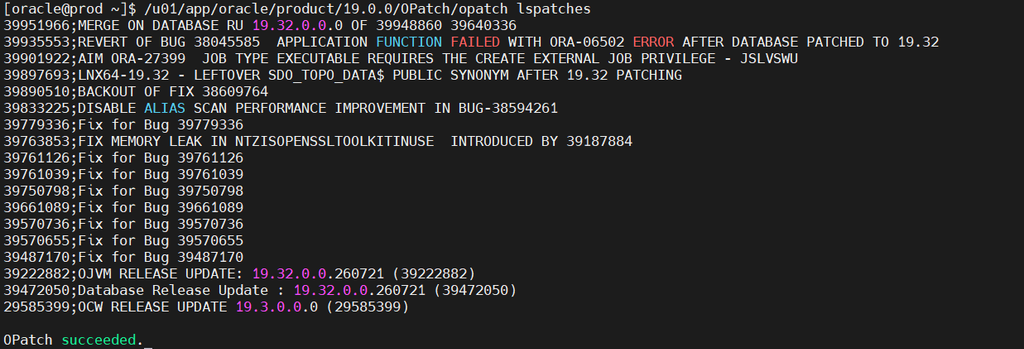
Then verify:
$ORACLE_HOME/OPatch/opatch lsinventory
Start the database:
STARTUP;
Check:
SELECT * FROM v$version;
Check SQL patches:
SELECT patch_id,
       action,
       status,
       action_time,
       description
FROM dba_registry_sqlpatch
ORDER BY action_time DESC;
For RAC:
crsctl stat res -t
Verify:
- Database instances
- RAC services
- ASM
- Listener
- Application connectivity
- Data Guard status
- Backup jobs
- Monitoring
- OEM targets
- Application transactions
17. Lessons From This Installation
This installation highlights several important operational practices.
1. Check the prerequisite RU first
Patch 39971265 requires the Oracle Home to have the 19.32.0.0.260721 Database Release Update.
In this environment, the prerequisite RU was already installed:
39472050;Database Release Update : 19.32.0.0.260721
2. Always perform the conflict check
The command:
opatch prereq CheckConflictAgainstOHWithDetail
successfully passed before the actual installation.
This provides an important validation step before changing the Oracle Home.
3. Record the pre-patch inventory
The output of:
opatch lspatches
provides a baseline that can be compared with the post-patching inventory.
4. Review every patch included in a composite MRP
Patch 39971265 applied multiple individual patches, including:
39487170
39570655
39570736
39661089
39750798
39761039
39761126
39763853
39779336
39833225
39890510
39897693
39901922
39935553
39951966
5. Don’t stop at OPatch
A successful:
OPatch succeeded.
confirms the Oracle Home patching operation completed successfully. Database-level SQL patch verification and application validation should still be completed according to the environment’s patching procedure.
18. Complete Command Summary
For reference, the core procedure used in this installation was:
cd /u01/app/oracle/product/19.0.0/OPatch

./opatch version

./opatch lspatches
Extract the patch:
unzip p39971265_1932000DBRU_Linux-x86-64.zip
Run conflict check:
/u01/app/oracle/product/19.0.0/OPatch/opatch \
prereq CheckConflictAgainstOHWithDetail \
-ph ./39971265
Apply:
/u01/app/oracle/product/19.0.0/OPatch/opatch \
napply ./39971265
Verify:
/u01/app/oracle/product/19.0.0/OPatch/opatch lspatches
and:
/u01/app/oracle/product/19.0.0/OPatch/opatch lsinventory
Then perform the required database-level SQL patch verification.
Conclusion
Oracle Database MRP 19.32.0.0.260915, delivered through Patch 39971265, is a cumulative Database Monthly Recommended Patch that can be applied to an Oracle Database Home already running the 19.32.0.0.260721 Release Update.
In the installation documented in this article, OPatch 12.2.0.1.52 was used to validate and apply the MRP. The conflict prerequisite check completed successfully, all 15 individual patches reported successful application, and OPatch ended with:
Patches ... successfully applied.

OPatch succeeded.
For production environments, the safest approach is to treat MRP installation as a complete lifecycle: pre-check → inventory → conflict validation → Oracle Home patching → database SQL patching → RAC/Data Guard verification → application validation.
Always review the patch-specific README and Oracle Support documentation before applying an MRP to a production environment, particularly for RAC, Data Guard, GI, and other complex topologies.
Patch: 39971265
MRP: 19.32.0.0.260915
Required RU: 19.32.0.0.260721
Platform: Linux x86-64
OPatch: 12.2.0.1.52
Installation status: Successfully applied


