
Oracle Grid Infrastructure patching is a critical maintenance activity for Oracle RAC environments. Applying the correct Monthly Recommended Patch (MRP) requires careful validation of the patch applicability, Oracle Grid Infrastructure home, Oracle Database home, cluster configuration, and running database services.
This article walks through a practical example of applying the August 2026 Oracle GI MRP 23.26.3.0.0 using OPatchAuto on an Oracle RAC environment.


The example is based on an Oracle RAC environment running Oracle 23c with the following homes:
Grid Home:
 /u01/app/23.26.0.0/grid

Oracle Database Home:
 /u01/app/oracle/product/23.26.0.0/dbhome_1
The patch bundle used in this example is:
39834064Note: Always review the official README supplied with the patch before applying it to a production environment. The exact patch prerequisites and supported configurations can vary between releases.
Environment Overview
The RAC environment used for the patching activity contained two nodes:
rac-node1
rac-node2
The Oracle Grid Infrastructure version reported by OPatchAuto was:
23.0.0.0.0The Oracle Database home was:
/u01/app/oracle/product/23.26.0.0/dbhome_1An older Oracle 19c home was also present:
/u01/app/oracle/product/19.0.0/dbhome_1The 19c home was not applicable to this particular patch and was therefore skipped by OPatchAuto.
1. Verify the OPatch Version
Before starting the patching process, verify the OPatch version available in the Grid home.
cd $ORACLE_HOME/OPatch

./opatch version
Example output:
OPatch Version: 12.2.0.1.52

OPatch succeeded.
The OPatch version should satisfy the minimum version requirement specified in the patch README.
2. Extract the Patch
The patch bundle should first be copied to the server and extracted.
For example:
cd /u01/patch

unzip p39834064_2326300DBRU_Linux-x86-64.zip
This creates the patch directory:
/u01/patch/39834064The patch bundle contains multiple component patches and supporting files. In this example, one of the extracted directories was:
39834064/39739668/with its associated patch files and JAR files.
3. Run OPatchAuto Analyze First
One of the most important steps is to perform an analyze-only operation before applying the patch.
This allows OPatchAuto to determine whether the patches are applicable to the Grid Infrastructure and RAC Database homes.
Run:
/u01/app/23.26.0.0/grid/OPatch/opatchauto apply ./39834064 -analyzeThe analysis completed successfully in the example environment.
The output showed:
Executing OPatch prereq operations to verify patch applicability
Patch applicability verified successfully
OPatchAuto also successfully completed the patch validation checks for both the Grid home and Database home.
4. Understand the “SKIPPED” Patches
During the analyze stage, OPatchAuto reported some patches as skipped.
For the Grid Infrastructure home, several patches were reported as:
Reason: This patch is not applicable to this specified target type - "cluster"For the RAC Database home, one patch was reported as:
Reason: This patch is not applicable to this specified target type - "rac_database"This does not automatically mean that the patching process has failed.
OPatchAuto evaluates each patch against the target type. Component patches may be applicable only to a specific Oracle home or target type.
The analysis showed that the applicable patches were successfully identified for both the Grid and RAC Database homes.
5. Review the 19c Oracle Home
The environment also contained:
/u01/app/oracle/product/19.0.0/dbhome_1OPatchAuto reported:
Following homes are skipped during patching as patches are not applicable:

/u01/app/oracle/product/19.0.0/dbhome_1
This is an important point when patching servers that contain multiple Oracle homes.
Do not assume that every Oracle home on the server will be patched by the same patch bundle.
Always review the OPatchAuto analysis output and confirm which homes are included and which are excluded.
6. Apply the Patch
After confirming that the analyze operation completed successfully and that the applicable patches were identified, the actual patch can be applied.
Run:
/u01/app/23.26.0.0/grid/OPatch/opatchauto apply ./39834064In the example environment, OPatchAuto performed the following major operations:
- Verified patch applicability.
- Performed patch validation.
- Enabled two-stage patches.
- Prepared the Oracle Database home.
- Performed prepatch operations.
- Brought down CRS as required.
- Applied the binary patches.
- Executed
rootadd_rdbms.sh. - Performed postpatch operations.
- Restarted CRS.
- Performed the required post-patching checks.
The binary patching of the Oracle Database home completed successfully:
Binary patch applied successfully on home
/u01/app/oracle/product/23.26.0.0/dbhome_1
The Grid Infrastructure binary patch also completed successfully:
Binary patch applied successfully on home
/u01/app/23.26.0.0/grid
CRS was subsequently started successfully.
7. Review the Patching Summary
At the end of the patching process, OPatchAuto reported:
OPatchAuto successful.The RAC Database home on rac-node1 showed the applicable patches as successfully applied, including:
39661089
39739668
39739695
39779336
39779540
39788260
39836748
while patch 39745860 was skipped for the RAC Database target because it was not applicable to that target type.
For the Grid Infrastructure home, the applicable patches included:
39739668
39745860
39788260
39836748
The other component patches were skipped because they were not applicable to the cluster target type.
8. Perform the Same Validation on the Second RAC Node
After completing the required patching activity on the first RAC node, the second node should also be validated.
Run the analyze operation from the second node:
/u01/app/23.26.0.0/grid/OPatch/opatchauto apply ./39834064 -analyzeThe analysis on rac-node2 successfully verified the patch applicability for:
/u01/app/23.26.0.0/gridand:
/u01/app/oracle/product/23.26.0.0/dbhome_1The applicable patches were identified successfully.
9. Important RAC Considerations
Oracle RAC patching requires more planning than patching a standalone Oracle Database.
Before starting the activity, verify:
- RAC node status
- CRS status
- Database status
- Oracle Database services
- ASM status
- Voting disks and OCR
- ACFS usage, if applicable
- Oracle Home ownership and permissions
- Available filesystem space
- OPatch version
- Patch prerequisites
- Running database instances
- Application dependencies
- Backup availability
Oracle’s patching instructions also emphasize that database services may need to be stopped depending on the RAC and Oracle Home configuration. For environments using ACFS, ACFS filesystems may also need to be unmounted and remounted during the patching procedure.
10. Useful OPatchAuto Logs
OPatchAuto generates several logs that are extremely useful when troubleshooting patching issues.
For example:
/u01/app/23.26.0.0/grid/cfgtoollogs/opatchauto/and:
/u01/app/oracle/product/23.26.0.0/dbhome_1/cfgtoollogs/opatchauto/The patching activity in this example generated logs such as:
opatchauto2026-08-19_08-00-58AM.logand component-level OPatch logs such as:
opatch2026-08-19_08-09-31AM_1.logThese logs should be retained as part of the change-management and patching evidence.
11. Patching Duration
In the example environment, the first analyze operation completed in approximately:
4 minutes 39 secondsThe actual OPatchAuto patching session completed in approximately:
27 minutes 16 secondsThe second-node analysis completed in approximately:
3 minutes 41 secondsActual patching duration will vary depending on the server hardware, Oracle Home size, cluster configuration, running services, filesystem performance, and patch contents.
12. Post-Patching Validation
A successful OPatchAuto message should not be considered the only validation step.
After patching, verify the RAC environment.
Check CRS
crsctl check crsCheck Cluster Resources
crsctl stat res -tCheck RAC Database Status
srvctl status database -d <db_unique_name>Check Database Instances
SELECT inst_id,
       instance_name,
       status
FROM gv$instance
ORDER BY inst_id;
Check Database Version
SELECT banner
FROM v$version;
Check SQL Patch Inventory
SELECT patch_id,
       patch_type,
       action,
       status,
       action_time,
       description
FROM dba_registry_sqlpatch
ORDER BY action_time DESC;
Also verify:
- ASM disk groups
- Database services
- Application connectivity
- Listener status
- CRS resources
- Alert logs
- Clusterware logs
- Application health checks
13. A Practical Patching Workflow
A simple workflow for this type of RAC patching activity is:
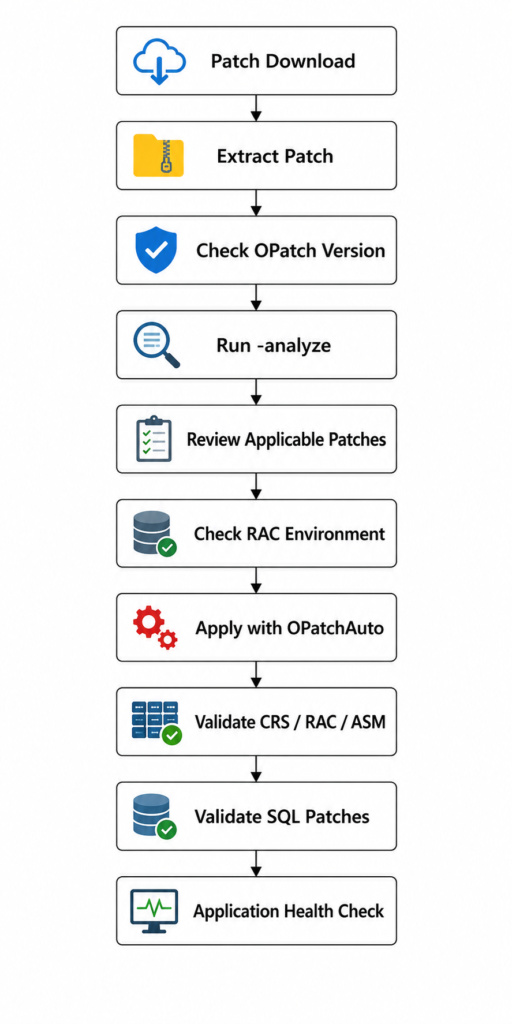
The most important principle is to never skip the analyze stage.
Conclusion
The August 2026 Oracle 23.26.3.0.0 GI MRP patching exercise demonstrates how OPatchAuto can be used to validate and apply a multi-component patch bundle across Oracle RAC Grid Infrastructure and Database homes.
In this example, patch bundle 39834064 was successfully analyzed and applied to the applicable Oracle 23c homes. OPatchAuto automatically identified patches that were applicable to the cluster and rac_database target types and skipped components that did not apply.
The key lessons are:
- Always verify the OPatch version before patching.
- Extract and inspect the patch bundle.
- Run
opatchauto ... -analyzebefore applying the patch. - Carefully review skipped versus successfully analyzed patches.
- Do not assume every Oracle Home on the server is applicable.
- Review the OPatchAuto logs throughout the activity.
- Validate CRS, ASM, RAC databases, services, and SQL patches after the change.
- Perform application-level validation before declaring the maintenance successful.
- Follow the Oracle patch README for the exact RAC and ACFS configuration.
- Keep the patching logs as evidence for operational and change-management records.
This approach provides a controlled and repeatable method for applying Oracle RAC infrastructure patches while reducing the risk of unexpected issues during planned maintenance.



Comments 1