

I get asked some version of this question fairly often, usually from a newer DBA staring at a security checklist: “Don’t we already have this covered with user privileges?” And I understand the instinct — if nobody without the right grants can query the table, isn’t the data protected? Except that logic falls apart the moment someone doesn’t go through the database at all. Copy the datafiles off disk, restore a backup somewhere else, walk off with a tape — none of your GRANT statements travel with the bytes. That’s a different problem, and Oracle solves it with a different toolset: Oracle Wallet, Transparent Data Encryption, Oracle Advanced Security, and DBMS_CRYPTO.
These four aren’t interchangeable, and picking the wrong one for the job is a mistake I’ve watched more than one team make. This is my attempt to lay out what each one actually does and, more importantly, when you’d reach for it over the others.


Oracle Wallet — Where the Keys Actually Live
Strip away the acronyms and a wallet is just a locked container. Inside it, Oracle keeps:
- TDE master encryption keys
- Certificates
- Database credentials
- SSL keys
- Passwords
- Connection strings
The wallet is itself password-protected, so getting hold of the file isn’t the same as getting hold of what’s in it.
Getting a Wallet Created
You’ve got a few tools available — orapki, mkstore, and the ADMINISTER KEY MANAGEMENT command. Honestly, in most cases you won’t even do this manually. The moment you configure TDE, Oracle sets up the software keystore and wallet on its own.
Where It Lives
Default location works fine for a lot of shops, but you can point it elsewhere — either through ENCRYPTION_WALLET_LOCATION in sqlnet.ora, or via the WALLET_ROOT initialization parameter if you’re centralizing wallet storage across your environment, which most larger organizations end up doing eventually.
Password Wallet or Auto Login — Pick Your Trade-off
Password Wallet needs a human (or a script with the password) to open it manually. Highest security, and what I default to for anything genuinely sensitive.
Auto Login Wallet opens itself right after the database starts, no intervention needed. Great for unattended environments and SSO setups — but you’re trading a bit of security for that convenience, so know what you’re giving up before you flip that switch.
Confirming the Wallet’s Actually Open
SELECT *
FROM V$ENCRYPTION_WALLET;
Tells you the wallet status, type, location, and keystore state. I’d rather check this proactively than find out during an incident that a wallet closed itself after a restart nobody accounted for.
So What Is TDE, Exactly?
Transparent Data Encryption sits under the Oracle Advanced Security umbrella, and its whole job is encrypting data at rest without asking developers to change a single line of application code.
SELECT * FROM customers;INSERT INTO customers VALUES (...);Same statements before and after TDE goes live. Oracle handles the encrypt-on-write, decrypt-on-read cycle entirely on its own — that’s the “transparent” part, and it’s honestly one of the better-designed features Oracle ships, because it means security doesn’t become a developer’s problem to solve.
What It’s Actually Protecting
TDE covers datafiles, tablespaces, backups, exports, and archived redo logs. Pull those files straight off the OS and you’re still looking at encrypted bytes — no key, no readable data.
One Thing TDE Is Not
TDE encrypts what’s stored. It’s not a substitute for database users, authentication, authorization, or object privileges — those still gate access the same way they always did. Someone still needs the right grants before Oracle will even attempt to decrypt anything for them. I’ve had this exact misunderstanding come up in an audit once — someone assumed TDE alone meant privilege review could be skipped. It can’t. They’re solving different problems and you need both.
The Two-Tier Key Model
TDE doesn’t use one key to encrypt everything directly — it layers keys instead:
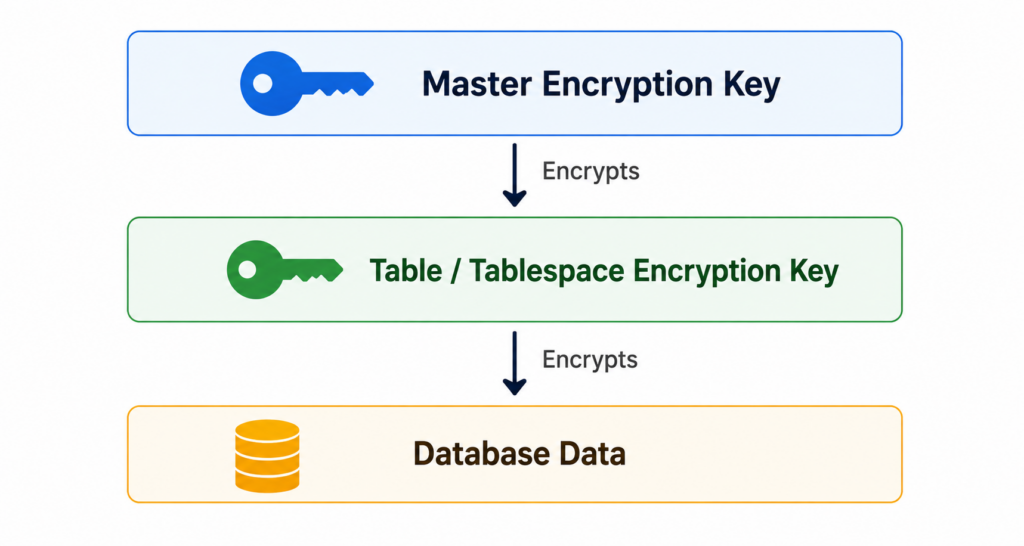
The master key never touches your actual data. Its only job is encrypting the Table Encryption Keys and Tablespace Encryption Keys, and those are what actually do the work on your data. It’s a bit like a keyring — the master key doesn’t open the front door itself, it protects the key that does.
And Those Keys Live in Different Places
| Component | Storage Location |
|---|---|
| Master Encryption Key | Oracle Wallet / Software Keystore / HSM |
| Table Encryption Keys | Data Dictionary |
| Tablespace Encryption Keys | Datafile Header |
Splitting things up like this means compromising one location doesn’t automatically hand over everything.
Why the Wallet Has to Be Open
If the wallet’s closed, Oracle can’t get to the master key — and without the master key, nothing downstream decrypts. No TEKs, no TSKs, no readable database blocks. This is exactly the failure mode I see catch people off guard after a database restart: everything looks fine until the first query against encrypted data hangs or errors out, and nine times out of ten the wallet just never got reopened.
Column-Level vs. Tablespace-Level Encryption
For a single sensitive column:
CREATE TABLE customers
(
    customer_id NUMBER,
    card_number VARCHAR2(30) ENCRYPT
);
Only that column gets protected — everything else in the table sits unencrypted.
For everything at once:
CREATE TABLESPACE secure_ts
DATAFILE '/u01/oradata/secure01.dbf'
SIZE 1G
ENCRYPTION USING 'AES256'
DEFAULT STORAGE (ENCRYPT);
Every object landing in that tablespace is encrypted automatically going forward. In practice I lean toward tablespace-level almost every time — it’s one less thing to remember when someone adds a new column six months later and forgets it needs ENCRYPT on it too.
Default Algorithms, and Why I Usually Override Them
| Encryption Type | Default Algorithm |
|---|---|
| Column Encryption | AES192 |
| Tablespace Encryption | AES128 |
Those defaults aren’t bad, but for anything genuinely sensitive I’ll specify AES256 explicitly rather than rely on the out-of-the-box setting. It costs you almost nothing in performance and it closes a conversation before an auditor opens it.
Rotating the Master Key
Plenty of compliance frameworks require periodic key rotation, and the re-keying process itself is straightforward conceptually: existing data gets decrypted, a new key gets generated, and everything’s re-encrypted under the new key.
What’s not so simple is the impact — re-encrypting protected data isn’t free, and depending on volume it can affect availability while it runs. Plan this during a maintenance window. I learned that one the hard way on a database that was larger than I’d accounted for, and what I expected to be a quiet background operation turned into a very visible performance conversation with the app team.
Bringing Your Own Master Key
If your organization already has an enterprise key management system, a cloud KMS, or an HSM in place, Oracle doesn’t force you to generate keys independently of that. You can import externally generated keys through ADMINISTER KEY MANAGEMENT, which keeps your Oracle environment consistent with whatever key management standard the rest of the org is already running.
Software Keystore or HSM?
| Software Keystore | Hardware Security Module |
|---|---|
| File-based wallet | Dedicated hardware appliance |
| Lower cost | Highest security |
| Easy deployment | Tamper-resistant key storage |
| Suitable for most deployments | Used in highly regulated industries |
For most shops, a software keystore is plenty. Once you’re in banking, healthcare, or government territory, the conversation usually shifts toward HSMs pretty quickly, and that’s generally the right call.
DBMS_CRYPTO — When You Actually Want to Do It Yourself
Everything above is Oracle managing encryption for you. DBMS_CRYPTO flips that — it’s a package that lets developers generate keys, encrypt and decrypt data, and hash values, with the application itself in full control of the process rather than Oracle.
TDE or DBMS_CRYPTO?
| Feature | Transparent Data Encryption | DBMS_CRYPTO |
|---|---|---|
| Automatic Encryption | Yes | No |
| Application Changes | No | Yes |
| Key Management | Oracle | Developer |
| Encryption/Decryption | Oracle | Developer |
| SQL Changes Required | No | Yes |
| Recommended For | Database Security | Application-Level Encryption |
My rule of thumb: reach for TDE first, always. Only drop down to DBMS_CRYPTO when there’s a genuine application-specific requirement TDE can’t satisfy — field-level encryption tied to business logic, for instance, where the application itself needs to control who can decrypt what.
If You Do Go the DBMS_CRYPTO Route
A few things I’d insist on:
- Generate genuinely strong keys, not something predictable
- Keep keys stored well away from the encrypted data itself
- Never, under any circumstances, put the key in the same table as what it’s protecting
- Rotate keys on a schedule
- Re-encrypt immediately if a key’s ever suspected compromised
- Protect keys in transit, not just at rest
- Apply least privilege religiously to who can touch the keys
- Consider wrapping the PL/SQL that handles this, so the logic itself isn’t sitting in plain view
Where the Keys Should Actually Sit
Oracle’s guidance here is consistent: keep keys separate from what they protect. That could mean a separate schema, OS-level files, an HSM, an Oracle Wallet, or an external key management system. What it should never mean is the same table, or even the same schema, as the encrypted values.
Getting Keys From Point A to Point B
Never send a key in plain text. Don’t email it. Don’t drop it in a Slack channel because it was faster than doing it properly (I’ve seen this happen — it’s not a hypothetical). Use encrypted channels, route it through an enterprise key management system, lean on an HSM, or in rare high-security cases, hand-deliver it on encrypted media.
Best Practices, Pulled Together
- Default to TDE wherever it’s a viable option
- Protect the master key with a wallet or HSM — never leave it exposed
- Rotate keys on a real schedule, not “whenever we remember”
- Back up the wallet after every key change, no exceptions
- Check
V$ENCRYPTION_WALLETas part of routine monitoring - Use AES256 for anything genuinely sensitive
- Save DBMS_CRYPTO for cases that specifically need application-level control
- Apply least privilege to wallet and key access across the board
Bottom Line
Oracle gives you layered options here, and that’s the point — not every situation calls for the same tool. TDE plus Oracle Wallet handles the overwhelming majority of enterprise cases cleanly, with automatic protection and minimal operational overhead. Software keystores and HSMs give you room to scale key management up as your compliance requirements demand it. And DBMS_CRYPTO is there for the narrower set of cases where the application genuinely needs to own the encryption logic itself. Match the tool to the actual requirement, not the other way around, and this stops being complicated.


