

There’s a question I get a lot from teams evaluating Oracle MySQL HeatWave: “wait, so it’s MySQL, but it also does analytics and machine learning?” Yes, and that’s exactly the part people find hard to believe until they see it running. The usual setup most of us grew up maintaining looks like this — an OLTP database for the app, a separate data warehouse for reporting, maybe a third platform bolted on for ML, and an ETL pipeline stitching the three together and quietly breaking every few months. HeatWave’s whole premise is that this separation was never strictly necessary; it was just the only option available for a long time.
HeatWave runs OLTP, real-time analytics, in-database machine learning, and now Lakehouse querying against object storage, all inside one MySQL service, available on OCI, AWS, and Azure. No ETL duplication, no second platform to patch and secure. Let’s get into how it’s actually built, because the architecture is what makes the rest of this believable rather than a slide-deck promise.

What you’re replacing, and why it hurts
If you’ve run the traditional split — transactional database, warehouse, lake, ML platform, each with its own team and its own quirks — you already know the pain points by name. ETL jobs that need babysitting. License and infrastructure costs multiplying across every platform you’re paying for separately. Analytics running on data that’s hours or days stale because that’s how often the pipeline fires. Every hop between systems is one more place credentials can leak or data can land somewhere it shouldn’t. And operationally, your team ends up half DBA, half data engineer, half ML ops, spread too thin across all of it.
HeatWave doesn’t claim to make analytics or ML magically simple. What it does is remove the plumbing between them and your transactional data, which turns out to be most of the actual pain.
How the pieces fit together
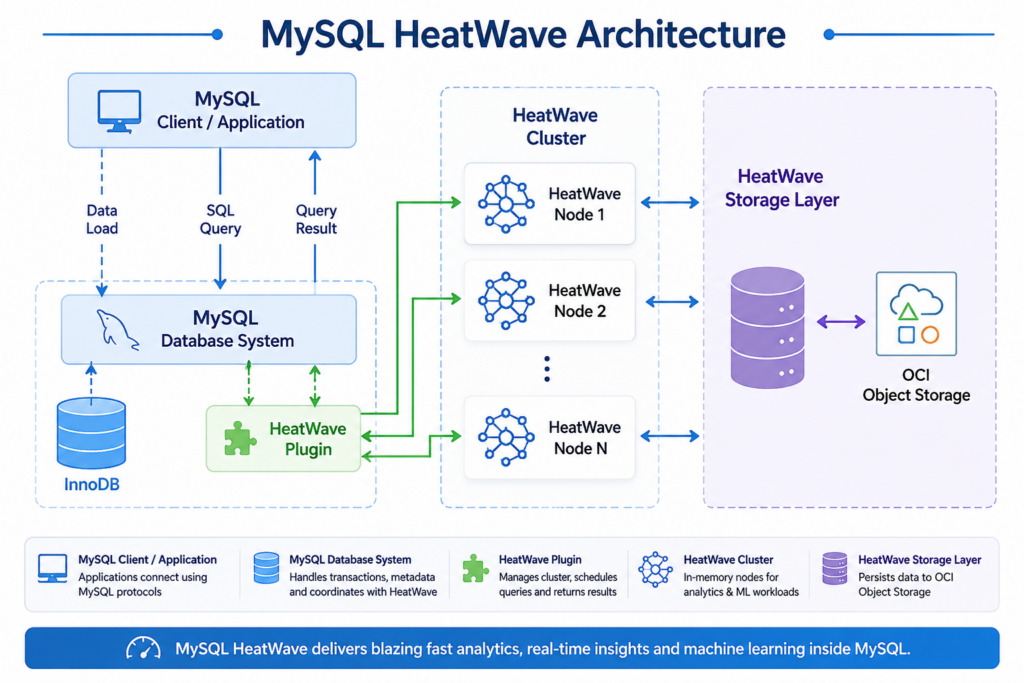
A HeatWave deployment is really two things working in tandem: the MySQL Database System handling your normal OLTP traffic, and a HeatWave Cluster sitting alongside it handling analytics and ML. The cluster is made up of one or more HeatWave nodes, and each node holds its slice of data in memory rather than on disk — that’s a big part of why the analytics performance is what it is. A single deployment can scale up to 800 GB of in-memory data across the cluster, and each node runs its own instance of the HeatWave query engine, built for massively parallel, distributed, in-memory processing.
The piece that ties it back to MySQL is the HeatWave plugin living inside the database system itself. It handles cluster management, schedules queries, coordinates resources, and hands results back to MySQL once the cluster’s done its part. From the application’s point of view, none of this exists — you’re still just talking to MySQL.
What happens when you actually run a query
This is the part I find genuinely elegant. Your application keeps connecting the same way it always has — MySQL Shell, Workbench, JDBC, ODBC, whatever you’re already using. Nothing changes on that end. Under the hood, though, the optimizer is doing real work on every query. First it checks whether the operators and functions involved are even supported on HeatWave. Assuming they are, it estimates how long the query would take running on standard MySQL versus on the HeatWave engine, and if HeatWave wins that comparison, the query gets pushed there automatically and runs in parallel across however many nodes are in the cluster. The results come back to MySQL and get handed to your application like nothing unusual happened. You didn’t rewrite a single line of application code to get that.
Getting data into the cluster in the first place
None of the query acceleration works until data actually lives in HeatWave’s memory, so there’s a loading step first. Tables get read out of InnoDB using multi-threaded reads to keep loading reasonably fast, converted into HeatWave’s columnar format, and spread across the cluster’s nodes — by primary key by default, though you can define your own data placement key if your access patterns call for it. That horizontal split is what lets queries run in parallel rather than queuing up on a single node.
What I’d actually call the standout feature here is that this isn’t a one-time load you have to manage. Once a table’s in the cluster, changes made in MySQL propagate to HeatWave automatically through a lightweight change-tracking mechanism, so your analytics queries are running against current data, not last night’s snapshot. Anyone who’s maintained a nightly ETL job and dealt with the “why is this report wrong” conversation the next morning will appreciate what that actually saves you.
Standing up a cluster
Before you can turn HeatWave on, you’ll need a MySQL Database Service system already running, the right VM shape and OCI networking in place, and MySQL Shell at version 8.0.22 or newer. Permissions-wise, standard MySQL Database Service access isn’t quite enough on its own — you’ll also need the MySQL Analytics policies attached.
From there it’s a console operation: Database Systems → pick your system → Add HeatWave Cluster, then specify the shape, OCPU count, memory, and node count you want. OCI handles the provisioning from that point.
Sizing that cluster correctly is where I’d slow down rather than guess. HeatWave’s built-in Node Count Estimator scans your schemas, looks at table sizes, works out actual memory requirements, and recommends a node count you can apply directly — which beats either overprovisioning and burning budget on idle capacity, or underprovisioning and discovering it under load.
AutoML: machine learning without standing up a separate platform
The traditional ML workflow — extract data, run it through a pipeline, hand it to a separate platform, get a data scientist involved — is exactly the kind of multi-system overhead HeatWave is built to remove. AutoML lets you build, train, deploy, and get explanations for models without leaving MySQL, and without needing ML expertise to do it. Picture an online store: purchase data lands in MySQL as transactions happen, AutoML picks up on patterns in that data, recommendation models get built from it, and suggestions show up for customers essentially in real time. The dashboard tracking all of this updates immediately too, with no ETL job running in the background and no separate ML infrastructure for anyone to maintain.
Lakehouse: querying what’s outside MySQL entirely
Lakehouse is the newer piece, and it tackles a different problem — the data that’s never lived inside MySQL at all, sitting in object storage as CSV, Parquet, or exports from systems like Aurora or Redshift. Rather than loading that data into MySQL first, HeatWave queries it directly where it sits, at a scale that goes up to 500 TB across as many as 512 nodes.
Nothing gets copied or duplicated to make this work, which means no extra storage bill and no ETL lag waiting for a copy job to finish. And because it’s still just MySQL underneath, you can write a single SQL query that joins your transactional tables with the lake data sitting in object storage — genuinely one query spanning both worlds, not two separate tools you’re trying to reconcile afterward.
Living with a cluster day to day
Operationally, clusters behave about how you’d expect. Stopping one pauses analytics processing and stops HeatWave billing while keeping the configuration intact, so spinning it back up later doesn’t mean reconfiguring from scratch — billing just resumes. Restarting reboots the cluster services but does require a data reload, so it’s something you’d schedule deliberately rather than trigger casually mid-day.
If you’re done with a cluster entirely, deleting it through Database Systems → HeatWave resources → Delete removes the analytics layer but leaves your MySQL database system and its data untouched. Worth knowing the reverse isn’t true, though — if you delete the underlying database system itself, the attached HeatWave cluster goes with it.
Where this leaves you
What HeatWave is really doing is making a bet that most organizations don’t need three or four separate database platforms stitched together — they need one platform that’s fast enough to handle transactions, analytics, and ML without the seams showing. Whether you’re running day-to-day operational workloads, building something AI-powered, or trying to make sense of hundreds of terabytes sitting in object storage, the case for HeatWave comes down to one thing: it lets you stop paying the ETL tax and start querying the data where it already lives.



Comments 1