

When working with Oracle databases, especially where database links (DB Links) are involved, timezone mismatches can quickly cause unexpected and frustrating errors. One of the most confusing and commonly reported errors in cross-database operations is:
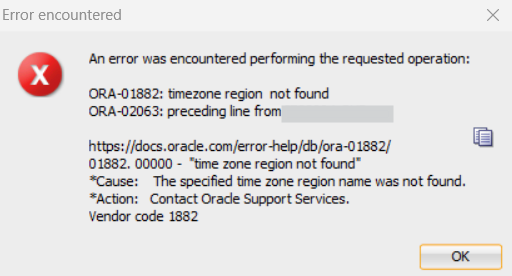
ORA-01882: timezone region not found
ORA-02063: preceding line from <DBLINK>
This error often appears when running queries across a DB link, executing remote procedures, inserting data into a remote table, or when applications call remote services. While Oracle’s official documentation gives a short description, the real-world cause — and fix — is much clearer once you understand how Oracle handles time zones internally.


In this guide, we’ll explain why ORA-01882 happens, why it often appears together with ORA-02063, and how you can fix it by checking and aligning the timezone settings on both the source and target databases.
Let’s break it down in a simple, practical way.
What the Error Really Means
The full Oracle message says:
ORA-01882: timezone region not found
Cause: The specified time zone region name was not found.
Action: Contact Oracle Support Services.
the issue is straightforward:
Oracle cannot find or match the timezone region being used by the remote database or the source session.
In simple words:
- Your source database is using timezone A
- Your target database is using timezone B
- Oracle is trying to convert a DATE or TIMESTAMP WITH TIME ZONE
- But the timezone region name is unknown or unsupported on one end
- So Oracle throws ORA-01882
Because the error occurs through a DB link, you also see:
ORA-02063: preceding line from SINGEXTDB
(or whatever your DB link name is)
This simply means the error originated on the remote database.
Why ORA-01882 Happens (Most Common Real-World Causes)
✔ 1. Timezone files on source and target databases do not match
For example:
- Source DB is using timezone file version 32
- Target DB is using version 26
Oracle cannot map the timezone region.
✔ 2. DB link session inherits the source database timezone
If the source database NLS settings contain a timezone that the target doesn’t support, the DB link fails.
Example:
Source session uses:
America/Colombo
Target DB does not recognize this timezone → ORA-01882
✔ 3. Incorrect or uncommon timezone region names
Using a region that Oracle does not support, such as:
- GMT+5:30
- Asia-Colombo (wrong format)
✔ 4. Application or client passes unsupported timezone strings
Especially common in Java or .NET apps.
✔ 5. Target DB running on a system with outdated OS timezone definitions
Older OS = outdated timezone mapping.
How to Diagnose the Issue (Step-By-Step)
To fix ORA-01882, you must check both sides of the DB link.
1. Check source database timezone
SELECT dbtimezone, sessiontimezone FROM dual;
2. Check target database timezone (through local login)
Log in directly to the target DB:
SELECT dbtimezone, sessiontimezone FROM dual;
3. Check Timezone File Version
Source DB:
SELECT * FROM v$timezone_file;
Target DB:
SELECT * FROM v$timezone_file;
If versions differ widely, timezone region mapping fails.
4. Check the timezone used by the DB link session
Run:
SELECT * FROM nls_session_parameters WHERE PARAMETER LIKE '%TIME%';
If the session timezone here is not recognized on the target side, the DB link errors out.
Solution — How to Fix ORA-01882 (Simple and Effective)
Your required solution is EXACTLY what Oracle DBAs do in real production systems:
Fix: Check Target DB Timezone and Change Source Timezone to Match
This is the real fix.
Because the problem happens through a DB link, the remote database cannot understand the timezone used by the source session.
✔ Step 1: Find the timezone region used by the target DB
On the target database:
SELECT dbtimezone, sessiontimezone FROM dual;
Example output:
+05:30
or
Asia/Colombo
✔ Step 2: Change source database session timezone to match the target
On the source database, before using the DB link:
ALTER SESSION SET time_zone = '+05:30';
or, if the target is using region names:
ALTER SESSION SET time_zone = 'Asia/Colombo';
✔ Step 3: Re-run the operation through the DB link
The query should now work without ORA-01882.
If you want to set it at database level (permanent fix)
This requires a restart:
ALTER DATABASE SET TIME_ZONE = '+05:30';
Restart DB, then verify:
SELECT dbtimezone FROM dual;
Additional Fix Options (If mismatch is caused by timezone file version)
✔ Upgrade timezone files
On the target DB, upgrade timezone file using:
DBMS_DST
Example:
EXEC DBMS_DST.BEGIN_PREPARE(32);
EXEC DBMS_DST.END_PREPARE;
This is typically done when upgrading databases.
✔ Fix for Apps (Java / WebLogic / .NET)
Ensure the application uses a supported Oracle timezone:
For Java:
-Duser.timezone=Asia/Colombo
Best Practices to Prevent ORA-01882
- Keep Oracle timezone files updated
- Ensure source and target databases share compatible timezone regions
- Avoid using OS-specific or custom timezone names
- Set timezone at session level before DB link operations
- Align timezone settings across all environments (DEV / QA / PROD)
Real Example from Production
A query through DB link:
SELECT * FROM orders@SINGEXTDB;
Failed with:
ORA-01882: timezone region not found
ORA-02063: preceding line from SINGEXTDB
Root cause:
- Source DB timezone: GMT+6
- Target DB timezone: Asia/Colombo
- Target DB did not recognize “GMT+6”
Fix:
ALTER SESSION SET time_zone='Asia/Colombo';
Query succeeded immediately.
Final Thoughts
The ORA-01882: timezone region not found error is one of the most common timezone-related issues in Oracle, particularly when dealing with DB links. Despite Oracle’s documentation advising to “contact support,” the fix is simple:
✔ Match the source database session timezone with the target database timezone.
Once both databases agree on timezone format and region, the DB link works flawlessly.


