

ORA-28000 The Account Is Locked is a common Oracle authentication error that appears when a database user account is automatically locked due to failed login attempts, password policies, or security restrictions.
Whether this error occurs during application logins, SQL*Plus connections, or scheduled jobs, it always indicates that Oracle has locked the user for security protection.
In this guide, we’ll break down why ORA-28000 happens, how to fix it instantly, and how to prevent it permanently in production environments.


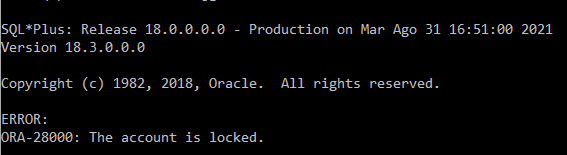
What Does ORA-28000 Mean?
When you try to log in, Oracle returns:
ORA-28000: The account is locked
This means the user account has been locked by Oracle due to:
- Multiple failed login attempts
- Password policy rules
- DBA manually locking the account
- Password expiration triggers
- Security profile restrictions
The account must be unlocked by a DBA before it can be used again.
Why Oracle Locks User Accounts (Root Causes)
Here are the most common reasons behind ORA-28000:
Too Many Failed Login Attempts
If a user enters the wrong password more times than allowed by the profile:
SELECT * FROM dba_profiles WHERE resource_name='FAILED_LOGIN_ATTEMPTS';
Default values range from 3–10 attempts depending on security policies.
Database User is Locked in the Application Layer
Sometimes the DB account is correct but the application is repeatedly retrying with a wrong password — causing Oracle to lock the account.
Password Expired
If a user tries logging in after password expiration, the account may lock automatically depending on profile rules:
SELECT * FROM dba_profiles WHERE resource_name='PASSWORD_LIFE_TIME';
Account Manually Locked by a DBA
DBAs may lock accounts for:
- Security
- System maintenance
- Application migrations
ALTER USER test_user ACCOUNT LOCK;
Clustered or Shared Environments
In RAC or application server farms, one wrong password saved in a config file can repeatedly lock the account from multiple nodes.
How to Fix ORA-28000 Instantly
Fix 1: Unlock the User Account
This is the simplest and most common fix:
ALTER USER username ACCOUNT UNLOCK;
Example:
ALTER USER APPUSER ACCOUNT UNLOCK;
Fix 2: Reset the Password
If the password is unknown, expired, or compromised:
ALTER USER APPUSER IDENTIFIED BY NewPassword123;
ALTER USER APPUSER ACCOUNT UNLOCK;
Fix 3: Check and Fix Profile Settings
Check the user’s profile:
SELECT username, profile FROM dba_users WHERE username='APPUSER';
Check failed login attempts policy:
SELECT * FROM dba_profiles
WHERE profile='DEFAULT' AND resource_name='FAILED_LOGIN_ATTEMPTS';
Increase allowed login attempts:
ALTER PROFILE DEFAULT LIMIT FAILED_LOGIN_ATTEMPTS UNLIMITED;
⚠️ Warning: Use UNLIMITED only for trusted internal accounts.
Fix 4: Identify Sessions Repeatedly Locking the Account
This is crucial in RAC:
SELECT username, osuser, machine, program
FROM v$session
WHERE username='APPUSER';
If an outdated password is stored in:
- Application server
- Middleware pool
- Cron script
- BI tool
It may repeatedly relock the account.
Fix 5: Clear Locked Login Attempts
In some cases, the account appears unlocked but still fails login due to “cached” attempts.
Use:
ALTER SYSTEM FLUSH SHARED_POOL;
or restart the affected application service.
How to Prevent ORA-28000 Permanently
Increase Failed Login Attempts
For system accounts:
ALTER PROFILE DEFAULT LIMIT FAILED_LOGIN_ATTEMPTS 10;
Disable Login Locking for Trusted Accounts
Example: monitoring or app integration users.
ALTER PROFILE DEFAULT LIMIT FAILED_LOGIN_ATTEMPTS UNLIMITED;
Set Password Grace Periods
Prevents accidental expiration:
ALTER PROFILE DEFAULT LIMIT PASSWORD_GRACE_TIME 30;
Use Strong Password Policies
Enforce strong passwords without excessive expiration:
ALTER PROFILE DEFAULT LIMIT PASSWORD_LIFE_TIME 90;
Fix Application Password Caching
Most ORA-28000 problems in production come from:
- Web servers
- Middleware JDBC pools
- OBIEE / WebLogic
- Cron jobs
- Legacy scripts
Ensure all configs are updated with the correct password.
Real-World Example
A customer’s HR application repeatedly failed with ORA-28000 every morning.
DBA unlocks the account — but within seconds it locks again.
Root cause:
A background service on another server was using an old password and retrying every 3 seconds.
Fix:
Corrected the password in the service config and increased failed login attempts to 10.
Result:
No more account lockouts. Service and application returned to normal.
Best Practices Summary
| Recommendation | Benefit |
|---|---|
| Increase failed login attempts | Prevent accidental lockouts |
| Use strong passwords | Better security |
| Fix application password caching | Avoid repeated account locks |
| Set password grace period | Early user warnings |
| Monitor lockouts with auditing | Catch malicious login attempts |
Related Articles
- ORA-04063 and ORA-00904 on “SYS.DBA_REGISTRY” Has Errors
- Fixing the “Error in invoking target ‘agent nmhs’ of makefile ins_emagent.mk” During Oracle 11.2.0.4 Installation on Linux
Final Thoughts
ORA-28000 is not a database issue — it’s a security safeguard.
Once you understand what triggers the lock, the fix becomes simple.
With proper password policies, monitoring, and application configuration, your database accounts can run smoothly without repeated lockouts.


