

ORA-01578 vs ORA-01110 is a classic Oracle error combination that instantly tells a DBA one thing:
👉 Your database has a corrupted block, and Oracle is pointing you directly to the exact file and block number.
Block corruption is one of the most serious Oracle issues, but with modern tools like RMAN, DBVERIFY, and AWR diagnostics, recovering from corruption is easier and faster than it used to be.

In this guide, we’ll break down both errors, show a real-world case study, and walk through step-by-step fixes that DBAs can apply safely in production.
Understanding ORA-01578 and ORA-01110
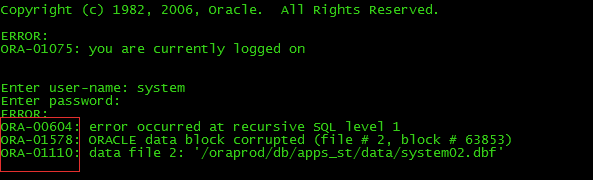
When corruption occurs, Oracle throws:
ORA-01578: ORACLE data block corrupted (file # x, block # y)
ORA-01110: data file x: 'path_to_datafile.dbf'
ORA-01578 → tells you which block is corrupted
ORA-01110 → tells you which datafile contains that block
Together, these errors give you the exact location of the corruption.
What Causes Block Corruption?
Block corruption can occur due to:
1️⃣ Storage or disk I/O issues
Bad sectors, failing disks, SAN controller issues.
2️⃣ Sudden power failures
Incomplete writes or partial commits.
3️⃣ Memory corruption
Faulty RAM, OS crashes, or unstable kernel drivers.
4️⃣ Oracle instance crashes during DML
Especially during heavy batch operations.
5️⃣ Logical corruption
Valid block format but inconsistent content—often caused by bugs or misbehaving applications.
Case Study: ORA-01578 + ORA-01110 on a Production OLTP System
Environment: Oracle 19c, 2TB OLTP database
Error logged during index scan:
ORA-01578: ORACLE data block corrupted (file # 7, block # 144321)
ORA-01110: data file 7: '/u01/oradata/PROD/users01.dbf'
🔍 Step 1 – Identify What Object Owns the Corrupted Block
SELECT owner, segment_name, segment_type
FROM dba_extents
WHERE file_id = 7
AND 144321 BETWEEN block_id AND block_id + blocks - 1;
Output:
SEGMENT_NAME: IDX_CUSTOMER_EMAIL
SEGMENT_TYPE: INDEX
Good news — index block corruption is the easiest to fix.
Step-by-Step Fix: Index Corruption
Solution: Rebuild the index
ALTER INDEX IDX_CUSTOMER_EMAIL REBUILD;
Oracle recreates the index from scratch and skips the corrupt block.
Validation
SELECT * FROM v$database_block_corruption;
Output:
no rows selected
Production restored without downtime.
Case Study 2: Table Block Corruption (More Serious)
Error:
ORA-01578: ORACLE data block corrupted (file # 12, block # 199912)
ORA-01110: data file 12: '/u01/oradata/PROD/data12.dbf'
Step 1 — Identify the object
SELECT owner, segment_name, segment_type
FROM dba_extents
WHERE file_id = 12
AND 199912 BETWEEN block_id AND block_id + blocks - 1;
Output:
SEGMENT_NAME: SALES_TRANSACTIONS
SEGMENT_TYPE: TABLE
This is data corruption, not an index — needs RMAN.
Step-by-Step Fix Using RMAN Block Recovery
1. Start block-level recovery
RMAN> BLOCKRECOVER DATAFILE 12 BLOCK 199912;
RMAN will pull the clean block from backups or Data Guard.
2. Validate database
RMAN> VALIDATE DATABASE;
3. Recheck corruption view
SELECT * FROM v$database_block_corruption;
Output:
no rows selected
If RMAN cannot fix the block (rare case), use:
Alternative Fix: Export → Drop/Table → Import
expdp user/table ...
impdp user/table ...
This extracts valid rows and bypasses corrupted blocks.
How Oracle Detects Block Corruption
Use RMAN VALIDATE
RMAN> VALIDATE DATABASE CHECK LOGICAL;
Use DBVERIFY (Offline)
dbv file=/u01/oradata/PROD/data12.dbf blocksize=8192
View Corruption Summary
SELECT * FROM v$database_block_corruption;
Prevention: How to Avoid ORA-01578 & ORA-01110
1. Enable block checking
ALTER SYSTEM SET db_block_checking=FULL SCOPE=SPFILE;
2. Enable block checksum
ALTER SYSTEM SET db_block_checksum=FULL SCOPE=SPFILE;
3. Use healthy storage (SSD/NVMe/SAN)
4. Run RMAN VALIDATE monthly
5. Monitor OS logs for I/O errors
6. Use Data Guard for real-time corruption detection & repair
(Physical standby automatically repairs many corruptions via automatic block media recovery.)
Real-World Lessons Learned
From hundreds of corruption cases, the patterns are clear:
- Index corruption = easy fix
- Table corruption = requires RMAN
- LOB corruption = often needs export/rebuild
- Frequent ORA-01578 = storage system failing
- Corruption during patching/upgrade = file system snapshot issues
A disciplined backup strategy + Data Guard + RMAN validation = zero downtime corruption resilience.
Final Thoughts
ORA-01578 and ORA-01110 often look scary, but they are actually some of the most helpful Oracle errors because they tell you:
- Exactly which file is corrupted
- Exactly which block is affected
- Whether the object is table, index, or LOB
- Whether you can repair it instantly
With RMAN block recovery and proactive monitoring, you can resolve block corruption quickly and prevent future incidents.
A good DBA isn’t someone who never encounters corruption—
A good DBA is someone whose system recovers instantly when corruption happens.


