

Introduction
In a world where database uptime directly translates to business continuity, having a reliable and automated standby solution is non-negotiable. Enterprises running Oracle, Microsoft SQL Server, or PostgreSQL often face a common challenge — maintaining data consistency, synchronization, and recoverability across heterogeneous environments.
This is where Dbvisit StandbyMP (MultiPlatform) excels.
It is a cross-platform disaster recovery and standby management solution designed to handle the complete lifecycle of standby databases — from creation and synchronization to activation, failover, and reporting.

With RPO (Recovery Point Objective) and RTO (Recovery Time Objective) typically measured in minutes, Dbvisit StandbyMP bridges the gap between enterprise-grade resiliency and operational simplicity.
What Is Dbvisit StandbyMP?
Dbvisit StandbyMP is a multi-database standby management platform that automates disaster recovery processes across Oracle, SQL Server, and PostgreSQL.
It removes the need for complex scripting or expensive proprietary solutions like Oracle Data Guard or SQL Server Always On, providing a lightweight, policy-driven alternative suitable for both on-premises and cloud environments.
Dbvisit StandbyMP orchestrates tasks such as:
- Standby database creation
- Data synchronization and log management
- Failover and switchover operations
- Test/dev snapshots
- Monitoring and alerting
Its consistent user experience across database platforms allows DBAs to implement standardized disaster recovery practices organization-wide.

Core Architecture and Components
Dbvisit StandbyMP follows a modular architecture, enabling consistent behavior across supported databases while offering platform-specific optimizations.
| Component | Description |
|---|---|
| Dbvisit Core Engine | Handles standby creation, backup, log transfer, and apply operations. |
| Dbvisit Agent | Runs on each database server (primary and standby) to manage synchronization and communication. |
| Dbvcontrol Web GUI | Web-based interface for configuration, monitoring, and managing standby lifecycle. |
| dbvcli | General-purpose command-line tool for all supported database platforms. |
| dbvctl | Oracle-specific CLI utility for platform-focused management. |
| API (REST) | Provides integration with DevOps pipelines (Ansible, Jenkins, Terraform). |
This modular setup ensures cross-platform flexibility while maintaining database-specific accuracy.
Supported Database Platforms
Dbvisit StandbyMP supports the following platforms with dedicated synchronization engines:
- Oracle Database (Standard and Enterprise Editions)
- Supports single-instance, ASM, RAC, OMF, and Multitenant (CDB/PDB) environments.
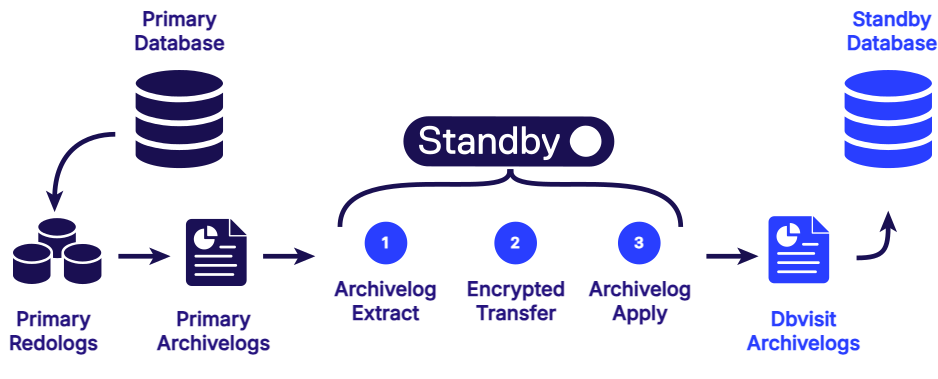
- Synchronization through archived redo log extraction and apply.
- Supports read-only standby for reporting when log apply is paused.
- Microsoft SQL Server
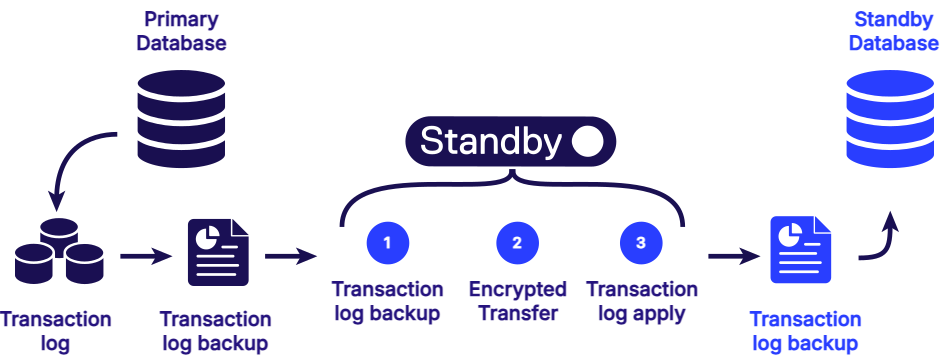
- Utilizes native backup and transaction log replication.
- Provides automated standby creation, continuous updates, and failover workflows.
- PostgreSQL
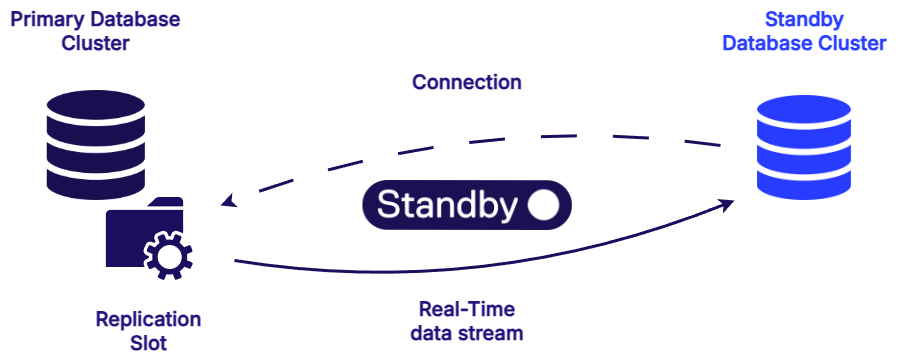
- Supports both streaming replication and WAL (Write-Ahead Log) shipping.
- Compatible with hot (readable) and warm standby configurations.
- Continuous monitoring of lag and replication health.
How Dbvisit StandbyMP Synchronization Works
Dbvisit StandbyMP uses an intelligent log-based synchronization mechanism that can be summarized in six stages.
1. Log Generation on Primary
The primary database continuously generates redo or transaction logs (depending on platform). These logs capture all committed changes.
2. Archive Extraction
Dbvisit automatically detects new archived logs (Oracle) or transaction backups (SQL Server/PostgreSQL) that haven’t been shipped yet.
3. Compression and Encryption
Before transfer, logs are compressed and encrypted, ensuring minimal network usage and complete data security.
4. Secure Transfer
Encrypted logs are transferred over secure network channels using Dbvisit’s internal transport protocol, ensuring integrity even over WAN connections.
5. Apply on Standby
On the standby host, Dbvisit automatically applies the transferred logs. For Oracle, this uses RECOVER DATABASE operations; for SQL Server, native RESTORE LOG operations are used; and for PostgreSQL, WALs are replayed.
6. Real-Time Monitoring
Synchronization health, lag, and transfer efficiency are continuously monitored via dbvcontrol or the CLI/API, giving DBAs real-time control and alerting.
Typical Synchronization Flow (Oracle Example)
Below is the conceptual flow of how Dbvisit StandbyMP handles Oracle standby updates:
- Primary Database generates redo logs.
- Archived logs are created and picked up by Dbvisit.
- Archivelog Extract – Dbvisit extracts new logs.
- Encrypted Transfer – Logs are securely sent to the standby.
- Archivelog Apply – Standby applies changes sequentially.
- Validation ensures data consistency across both databases.
This approach guarantees that the standby remains within minutes of the primary, even during peak workloads.
Recovery Objectives: RPO and RTO
Dbvisit StandbyMP is engineered for minimal data loss and fast recovery:
- RPO (Recovery Point Objective):
Typical delay of under 5 minutes, depending on network conditions and database activity. - RTO (Recovery Time Objective):
Failover or activation can usually be achieved within minutes through automated workflows.
It’s important to note that these are target values, not absolute guarantees, as they depend on system configuration and infrastructure.
Operational Modes and Standby States
Depending on the use case, Dbvisit supports multiple standby operating modes:
- MOUNT Mode: Default mode during active synchronization.
- READ-ONLY Mode: The standby can be opened for query/reporting purposes when log apply is paused.
- HOT/WARM Standby (PostgreSQL): Streaming or WAL-based replication modes for flexibility.
This flexibility allows organizations to use standby databases for reporting, testing, or patch validation, maximizing the value of their DR environments.
User Interaction Options
Dbvisit StandbyMP provides four major interfaces to suit DBA workflows:
- dbvcli: Multi-platform CLI for command-line automation.
- dbvctl: Oracle-specific CLI for advanced DBA operations.
- REST API: For integration into CI/CD or orchestration pipelines.
- dbvcontrol (Web GUI): Browser-based GUI for configuration, monitoring, and management.
This hybrid control model makes Dbvisit StandbyMP suitable for both traditional DBAs and DevOps-driven teams.
Licensing and Platform Considerations
Each Dbvisit StandbyMP deployment requires a per-database license key tied to the database name and OS platform.
Different keys apply for Oracle, SQL Server, and PostgreSQL environments.
Key points:
- Version 12.1+ introduces a new license key format.
- Each platform has its own engine components and limitations (e.g., PDB-level replication in Oracle must occur at the CDB scope).
- Linux and Windows are fully supported; snapshot features may have platform restrictions.
Source: Dbvisit StandbyMP Licensing Documentation
Advanced Features
Dbvisit StandbyMP offers several enterprise-grade features:
- Automated failover and switchover workflows
- Zero data-loss switchovers (Oracle)
- Snapshot standby databases for testing/reporting
- Email and SNMP monitoring alerts
- Integration with external backup and security systems
- Role reversal and activation with one-click via GUI or CLI
These advanced capabilities make it more than just a standby tool — it’s a full-featured disaster recovery automation platform.
Conclusion
In multi-database enterprise environments, maintaining high availability across Oracle, SQL Server, and PostgreSQL systems can be challenging.
Dbvisit StandbyMP solves this by offering a single, unified platform for managing standby databases, synchronization, and recovery across all three major database technologies.
With RPO/RTO measured in minutes, cross-platform flexibility, and built-in security, Dbvisit StandbyMP empowers DBAs to deliver enterprise-level resiliency without the complexity or cost of proprietary solutions.
Whether you manage mission-critical Oracle workloads or mixed-database environments, Dbvisit StandbyMP ensures that your disaster recovery strategy remains simple, secure, and always synchronized.


