
Introduction
Oracle Database administrators may encounter the following internal error when executing DBMS_STATS.FLUSH_DATABASE_MONITORING_INFO:
ORA-00600: internal error code, arguments:
[qosdExpStatRead: expcnt mismatch], [68743], [3207], [109928]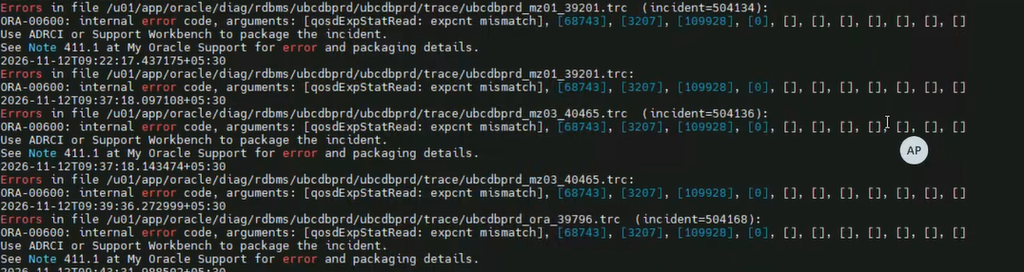
This error can occur during database monitoring information flushing and may also appear in the Oracle Database alert log and associated trace files.
The issue is associated with an internal Oracle Database statistics-related operation. Oracle investigated this problem under Internal Bug 33262799 and identified that enabling the fix control associated with Patch 31143146 is required.
This article explains how to identify the issue, investigate the internal statistics metadata, enable the required fix control, and validate the configuration.
1. Understanding the ORA-00600 Error
The error can be reproduced by executing:
EXEC DBMS_STATS.FLUSH_DATABASE_MONITORING_INFO;Example error output:
ORA-00600: internal error code, arguments:
[qosdExpStatRead: expcnt mismatch],
[68743], [3207], [109928], [0], [], [], [], [], [], [], []

ORA-06512: at "SYS.DBMS_STATS", line 2141
ORA-06512: at "SYS.DBMS_STATS", line 43486
ORA-06512: at line 1
The error indicates an internal mismatch detected during the reading of exported statistics information.
Unlike ordinary SQL errors, ORA-00600 represents an internal Oracle error. The complete incident trace file should be collected for further investigation.
2. Investigating the Internal Statistics Metadata
To investigate the mismatch, query the internal statistics-related objects SYS.EXP_STATS and SYS.EXP_OBJ$.
Execute the following SQL:
WITH b AS (
    SELECT COUNT(*) cnt,
           objn,
           snapshot_id
    FROM sys.exp_stats es
    GROUP BY objn, snapshot_id
)
SELECT *
FROM sys.exp_obj$ a, b
WHERE a.objn = b.objn
  AND a.snapshot_id = b.snapshot_id
  AND a.exp_cnt <> b.cnt;
Example output:
| OBJN | SNAPSHOT_ID | EXP_CNT | CNT |
|---|---|---|---|
| 109928 | 0 | 3207 | 68743 |
| 109928 | 1 | 21572 | 87108 |
The output shows differences between the recorded EXP_CNT values and the corresponding row counts.
These results provide an indication of the metadata mismatch associated with the reported error.
Important: These are Oracle internal dictionary objects. Do not manually update, delete, or modify their records.
3. Root Cause
Oracle investigated this issue under:
Internal Bug: 33262799
According to Oracle Support, the fix control associated with Patch 31143146 needs to be enabled to address this issue.
The required fix control is:
31143146:onIf another fix control is already configured, it must be preserved when enabling the additional fix control.
4. Check Existing _fix_control Settings
Before changing the parameter, check the existing configuration.
4.1 Check SPFILE and system parameter settings
Execute:
SELECT name, value
FROM v$system_parameter2
WHERE name LIKE '%fix_control%';
Alternatively, query the parameter directly:
SHOW PARAMETER fix_control;4.2 Check the instance memory setting
Execute:
SELECT a.ksppinm AS "Parameter",
       c.ksppstvl AS "Instance Value"
FROM x$ksppi a,
     x$ksppcv b,
     x$ksppsv c
WHERE a.indx = b.indx
  AND a.indx = c.indx
  AND a.ksppinm = '_fix_control'
ORDER BY 1;
Example existing configuration:
Parameter       Instance Value
--------------- ----------------
_fix_control    32005394:on
In this example, fix control 32005394:on is already configured.
We must retain this setting when enabling the additional fix control.
5. Enable Fix Control 31143146
To enable the required fix control without removing the existing configuration, execute:

ALTER SYSTEM SET "_fix_control" =
'31143146:on','32005394:on'
SCOPE=BOTH;
Expected output:
System altered.Explanation:
31143146:on– Enables the fix control associated with Patch 31143146.32005394:on– Preserves the previously configured fix control.SCOPE=BOTH– Applies the parameter change to the running instance and SPFILE.
Do not blindly replace the existing _fix_control value. Always review and preserve all required existing fix controls.
6. Verify the Fix Control Configuration
After executing the ALTER SYSTEM command, verify the updated configuration.
6.1 Verify using V$SYSTEM_PARAMETER2
SELECT name, value
FROM v$system_parameter2
WHERE name = '_fix_control';
Expected output:
NAME           VALUE
-------------- -----------------
_fix_control   31143146:on
_fix_control   32005394:on
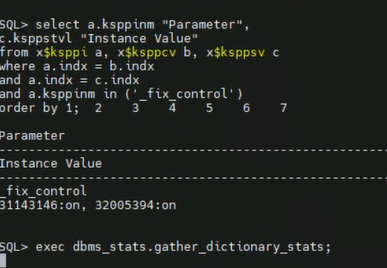
6.2 Verify the instance memory configuration
SELECT a.ksppinm AS "Parameter",
       c.ksppstvl AS "Instance Value"
FROM x$ksppi a,
     x$ksppcv b,
     x$ksppsv c
WHERE a.indx = b.indx
  AND a.indx = c.indx
  AND a.ksppinm = '_fix_control'
ORDER BY 1;
Expected output:
Parameter       Instance Value
--------------- -----------------------------
_fix_control    31143146:on, 32005394:on
6.3 Verify across RAC instances
For Oracle RAC environments, verify that the fix control is enabled on all database instances.
SELECT inst_id,
       bugno,
       value,
       description
FROM gv$system_fix_control
WHERE bugno IN (31143146, 32005394)
ORDER BY inst_id, bugno;
Confirm that the required fix controls are enabled across all instances.
7. Test DBMS_STATS.FLUSH_DATABASE_MONITORING_INFO
After confirming the configuration, execute the original command again:
EXEC DBMS_STATS.FLUSH_DATABASE_MONITORING_INFO;Monitor the database alert log and trace files for any further ORA-00600 errors.
If the error persists, collect the latest incident trace files and coordinate with Oracle Support for further investigation.
8. Additional Recommendations
Before implementing this change in a production environment, consider the following:
- Confirm the Oracle Database version and Release Update (RU).
- Verify the applicable patch requirements with Oracle Support.
- Record all existing
_fix_controlsettings before making changes. - Preserve existing fix controls when applying the additional setting.
- Verify the configuration across all RAC instances.
- Monitor the alert log after the change.
- Avoid directly modifying Oracle internal dictionary tables.
The _fix_control parameter is an undocumented Oracle parameter. Changes should be implemented based on Oracle Support recommendations and validated against the specific database version and patch level.
Conclusion
The ORA-00600 [qosdExpStatRead: expcnt mismatch] error encountered during DBMS_STATS.FLUSH_DATABASE_MONITORING_INFO is associated with an internal Oracle statistics-related issue investigated under Bug 33262799.
Oracle Support identified that enabling fix control 31143146:on is required to address the issue.
By preserving existing fix control settings, enabling the required fix, and validating the configuration across database instances, DBAs can implement the Oracle-recommended corrective action and investigate whether the error has been resolved.
Disclaimer: This article documents a specific Oracle Support-recommended solution. Always validate the applicability of the fix control with Oracle Support before implementing it in a production environment.
Bug 31143146 – ORA-00600: [QOSDEXPSTATREAD: EXPCNT MISMATCH] EVEN AFTER APPLYING 28681153 – KI28405