
The October 2026 quarterly patch landed, and as usual I wanted to see it on a real server before writing about it. This post covers GI Release Update 19.33.0.0.261020, Patch 39922757. It covers what the patch contains, the checks I ran beforehand, how the opatchauto run went on my Oracle Restart (SIHA) box, and what you should do afterwards. If you patch Grid Infrastructure for a living, most of this will feel familiar, but a few details in this cycle are worth knowing.
What Is the Oracle 19.33 GI Release Update?
Patch 39922757 is the Grid Infrastructure Release Update for 19c, and it covers both the Grid home and the database home. Like earlier GI RUs, it is cumulative and includes the database CPU security content, so you don’t need to chase the previous quarter first. The patch can be applied in a rolling fashion, and it supports Data Guard Standby-First installation.

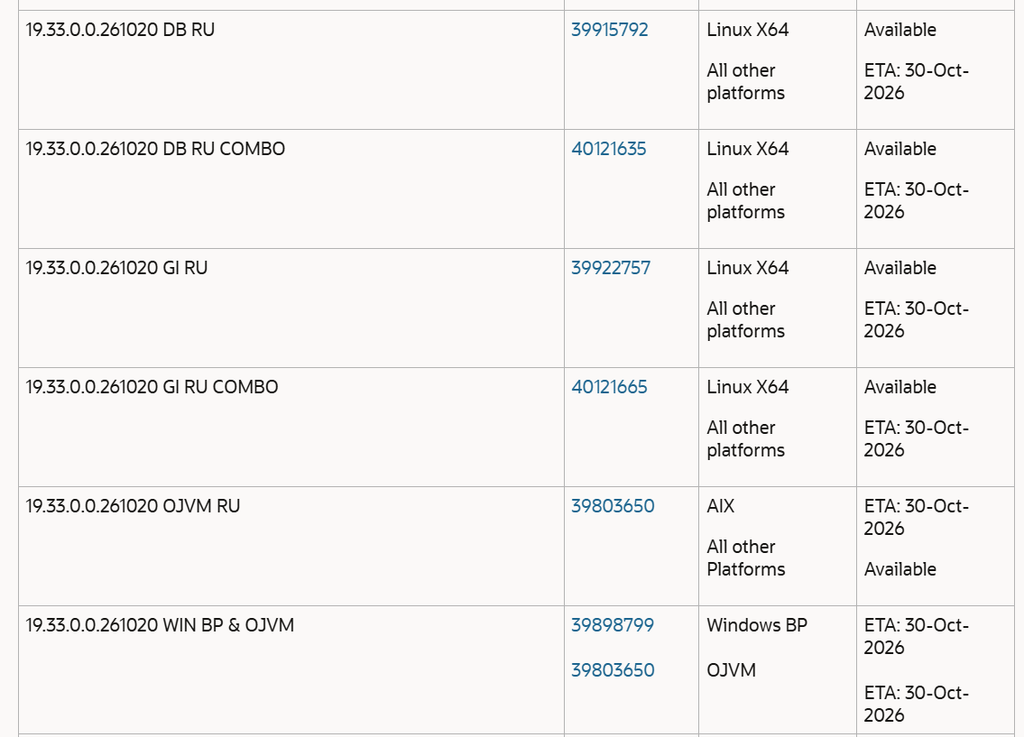
Inside the bundle sit five sub-patches, and it helps to know which one goes where:
| Sub-patch | Description | Applies to |
|---|---|---|
| 39915792 | Database Release Update 19.33.0.0.261020 | Oracle home (non-RAC), or both homes (RAC) |
| 39922783 | OCW Release Update 19.33.0.0.261020 | Oracle home and Grid home |
| 39922802 | ACFS Release Update 19.33.0.0.261020 | Grid home only |
| 39107855 | Tomcat Release Update 19.0.0.0.0 | Grid home only |
| 39107825 | DBWLM Release Update 19.0.0.0.0 | Grid home only |
Two things in the readme surprised people I’ve spoken to. Since 19.31 (April 2026), the Tomcat directories have been removed and replaced by Micronaut, and the QoS/WLM directory is gone too. Oracle kept the Tomcat and DBWLM sub-patches in the RU as empty shells so the inventory stays consistent and the patch stays cumulative. If you see them listed in lspatches and wonder what they do, the answer is not much, and that’s by design.
The readme also says the database sub-patch carries the JDK fixes from the previous cycle. For the latest JDK fixes you need the separate JDK patch, which is listed in the Primary Note for Database Quarterly Release Updates on My Oracle Support. Plenty of people miss that.
My Starting Point
I was moving from 19.32 to 19.33 on a single-server Oracle Restart setup, with the Grid home at /u01/app/19c/grid and the database home at /u01/app/oracle/product/19.0.0. The CDB had a stack of one-off patches on top of 19.32, including a merge patch and a few fixes for specific bugs. That matters because one-offs are where conflicts come from, so I treated the conflict check as the most important step of the day.
$ORACLE_HOME/OPatch/opatch lspatchesSave that output before you touch anything. You’ll want it if someone asks what was in the home before the patch.
Step 1: Check OPatch Version
The patch needs OPatch 12.2.0.1.52 or later. I was already on 12.2.0.1.52, so I didn’t need to download anything. Oracle still recommends the latest OPatch for 19c (patch 6880880 on MOS), and you need to update it in every home you’re patching, Grid and database alike. Do both, because a mismatch between homes causes silly failures at the worst time.How To Download And Install The Latest OPatch
./opatch versionStep 2: Validate the Inventory and Back Up the Homes
Before I patch anything, I run a detailed inventory check on each home:
/u01/app/19c/grid/OPatch/opatch lsinventory -detail -oh /u01/app/19c/grid/If this fails, stop and sort it out first, because patching a home with a broken inventory only adds problems. I also back up both Oracle homes and the central inventory. It’s a tar command and a few minutes of your time, and Oracle recommends it in the readme for good reason. This step has saved me more than once on older patch cycles.
Step 3: Unzip the Patch and Run the Prerequisite Checks
Unzip the patch into an empty directory that isn’t /tmp, readable by the oinstall group. I used /u01/patch, so the sub-patches ended up under /u01/patch/39922757/.
From there I ran the checks the readme asks for. For the Grid home that means a minimum OPatch version check on the database RU, and then a conflict check against each of the five sub-patches:
/u01/app/19c/grid/OPatch/opatch prereq CheckMinimumOPatchVersion -phBaseDir /u01/patch/39922757/39915792
/u01/app/19c/grid/OPatch/opatch prereq CheckConflictAgainstOHWithDetail -phBaseDir /u01/patch/39922757/39915792
I repeated the conflict check for 39922783, 39922802, 39107855 and 39107825. For the database home the list is shorter, only 39915792 and 39922783 apply, and I ran those as the database home owner. Every check came back passed.
If a conflict report shows a one-off that conflicts with the new patch, stop. If it only shows a subset patch already in the home, carry on, since the RU contains those fixes and OPatch rolls the subset back automatically. For anything else, use the MOS Conflict Checker to find a resolution patch.
Step 4: Check System Space
Create a text file listing the sub-patch directories for each home, then run the space check against it.
/tmp/patch_list_gihome.txt
/u01/patch/39922757/39915792
/u01/patch/39922757/39922783
/u01/patch/39922757/39922802
/u01/patch/39922757/39107855
/u01/patch/39922757/39107825
/u01/app/19c/grid/OPatch/opatch prereq CheckSystemSpace -phBaseFile /tmp/patch_list_gihome.txtThe database home gets its own list with just the first two entries. Both passed for me. Don’t skip this one. A patch that dies halfway because the filesystem filled up is a bad afternoon.
Oracle also recommends cluvfy stage -pre patch to check Grid home readiness, and datapatch -sanity_checks to check the database side. I’d add both to your routine if they aren’t already there.
Step 5: Run opatchauto
As root, with the Grid OPatch directory in the path:
export PATH=$PATH:/u01/app/19c/grid/OPatch
opatchauto apply /u01/patch/39922757
On an Oracle Restart system with no -oh flag, one invocation handles both homes. opatchauto verified applicability and validation on both, then stopped the CDB, brought down the CRS stack, applied the binaries to the Grid home and then the database home, ran rootadd_rdbms.sh, and restarted CRS. The run ended with “OPatchAuto successful”. From the first prompt to that final message took me a little under three hours, so plan your outage window with room to spare. Your hardware will differ.
The summary at the end will list a lot of SKIPPED patches, and that scared me the first time I saw it years ago. Tomcat and DBWLM show up as not applicable to the database target. Some sub-patches show “not required to be applied to oracle home”, which usually means the home doesn’t need that component or the fix is already present. On my run, the Grid home summary showed 39915792, 39922783 and 39922802 as successfully applied. Read the summary line by line, then confirm with lspatches rather than trusting the skip messages alone.
Step 6: Verify and Run Datapatch
Check both homes after the run:
/u01/app/19c/grid/OPatch/opatch lspatches
/u01/app/oracle/product/19.0.0/OPatch/opatch lspatches
You should see the 19.33 entries for the database RU, OCW and ACFS in the Grid home, and the 19.33 database RU in the database home.
Binaries are only half the job. The SQL changes still need to be loaded, and that’s what datapatch does. Start the database, open all pluggable databases, and run:
sqlplus / as sysdba
SQL> startup
SQL> alter pluggable database all open;
SQL> exit

cd $ORACLE_HOME/OPatch
./datapatch -sanity_checks
./datapatch -verbose
Then check CDB_REGISTRY_SQLPATCH and confirm the APPLY status is SUCCESS for patch 39915792. If any PDB was closed during datapatch, open it later and run datapatch again. If you use RMAN with a recovery catalog, run UPGRADE CATALOG; twice to confirm it. Finally, run utlrp.sql through catcon.pl if you find invalid objects.
One more point on optimizer behavior. No new fix that could change an execution plan gets switched on automatically by this patch. Fixes you already had enabled stay enabled, but nothing new activates itself, so your plans shouldn’t shift unexpectedly after the patch.
Patching in a Data Guard Environment
opatchauto doesn’t support Data Guard, so you need the Standby-First approach. Apply the database RU sub-patch 39915792 to the standby with OPatch, and do not run datapatch on the standby, since it will fail on the DBMS_QOPATCH call. Once the primary and all standbys are patched, run datapatch on the primary only. The MOS note referenced in the readme walks through this in full.
Rolling Back
If something goes wrong, the rollback mirrors the apply:
opatchauto rollback /u01/patch/39922757For a single-instance home, use opatch rollback -id 39915792. After a rollback, run datapatch again, confirm that the ROLLBACK status shows SUCCESS in CDB_REGISTRY_SQLPATCH, and upgrade the RMAN catalog again.
Lessons From This Cycle
Run the conflict checks days before your maintenance window, not on the day. Keep your one-off list tidy, because every extra interim patch is a possible conflict. And read the MOS known issues note for 19c RU October 2026 before you start, since issues documented after release won’t be in the readme.
Frequently Asked Questions
Is Patch 39922757 cumulative? Yes. It includes everything from earlier 19c GI Release Updates plus the database CPU security content.
Can I apply it in a rolling fashion? Yes, for RAC. Grid and database homes can be patched node by node.
Do I need a newer OPatch? The minimum is 12.2.0.1.52, but update to the latest 19c OPatch anyway.
Why were Tomcat and DBWLM skipped? Both were removed from the product beginning with 19.31. The sub-patches stay in the RU as empty shells for inventory continuity.
Do I need to run datapatch after opatchauto? Always check. Run datapatch and confirm the APPLY status in CDB_REGISTRY_SQLPATCH.
Oracle Critical Patch Update Advisory – October 2026
Oracle 19.33 Database Release Update: Applying Patch 39915792 (19.33.0.0.261020)