

Introduction
Oracle Database provides the DBMS_QOPATCH package to expose information about installed patches and the OPatch inventory. It is commonly used to verify patch levels, troubleshoot patching issues, and retrieve information about installed interim patches and Release Updates.
However, DBMS_QOPATCH can fail when the Oracle Home path contains symbolic links. A common combination of errors is:


ORA-20001: Latest xml inventory is not loaded into tableORA-06512: at "SYS.DBMS_QOPATCH"ORA-29913: error in executing ODCIEXTTABLEFETCH calloutORA-29400: data cartridge errorKUP-04027: file name check failedKUP-04017: OS message: Oracle Directory object contains 1 symbolic links
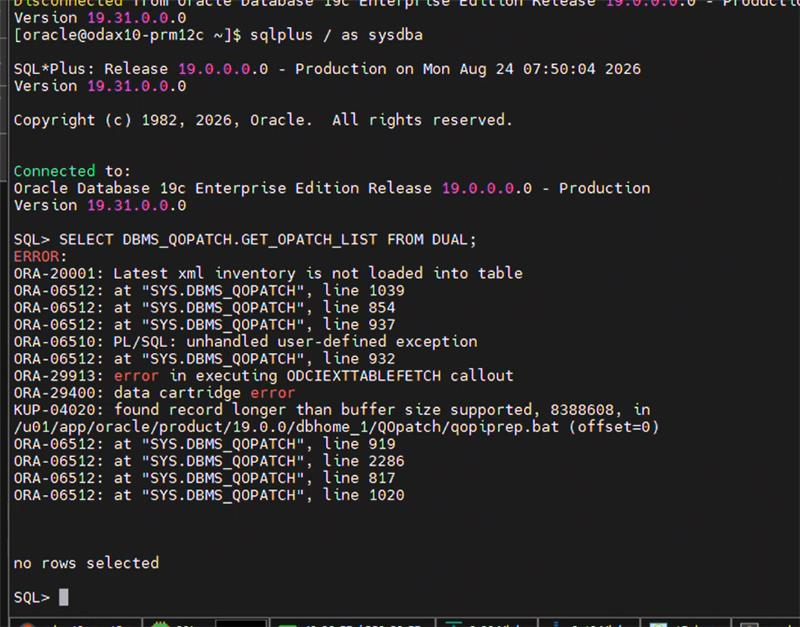
This article explains the cause of the issue and provides the recommended resolution.
Symptoms
When executing a query against the OPatch inventory, the following error may be returned:
SQL> SELECT * FROM OPATCH_XML_INV;

ERROR:
ORA-29913: error in executing ODCIEXTTABLEFETCH callout
ORA-29400: data cartridge error
KUP-04027: file name check failed: <$ORACLE_HOME>/QOpatch/qopiprep.bat
Calling DBMS_QOPATCH may also result in:
ORA-20001: Latest xml inventory is not loaded into table
ORA-06512: at "SYS.DBMS_QOPATCH", line 1448
ORA-06512: at "SYS.DBMS_QOPATCH", line 122
The qopatch_log.log file can provide additional information:
KUP-04027: file name check failed: qopiprep.bat
KUP-04017: OS message: Error 0
KUP-04017: OS message: Oracle Directory object contains 1 symbolic links
at path component /u01
KUP-04118: operation "lstat64"
These errors indicate that Oracle is unable to access the OPatch files through the configured directory path.
Root Cause
The issue occurs when the ORACLE_HOME path contains a symbolic link.
For example:
$ ls -ld /opt/oracle

lrwxrwxrwx 1 root root 12 May 7 2012 /opt/oracle -> /appl/oracle
In this example, the Oracle Home is configured as:
ORACLE_HOME=/opt/oracle/12101aAlthough /opt/oracle/12101a appears to be a valid Oracle Home, the /opt/oracle component is actually a symbolic link to:
/appl/oracleTherefore, when Oracle accesses files such as:
$ORACLE_HOME/QOpatch/qopiprep.batthe underlying path contains a symbolic-link component.
DBMS_QOPATCH uses Oracle directory objects and external-table functionality to access the OPatch inventory. The external-table access mechanism performs path validation and can reject paths containing symbolic links.
As a result, the qopiprep.bat file cannot be accessed successfully, causing the subsequent DBMS_QOPATCH errors.
How the Error Chain Occurs
The problem can be understood as the following sequence:
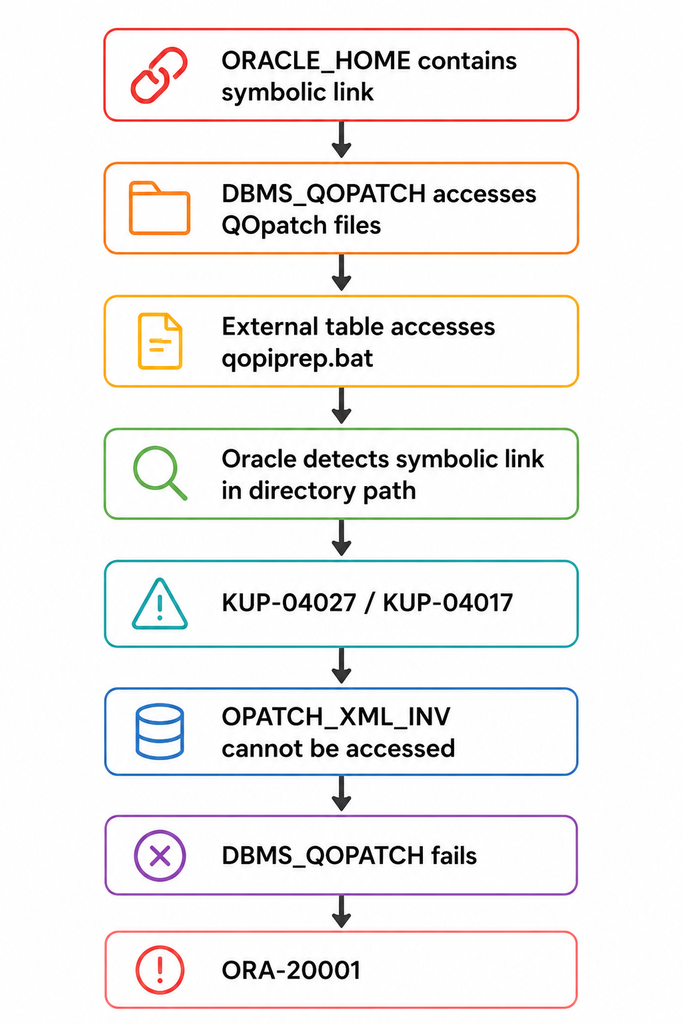
The important point is that the ORA-20001 error is generally a symptom rather than the original cause.
The underlying problem is the inability to access the OPatch inventory because of the symbolic link in the directory path.
Solution
There are two possible approaches.
Solution 1: Recreate the OPatch Directory Objects Using the Physical Path
The preferred approach is to configure the OPatch directory objects using the complete physical path to the QOpatch directory rather than a path containing the symbolic link.
First, identify the actual Oracle Home.
For example:
$ ls -ld /opt/oracle

lrwxrwxrwx 1 root root 12 May 7 2012 /opt/oracle -> /appl/oracle
Therefore:
/opt/oracle/12101aresolves to:
/appl/oracle/12101aThe physical QOpatch directory would therefore be:
/appl/oracle/12101a/QOpatchConnect to the database as a privileged user and recreate the directory objects using the physical path:
CREATE OR REPLACE DIRECTORY OPATCH_LOG_DIR
AS '/appl/oracle/12101a/QOpatch';

CREATE OR REPLACE DIRECTORY OPATCH_SCRIPT_DIR
AS '/appl/oracle/12101a/QOpatch';
Verify the directory objects:
SELECT directory_name, directory_path
FROM dba_directories
WHERE directory_name IN ('OPATCH_LOG_DIR', 'OPATCH_SCRIPT_DIR');
The output should show the physical path rather than the symbolic-link path.
For example:
DIRECTORY_NAME       DIRECTORY_PATH
-------------------  -------------------------------
OPATCH_LOG_DIR       /appl/oracle/12101a/QOpatch
OPATCH_SCRIPT_DIR    /appl/oracle/12101a/QOpatch
Solution 2: Remove the Symbolic Link
An alternative is to remove the symbolic link and recreate the Oracle directory structure using the actual physical path.
For example, instead of:
/opt/oracle -> /appl/oraclethe Oracle Home can be installed or referenced directly through the physical directory structure.
Important: Changing or removing an Oracle Home symbolic link should be performed carefully. Oracle processes, scripts, services, cron jobs, environment files, and other applications may depend on the existing path.
Before making such a change, verify all references to the existing Oracle Home.
Re-Execute Datapatch
After correcting the OPatch directory configuration, re-execute the Oracle post-installation SQL patching steps.
Navigate to the OPatch directory:
cd $ORACLE_HOME/OPatchFor older Oracle versions/environments where the relevant scripts are under sqlpatch, use:
cd $ORACLE_HOME/sqlpatchThen execute:
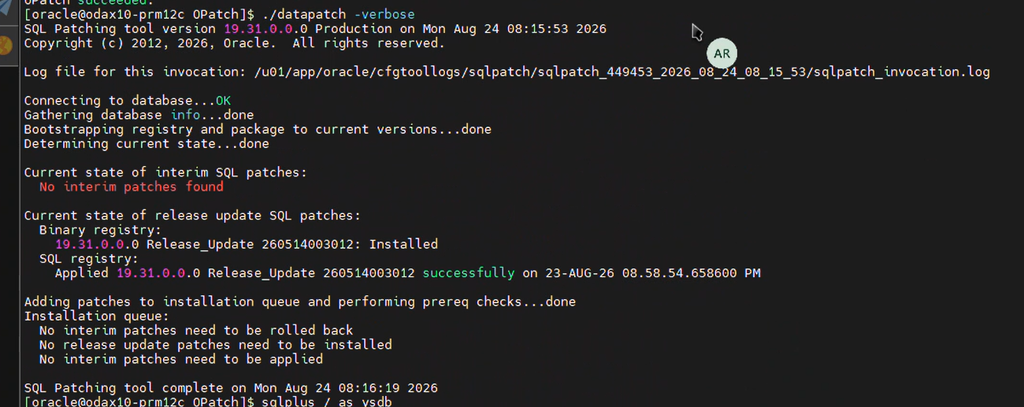
./datapatch -verboseReview the output carefully and confirm that the SQL patching operation completes successfully.
Verification
After running datapatch, verify that DBMS_QOPATCH is working.
For example:
SELECT *
FROM OPATCH_XML_INV;
You can also test the DBMS_QOPATCH package:
SELECT DBMS_QOPATCH.GET_OPATCH_LSINVENTORY()
FROM dual;
Another useful check is:
SELECT DBMS_QOPATCH.GET_OPATCH_COUNT()
FROM dual;
If the issue has been resolved, the queries should return OPatch inventory information without the previous:
ORA-20001
ORA-29913
ORA-29400
KUP-04027
KUP-04017
errors.
Key Takeaways
When troubleshooting DBMS_QOPATCH errors such as:
ORA-20001: Latest xml inventory is not loaded into table
KUP-04027: file name check failed
KUP-04017: Oracle Directory object contains symbolic links
check the following:
- Verify the value of
ORACLE_HOME. - Check whether any component of the Oracle Home path is a symbolic link.
- Check the
OPATCH_LOG_DIRandOPATCH_SCRIPT_DIRdirectory objects. - Configure these directory objects using the complete physical path.
- Re-run
datapatch -verbose. - Verify
OPATCH_XML_INVandDBMS_QOPATCHafter the change.
The key lesson is that ORA-20001 may not indicate a problem with the OPatch inventory itself. If the qopatch_log.log contains KUP-04027 and reports symbolic links in the Oracle Directory path, investigate the Oracle Home path and OPatch directory objects first.
Conclusion
DBMS_QOPATCH depends on being able to access the OPatch files and inventory correctly. When ORACLE_HOME contains a symbolic link, Oracle’s external-table mechanism can reject the resulting path and prevent access to qopiprep.bat.
Using the physical Oracle Home path for OPATCH_LOG_DIR and OPATCH_SCRIPT_DIR is a straightforward way to avoid this problem. Once the directory objects are corrected, running datapatch -verbose and validating DBMS_QOPATCH can confirm that the OPatch inventory is functioning normally again.
Always validate the actual physical path before changing Oracle directory objects, and ensure the Oracle software owner has the required permissions on the target directories.


