

I’ve lost count of how many security audits I’ve sat through where the first question isn’t “who can log into this database” but “what happens if someone just walks off with the disk.” Access controls are great until somebody bypasses them entirely — copies a datafile, restores a backup on their own laptop, or pulls a tape out of an offsite storage box. None of your GRANT statements matter at that point.
That’s the gap Oracle Wallet, Transparent Data Encryption, and Oracle Key Vault were built to close. I want to walk through how these three pieces fit together, because I see DBAs treat them as separate topics all the time, when really they’re one continuous chain — wallet holds the keys, TDE uses the keys, Key Vault manages the keys at scale. Once that clicks, the rest is just syntax.


Oracle Wallet, in Plain Terms
Think of the wallet as a locked box sitting on the OS. Inside it you’ll find things like:
- TDE master encryption keys
- SSL certificates
- Database credentials and passwords
- Connection strings
- Private and public key pairs
Under the hood it’s a PKCS#12 container, and everything inside is encrypted using a key derived from the wallet password. So even if someone gets read access to the wallet file itself, they still can’t do anything with it without that password (or without the auto-login mechanism, which I’ll get to).
There are three flavors of wallet you’ll run into:
- Password Protected Wallets
- Auto Login Wallets
- Local Auto Login Wallets
Where Does the Wallet Actually Live?
A few places, depending on your setup:
- The default wallet directory
- A custom directory you point to yourself
- The Windows Registry, if you’re unfortunate enough to be running on Windows
Most of the time you’re pointing to it via WALLET_ROOT or ENCRYPTION_WALLET_LOCATION inside sqlnet.ora. A typical entry looks like this:
WALLET_LOCATION=
 (SOURCE=
   (METHOD=FILE)
   (METHOD_DATA=
      (DIRECTORY=/u01/app/oracle/wallet)))
Creating a Wallet
Oracle gives you a handful of tools for wallet management — mkstore, orapki, and the ADMINISTER KEY MANAGEMENT SQL command. For a plain credential wallet, mkstore is usually the quickest path:
mkstore -wrl /home/oracle/testwallet -createYou’ll be prompted for a password at creation time, and that password is what protects everything you drop into the wallet afterward.
Stashing Credentials in the Wallet
Here’s a part people forget — the wallet isn’t only for encryption keys. It happily stores database usernames and passwords too, which is genuinely useful for anything that needs to connect without a password sitting in a script somewhere.
mkstore \
-wrl /home/oracle/testwallet \
-createCredential ORCLPDB1_testuser1 testuser1 cloud_4u
To check what’s already stored:
mkstore \
-wrl /home/oracle/testwallet \
-listCredential
The password itself never gets echoed back to you — it stays encrypted inside the wallet, which is exactly the point.
Logging In Without Typing a Password
Once the credential is stored, connecting is almost anticlimactic:
sqlplus /@ORCLPDB1_testuser1Oracle quietly pulls the username and password out of the wallet behind the scenes. I use this constantly for RMAN scripts, Data Pump jobs, and anything scheduled through cron that shouldn’t have a plaintext password sitting in a shell script for the next person to stumble across.
What Transparent Data Encryption Actually Does
TDE encrypts your data at rest — datafiles, tablespaces, backups, redo, undo — without your applications knowing or caring. That last part is the whole point of the name. Nobody has to rewrite a single SELECT or INSERT statement.
SELECT * FROM customers;INSERT INTO customers VALUES(...);Same statements, same behavior from the application’s point of view. Oracle handles encryption on write and decryption on read, and neither the developer nor the end user ever notices it’s happening.
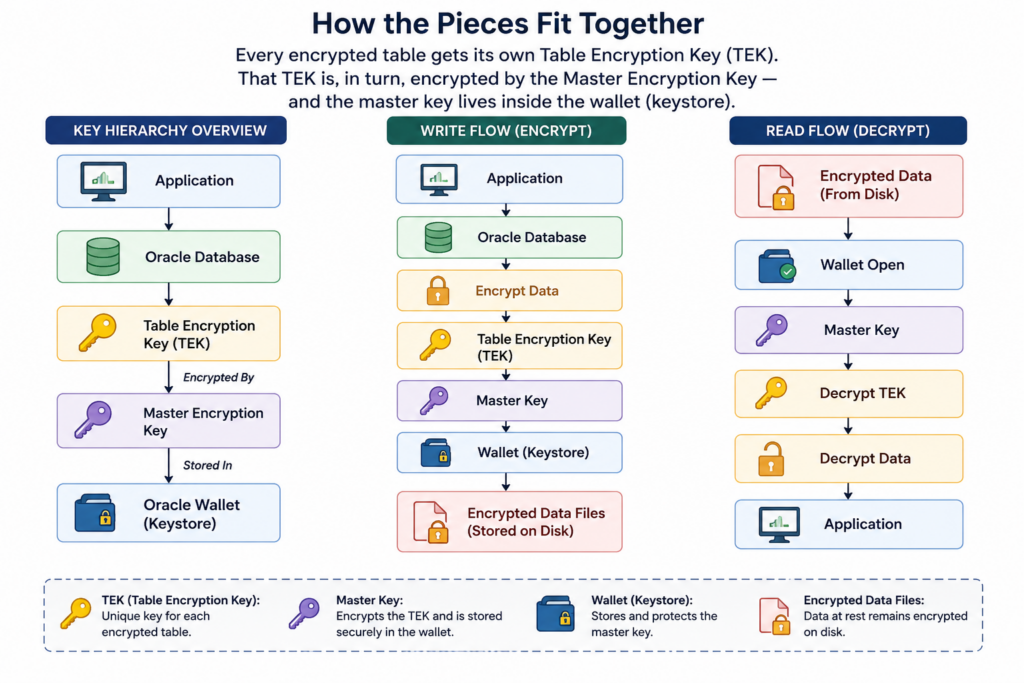
How the Pieces Fit Together
Every encrypted table gets its own Table Encryption Key (TEK). That TEK is, in turn, encrypted by the Master Encryption Key — and the master key lives inside the wallet, or the keystore, depending on which term your version of the docs prefers (they mean the same thing here).
Encrypting a Single Column
If you only need one sensitive column encrypted — a credit card field, say — you can do it right in the CREATE TABLE statement:
CREATE TABLE customers
(
    customer_id NUMBER,
    name VARCHAR2(100),
    credit_card VARCHAR2(50) ENCRYPT
);
Oracle takes care of generating the table encryption key on its own; you don’t have to manage that part.
Encrypting a Whole Tablespace
Column-level encryption is fine for small cases, but honestly, tablespace-level encryption is what I reach for in production almost every time — it’s simpler to administer and you don’t end up chasing down which columns you forgot. This has been available since 11g:
CREATE TABLESPACE secure_ts
DATAFILE '/u01/oradata/secure01.dbf'
SIZE 500M
ENCRYPTION USING 'AES256'
DEFAULT STORAGE(ENCRYPT);
Everything landing in that tablespace gets encrypted automatically, no extra thought required per object.
Which Algorithm Should You Actually Use
Oracle supports AES128, AES192 (the default), AES256, and 3DES168. In practice, AES256 is what I recommend for anything that touches regulated or sensitive data — the performance difference versus AES128 is small enough that it’s rarely worth the tradeoff.
Setting Up the Keystore
Before any of this works, you need a keystore in place. Three commands get you there.
Create it:
ADMINISTER KEY MANAGEMENT
CREATE KEYSTORE
'/u01/app/oracle/wallet'
IDENTIFIED BY "Password";
Open it:
ADMINISTER KEY MANAGEMENT
SET KEYSTORE OPEN
IDENTIFIED BY "Password";
And generate the master key:
ADMINISTER KEY MANAGEMENT
SET KEY
IDENTIFIED BY "Password"
WITH BACKUP;
Don’t skip the WITH BACKUP clause. I’ve seen more than one restore scenario go sideways because nobody thought to keep a backup of the wallet after a key change.
Checking on the Wallet’s Status
A quick query tells you everything you need:
SELECT *
FROM V$ENCRYPTION_WALLET;
It reports the wallet status, type, location, and whether the keystore is open — worth building into your routine health checks, not just something you look at during an incident.
Password Wallets vs. Auto Login Wallets
| Password Wallet | Auto Login Wallet |
|---|---|
| Requires password | Opens automatically |
| More secure | Easier to administer |
| Manual open after restart | Opens on its own after restart |
| Good fit for highly secured systems | Good fit for unattended environments |
Local Auto Login Wallets
A local auto login wallet takes the auto-login convenience but ties it to the specific server it was created on — copy it elsewhere and it simply won’t work. It’s a nice middle ground: you get the unattended-restart benefit without the wallet becoming portable (and therefore stealable).
Bringing Oracle Key Vault Into the Picture
All of the above works fine for one database. It starts to get messy once you’re managing keys across ten, fifty, or a few hundred databases — every server maintaining its own wallet independently. That’s the problem Oracle Key Vault solves: one centralized repository for keys across your whole estate instead of scattered wallets nobody’s tracking consistently.
Key Vault stores wallets, TDE master keys, certificates, SSH keys, Java keystores, passwords, and general credentials, all in one place.
Virtual Wallets
Inside Key Vault, everything gets organized into virtual wallets — logical groupings that might hold certificates, keys, passwords, or entire Oracle wallets together. You control access at the virtual wallet level, deciding which users and which database endpoints can reach which wallet. It’s a much cleaner access model than “everyone who can SSH into the box can see the wallet.”
Tracking a Key’s Lifecycle
Key Vault also tracks each security object through a defined lifecycle:
- Pre-Active
- Active
- Deactivated
- Compromised
- Destroyed
- Destroyed Compromised
That lifecycle tracking is what makes key rotation and retirement manageable at scale — you’re not relying on a spreadsheet somewhere to remember which key got compromised eighteen months ago.
Uploading a Wallet to Key Vault
okvutil upload \
-t WALLET \
-l /u01/app/oracle/wallet \
-g FinanceWallet
That pushes your local wallet into a named virtual wallet on Key Vault for centralized management.
Pulling a Wallet Back Down
okvutil download \
-t WALLET \
-l /u01/app/oracle/wallet \
-g FinanceWallet
One small detail worth knowing: if a wallet already exists in the target directory, Oracle doesn’t just overwrite it — it renames the old one, usually by appending a timestamp, before dropping in the new ewallet.p12. Small thing, but it’s saved me from a bad afternoon more than once.
A Few Things I’d Call Best Practice
- Turn on TDE for anything holding sensitive data — don’t wait for an audit finding to force the issue
- Keep master keys in Oracle Wallet or Key Vault, never anywhere improvised
- Rotate master encryption keys on a schedule, not only when something goes wrong
- Back up the wallet every single time you change a key
- Lock down permissions on the wallet directory itself
- Reserve auto login wallets for cases where the operational need genuinely justifies the reduced friction
- Check
V$ENCRYPTION_WALLETregularly, not just when troubleshooting - If you’re running more than a handful of databases, get Key Vault into the picture sooner rather than later
Wrapping Up
Oracle Wallet, TDE, and Oracle Key Vault aren’t three unrelated features you learn separately — they’re a chain. The wallet secures the keys, TDE uses those keys to encrypt data transparently, and Key Vault takes over key management once you’re running more than a database or two. Get comfortable with how they connect, and you’ve covered one of the more common gaps auditors love to point out — data that’s locked down from application access but sitting wide open the moment someone gets their hands on the physical files.


